
- Posts: 220
- Thank you received: 0
login form goes to hikashop product page
- clairewang
-
 Topic Author
- Offline
Less
More
11 years 1 week ago #215140
by clairewang
login form goes to hikashop product page was created by clairewang
Dear,
Whenever a user wants to login, the page always refresh to the buying page of Hikashop to stop logining in.It looks like the whole login form redirect to the Hikashop Product page.How can we fix it? Thanks a lot.
Whenever a user wants to login, the page always refresh to the buying page of Hikashop to stop logining in.It looks like the whole login form redirect to the Hikashop Product page.How can we fix it? Thanks a lot.
Please Log in or Create an account to join the conversation.

11 years 1 week ago #215163
by nicolas
Replied by nicolas on topic login form goes to hikashop product page
Hi,
I'm sorry but I'm not following you.
You also didn't provide any of the information we request when creating a new thread, so we don't know the version of Joomla and HikaShop you're using, nor the URL to the page with the issue so that we could look at it.
Please provide these so that we can move forward.
I'm sorry but I'm not following you.
You also didn't provide any of the information we request when creating a new thread, so we don't know the version of Joomla and HikaShop you're using, nor the URL to the page with the issue so that we could look at it.
Please provide these so that we can move forward.
Please Log in or Create an account to join the conversation.
- clairewang
-
Topic Author
- Offline
Less
More
- Posts: 220
- Thank you received: 0
11 years 1 week ago #215178
by clairewang
Replied by clairewang on topic login form goes to hikashop product page
Thanks Nicolas for your reply. Here is the info-
Url of the page with the problem: facianohair.com.tw
HikaShop version 2.5
Joomla version 3.3.6
PHP version 5.3.29
Browser(s) name and version Chrome 45
Url of the page with the problem: facianohair.com.tw
HikaShop version 2.5
Joomla version 3.3.6
PHP version 5.3.29
Browser(s) name and version Chrome 45
Please Log in or Create an account to join the conversation.
11 years 1 week ago #215212
by nicolas
Replied by nicolas on topic login form goes to hikashop product page
Hi,
The issue has nothing to do with HikaShop and comes from a customization of your login module whereby you enclosed all the input fields of the Joomla login form inside a HTML link leading to the products listing page of HikaShop.
So whenever you click in an input field, you get redirected to that link.
take.ms/jOnM2n
Remove that customization and you won't have the problem.
The issue has nothing to do with HikaShop and comes from a customization of your login module whereby you enclosed all the input fields of the Joomla login form inside a HTML link leading to the products listing page of HikaShop.
So whenever you click in an input field, you get redirected to that link.
take.ms/jOnM2n
Remove that customization and you won't have the problem.
Please Log in or Create an account to join the conversation.
- clairewang
-
Topic Author
- Offline
Less
More
- Posts: 220
- Thank you received: 0
11 years 1 week ago #215331
by clairewang
Replied by clairewang on topic login form goes to hikashop product page
Thanks a lot, Nicolas.
I removed the link I put in the language code behind" the shopping cart empty" so now the problem is solved.
But I still need to redirect to the Hikashop product page whenever the shopping cart is empty. I put the link in the Main--Cart --URL where you will be redirected when the cart is empty
Why doesn't it work?
I removed the link I put in the language code behind" the shopping cart empty" so now the problem is solved.
But I still need to redirect to the Hikashop product page whenever the shopping cart is empty. I put the link in the Main--Cart --URL where you will be redirected when the cart is empty
Why doesn't it work?
Please Log in or Create an account to join the conversation.

11 years 1 week ago #215370
by Jerome
Jerome - Obsidev.com
HikaMarket & HikaSerial developer / HikaShop core dev team.
Replied by Jerome on topic login form goes to hikashop product page
Hi,
Please read our HikaShop configuratin documentation for settings about the cart and URL used when the cart is empty.
www.hikashop.com/support/support/documen...onfig.html#main_cart
Regards,
Please read our HikaShop configuratin documentation for settings about the cart and URL used when the cart is empty.
www.hikashop.com/support/support/documen...onfig.html#main_cart
Regards,
Jerome - Obsidev.com
HikaMarket & HikaSerial developer / HikaShop core dev team.
Please Log in or Create an account to join the conversation.
- clairewang
-
Topic Author
- Offline
Less
More
- Posts: 220
- Thank you received: 0
11 years 1 week ago #215386
by clairewang
Replied by clairewang on topic login form goes to hikashop product page
Hi
As I told you, I did setup the configuration you showed but it doesn't work.
configuration--Main--Cart --URL where you will be redirected when the cart is empty
As I told you, I did setup the configuration you showed but it doesn't work.
configuration--Main--Cart --URL where you will be redirected when the cart is empty
Please Log in or Create an account to join the conversation.
11 years 1 week ago #215389
by nicolas
Replied by nicolas on topic login form goes to hikashop product page
Hi,
What that option does is that if you try to access the checkout of HikaShop (for example via a HikaShop checkout menu item), the system will automatically redirect you to that URL if you don't have any products in your cart.
I don't see why that wouldn't work. You must be talking about something else. If you want to add a link to the text "the cart is empty", it's totally possible with a translation override:
hikashop.com/download/languages.html#modify
If the override is done correctly, the link will work and go where you tell it to go when you click on the link.
What that option does is that if you try to access the checkout of HikaShop (for example via a HikaShop checkout menu item), the system will automatically redirect you to that URL if you don't have any products in your cart.
I don't see why that wouldn't work. You must be talking about something else. If you want to add a link to the text "the cart is empty", it's totally possible with a translation override:
hikashop.com/download/languages.html#modify
If the override is done correctly, the link will work and go where you tell it to go when you click on the link.
Please Log in or Create an account to join the conversation.
- clairewang
-
Topic Author
- Offline
Less
More
- Posts: 220
- Thank you received: 0
11 years 1 week ago #215604
by clairewang
Replied by clairewang on topic login form goes to hikashop product page
Hi,
I guess the reason is I put the cart image < img...>behind the words of "empty cart" in the translation file. So the url redirect in the configuration doesn''t work?
Is there a way that you have the cart image provided and I can also redirect to the product page when cart is empty?
I guess the reason is I put the cart image < img...>behind the words of "empty cart" in the translation file. So the url redirect in the configuration doesn''t work?
Is there a way that you have the cart image provided and I can also redirect to the product page when cart is empty?
Please Log in or Create an account to join the conversation.
11 years 1 week ago #215625
by nicolas
Replied by nicolas on topic login form goes to hikashop product page
The URL redirect of the configuration do work. It's just that it's not doing what you think it does.
The URL direct of the configuration will redirect automatically to there when the cart is empty and that you're trying to access the checkout.
If you want to have a link on the "cart is empty" message in order to redirect to that same URL, it's possible with a translation override of that text, as I explained in my previous message.
The URL direct of the configuration will redirect automatically to there when the cart is empty and that you're trying to access the checkout.
If you want to have a link on the "cart is empty" message in order to redirect to that same URL, it's possible with a translation override of that text, as I explained in my previous message.
Please Log in or Create an account to join the conversation.
- clairewang
-
Topic Author
- Offline
Less
More
- Posts: 220
- Thank you received: 0
11 years 5 days ago #215909
by clairewang
Replied by clairewang on topic login form goes to hikashop product page
My original code in translation is
CART_EMPTY=" 購物車是空的 <img src=' facianohair.com.tw/images/shopping-cart-icon.png'/ >""
and it caused the whole login redirect to that link.
Now I changed to
CART_EMPTY=" 購物車是空的 <img src=' facianohair.com.tw/images/shopping-cart-icon.png'/ >"
and edit the configuration redirect, it doesn't work.
How can I change the code?
CART_EMPTY=" 購物車是空的 <img src=' facianohair.com.tw/images/shopping-cart-icon.png'/ >""
and it caused the whole login redirect to that link.
Now I changed to
CART_EMPTY=" 購物車是空的 <img src=' facianohair.com.tw/images/shopping-cart-icon.png'/ >"
and edit the configuration redirect, it doesn't work.
How can I change the code?
Please Log in or Create an account to join the conversation.
11 years 5 days ago #215914
by nicolas
Replied by nicolas on topic login form goes to hikashop product page
Hi,
That's wrong.
I suppose the translation override should be:
That's wrong.
I suppose the translation override should be:
Code:
CART_EMPTY=" <a href='http://facianohair.com.tw/%E7%B7%9A%E4%B8%8A%E8%A8%82%E8%B3%BC.html'>購物車是空的 <img src='facianohair.com.tw/images/shopping-cart-icon.png'/></a>"
Please Log in or Create an account to join the conversation.
- clairewang
-
Topic Author
- Offline
Less
More
- Posts: 220
- Thank you received: 0
11 years 5 days ago #215984
by clairewang
Replied by clairewang on topic login form goes to hikashop product page
oh Yes, that was how I did. The one I told you was I forgot and put you wrong.
We coded the one you wrote, and then the whole login form redirect to that same link. How can we fix it with the cart image?
Thanks Nicolas with your patience.
We coded the one you wrote, and then the whole login form redirect to that same link. How can we fix it with the cart image?
Thanks Nicolas with your patience.
Please Log in or Create an account to join the conversation.
11 years 4 days ago #216021
by nicolas
Replied by nicolas on topic login form goes to hikashop product page
Please provide a screenshot of the translation override popup with that override, and a link to the page where you have the cart empty.
Please Log in or Create an account to join the conversation.
- clairewang
-
Topic Author
- Offline
Less
More
- Posts: 220
- Thank you received: 0
11 years 4 days ago #216088
by clairewang
Replied by clairewang on topic login form goes to hikashop product page
I put in the original code instead of overwrite place, the result was what I said about.
Now I move to overwrite place, the cart image is gone.
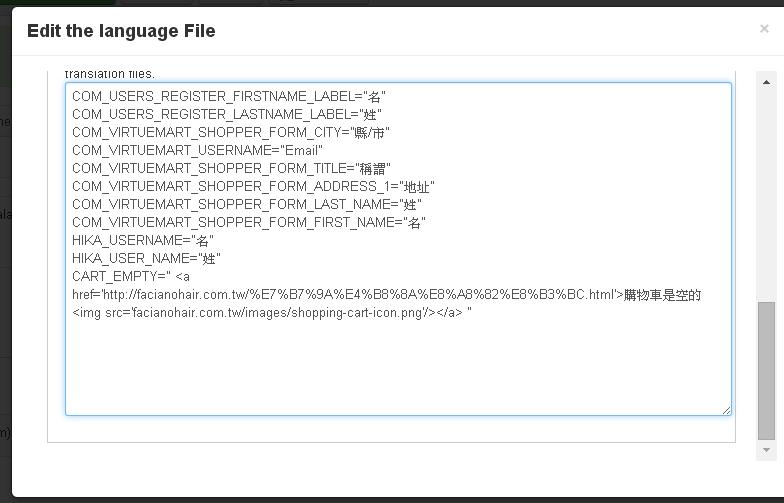
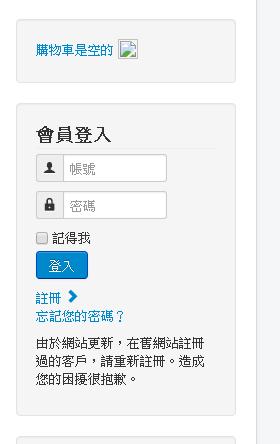
Now I move to overwrite place, the cart image is gone.
Please Log in or Create an account to join the conversation.
11 years 3 days ago #216090
by Jerome
Jerome - Obsidev.com
HikaMarket & HikaSerial developer / HikaShop core dev team.
Replied by Jerome on topic login form goes to hikashop product page
Hi,
You should try with a full URL for the image, like
Otherwise, you specify just the relativ path
But your original url is not valid.
Regards,
You should try with a full URL for the image, like
Code:
<img src='http://facianohair.com.tw/images/shopping-cart-icon.png'/>
Code:
<img src='/images/shopping-cart-icon.png'/>
Regards,
Jerome - Obsidev.com
HikaMarket & HikaSerial developer / HikaShop core dev team.
Please Log in or Create an account to join the conversation.
Time to create page: 0.594 seconds