

- Posts: 6
- Thank you received: 0
How to display “Characteristics” in demo install?
11 years 1 week ago #215275
by m980
How to display “Characteristics” in demo install? was created by m980
-- url of the page with the problem -- :
slcst.com
-- HikaShop version -- : 1509231716
-- Joomla version -- : 3.4.4
-- PHP version -- : 5.6.10
-- Browser(s) name and version -- : Chrome 45.0.2454.93 m
-- Error-message(debug-mod must be tuned on) -- : No error message
HikaShop version: 1509231716
URL: slcst.com
Joomla: Joomla! 3.4.4 Stable
PHP Version: 5.6.10
Chrome: 45.0.2454.93 m
Admin user name:
Admin password:
Topic: How to display “Characteristics” in demo install.
I installed HikaShop Starter and demo data.
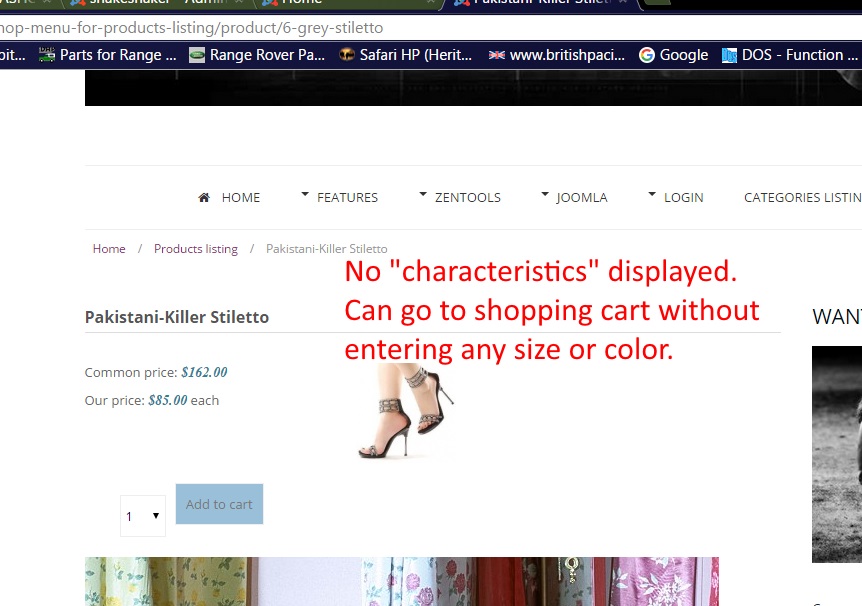
It was surprising not to find "characteristics" working on the demo products.
I modified two shoes and added a T shirt.
I added "characteristics" for each.
Nothing I do seems help the size and color characteristics to show.
I've read the documentation.
I've searched the forum and the web.
I watched the videos about installation, configuration, etc.
Have I misconfigured something?
-- HikaShop version -- : 1509231716
-- Joomla version -- : 3.4.4
-- PHP version -- : 5.6.10
-- Browser(s) name and version -- : Chrome 45.0.2454.93 m
-- Error-message(debug-mod must be tuned on) -- : No error message
HikaShop version: 1509231716
URL: slcst.com
Joomla: Joomla! 3.4.4 Stable
PHP Version: 5.6.10
Chrome: 45.0.2454.93 m
Admin user name:
Admin password:
Topic: How to display “Characteristics” in demo install.
I installed HikaShop Starter and demo data.
It was surprising not to find "characteristics" working on the demo products.
I modified two shoes and added a T shirt.
I added "characteristics" for each.
Nothing I do seems help the size and color characteristics to show.
I've read the documentation.
I've searched the forum and the web.
I watched the videos about installation, configuration, etc.
Have I misconfigured something?
Please Log in or Create an account to join the conversation.

11 years 1 week ago - 11 years 1 week ago #215287
by Xavier
Replied by Xavier on topic How to display “Characteristics” in demo install?
Hi,
By default the article "grey stiletto" does not have characteristics applied on it.
So I think that the issue come from a misconfiguration.
Please make sure that after you added the characteristics to your product, you go in the "Variants" tab of the product and use the "add variants" button in order to add the variants you want for the product.
By default the article "grey stiletto" does not have characteristics applied on it.
So I think that the issue come from a misconfiguration.
Please make sure that after you added the characteristics to your product, you go in the "Variants" tab of the product and use the "add variants" button in order to add the variants you want for the product.
Last edit: 11 years 1 week ago by nicolas.
Please Log in or Create an account to join the conversation.
Time to create page: 0.188 seconds