

- Posts: 294
- Thank you received: 9
New 2.6.0 Product Menu Image Scaling Issue
11 years 1 week ago - 11 years 1 week ago #215600
by MSTACE
New 2.6.0 Product Menu Image Scaling Issue was created by MSTACE
-- HikaShop version -- : 2.6.0
-- Joomla version -- : 3.4.4
The new v2.6.0 Product Listing Menu Item has a terrific Product Options panel.
The problem though is with the Item Layout Item Height.
This value is FORCED to be in pixels. The issue here is that it will add unwanted space to the bottom of an image.
Here, the products are listed using v.2.5.0 with the IMAGE HEIGHT (from Configuration page) set to AUTO.
www.immigrantsvineyard.co.nz/new/our-wines/product/listing
Notice that there isn't any excess space below the product image.
Here, the products are using the v.2.6.0 with the IMAGE HEIGHT forced to be a pixel size.
www.tartlettebakery.com/new/order-online
The gap beneath the image is not good and I cannot seem to get rid of it.
If you set the IMAGE HEIGHT to AUTO it causes an error on the front-end.
-- Joomla version -- : 3.4.4
The new v2.6.0 Product Listing Menu Item has a terrific Product Options panel.
The problem though is with the Item Layout Item Height.
This value is FORCED to be in pixels. The issue here is that it will add unwanted space to the bottom of an image.
Here, the products are listed using v.2.5.0 with the IMAGE HEIGHT (from Configuration page) set to AUTO.
www.immigrantsvineyard.co.nz/new/our-wines/product/listing
Notice that there isn't any excess space below the product image.
Here, the products are using the v.2.6.0 with the IMAGE HEIGHT forced to be a pixel size.
www.tartlettebakery.com/new/order-online
The gap beneath the image is not good and I cannot seem to get rid of it.
If you set the IMAGE HEIGHT to AUTO it causes an error on the front-end.
Last edit: 11 years 1 week ago by MSTACE.
Please Log in or Create an account to join the conversation.

11 years 1 week ago - 11 years 1 week ago #215635
by Xavier
Replied by Xavier on topic New 2.6.0 Product Menu Image Scaling Issue
Hi,
Please give us a screenshot of your settings regarding the image part and the error message you got on frontend when selecting "auto" for the image height.
Currently I guess that you have set a height of 300px, right ? If it is you should try 200px instead.
Please give us a screenshot of your settings regarding the image part and the error message you got on frontend when selecting "auto" for the image height.
Currently I guess that you have set a height of 300px, right ? If it is you should try 200px instead.
Last edit: 11 years 1 week ago by Xavier.
Please Log in or Create an account to join the conversation.
11 years 1 week ago #215690
by MSTACE
Replied by MSTACE on topic New 2.6.0 Product Menu Image Scaling Issue
Setting the image to 200px makes it too small.
Here is the settings and also the error when I set the Image Height to auto.

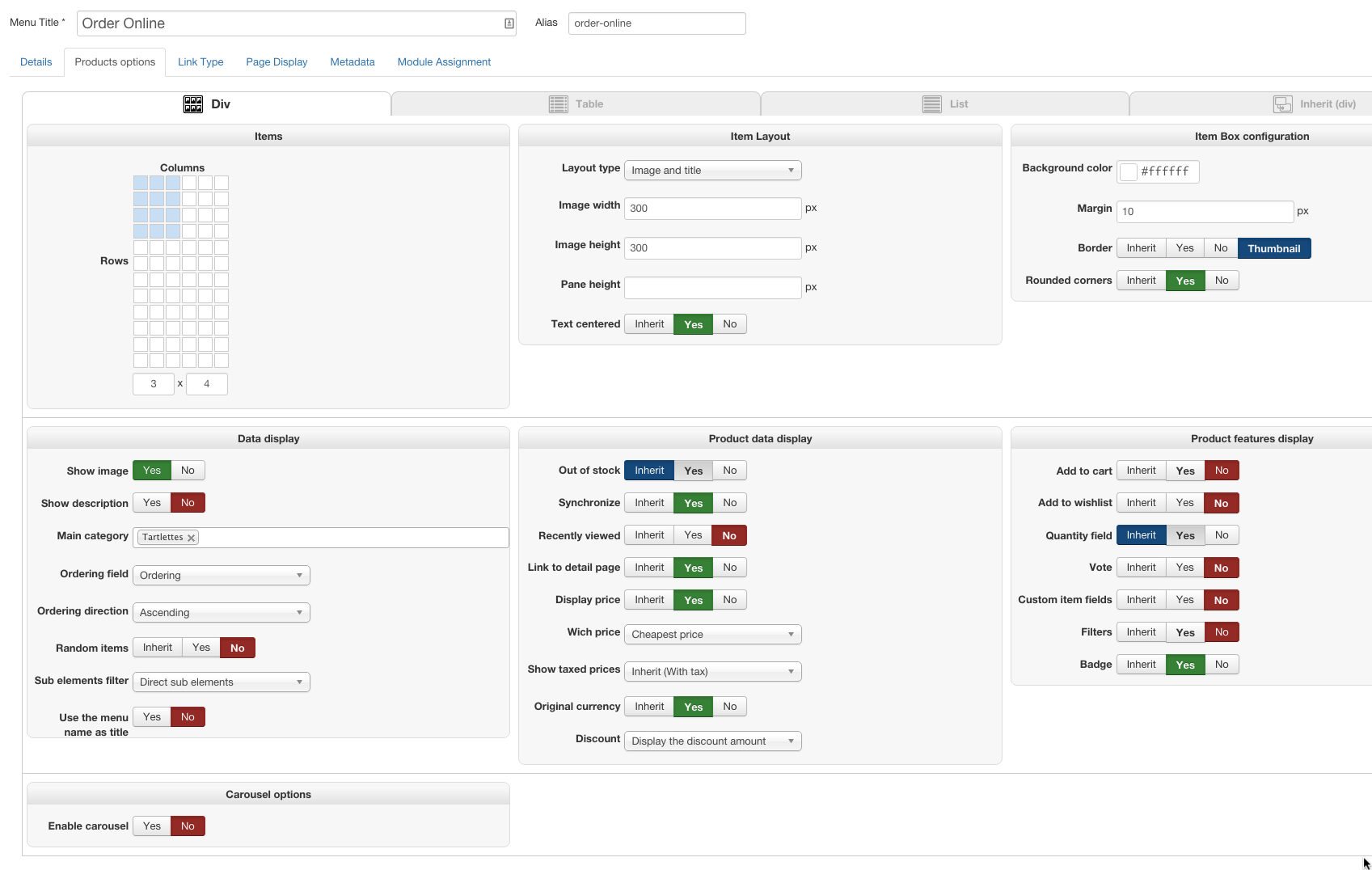
Here is the settings and also the error when I set the Image Height to auto.
Please Log in or Create an account to join the conversation.

11 years 6 days ago #215697
by Jerome
Jerome - Obsidev.com
HikaMarket & HikaSerial developer / HikaShop core dev team.
Replied by Jerome on topic New 2.6.0 Product Menu Image Scaling Issue
Hi,
Well, I think that the error message is clear ; the mentioned folder is not writable.
It means that HikaShop can't create that folder and can't create a file into that folder.
It means that you have some folder permission issues and you should change that permissions to let HikaShop create his thumbnails.
Regards,
Well, I think that the error message is clear ; the mentioned folder is not writable.
It means that HikaShop can't create that folder and can't create a file into that folder.
It means that you have some folder permission issues and you should change that permissions to let HikaShop create his thumbnails.
Regards,
Jerome - Obsidev.com
HikaMarket & HikaSerial developer / HikaShop core dev team.
Please Log in or Create an account to join the conversation.
11 years 6 days ago #215837
by MSTACE
Replied by MSTACE on topic New 2.6.0 Product Menu Image Scaling Issue
All folders are writeable (System Information).
The /public_html/new/images/com_hikashop folder is 755.
The /public_html/new/images/com_hikashop folder is 755.
Please Log in or Create an account to join the conversation.
11 years 5 days ago #215838
by Jerome
Jerome - Obsidev.com
HikaMarket & HikaSerial developer / HikaShop core dev team.
Replied by Jerome on topic New 2.6.0 Product Menu Image Scaling Issue
Hi,
Did you checked the subfolders ?
Did you checked the folder that is displayed in your error message ? Does that folder exists ? Does it have good rights ? Does it parent have good rights ?
Regards,
Did you checked the subfolders ?
Did you checked the folder that is displayed in your error message ? Does that folder exists ? Does it have good rights ? Does it parent have good rights ?
Regards,
Jerome - Obsidev.com
HikaMarket & HikaSerial developer / HikaShop core dev team.
Please Log in or Create an account to join the conversation.
Time to create page: 0.221 seconds