

- Posts: 59
- Thank you received: 1
Product options not responsive
11 years 1 day ago #216300
by madjedo
Product options not responsive was created by madjedo
-- HikaShop version -- : 2.6.0
-- Joomla version -- : 3.4
Hi,
I added a product option to one of my products.
Everything went smoothly but when entering the product page from a mobile (Iphone 5) it doesn't look very good.
I have attached a picture where I explain it better.
Best Regards,
-- Joomla version -- : 3.4
Hi,
I added a product option to one of my products.
Everything went smoothly but when entering the product page from a mobile (Iphone 5) it doesn't look very good.
I have attached a picture where I explain it better.
Best Regards,
Please Log in or Create an account to join the conversation.

11 years 1 day ago #216311
by nicolas
Replied by nicolas on topic Product options not responsive
Hi,
It should be easy to customize with a bit of CSS code.
Please provide a link to that page so that we can see the problem if you want us to give the exact CSS to use.
It should be easy to customize with a bit of CSS code.
Please provide a link to that page so that we can see the problem if you want us to give the exact CSS to use.
Please Log in or Create an account to join the conversation.
11 years 20 hours ago #216423
by madjedo
Replied by madjedo on topic Product options not responsive
Please Log in or Create an account to join the conversation.
11 years 18 hours ago #216441
by madjedo
Replied by madjedo on topic Product options not responsive
Hey, I just turned on vote & comments for products and I have the same issue.
Where the user enters his username. See attached image.
Where the user enters his username. See attached image.
Please Log in or Create an account to join the conversation.

11 years 6 hours ago - 11 years 16 hours ago #216450
by Philip
Replied by Philip on topic Product options not responsive
Hello,
I will show you step by step how to custom your CSS, That will solve your trouble.
Take care to follow precisely ALL steps.
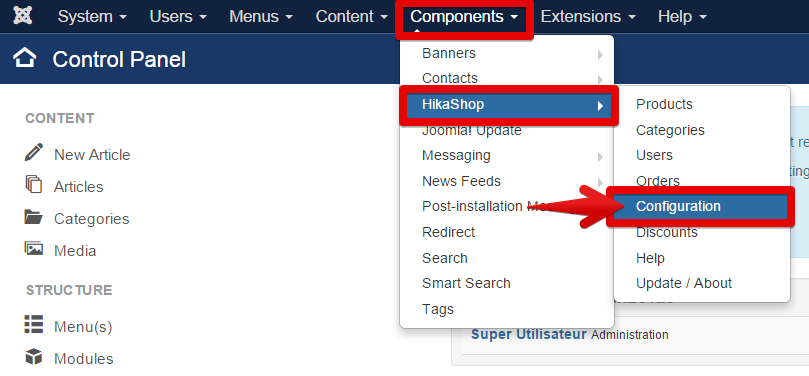
1° Go to the Components -> HikaShop -> Configuration
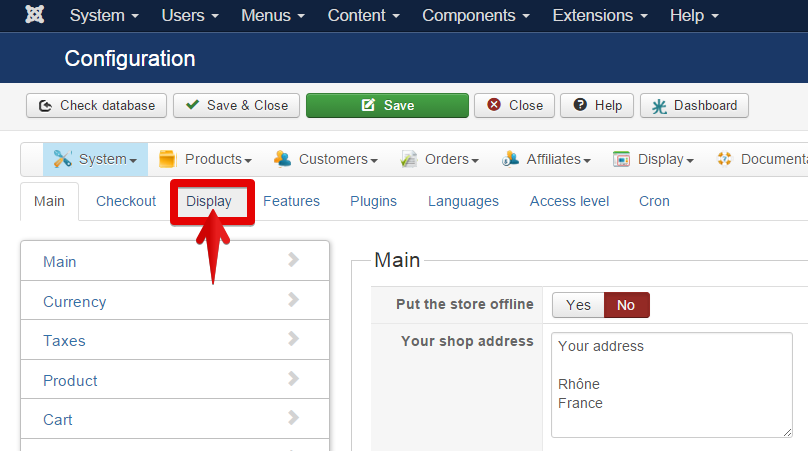
2° Click on "Display" tab
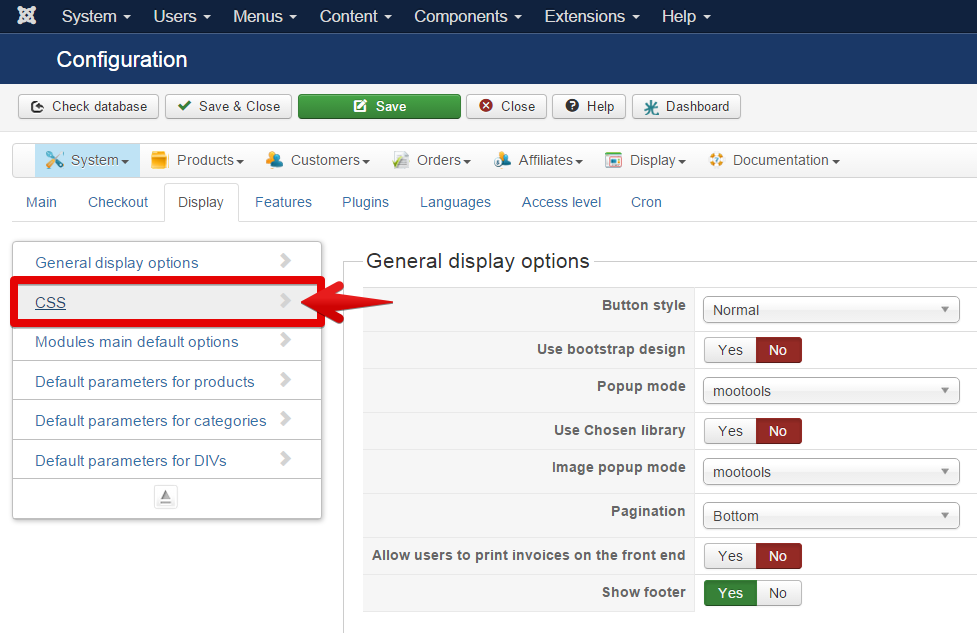
3° Click on CSS
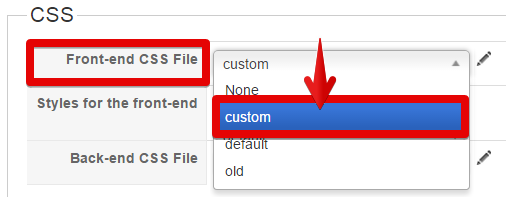
4° Here, on Front-end CSS File you must have selected "custom" BUT if not, select it!
5° Click on the little pen/ "edit" icon
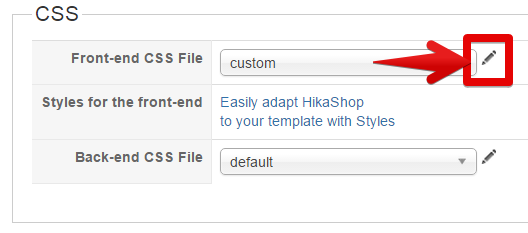
6° Copy & Paste this code :
/* ADD CSS CODE HERE !!! */
@media only screen and (max-width:400px) {
select #hikashop_product_option_0 {
width: 100%;
}
}
/* CUSTOM END */
AND don't forget to save !!!
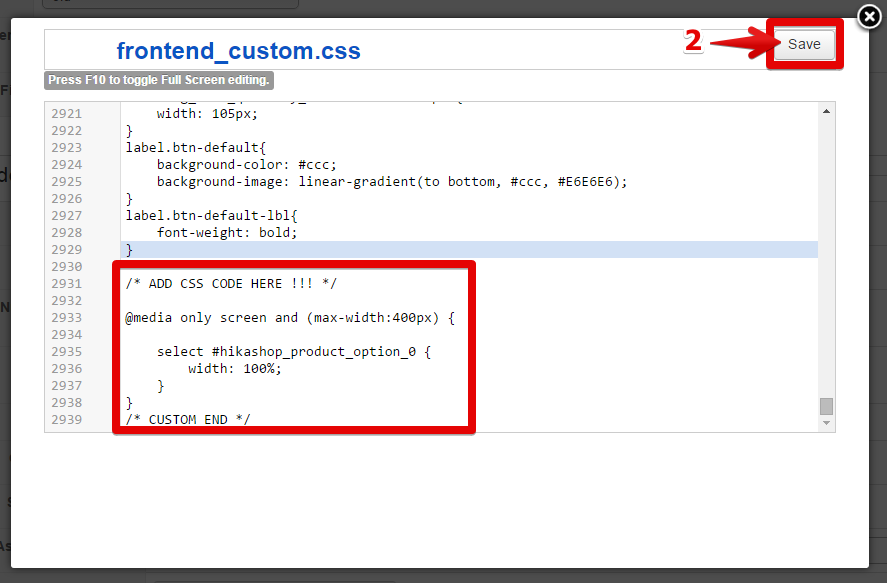
If I'm right your issue will be solve with this.
Regards,
I will show you step by step how to custom your CSS, That will solve your trouble.
Take care to follow precisely ALL steps.
1° Go to the Components -> HikaShop -> Configuration
2° Click on "Display" tab
3° Click on CSS
4° Here, on Front-end CSS File you must have selected "custom" BUT if not, select it!
5° Click on the little pen/ "edit" icon
6° Copy & Paste this code :
/* ADD CSS CODE HERE !!! */
@media only screen and (max-width:400px) {
select #hikashop_product_option_0 {
width: 100%;
}
}
/* CUSTOM END */
AND don't forget to save !!!
If I'm right your issue will be solve with this.
Regards,
Last edit: 11 years 16 hours ago by Philip.
The following user(s) said Thank You: madjedo
Please Log in or Create an account to join the conversation.
10 years 11 months ago - 10 years 11 months ago #216877
by madjedo
Replied by madjedo on topic Product options not responsive
Hi, I am sorry but it didn't work...
*just took care of it, changed the code to:
/* ADD CSS CODE HERE !!! */
@media only screen and (max-width:400px) {
.hikashop_product_options_table select{padding:2px; color:#666; width:100%}
}
/* CUSTOM END */
*just took care of it, changed the code to:
/* ADD CSS CODE HERE !!! */
@media only screen and (max-width:400px) {
.hikashop_product_options_table select{padding:2px; color:#666; width:100%}
}
/* CUSTOM END */
Last edit: 10 years 11 months ago by madjedo.
Please Log in or Create an account to join the conversation.
Time to create page: 0.173 seconds