

- Posts: 19
- Thank you received: 0
Image and description box size problem
10 years 11 months ago #217034
by fgonc124
Image and description box size problem was created by fgonc124
-- url of the page with the problem -- :
www.lojadocaopreto.com
-- HikaShop version -- : 2.6.0
-- Joomla version -- : 2.5
-- Browser(s) name and version -- : Chrome 45.0.2454.101
I upgraded Hikashop on my Joomla 2.5 site to Hikashop 2.6.0
After that, all product pages have problem with box size . It looks like all boxes are resized to largest product box on that page.
If there is one product wtih a large description then all products occupy the same space on that page.
thank you for your help
-- HikaShop version -- : 2.6.0
-- Joomla version -- : 2.5
-- Browser(s) name and version -- : Chrome 45.0.2454.101
I upgraded Hikashop on my Joomla 2.5 site to Hikashop 2.6.0
After that, all product pages have problem with box size . It looks like all boxes are resized to largest product box on that page.
If there is one product wtih a large description then all products occupy the same space on that page.
thank you for your help
Please Log in or Create an account to join the conversation.

10 years 11 months ago #217036
by Jerome
Jerome - Obsidev.com
HikaMarket & HikaSerial developer / HikaShop core dev team.
Replied by Jerome on topic Image and description box size problem
Hi,
In HikaShop 2.6.0 we added a "height consistency" script for the product and category listings.
In the view "product / listing_div", you will find the line
If you remove the data-consistencyheight parameter, the script won't be process anymore and each product container will have his own size.
Regards,
In HikaShop 2.6.0 we added a "height consistency" script for the product and category listings.
In the view "product / listing_div", you will find the line
Code:
<div class="hikashop_products" data-consistencyheight=".hikashop_subcontainer">
Regards,
Jerome - Obsidev.com
HikaMarket & HikaSerial developer / HikaShop core dev team.
The following user(s) said Thank You: Chrisomio
Please Log in or Create an account to join the conversation.
10 years 11 months ago #217782
by simmiepam
Replied by simmiepam on topic Image and description box size problem
My problem is not how they display to the user...but how it displays in my backend.
I cannot see the entire window for the description to type...some of it is hidden behind another box.
Are you saying that I have to change some code in order to see this box in it's entirety to include my content?
Pam
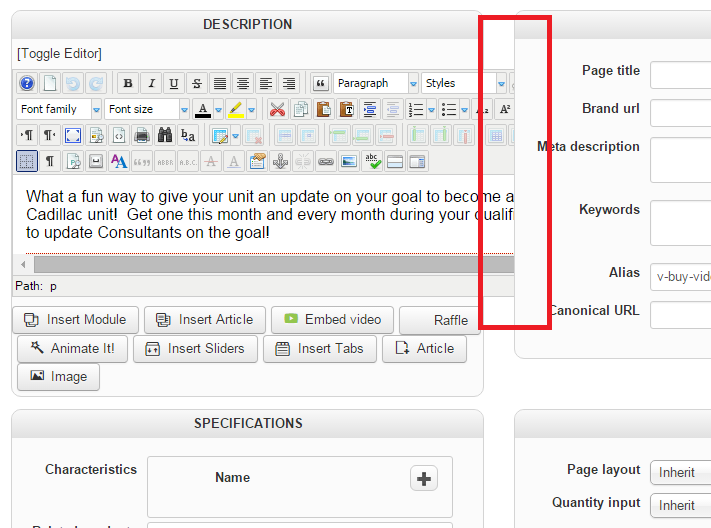
I cannot see the entire window for the description to type...some of it is hidden behind another box.
Are you saying that I have to change some code in order to see this box in it's entirety to include my content?
Pam
Please Log in or Create an account to join the conversation.

10 years 11 months ago #217831
by nicolas
Replied by nicolas on topic Image and description box size problem
Hi,
The issue is that your editor has toolbars bigger than the area where we display the editor (which isn't the case with the default editor of Joomla).
Either shorten the toolbars of your editor, or change the "editor" setting of your HikaShop configuration in order to use the standard tinyMCE editor and you shouldn't have the problem anymore.
The issue is that your editor has toolbars bigger than the area where we display the editor (which isn't the case with the default editor of Joomla).
Either shorten the toolbars of your editor, or change the "editor" setting of your HikaShop configuration in order to use the standard tinyMCE editor and you shouldn't have the problem anymore.
Please Log in or Create an account to join the conversation.
Time to create page: 0.209 seconds