

- Posts: 61
- Thank you received: 0
Custom fields in Tab on product description page.
10 years 10 months ago #221111
by DimLVL
Custom fields in Tab on product description page. was created by DimLVL
-- HikaShop version -- : 2.6.0
-- Joomla version -- : 3.4.5
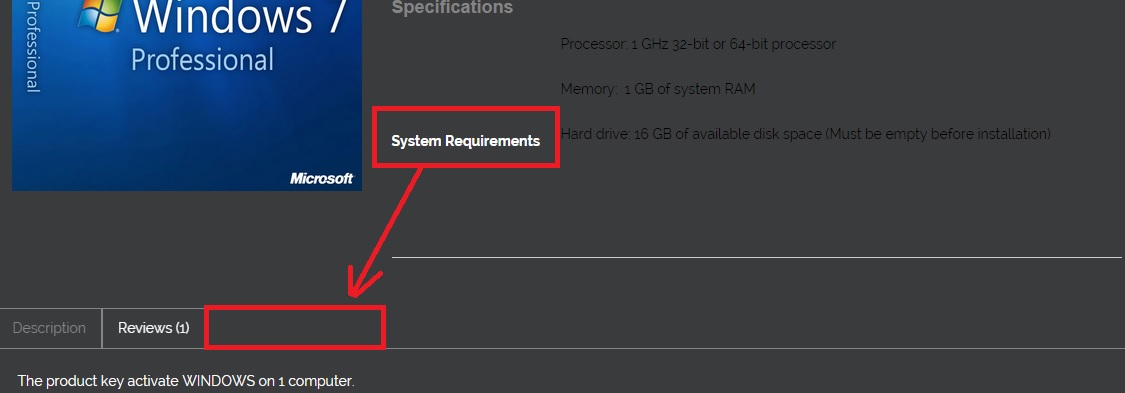
Now custom fields are added next to product images like additional field on product description page. I want to make new tab next to Description and Reviews tabs. How can I make it? Please see the attached image
-- Joomla version -- : 3.4.5
Now custom fields are added next to product images like additional field on product description page. I want to make new tab next to Description and Reviews tabs. How can I make it? Please see the attached image
Please Log in or Create an account to join the conversation.

10 years 10 months ago #221118
by nicolas
Replied by nicolas on topic Custom fields in Tab on product descrip tion page.
Hi,
That's how it is by default with the "tabular" layout of HikaShop.
So this means that your product page layout has been customized:
- either by your template provider, and thus you should contact them
- or by yourself, and you should know better than us what to do
A simple solution is to delete the customization of the product page layout view file (show_tabular) via the menu Display>Views and make sure that the tabular layout is selected in the "layout on product page" setting and you should get that tab. But that also means that you'll loose all the customization that had been done to that page.
That's how it is by default with the "tabular" layout of HikaShop.
So this means that your product page layout has been customized:
- either by your template provider, and thus you should contact them
- or by yourself, and you should know better than us what to do
A simple solution is to delete the customization of the product page layout view file (show_tabular) via the menu Display>Views and make sure that the tabular layout is selected in the "layout on product page" setting and you should get that tab. But that also means that you'll loose all the customization that had been done to that page.
Please Log in or Create an account to join the conversation.
Time to create page: 0.224 seconds