

- Posts: 1184
- Thank you received: 13
Change the tax order
10 years 8 months ago #226323
by verzevoul
Change the tax order was created by verzevoul
-- HikaShop version -- : 2.6.0
-- Joomla version -- : 3.4.8
-- PHP version -- : 5.4
Hello!
At the product page i have both prices displayed (with AND without tax).
The taxed price is first and next to it is the price without tax.
I want the prices to appear at the opposite order, first the non taxed price and then the taxed price.
How can i change that?
Thank you!
-- Joomla version -- : 3.4.8
-- PHP version -- : 5.4
Hello!
At the product page i have both prices displayed (with AND without tax).
The taxed price is first and next to it is the price without tax.
I want the prices to appear at the opposite order, first the non taxed price and then the taxed price.
How can i change that?
Thank you!
Please Log in or Create an account to join the conversation.

10 years 8 months ago #226340
by nicolas
Replied by nicolas on topic Change the tax order
Hi,
You need to edit the file "listing_price" of the view "product".
There, swap $price->price_value_with_tax and $price->price_value
You need to edit the file "listing_price" of the view "product".
There, swap $price->price_value_with_tax and $price->price_value
The following user(s) said Thank You: verzevoul
Please Log in or Create an account to join the conversation.
10 years 8 months ago #229062
by verzevoul
Replied by verzevoul on topic Change the tax order
Hello!
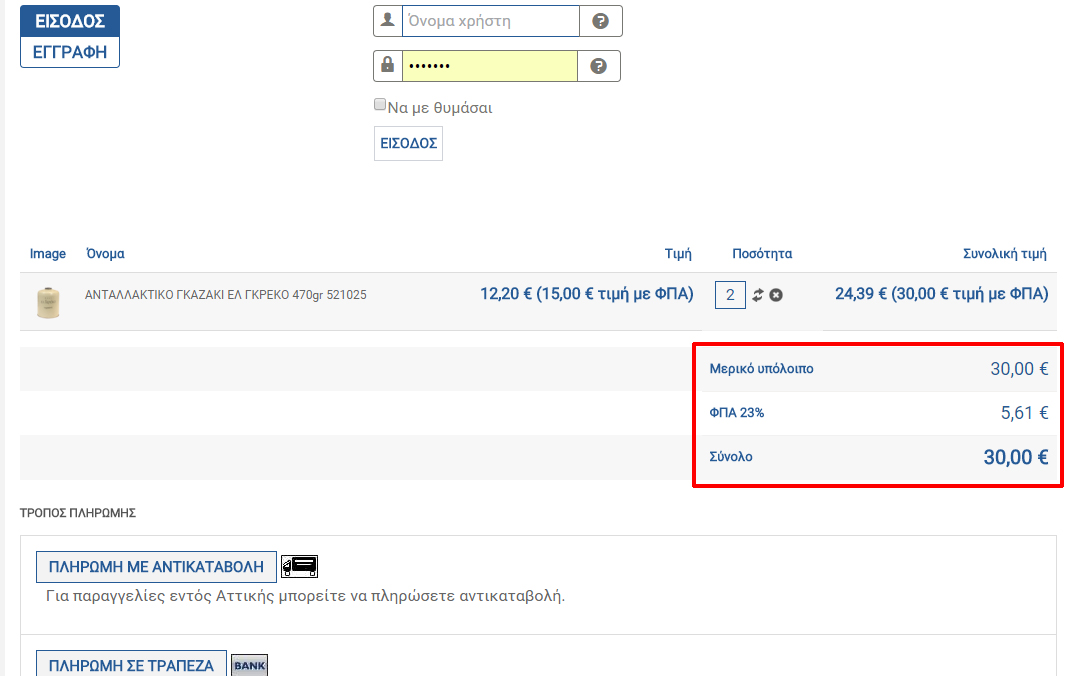
This works perfectly except from one thing, at the checkout page, at the bottom of the cart , the total ammount price is displayed WITH tax and below that displays the tax ammount (23%) and below the tax displays the full price.
Total ammount should display the price without tax and then the tax ammount and finally tha full price.
See the screenshot,
Regards
You need to edit the file "listing_price" of the view "product".
There, swap $price->price_value_with_tax and $price->price_value
This works perfectly except from one thing, at the checkout page, at the bottom of the cart , the total ammount price is displayed WITH tax and below that displays the tax ammount (23%) and below the tax displays the full price.
Total ammount should display the price without tax and then the tax ammount and finally tha full price.
See the screenshot,
Regards
Please Log in or Create an account to join the conversation.
10 years 8 months ago #229069
by nicolas
Replied by nicolas on topic Change the tax order
Hi,
In that case, you want to change the line:
to:
in the file "cart" of the view "checkout".
In that case, you want to change the line:
Code:
echo $this->currencyHelper->format(@$this->total->prices[0]->price_value_with_tax,@$this->total->prices[0]->price_currency_id);
Code:
echo $this->currencyHelper->format(@$this->total->prices[0]->price_value,@$this->total->prices[0]->price_currency_id);
The following user(s) said Thank You: verzevoul
Please Log in or Create an account to join the conversation.
Time to create page: 0.191 seconds