
- Posts: 515
- Thank you received: 22
characteristics on product not in description
- jouwnaambord.nl
-
 Topic Author
- Offline
Less
More
10 years 8 months ago #227640
by jouwnaambord.nl
characteristics on product not in description was created by jouwnaambord.nl
-- url of the page with the problem -- :
www.jouwnaambord.nl/naamborden/basisbord...naambord-aluminium-1
-- HikaShop version -- : 2.6.1
-- Joomla version -- : 3,4,8
Hi,
in the latest installed version I have a problem with some variants. These are old variants, working fine until now.
In the product the characteristics for the variant aren't shown correctly. When choosing a characteristic, the productname isn't updated with the right name, see screenshots.
Michel Pouli
-- HikaShop version -- : 2.6.1
-- Joomla version -- : 3,4,8
Hi,
in the latest installed version I have a problem with some variants. These are old variants, working fine until now.
In the product the characteristics for the variant aren't shown correctly. When choosing a characteristic, the productname isn't updated with the right name, see screenshots.
This attachment is hidden for guests.
Please log in or register to see it.
Please log in or register to see it.
This attachment is hidden for guests.
Please log in or register to see it.
Please log in or register to see it.
Michel Pouli
Please Log in or Create an account to join the conversation.

10 years 8 months ago #227659
by Jerome
Jerome - Obsidev.com
HikaMarket & HikaSerial developer / HikaShop core dev team.
Replied by Jerome on topic characteristics on product not in description
Hi,
Would it be possible to know how your variants are configured ?
Do you have some view override for the view "product | show" ?
Regarding the content of the page ; all your variants have the same product name
Regards,
PS : For screenshots, please use JPEG images instead of PDF.
Would it be possible to know how your variants are configured ?
Do you have some view override for the view "product | show" ?
Regarding the content of the page ; all your variants have the same product name
Regards,
PS : For screenshots, please use JPEG images instead of PDF.
Jerome - Obsidev.com
HikaMarket & HikaSerial developer / HikaShop core dev team.
Please Log in or Create an account to join the conversation.
- jouwnaambord.nl
-
Topic Author
- Offline
Less
More
- Posts: 515
- Thank you received: 22
10 years 8 months ago #227706
by jouwnaambord.nl
Replied by jouwnaambord.nl on topic characteristics on product not in description
Hi,
Here a 2 screenshots of the variants. There is indeed an override, but removing that does not solve the problem. The strange thing is that most other variants are wortking fine. The problem only appaers with 2 characteristics and it seems to occurred after installing the latest version 2.6.1. I have checked these characteristics in the database, but all looks fine, all of them have tha same product name but different productcodes, they were added in 2010 and worked fine untill now.
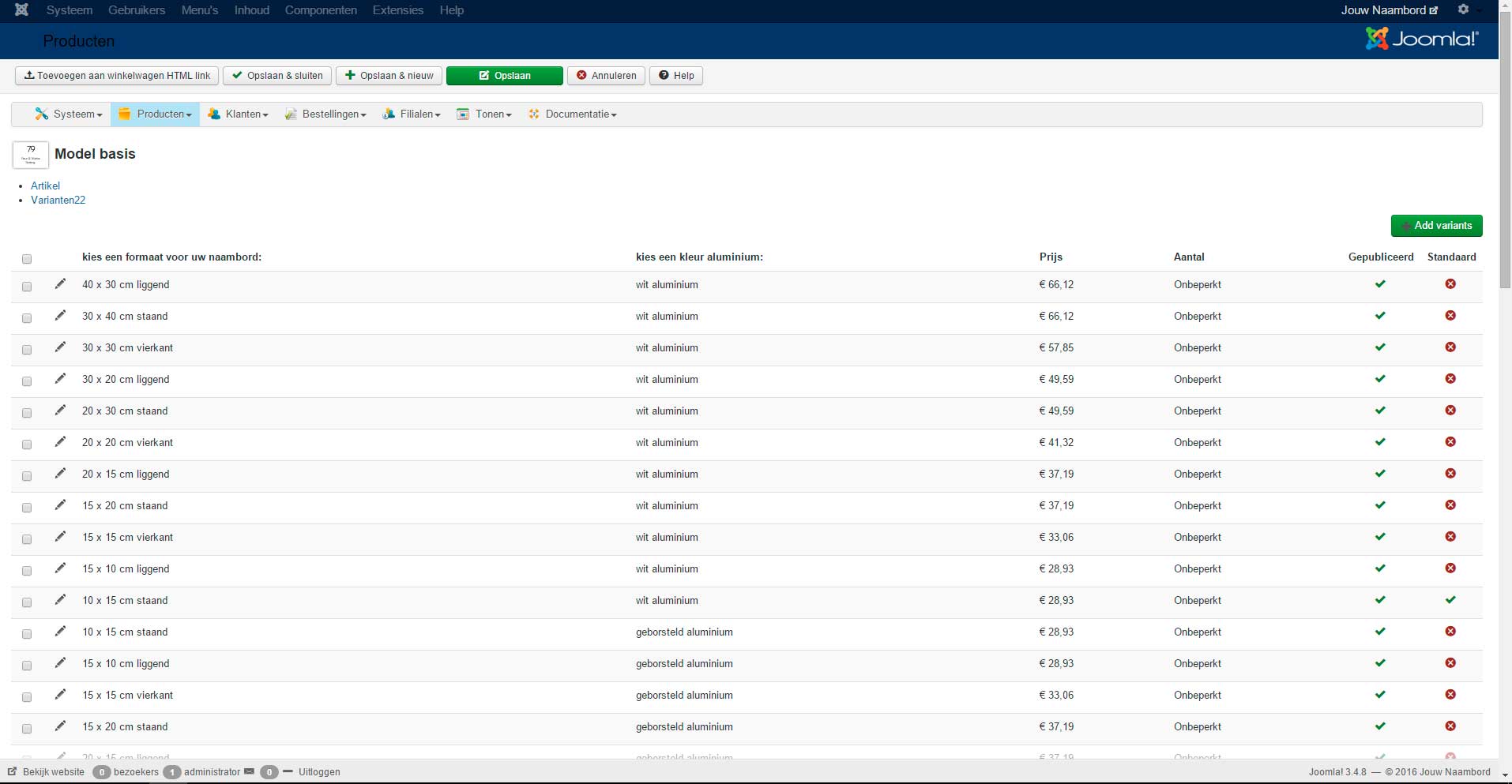
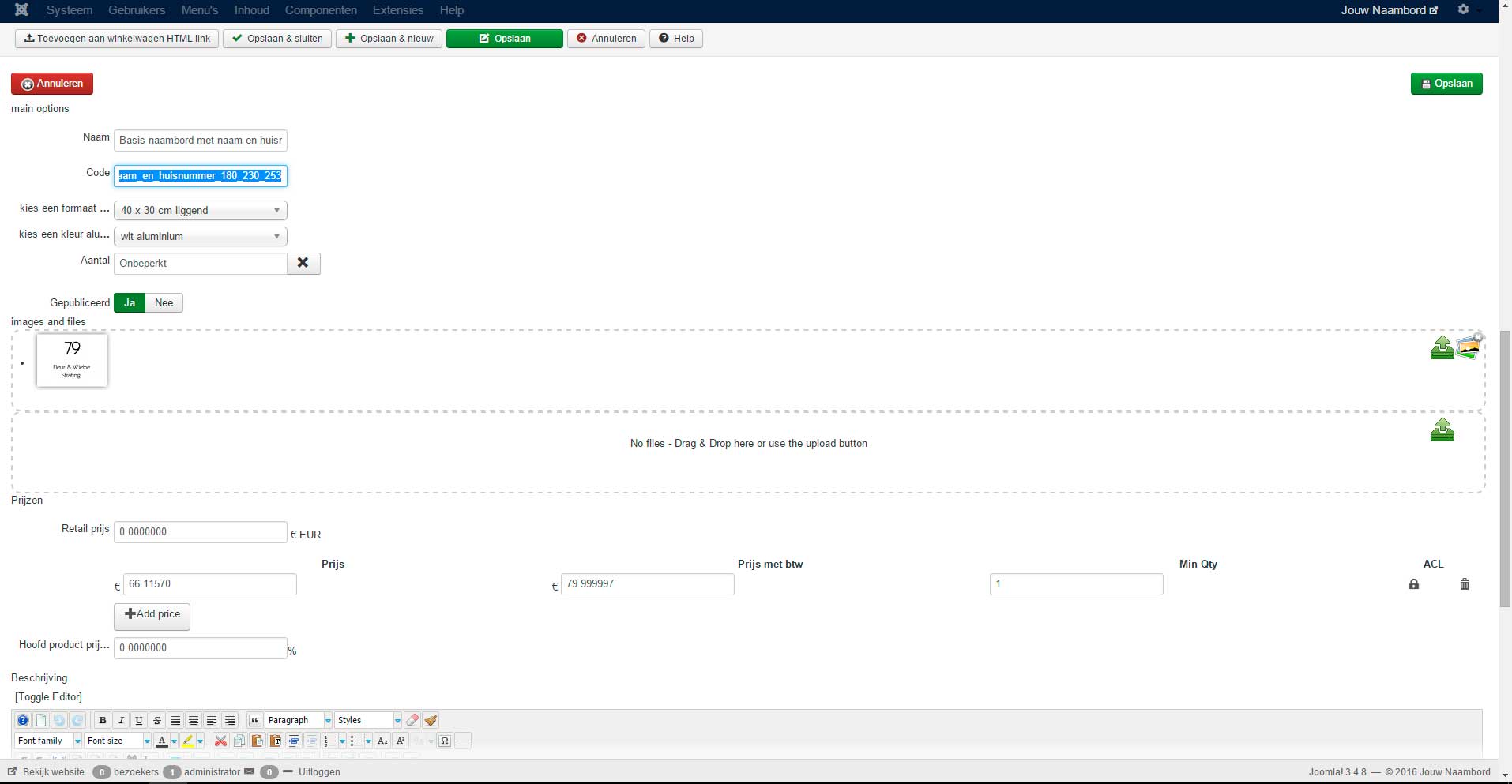
Michel
Here a 2 screenshots of the variants. There is indeed an override, but removing that does not solve the problem. The strange thing is that most other variants are wortking fine. The problem only appaers with 2 characteristics and it seems to occurred after installing the latest version 2.6.1. I have checked these characteristics in the database, but all looks fine, all of them have tha same product name but different productcodes, they were added in 2010 and worked fine untill now.
Michel
Please Log in or Create an account to join the conversation.
10 years 8 months ago #227716
by Jerome
Jerome - Obsidev.com
HikaMarket & HikaSerial developer / HikaShop core dev team.
Replied by Jerome on topic characteristics on product not in description
Hi,
Please see the field "name" in your variant screenshot.
Like I was telling you in my previous message, you set a name and that is this information which is displayed in the product page.
So, you can leave the field "name" empty in order to retrieve the automatic naming OR you can set manually names for your variants.
Please understand that is a new feature ; it is an improvement because it let you configure what you want to display in the product pages.
Regards,
Please see the field "name" in your variant screenshot.
Like I was telling you in my previous message, you set a name and that is this information which is displayed in the product page.
So, you can leave the field "name" empty in order to retrieve the automatic naming OR you can set manually names for your variants.
Please understand that is a new feature ; it is an improvement because it let you configure what you want to display in the product pages.
Regards,
Jerome - Obsidev.com
HikaMarket & HikaSerial developer / HikaShop core dev team.
Please Log in or Create an account to join the conversation.
- jouwnaambord.nl
-
Topic Author
- Offline
Less
More
- Posts: 515
- Thank you received: 22
10 years 8 months ago #227823
by jouwnaambord.nl
Replied by jouwnaambord.nl on topic characteristics on product not in description
Hello Jerome,
Ok, I understand. New features are just fine, but not if they're causing unexpected changes in the shop.... How do I remove all the now unwanted names in the variants?
Ok, I understand. New features are just fine, but not if they're causing unexpected changes in the shop.... How do I remove all the now unwanted names in the variants?
Please Log in or Create an account to join the conversation.

10 years 8 months ago #227857
by Xavier
Replied by Xavier on topic characteristics on product not in description
Hi,
To remove the name of all the variants, you can set up a mass action like that: take.ms/6ka64
www.hikashop.com/support/documentation/s...massaction-form.html
Be careful, do a backup of your database before running a mass action.
To remove the name of all the variants, you can set up a mass action like that: take.ms/6ka64
www.hikashop.com/support/documentation/s...massaction-form.html
Be careful, do a backup of your database before running a mass action.
Please Log in or Create an account to join the conversation.
Time to create page: 0.195 seconds