
- Posts: 50
- Thank you received: 1
Add image button not working after update
- PaulLenton
-
 Topic Author
- Offline
Less
More
10 years 8 months ago #228593
by PaulLenton
Add image button not working after update was created by PaulLenton
-- url of the page with the problem -- :
www.billbo.co.uk
-- HikaShop version -- : 2.6.1
-- Joomla version -- : 2.5.28
-- Browser(s) name and version -- : chrome
Hi,
I have just updated to v2.6.1 business and now my add image buttons doesn't work. I have seen in the forum that you suggest changing the popup in configuration to vex but I dont have that option only mootools or shadowbox. Am I looking in the wrong place Configuration - Display - General Dislpay Options - image popup mode or do i need to install something else.
Thanks
Paul
-- HikaShop version -- : 2.6.1
-- Joomla version -- : 2.5.28
-- Browser(s) name and version -- : chrome
Hi,
I have just updated to v2.6.1 business and now my add image buttons doesn't work. I have seen in the forum that you suggest changing the popup in configuration to vex but I dont have that option only mootools or shadowbox. Am I looking in the wrong place Configuration - Display - General Dislpay Options - image popup mode or do i need to install something else.
Thanks
Paul
Please Log in or Create an account to join the conversation.

10 years 8 months ago - 10 years 8 months ago #228595
by Philip
Replied by Philip on topic Add image button not working after update
Hello,
Look just a little above and switch "Popup mode" => vex
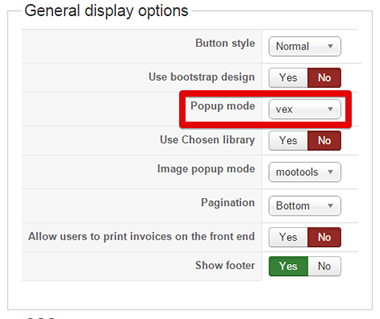
Plus, read here to learn more about the new HikaShop 2.6.1
Regards,
Look just a little above and switch "Popup mode" => vex
Plus, read here to learn more about the new HikaShop 2.6.1
Regards,
Last edit: 10 years 8 months ago by Philip.
Please Log in or Create an account to join the conversation.
- PaulLenton
-
Topic Author
- Offline
Less
More
- Posts: 50
- Thank you received: 1
10 years 8 months ago #228692
by PaulLenton
Replied by PaulLenton on topic Add image button not working after update
Hi,
I have looked at the release notes and I can see that you can use vex but I dont have that option ( see attached screen shot ). How do I get the vex option.
Thanks
Paul
I have looked at the release notes and I can see that you can use vex but I dont have that option ( see attached screen shot ). How do I get the vex option.
Thanks
Paul
Please Log in or Create an account to join the conversation.

10 years 8 months ago #228701
by Jerome
Jerome - Obsidev.com
HikaMarket & HikaSerial developer / HikaShop core dev team.
Replied by Jerome on topic Add image button not working after update
Hi,
Please re-download HikaShop 2.6.1 ; I just added a patch for Joomla 2.5.
Because Joomla 2.5 just have one single popup system included (mootools squeezebox), the setting "popup mode" wasn't useful because it would only display one single choice.
I'll see with the rest of the team if we can now allow that setting for Joomla 2.5 because it can now propose two modes.
About the patch, I fixed some calls for the popup in the upload integration so it will avoid the issue you currently having.
Regards,
Please re-download HikaShop 2.6.1 ; I just added a patch for Joomla 2.5.
Because Joomla 2.5 just have one single popup system included (mootools squeezebox), the setting "popup mode" wasn't useful because it would only display one single choice.
I'll see with the rest of the team if we can now allow that setting for Joomla 2.5 because it can now propose two modes.
About the patch, I fixed some calls for the popup in the upload integration so it will avoid the issue you currently having.
Regards,
Jerome - Obsidev.com
HikaMarket & HikaSerial developer / HikaShop core dev team.
Please Log in or Create an account to join the conversation.
- PaulLenton
-
Topic Author
- Offline
Less
More
- Posts: 50
- Thank you received: 1
10 years 8 months ago #228723
by PaulLenton
Replied by PaulLenton on topic Add image button not working after update
HI,
I have re-downloaded 2.6.1 and nothing has changed, I still have the same problem.
I have re-downloaded 2.6.1 and nothing has changed, I still have the same problem.
Please Log in or Create an account to join the conversation.
10 years 8 months ago #228730
by Jerome
Jerome - Obsidev.com
HikaMarket & HikaSerial developer / HikaShop core dev team.
Replied by Jerome on topic Add image button not working after update
Hi,
Please be sure that you have clear your browser cache.
The modification is mostly in a javascript file ; so you browser need to retrieve the file and not use the one in his cache.
Regards,
Please be sure that you have clear your browser cache.
The modification is mostly in a javascript file ; so you browser need to retrieve the file and not use the one in his cache.
Regards,
Jerome - Obsidev.com
HikaMarket & HikaSerial developer / HikaShop core dev team.
Please Log in or Create an account to join the conversation.
- PaulLenton
-
Topic Author
- Offline
Less
More
- Posts: 50
- Thank you received: 1
10 years 8 months ago - 10 years 8 months ago #228742
by PaulLenton
Replied by PaulLenton on topic Add image button not working after update
I have cleared browser cache and restarted chrome but still the same.
Update: The `+` button is now working but when I want to change a files properties it will not open unless I right click and open in new window.
see attached
Update: The `+` button is now working but when I want to change a files properties it will not open unless I right click and open in new window.
see attached
Last edit: 10 years 8 months ago by PaulLenton.
Please Log in or Create an account to join the conversation.
10 years 8 months ago #228893
by Jerome
Jerome - Obsidev.com
HikaMarket & HikaSerial developer / HikaShop core dev team.
Replied by Jerome on topic Add image button not working after update
Hi,
In the view "backend / product / form_file" please replace
By
Regards,
In the view "backend / product / form_file" please replace
Code:
t.openBox(n,href,(el.getAttribute('rel') == null));
Code:
t.openBox(n,href);
Jerome - Obsidev.com
HikaMarket & HikaSerial developer / HikaShop core dev team.
The following user(s) said Thank You: PaulLenton
Please Log in or Create an account to join the conversation.
- PaulLenton
-
Topic Author
- Offline
Less
More
- Posts: 50
- Thank you received: 1
10 years 7 months ago #229266
by PaulLenton
Replied by PaulLenton on topic Add image button not working after update
Hi Jerome,
This did the trick, all working thanks.
Paul
This did the trick, all working thanks.
Paul
Please Log in or Create an account to join the conversation.
Time to create page: 0.214 seconds