

- Posts: 8
- Thank you received: 0
Blank page after click on Brand link
10 years 8 months ago #228785
by giaf10
Blank page after click on Brand link was created by giaf10
-- HikaShop version -- : 2.6.1
-- Joomla version -- : 3.4.8
-- PHP version -- : 5.4.43
-- Browser(s) name and version -- : Chrome 48.0.2564.97
Hi,
in Hikashop configuration-->Display-->"Default parameters for product" i set "Display the manufacturer" to "Yes", so i can see the brand link in product page but when i click on it i see a blank page; i read this topic:
www.hikashop.com/forum/2-general-talk-ab...with-brand-link.html
i created a Menu Item with type "Categories listing" and set in Categories option-->Data display-->Main category: Brand, but i still have a blank page when click on brand link; how can i "connect" the brand link on product page to the new menu item i created?
Maybe there is some option that i missed,
thank you
-- Joomla version -- : 3.4.8
-- PHP version -- : 5.4.43
-- Browser(s) name and version -- : Chrome 48.0.2564.97
Hi,
in Hikashop configuration-->Display-->"Default parameters for product" i set "Display the manufacturer" to "Yes", so i can see the brand link in product page but when i click on it i see a blank page; i read this topic:
www.hikashop.com/forum/2-general-talk-ab...with-brand-link.html
i created a Menu Item with type "Categories listing" and set in Categories option-->Data display-->Main category: Brand, but i still have a blank page when click on brand link; how can i "connect" the brand link on product page to the new menu item i created?
Maybe there is some option that i missed,
thank you
Please Log in or Create an account to join the conversation.

10 years 8 months ago - 10 years 8 months ago #228864
by Philip
Replied by Philip on topic Blank page after click on Brand link
Hello,
Maybe because no products are link to your Brand category?
Did you add each brand category to relative products?
For be more precise :
In your product configuration, in your MAIN OPTIONS, did you set this in each product :
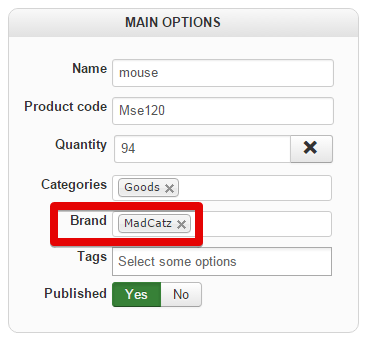
Later, when clicking to your brand link, your Item Menu category will get all relative products and display them (two in this example)
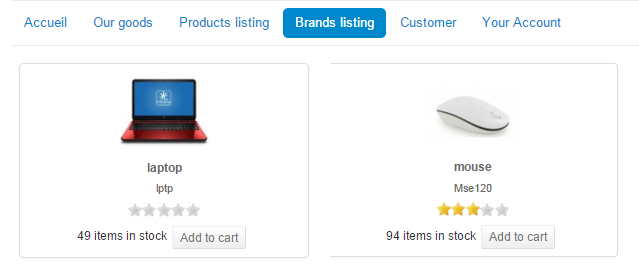
If you have already set this point, can you provide a link in order to see it by myself.
Regards,
Maybe because no products are link to your Brand category?
Did you add each brand category to relative products?
For be more precise :
In your product configuration, in your MAIN OPTIONS, did you set this in each product :
Later, when clicking to your brand link, your Item Menu category will get all relative products and display them (two in this example)
If you have already set this point, can you provide a link in order to see it by myself.
Regards,
Last edit: 10 years 8 months ago by Philip.
Please Log in or Create an account to join the conversation.
10 years 8 months ago #229074
by giaf10
Replied by giaf10 on topic Blank page after click on Brand link
brand is set in each product, in MAIN OPTIONS, as you can see in the image attached; however there is still a blank page after click, here there is a link to a product page:
www.livinplay.com/marche/prodotti/9387-b...a-livinplay-vicassel
brand link is next to "marca:".
Thank you
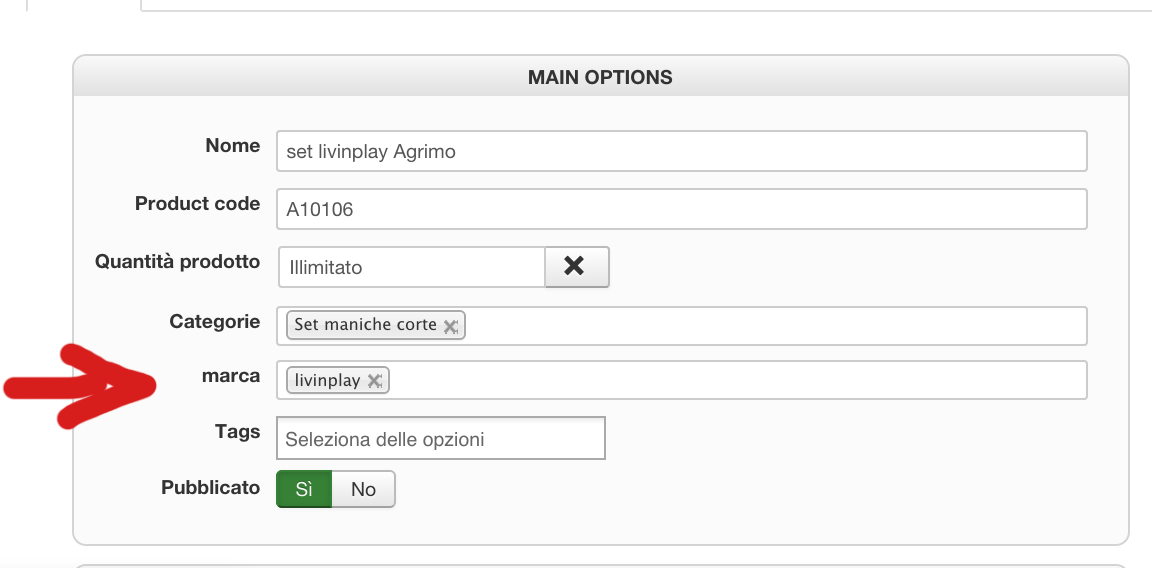
www.livinplay.com/marche/prodotti/9387-b...a-livinplay-vicassel
brand link is next to "marca:".
Thank you
Please Log in or Create an account to join the conversation.

10 years 8 months ago #229145
by nicolas
Replied by nicolas on topic Blank page after click on Brand link
Hi,
Having a brands listing menu item is indeed the solution to avoid that.
But maybe the wrong URL has already been saved as "canonical URL" of your brands and you have the "force canonical URL on listings" setting activated in the HikaShop configuration and thus you don't get the new URL that should be generated based on that brands listing menu item.
I would recommend to edit your brand and make sure that the canonical URL field is empty.
Having a brands listing menu item is indeed the solution to avoid that.
But maybe the wrong URL has already been saved as "canonical URL" of your brands and you have the "force canonical URL on listings" setting activated in the HikaShop configuration and thus you don't get the new URL that should be generated based on that brands listing menu item.
I would recommend to edit your brand and make sure that the canonical URL field is empty.
Please Log in or Create an account to join the conversation.
10 years 8 months ago #229160
by giaf10
Replied by giaf10 on topic Blank page after click on Brand link
Thanks for answering, i checked "force canonical URL on listings" and it is set on "Use canonical URL if specified", and in all brands "Canonical URL" is empty; is there anything else i can do?
Please Log in or Create an account to join the conversation.
10 years 8 months ago #229167
by nicolas
Replied by nicolas on topic Blank page after click on Brand link
Hi,
Let's do differently then.
Change the line:
$Itemid = $menuClass->loadAMenuItemId('manufacturer','listing');
to:
$Itemid = XXX;
where XXX is the id of your brands listing menu item in the file "show_block_dimensions" via the menu Display>Views and that should do it.
Let's do differently then.
Change the line:
$Itemid = $menuClass->loadAMenuItemId('manufacturer','listing');
to:
$Itemid = XXX;
where XXX is the id of your brands listing menu item in the file "show_block_dimensions" via the menu Display>Views and that should do it.
The following user(s) said Thank You: giaf10
Please Log in or Create an account to join the conversation.
10 years 7 months ago - 10 years 7 months ago #229255
by giaf10
Replied by giaf10 on topic Blank page after click on Brand link
Hi,
I tried to set $Itemid as you showed me but it did not work (same as before); i noticed that manually setting Canonical URL in brands the brand page is displayed, for example i set " www.livinplay.com/marche/categorie/227-1livinplay " as Canonical URL in "livinplay" brand and it works, you can check from here: www.livinplay.com/marche/prodotti/9387-b...a-livinplay-vicassel
Maybe i have to set all Canonical URLs for all brands by hand?
I tried to set $Itemid as you showed me but it did not work (same as before); i noticed that manually setting Canonical URL in brands the brand page is displayed, for example i set " www.livinplay.com/marche/categorie/227-1livinplay " as Canonical URL in "livinplay" brand and it works, you can check from here: www.livinplay.com/marche/prodotti/9387-b...a-livinplay-vicassel
Maybe i have to set all Canonical URLs for all brands by hand?
Last edit: 10 years 7 months ago by giaf10.
Please Log in or Create an account to join the conversation.
10 years 7 months ago #229271
by nicolas
Replied by nicolas on topic Blank page after click on Brand link
Hi,
If you leave the canonical URL empty, the modification I propose should help. That is unless you entered a wrong Itemid or if you did the modification for another template that the template you're using on your frontend.
But you can also set the canonical URLs. It's a good thing for SEO anyway.
If you leave the canonical URL empty, the modification I propose should help. That is unless you entered a wrong Itemid or if you did the modification for another template that the template you're using on your frontend.
But you can also set the canonical URLs. It's a good thing for SEO anyway.
The following user(s) said Thank You: giaf10
Please Log in or Create an account to join the conversation.
10 years 7 months ago #229409
by giaf10
Replied by giaf10 on topic Blank page after click on Brand link
Thank you, it worked!!! It was the template, i had set a wrong template, one that was not used in my front-end; now it works without setting Canonical URLs, thank you again!
Please Log in or Create an account to join the conversation.
Time to create page: 0.224 seconds