
- Posts: 162
- Thank you received: 0
Category name doesn't display correctly
- info@vesica.org
-
 Topic Author
- Offline
Less
More
10 years 8 months ago #229019
by info@vesica.org
Category name doesn't display correctly was created by info@vesica.org
-- HikaShop version -- : 2.6.1
-- Joomla version -- : 3.4.8
-- PHP version -- : 5.4
Hi,
For all new categories that we create, category name doesn't display correctly when we navigate via categories layout. Instead of displaying the category name is showing the parent category name. When we navigate via menu items everything looks fine.
Old categories work well. I've noticed that links for new categories are different.
Old category link: index.php?option=com_hikashop&view=category&layout=listing&Itemid=715
New category link: index.php?option=com_hikashop&ctrl=category&task=listing&cid=71&name=crystals-minerals&Itemid=596
thanks!
-- Joomla version -- : 3.4.8
-- PHP version -- : 5.4
Hi,
For all new categories that we create, category name doesn't display correctly when we navigate via categories layout. Instead of displaying the category name is showing the parent category name. When we navigate via menu items everything looks fine.
Old categories work well. I've noticed that links for new categories are different.
Old category link: index.php?option=com_hikashop&view=category&layout=listing&Itemid=715
New category link: index.php?option=com_hikashop&ctrl=category&task=listing&cid=71&name=crystals-minerals&Itemid=596
thanks!
Please Log in or Create an account to join the conversation.

10 years 8 months ago #229037
by nicolas
Replied by nicolas on topic Category name doesn't display correctly
Hi,
I suppose that it's because the menu item with the id 596 is configured differently than the menu item with the id 715.
Since the links use different menu items, the way the categories will display will be different if the settings of the menu items are different.
I suppose that it's because the menu item with the id 596 is configured differently than the menu item with the id 715.
Since the links use different menu items, the way the categories will display will be different if the settings of the menu items are different.
Please Log in or Create an account to join the conversation.
- info@vesica.org
-
Topic Author
- Offline
Less
More
- Posts: 162
- Thank you received: 0
10 years 7 months ago #229248
by info@vesica.org
Replied by info@vesica.org on topic Category name doesn't display correctly
Hi,
the menu items are identical since they are created as duplicates. For example 596 is duplicate of 715. I've used "Save as Copy" feature.
Looking at the 2 URL's now I see that the same menu item has 2 different ID's.
When navigating via menu I get the real item ID of the category inside the URL which is 1559:
index.php?option=com_hikashop&view=category&layout=listing&Itemid=1559
and when I navigate via category listing page I get this URL, with another item ID:
index.php?option=com_hikashop&ctrl=category&task=listing&cid=71&name=crystals-minerals&Itemid=596
thanks!
the menu items are identical since they are created as duplicates. For example 596 is duplicate of 715. I've used "Save as Copy" feature.
Looking at the 2 URL's now I see that the same menu item has 2 different ID's.
When navigating via menu I get the real item ID of the category inside the URL which is 1559:
index.php?option=com_hikashop&view=category&layout=listing&Itemid=1559
and when I navigate via category listing page I get this URL, with another item ID:
index.php?option=com_hikashop&ctrl=category&task=listing&cid=71&name=crystals-minerals&Itemid=596
thanks!
Please Log in or Create an account to join the conversation.
10 years 7 months ago #229250
by nicolas
Replied by nicolas on topic Category name doesn't display correctly
So could you give a link to the page with the issue so that we could look at what is wrong with the category name ?
Please Log in or Create an account to join the conversation.
- info@vesica.org
-
Topic Author
- Offline
Less
More
- Posts: 162
- Thank you received: 0
10 years 7 months ago #229394
by info@vesica.org
Replied by info@vesica.org on topic Category name doesn't display correctly
Hi,
I've sent an email with the links and back-end logins. In case you need them.
Thank you!
I've sent an email with the links and back-end logins. In case you need them.
Thank you!
Please Log in or Create an account to join the conversation.
10 years 7 months ago #229414
by nicolas
Replied by nicolas on topic Category name doesn't display correctly
Please Log in or Create an account to join the conversation.
- info@vesica.org
-
Topic Author
- Offline
Less
More
- Posts: 162
- Thank you received: 0
10 years 7 months ago #229557
by info@vesica.org
Replied by info@vesica.org on topic Category name doesn't display correctly
Hi,
thanks, I've already tried that before, but is not working please see screenshots in order.
thanks, I've already tried that before, but is not working please see screenshots in order.
Please Log in or Create an account to join the conversation.

10 years 7 months ago - 10 years 7 months ago #229690
by Philip
Replied by Philip on topic Category name doesn't display correctly
Hello,
I found your error :
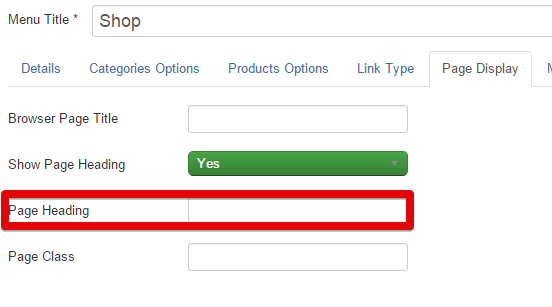
For your Item Menu you have fill the Page Heading, please let's it empty.
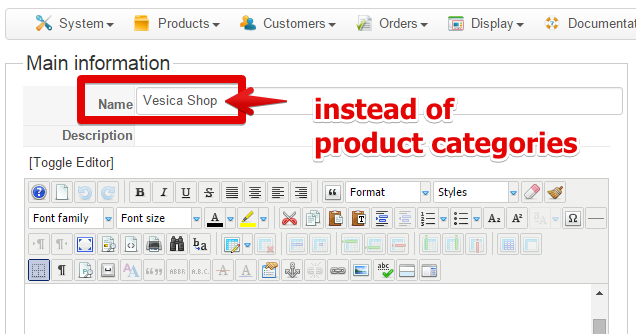
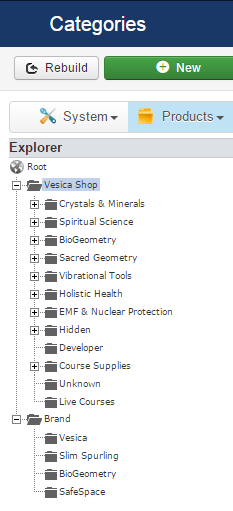
For have right title when click on "Crystals & Minerals" from "Shop" Menu, just change "product categories" name to "Vesica Shop" (In your categorie backend configuration.
Hope that will fit you.
Regards,
I found your error :
For your Item Menu you have fill the Page Heading, please let's it empty.
For have right title when click on "Crystals & Minerals" from "Shop" Menu, just change "product categories" name to "Vesica Shop" (In your categorie backend configuration.
Hope that will fit you.
Regards,
Last edit: 10 years 7 months ago by Philip.
The following user(s) said Thank You: info@vesica.org
Please Log in or Create an account to join the conversation.
Time to create page: 0.232 seconds