

- Posts: 44
- Thank you received: 1
Hikashop upgrade and broken module
10 years 6 months ago #233428
by Farang
Hikashop upgrade and broken module was created by Farang
-- url of the page with the problem -- :
openalldoors.co.uk/lanna/index.php/en/
-- HikaShop version -- : 2.6.1
-- Joomla version -- : 2.5.28
-- PHP version -- : 5.3.28
-- Browser(s) name and version -- : All
-- Error-message(debug-mod must be tuned on) -- : None
Hi Folks
I've upgraded the hikashop version and its broken the module on the left of site on the home page
I'm not sure what setting to look at or change
Link for site not working - openalldoors.co.uk/lanna/index.php/en/
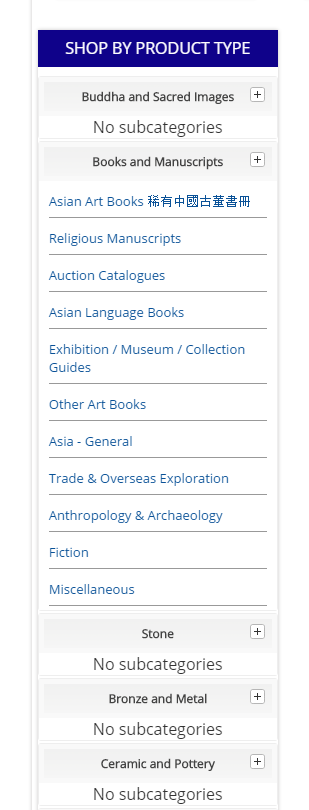
Link for site old hika version installed but working - www.lannaantique.com/en/
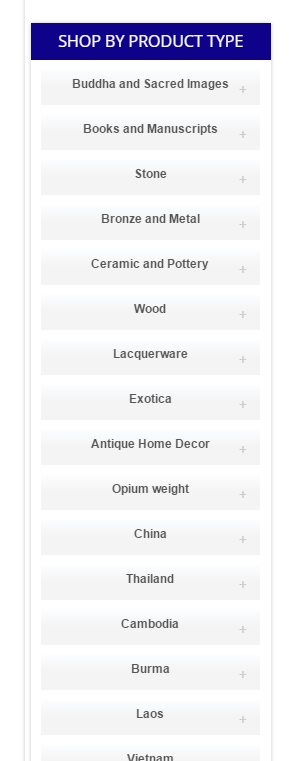
Thanks very much for any advice or guidance you can provide
Cheers
Paul
-- HikaShop version -- : 2.6.1
-- Joomla version -- : 2.5.28
-- PHP version -- : 5.3.28
-- Browser(s) name and version -- : All
-- Error-message(debug-mod must be tuned on) -- : None
Hi Folks
I've upgraded the hikashop version and its broken the module on the left of site on the home page
I'm not sure what setting to look at or change
Link for site not working - openalldoors.co.uk/lanna/index.php/en/
Link for site old hika version installed but working - www.lannaantique.com/en/
Thanks very much for any advice or guidance you can provide
Cheers
Paul
Please Log in or Create an account to join the conversation.

10 years 6 months ago #233443
by nicolas
Replied by nicolas on topic Hikashop upgrade and broken module
Hi,
I see several things in play here:
- Edit the module via the Joomla modules manager, and try the different values of the setting "Show children"
- Try to change the "use bootstrap design" setting of the HikaShop configuration
- It might also come from some kind of modification in the file templates/YOUR_TEMPLATE/html/com_hikashop/category/listing_list.php
I see several things in play here:
- Edit the module via the Joomla modules manager, and try the different values of the setting "Show children"
- Try to change the "use bootstrap design" setting of the HikaShop configuration
- It might also come from some kind of modification in the file templates/YOUR_TEMPLATE/html/com_hikashop/category/listing_list.php
The following user(s) said Thank You: Farang
Please Log in or Create an account to join the conversation.
10 years 6 months ago - 10 years 6 months ago #233515
by Farang
Replied by Farang on topic Hikashop upgrade and broken module
Hi Nicolas,
Thank you for getting back to me
I can't see show children in the hikashop module
I tried use bootstrap design but no joy with that
I'm not exactly sure what I'm looking for regarding the override - I can see listing_list in a product folder in the html but not category
However if I look at views I see many different versions of the file
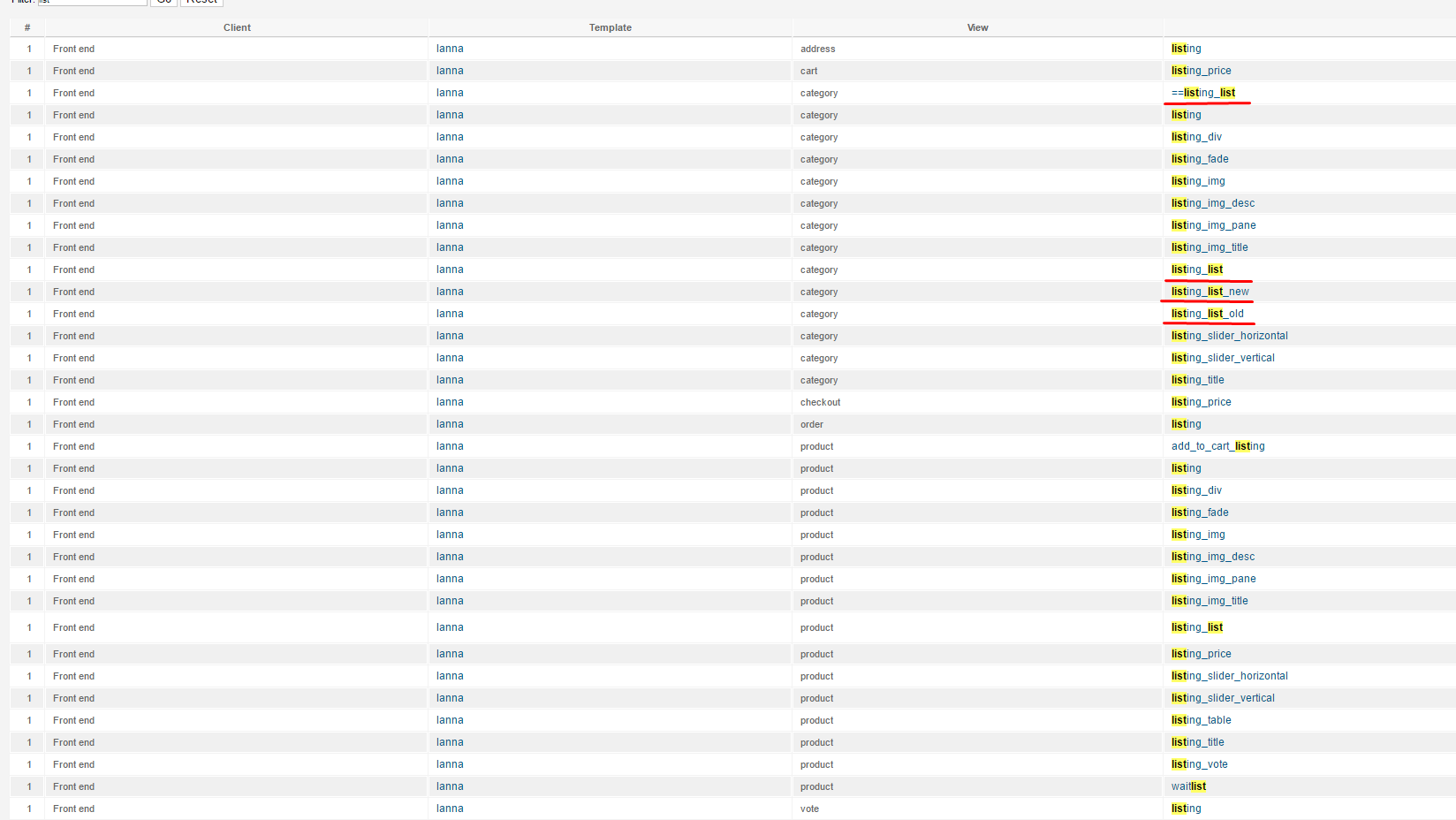
and override wise
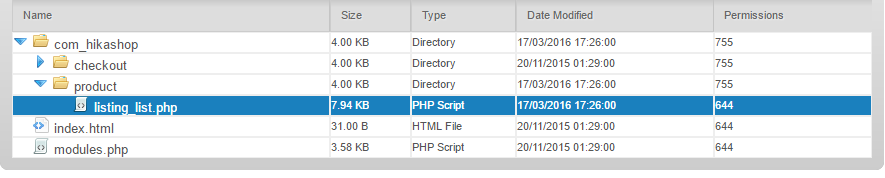
Thanks
Paul
Thank you for getting back to me
I can't see show children in the hikashop module
I tried use bootstrap design but no joy with that
I'm not exactly sure what I'm looking for regarding the override - I can see listing_list in a product folder in the html but not category
However if I look at views I see many different versions of the file
and override wise
Thanks
Paul
Last edit: 10 years 6 months ago by Farang.
Please Log in or Create an account to join the conversation.
10 years 6 months ago #233574
by nicolas
Replied by nicolas on topic Hikashop upgrade and broken module
Hi,
So based on your screenshots, I don't see any override so it apparently doesn't come from that.
When you edit the module via the Joomla modules manager, you'll see the "show children" setting in the "HikaShop options" tab.
So please check that.
So based on your screenshots, I don't see any override so it apparently doesn't come from that.
When you edit the module via the Joomla modules manager, you'll see the "show children" setting in the "HikaShop options" tab.
So please check that.
Please Log in or Create an account to join the conversation.
10 years 6 months ago #233596
by Farang
Replied by Farang on topic Hikashop upgrade and broken module
Hi 
I'm not quite sure where to look
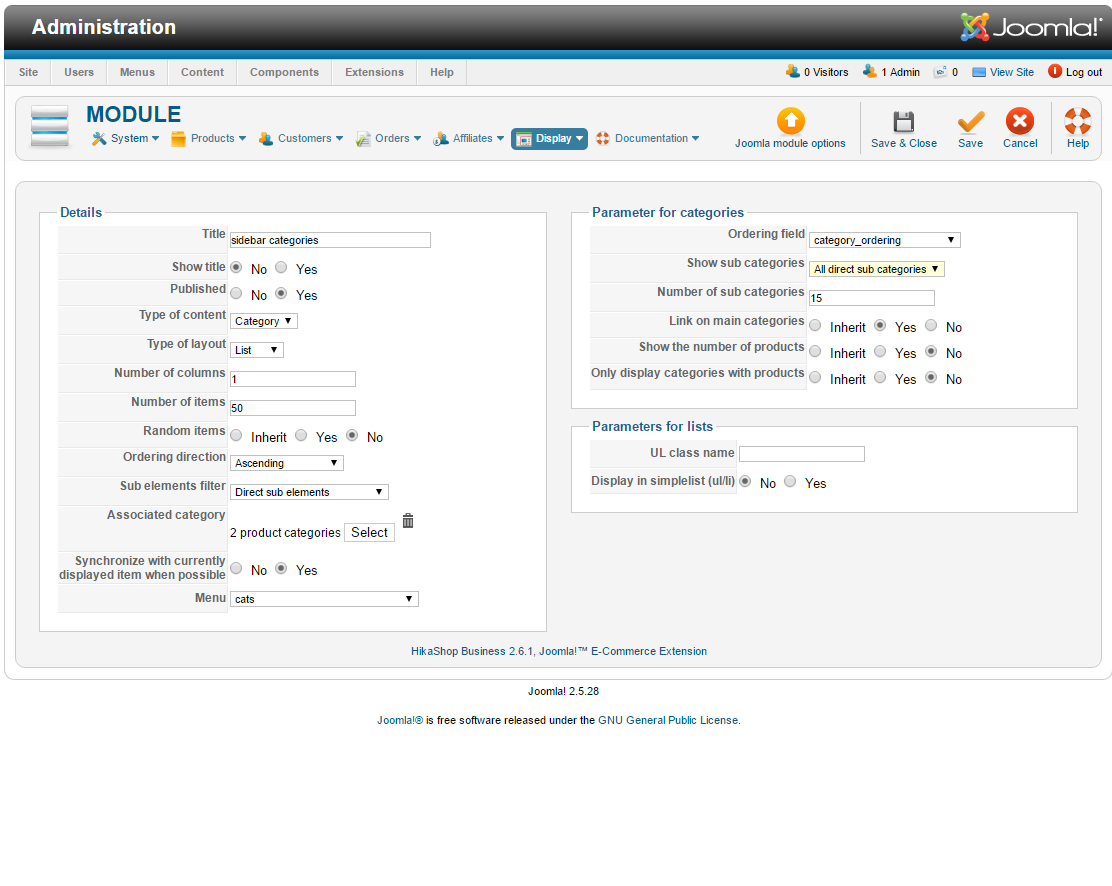
I have tried most options at one point
Cheers and thanks
Paul
I'm not quite sure where to look
I have tried most options at one point
Cheers and thanks
Paul
Please Log in or Create an account to join the conversation.
10 years 6 months ago #233598
by nicolas
Replied by nicolas on topic Hikashop upgrade and broken module
Hi,
Ah, I thought you were on Joomla 3. Sorry for that. On Joomla 2.5, the option is called "show sub categories"
Ah, I thought you were on Joomla 3. Sorry for that. On Joomla 2.5, the option is called "show sub categories"
Please Log in or Create an account to join the conversation.
10 years 6 months ago #233677
by Farang
Replied by Farang on topic Hikashop upgrade and broken module
Hi Nicolas
No worries
I've tried changing these settings - with "no child" it removes all the sub categories, all sub categories displays the same as "all direct sub categories but loses the plus symbol
I was wondering if there was a class name I needed to add somewhere - I did check the demo but access for the Joomla module itself isn't allowed
Cheers
Paul
No worries
I've tried changing these settings - with "no child" it removes all the sub categories, all sub categories displays the same as "all direct sub categories but loses the plus symbol
I was wondering if there was a class name I needed to add somewhere - I did check the demo but access for the Joomla module itself isn't allowed
Cheers
Paul
Please Log in or Create an account to join the conversation.
10 years 6 months ago #233716
by nicolas
Replied by nicolas on topic Hikashop upgrade and broken module
Hi,
From what I can see, the problem is that the file components/com_hikashop/views/category/tmpl/listing_list.php had been directly modified to display custom HTML for that module, and that the template has custom CSS based on that HTML.
When you updated, these modifications have been lost and thus you're back with the default HTML of HikaShop and the CSS of your template isn't used anymore.
So you would have to get that file from before the update and copy it over the new version of the file after the installation and it should hopefully fix the problem.
From what I can see, the problem is that the file components/com_hikashop/views/category/tmpl/listing_list.php had been directly modified to display custom HTML for that module, and that the template has custom CSS based on that HTML.
When you updated, these modifications have been lost and thus you're back with the default HTML of HikaShop and the CSS of your template isn't used anymore.
So you would have to get that file from before the update and copy it over the new version of the file after the installation and it should hopefully fix the problem.
Please Log in or Create an account to join the conversation.
10 years 6 months ago #233751
by Farang
Replied by Farang on topic Hikashop upgrade and broken module
Hi Nicolas,
Thanks for continuing help with this
I've added the previous code to this file

So its 2.3.0
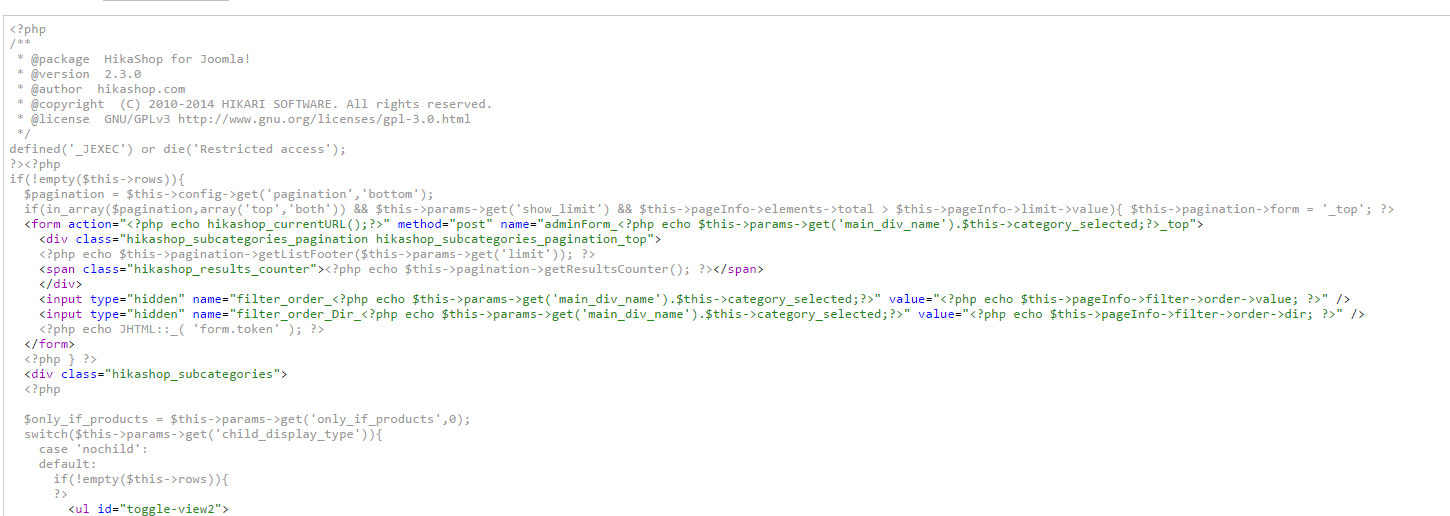
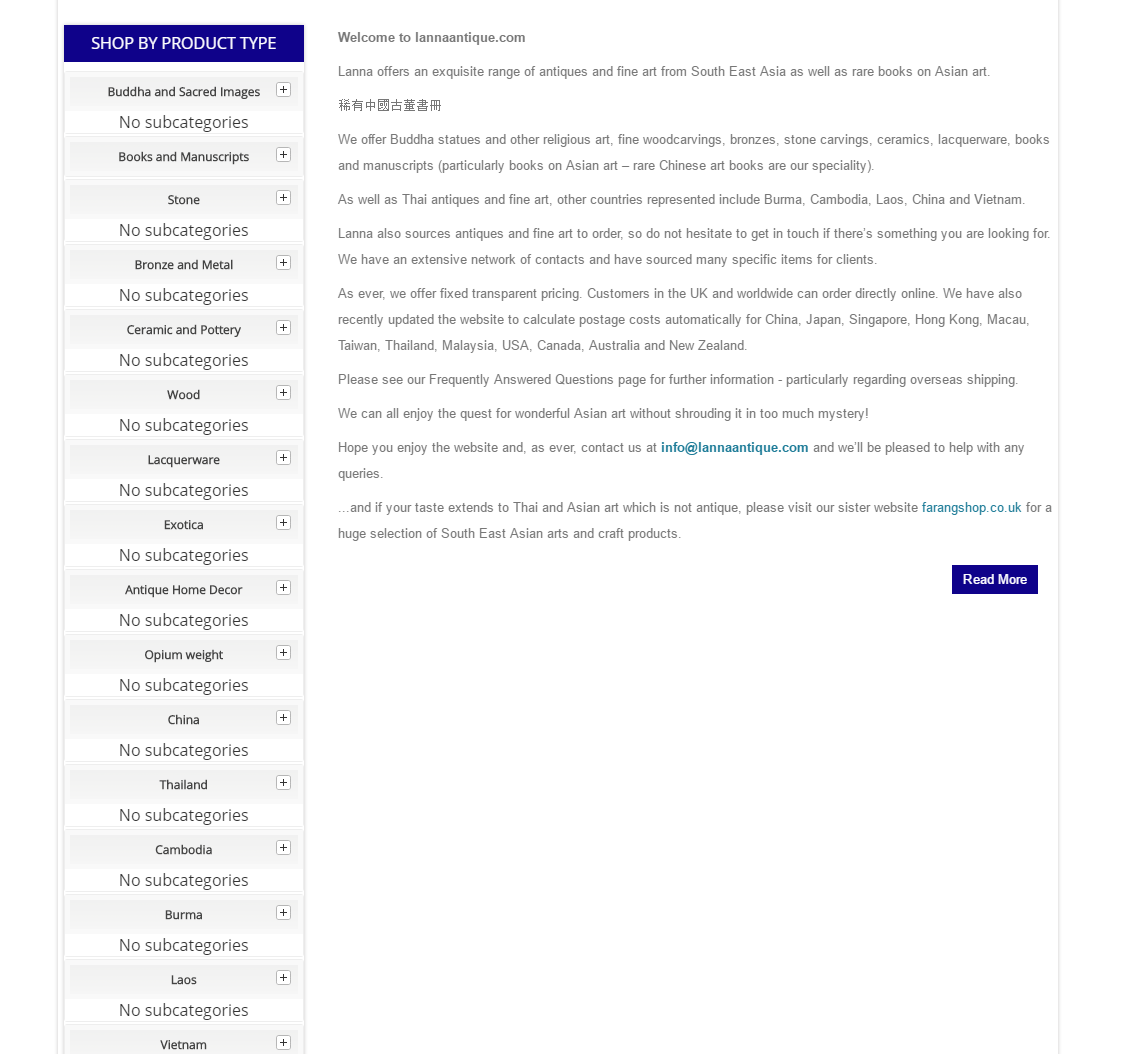
It's not fixed it unfortunately
The toggle that contained elements is now closed and unclickable
The others are still the same
Thanks for continuing help with this
I've added the previous code to this file
So its 2.3.0
It's not fixed it unfortunately
The toggle that contained elements is now closed and unclickable
The others are still the same
Please Log in or Create an account to join the conversation.
10 years 6 months ago #233818
by nicolas
Replied by nicolas on topic Hikashop upgrade and broken module
Hi,
The HTML is still different between the two versions from what I can see. Maybe other files had been modified elsewhere.
Please understand that we can't help with this as we don't know what has been modified where.
This is custom development and on top of that it hasn't been done properly. Such customization should be done via view files overrides so that you don't loose the changes when you update HikaShop. Since the changes were done directly in the core files of HikaShop it's normal that you lost the changes when you updated HikaShop.
You should contact the developer that had made the changes so that he can port them to the new version.
The HTML is still different between the two versions from what I can see. Maybe other files had been modified elsewhere.
Please understand that we can't help with this as we don't know what has been modified where.
This is custom development and on top of that it hasn't been done properly. Such customization should be done via view files overrides so that you don't loose the changes when you update HikaShop. Since the changes were done directly in the core files of HikaShop it's normal that you lost the changes when you updated HikaShop.
You should contact the developer that had made the changes so that he can port them to the new version.
The following user(s) said Thank You: Farang
Please Log in or Create an account to join the conversation.
10 years 6 months ago #233841
by Farang
Replied by Farang on topic Hikashop upgrade and broken module
Hi Nicolas,
Right - Thanks alas the developers are long gone
Cheers
Paul
Right - Thanks alas the developers are long gone
Cheers
Paul
Please Log in or Create an account to join the conversation.
10 years 6 months ago #233847
by Farang
Replied by Farang on topic Hikashop upgrade and broken module
Hi Nicolas,
What would be the best way to proceed if we started from scratch using a new template and the existing hikashop product data?
A clean slate so to speak with Hikashop views
Thanks
Paul
What would be the best way to proceed if we started from scratch using a new template and the existing hikashop product data?
A clean slate so to speak with Hikashop views
Thanks
Paul
Please Log in or Create an account to join the conversation.
10 years 6 months ago #233860
by nicolas
Replied by nicolas on topic Hikashop upgrade and broken module
Hi,
Well, the simplest and cheapest would be to just use another categories listing module, like the skyline accordion one:
extensions.joomla.org/extension/skyline-...cordion-for-hikashop
That way it won't be affected by the template.
The look will be a bit different but you can make it quite close to what you had with the old website with the display settings of the module.
Otherwise, you could also hire a developer to try to salvage the CSS/customization from the old website to the new one by checking the different views, CSS of the template, etc between both websites. It's not an easy task but it can be done and should be way faster than starting from scratch.
Well, the simplest and cheapest would be to just use another categories listing module, like the skyline accordion one:
extensions.joomla.org/extension/skyline-...cordion-for-hikashop
That way it won't be affected by the template.
The look will be a bit different but you can make it quite close to what you had with the old website with the display settings of the module.
Otherwise, you could also hire a developer to try to salvage the CSS/customization from the old website to the new one by checking the different views, CSS of the template, etc between both websites. It's not an easy task but it can be done and should be way faster than starting from scratch.
The following user(s) said Thank You: Farang
Please Log in or Create an account to join the conversation.
10 years 6 months ago #234228
by Farang
Replied by Farang on topic Hikashop upgrade and broken module
Thanks
I've contacted the developers as there seems to be some confusion in their documentation over J2.5 support
and their 2.5 demo site is broken
Cheers
Paul
I've contacted the developers as there seems to be some confusion in their documentation over J2.5 support
and their 2.5 demo site is broken
Cheers
Paul
Please Log in or Create an account to join the conversation.
10 years 6 months ago #234253
by nicolas
Replied by nicolas on topic Hikashop upgrade and broken module
Hi,
You can also find other modules like this one.
For example, this one:
extstore.com/joomla-extensions/modules/hikashop-accordion
Or this one, which is apparently compatible with J2.5:
www.smartaddons.com/extensions/commercia...kashop-joomla-module
You can also find other modules like this one.
For example, this one:
extstore.com/joomla-extensions/modules/hikashop-accordion
Or this one, which is apparently compatible with J2.5:
www.smartaddons.com/extensions/commercia...kashop-joomla-module
The following user(s) said Thank You: Farang
Please Log in or Create an account to join the conversation.
10 years 6 months ago #235580
by Farang
Replied by Farang on topic Hikashop upgrade and broken module
Thanks I've managed to implement that accordion module overriding the existing styling and replacing it with new css - so much stupid stuff in there
The module didn't work at the start so have had to remove some of the php added by the previous developer and the hard coded jquery in the index.php file (which broke any module I tried)
I'm now stuck on the development site on a different issue
openalldoors.co.uk/lanna/index.php/en/sh.../2014-05-15-12-04-26
openalldoors.co.uk/lanna/index.php/en/sh.../2014-05-13-12-59-03
I can't work out how to remove the black and make it like the other page
or even where to find the file - /index.php/en/shop-by-product-type/2014-05-13-12-59-03
Thanks again for the help with the accordion
The module didn't work at the start so have had to remove some of the php added by the previous developer and the hard coded jquery in the index.php file (which broke any module I tried)
I'm now stuck on the development site on a different issue
openalldoors.co.uk/lanna/index.php/en/sh.../2014-05-15-12-04-26
openalldoors.co.uk/lanna/index.php/en/sh.../2014-05-13-12-59-03
I can't work out how to remove the black and make it like the other page
or even where to find the file - /index.php/en/shop-by-product-type/2014-05-13-12-59-03
Thanks again for the help with the accordion
Please Log in or Create an account to join the conversation.

10 years 6 months ago #235623
by Xavier
Replied by Xavier on topic Hikashop upgrade and broken module
Hi,
You have to edit the module with the id "87" and change the value of the option "background color".
Else some css like that should do the job:
www.hikashop.com/support/documentation/1...ize-the-display.html
You have to edit the module with the id "87" and change the value of the option "background color".
Else some css like that should do the job:
Code:
.hikashop_subcontainer{ background-color: #fff !important; }
www.hikashop.com/support/documentation/1...ize-the-display.html
The following user(s) said Thank You: Farang
Please Log in or Create an account to join the conversation.
10 years 6 months ago #236013
by Farang
Replied by Farang on topic Hikashop upgrade and broken module
Thanks
I was hoping to get a handle on where the background black colour was or where it was coming from - as its added inline to the particular problem pages rather than override with !important
I was hoping it would explain pages like this
openalldoors.co.uk/lanna/index.php/en/sh...ooks-and-manuscripts
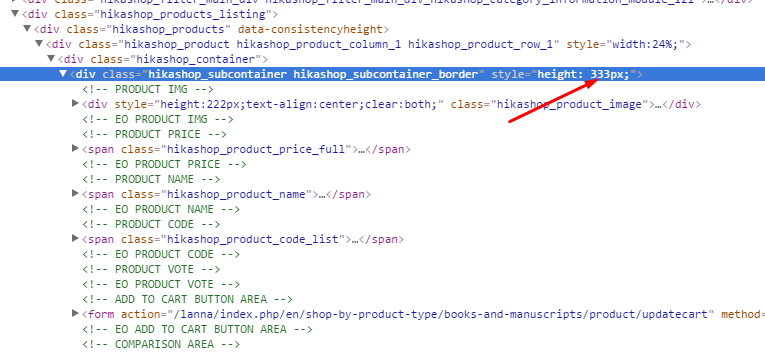
e.g. how to deal with the inline height value { height: 333px;}
I could wrap it in a media query but it means two media queries for where it breaks to 100% and one to override the
element.style for every or most pages
On the real site with the older version of hikashop it doesn't have any inline heights that I can see
The inline height is generally a problem as some products with long titles see the cart button pushed down on the the next product when displaying on mobile like widths
Cheers
Paul
I was hoping to get a handle on where the background black colour was or where it was coming from - as its added inline to the particular problem pages rather than override with !important
I was hoping it would explain pages like this
openalldoors.co.uk/lanna/index.php/en/sh...ooks-and-manuscripts
e.g. how to deal with the inline height value { height: 333px;}
I could wrap it in a media query but it means two media queries for where it breaks to 100% and one to override the
element.style for every or most pages
On the real site with the older version of hikashop it doesn't have any inline heights that I can see
The inline height is generally a problem as some products with long titles see the cart button pushed down on the the next product when displaying on mobile like widths
Cheers
Paul
Please Log in or Create an account to join the conversation.
10 years 5 months ago #236057
by nicolas
Replied by nicolas on topic Hikashop upgrade and broken module
Hi,
There is no inline height. The height is added dynamically with javascript so that the height of the elements is equal on each line of products.
If you don't want that, you need to remove the line:
in the file "listing_div" of the view "product" via the menu Display>Views.
There is no inline height. The height is added dynamically with javascript so that the height of the elements is equal on each line of products.
If you don't want that, you need to remove the line:
Code:
$attributes .= 'data-consistencyheight=".hikashop_subcontainer"';
The following user(s) said Thank You: Farang
Please Log in or Create an account to join the conversation.
10 years 5 months ago #236280
by Farang
Replied by Farang on topic Hikashop upgrade and broken module
Thanks
Please Log in or Create an account to join the conversation.
Time to create page: 0.313 seconds