

- Posts: 490
- Thank you received: 2
how to make a product grid view
10 years 4 months ago #242051
by ronron
how to make a product grid view was created by ronron
-- HikaShop version -- : 2.6.3
-- Joomla version -- : 3.4.3
-- PHP version -- : 5.5
-- Error-message(debug-mod must be tuned on) -- : none
hi i want to implement a grid view for my products listing. I used DIV then image and title for the layout. i found the thread below
www.hikashop.com/forum/product-category-...in-list-or-grid.html
i cant get it to work. the page is blank.
Please help. thanks
-- Joomla version -- : 3.4.3
-- PHP version -- : 5.5
-- Error-message(debug-mod must be tuned on) -- : none
hi i want to implement a grid view for my products listing. I used DIV then image and title for the layout. i found the thread below
www.hikashop.com/forum/product-category-...in-list-or-grid.html
i cant get it to work. the page is blank.
Please help. thanks
Please Log in or Create an account to join the conversation.

10 years 4 months ago #242076
by nicolas
Replied by nicolas on topic how to make a product grid view
Hi,
Products listings display in a grid view by default and is not emtpy.
The "products listing" menu item that is added by HikaShop in the Joomla menu manager when you install HikaShop for the first time on the website will do that automatically when you use it.
So I don't know what is your problem. Please provide a link to the page with the problem and screenshots of the settings of its menu item.
Products listings display in a grid view by default and is not emtpy.
The "products listing" menu item that is added by HikaShop in the Joomla menu manager when you install HikaShop for the first time on the website will do that automatically when you use it.
So I don't know what is your problem. Please provide a link to the page with the problem and screenshots of the settings of its menu item.
Please Log in or Create an account to join the conversation.
10 years 4 months ago - 10 years 4 months ago #242090
by ronron
Replied by ronron on topic how to make a product grid view
Sory, i think i was not clear.
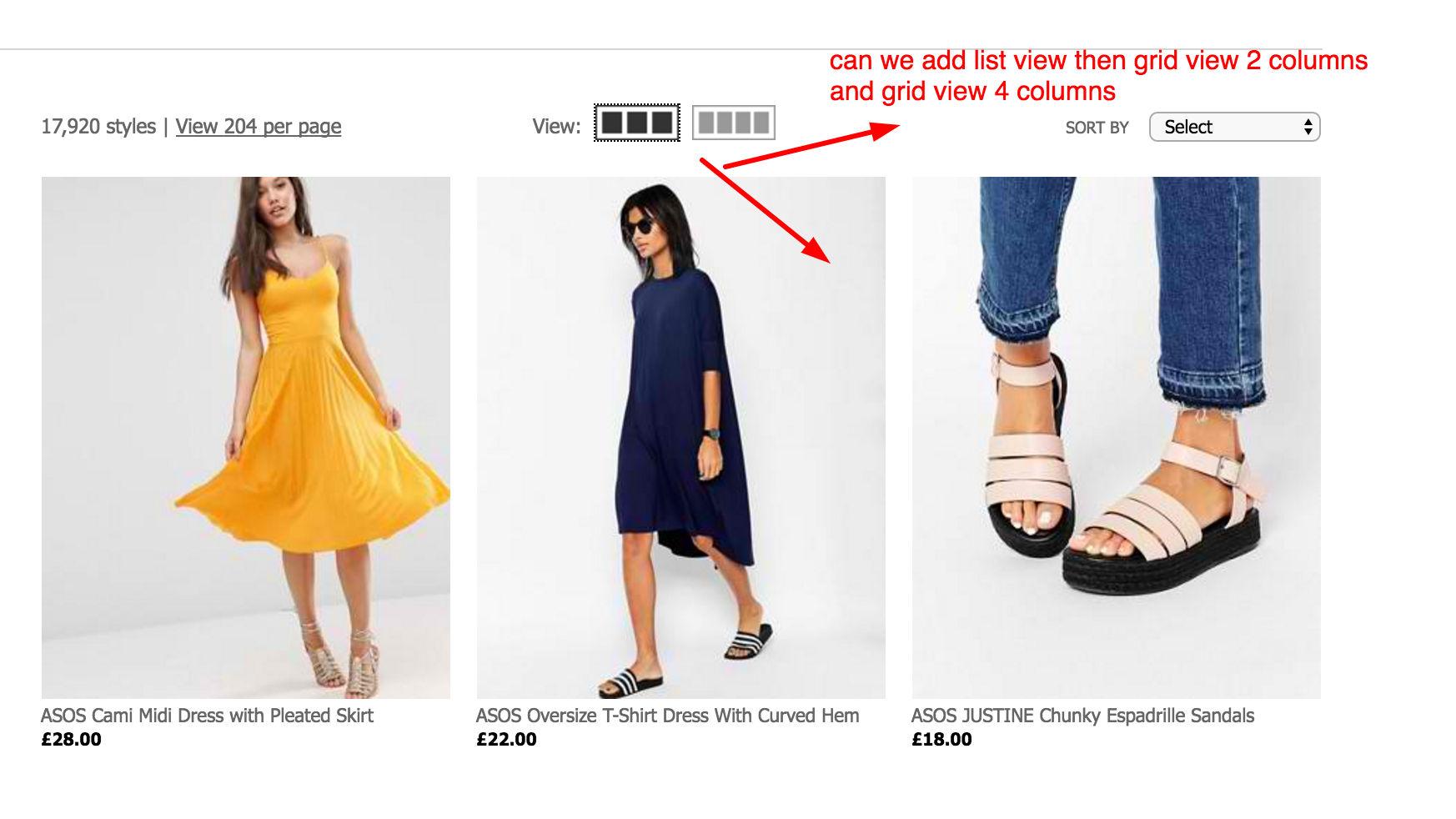
let me explain. As seen on the thread i want to implement list view to grid view 2 columns and grid view 3 columns that can be selected by the user on the front end. I am currently using product list div single column title and description layout. How can i achieve this?
I tried the solution included in the other thread but cant get it to work. Any solutions? The thread i tried to follow is in my initial inquiry.
here is the example i want to achieve
Thanks
let me explain. As seen on the thread i want to implement list view to grid view 2 columns and grid view 3 columns that can be selected by the user on the front end. I am currently using product list div single column title and description layout. How can i achieve this?
I tried the solution included in the other thread but cant get it to work. Any solutions? The thread i tried to follow is in my initial inquiry.
here is the example i want to achieve
Thanks
Last edit: 10 years 4 months ago by ronron.
Please Log in or Create an account to join the conversation.
10 years 4 months ago #242108
by nicolas
Replied by nicolas on topic how to make a product grid view
Hi,
Well, if you tried the solution on the other thread and you got a blank page, it means you made a mistake somewhere.
Please provide screenshots of what you did where. Then, turn on the error reporting and debug mode settings of the Joomla configuration and access the blank page again and you should see an error message giving information on what is wrong in your modifications.
Well, if you tried the solution on the other thread and you got a blank page, it means you made a mistake somewhere.
Please provide screenshots of what you did where. Then, turn on the error reporting and debug mode settings of the Joomla configuration and access the blank page again and you should see an error message giving information on what is wrong in your modifications.
Please Log in or Create an account to join the conversation.
10 years 4 months ago - 10 years 1 month ago #242310
by ronron
Replied by ronron on topic how to make a product grid view
this is the link
Part of the message is hidden for the guests. Please log in or register to see it.
this is the code
<?php global $Itemid;
if($Itemid==1697){ ?>
<a href="index.php?option=com_hikashop&view=product&layout=listing">grid</a>
<?php else{ ?>
<a href="index.php?option=com_hikashop&view=product&layout=listing">list</a>
<?php } ?>
both layouts are "image and description" so i guess it would be better to use the SEO links.
i edited the file listing_img_desc i added the link right after this code
if(!empty($this->row->extraData->top)) { echo implode("\r\n",$this->row->extraData->top); }
?>
well the page is no longer blank. But i dont see the anchor links.
debug is on and error reporting is set to max . this is the error but i dont think it is related.
thanks
Part of the message is hidden for the guests. Please log in or register to see it.
this is the code
<?php global $Itemid;
if($Itemid==1697){ ?>
<a href="index.php?option=com_hikashop&view=product&layout=listing">grid</a>
<?php else{ ?>
<a href="index.php?option=com_hikashop&view=product&layout=listing">list</a>
<?php } ?>
both layouts are "image and description" so i guess it would be better to use the SEO links.
i edited the file listing_img_desc i added the link right after this code
if(!empty($this->row->extraData->top)) { echo implode("\r\n",$this->row->extraData->top); }
?>
well the page is no longer blank. But i dont see the anchor links.
debug is on and error reporting is set to max . this is the error but i dont think it is related.
Code:
Notice: Undefined property: stdClass::$hikashop_product_custom_fob_price_line in /home/..../public_html/templates/.../html/com_hikashop/product/listing_img_desc.php on line 168
Last edit: 10 years 1 month ago by ronron.
Please Log in or Create an account to join the conversation.
10 years 3 months ago #243024
by nicolas
Replied by nicolas on topic how to make a product grid view
Hi,
Your code is not what it should be if you followed the explanations of the other thread:
www.hikashop.com/forum/product-category-...-or-grid.html#189449
Instead of YYY and ZZZ, you're supposed to put the links of the menu items. But you put just a non SEF link which is not valid:
index.php?option=com_hikashop&view=product&layout=listing
So please use real links. For example: mywebsite.com/alias-of-grid-menu-item.html
Also, the other thread says that you should add that modification in the file "listing" of the view "product". So why did you try adding it in the listing_img_desc view file ?
Your code is not what it should be if you followed the explanations of the other thread:
www.hikashop.com/forum/product-category-...-or-grid.html#189449
Instead of YYY and ZZZ, you're supposed to put the links of the menu items. But you put just a non SEF link which is not valid:
index.php?option=com_hikashop&view=product&layout=listing
So please use real links. For example: mywebsite.com/alias-of-grid-menu-item.html
Also, the other thread says that you should add that modification in the file "listing" of the view "product". So why did you try adding it in the listing_img_desc view file ?
Please Log in or Create an account to join the conversation.
10 years 3 months ago - 10 years 1 month ago #243037
by ronron
Replied by ronron on topic how to make a product grid view
hi thank you
i just want to have the capability of adding a grid view. im using listing_img_desc with 1 column as my home page. i want to add a grid view button how can we do this?
BTW this is the error. i did as you instructed
Parse error: syntax error, unexpected '<' in /home/.../public_html/templates/.../html/com_hikashop/product/listing_img_desc.php on line 23
i just want to have the capability of adding a grid view. im using listing_img_desc with 1 column as my home page. i want to add a grid view button how can we do this?
BTW this is the error. i did as you instructed
Parse error: syntax error, unexpected '<' in /home/.../public_html/templates/.../html/com_hikashop/product/listing_img_desc.php on line 23
Last edit: 10 years 1 month ago by ronron.
Please Log in or Create an account to join the conversation.
10 years 3 months ago #243054
by nicolas
Replied by nicolas on topic how to make a product grid view
Hi,
Again, you don't want to add that code in listing_img_desc. Please add it to listing.
Also, the error you have is not relative to the code you posted before. So either you changed the code, or you placed somewhere where it breaks the code.
Please understand that this is custom coding. We can't do it for you as part of the user support. We won't be able to help you further with that and we provided all the necessary information to do it.
If you need someone to help you with the changes, please contact a developer. You can potentially contact our partners here:
www.hikashop.com/home/our-partners.html
Again, you don't want to add that code in listing_img_desc. Please add it to listing.
Also, the error you have is not relative to the code you posted before. So either you changed the code, or you placed somewhere where it breaks the code.
Please understand that this is custom coding. We can't do it for you as part of the user support. We won't be able to help you further with that and we provided all the necessary information to do it.
If you need someone to help you with the changes, please contact a developer. You can potentially contact our partners here:
www.hikashop.com/home/our-partners.html
Please Log in or Create an account to join the conversation.
10 years 3 months ago #243135
by ronron
Replied by ronron on topic how to make a product grid view
Thank you.
oh i see.So hikashop has no capability of displaying a grid view and a list view at the same page. If i need this i have to contact your partners. is this correct?
thanks again
oh i see.So hikashop has no capability of displaying a grid view and a list view at the same page. If i need this i have to contact your partners. is this correct?
thanks again
Please Log in or Create an account to join the conversation.
10 years 3 months ago #243152
by nicolas
Replied by nicolas on topic how to make a product grid view
Hi,
I gave you the code modification to do it with HikaShop.
If you are not able to do the change on your own, then yes, you would have to contact a partner or have someone on your end help you with that.
I gave you the code modification to do it with HikaShop.
If you are not able to do the change on your own, then yes, you would have to contact a partner or have someone on your end help you with that.
Please Log in or Create an account to join the conversation.
10 years 3 months ago - 10 years 1 month ago #243245
by ronron
Replied by ronron on topic how to make a product grid view
thank you again
i cant get that to work so i used a different code and i hope its ok.
you can see it here
Part of the message is hidden for the guests. Please log in or register to see it.
my problem now is with the filters. how do i make the filters work the same for all the links or the menu links i have created?
example. i searched for shoes. the results is for a list. so i clicked the grid view to display more and change the layout. the problem is that, the filter is set again to zero, so back to the start.Now, if i use again the filter and decided that the results is to many, my option is to go back to the list view. the filter for that menu will retain is former settings. What can i do with this?
i guess it should be simple. i searched for something using the filter, then decided to change the layout by clicking on the menu links then it should only change layout. how can i do this?
thanks again
i cant get that to work so i used a different code and i hope its ok.
you can see it here
Part of the message is hidden for the guests. Please log in or register to see it.
my problem now is with the filters. how do i make the filters work the same for all the links or the menu links i have created?
example. i searched for shoes. the results is for a list. so i clicked the grid view to display more and change the layout. the problem is that, the filter is set again to zero, so back to the start.Now, if i use again the filter and decided that the results is to many, my option is to go back to the list view. the filter for that menu will retain is former settings. What can i do with this?
i guess it should be simple. i searched for something using the filter, then decided to change the layout by clicking on the menu links then it should only change layout. how can i do this?
thanks again
Last edit: 10 years 1 month ago by ronron.
Please Log in or Create an account to join the conversation.
10 years 3 months ago #243257
by nicolas
Replied by nicolas on topic how to make a product grid view
Hi,
The filters are saved per menu item.
So the issue you have with the filters is normal since you're using different menu items.
If you want to keep the filters values throughout the different display modes, then you should have only one menu item, and instead customize further the code of the view file to change the layout based on an extra parameter in the URL.
So it would be something like that:
The filters are saved per menu item.
So the issue you have with the filters is normal since you're using different menu items.
If you want to keep the filters values throughout the different display modes, then you should have only one menu item, and instead customize further the code of the view file to change the layout based on an extra parameter in the URL.
So it would be something like that:
Code:
<?php
if(!@$_GET['columns'] || $_GET['columns']>3){ $_GET['columns'] = 1;
$this->params->set('columns', $_GET['columns']);
?>
<a href="http://mayari.com.ph/store">1 column</a>
<a href="http://mayari.com.ph/store?columns=2">2 columns</a>
<a href="http://mayari.com.ph/store?columns=3">3 columns</a>
Please Log in or Create an account to join the conversation.
10 years 3 months ago - 10 years 3 months ago #244129
by ronron
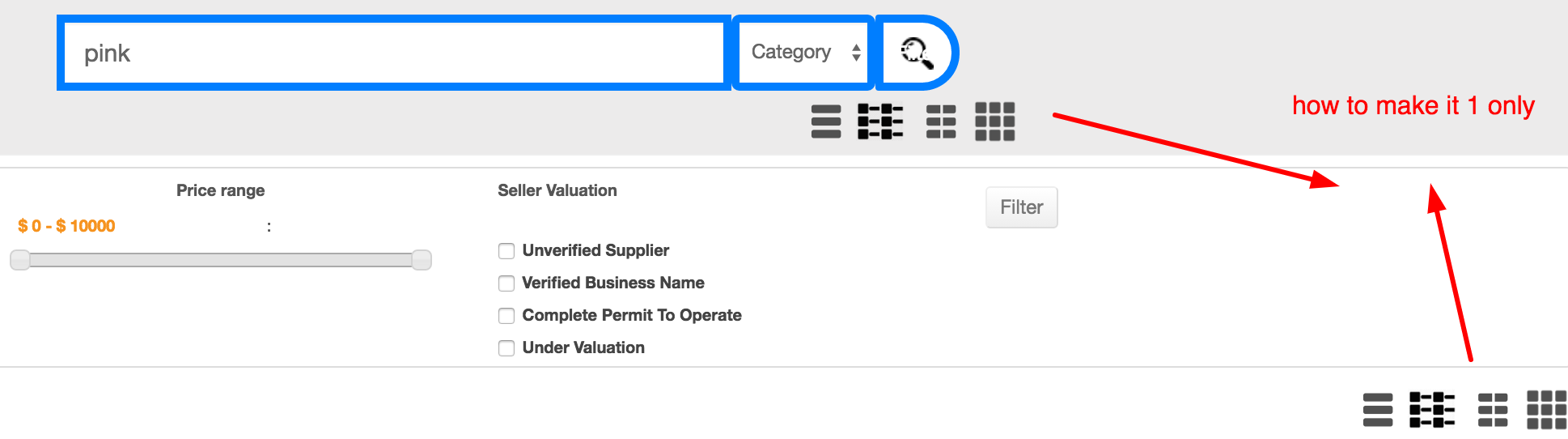
hi
please help me out on this.
my new problem is that for every instance of the filter, the grid view appears. Example if there are 2 filter modules, there are also 2 grid links.
can i add something so that only one instance appear?
Replied by ronron on topic how to make a product grid view
hi
please help me out on this.
my new problem is that for every instance of the filter, the grid view appears. Example if there are 2 filter modules, there are also 2 grid links.
can i add something so that only one instance appear?
Last edit: 10 years 3 months ago by ronron.
Please Log in or Create an account to join the conversation.

10 years 3 months ago #244133
by lousyfool
Need help with customisations of layouts, style or other site development? PM me!
(Don't forget to turn on "E-mail notification of new messages" )
Replied by lousyfool on topic how to make a product grid view
Hi again,
Obviously, that's due to the customization you made to have these links for different views.
Impossible to provide detailed help because only you know the customization.
But as a hint, it looks as if you should reconsider where to place the code for the links, so it does not appear multiple times on a page, and not multiple times with with filters.
Obviously, that's due to the customization you made to have these links for different views.
Impossible to provide detailed help because only you know the customization.
But as a hint, it looks as if you should reconsider where to place the code for the links, so it does not appear multiple times on a page, and not multiple times with with filters.
Need help with customisations of layouts, style or other site development? PM me!
(Don't forget to turn on "E-mail notification of new messages" )
The following user(s) said Thank You: Jerome
Please Log in or Create an account to join the conversation.
10 years 1 month ago - 10 years 1 month ago #248402
by ronron
Replied by ronron on topic how to make a product grid view
hi there can you please tell me where to add the code below?
thanks
Hi,
The filters are saved per menu item.
So the issue you have with the filters is normal since you're using different menu items.
If you want to keep the filters values throughout the different display modes, then you should have only one menu item, and instead customize further the code of the view file to change the layout based on an extra parameter in the URL.
So it would be something like that:
Code:<?php if(!@$_GET['columns'] || $_GET['columns']>3){ $_GET['columns'] = 1; $this->params->set('columns', $_GET['columns']); ?> <a href="http://.../store">1 column</a> <a href="http://.../store?columns=2">2 columns</a> <a href="http://.../store?columns=3">3 columns</a>
thanks
Last edit: 10 years 1 month ago by ronron.
Please Log in or Create an account to join the conversation.
10 years 1 month ago #248426
by nicolas
Replied by nicolas on topic how to make a product grid view
Hi,
We're still talking about the "listing" file of the "product" view. You can add that at the top there.
We're still talking about the "listing" file of the "product" view. You can add that at the top there.
The following user(s) said Thank You: ronron
Please Log in or Create an account to join the conversation.

10 years 1 month ago - 10 years 1 month ago #248467
by kyratn
Replied by kyratn on topic how to make a product grid view
Hi,
Just a quick questions.
1. What about SEO? Wouldn't it hurt it. Having 2-3 categories per item isn't so good.
2. What if I use canonical url?
3. Any chance it could be added into TODO list? So it could be used like it should... Looking other e-commerce its just quick ajax reload or something. It looks like it is not first time people are asking for it. Unless it is complicated to do with hikashop.
Regards
Just a quick questions.
1. What about SEO? Wouldn't it hurt it. Having 2-3 categories per item isn't so good.
2. What if I use canonical url?
3. Any chance it could be added into TODO list? So it could be used like it should... Looking other e-commerce its just quick ajax reload or something. It looks like it is not first time people are asking for it. Unless it is complicated to do with hikashop.
Regards
Last edit: 10 years 1 month ago by kyratn.
Please Log in or Create an account to join the conversation.
10 years 1 month ago #248475
by nicolas
Replied by nicolas on topic how to make a product grid view
Hi,
1.2. Having different URLs to reach the same pages is only a problem for SEO if you don't specify a canonical URL in your products/categories
3. It's already on our todo list.
1.2. Having different URLs to reach the same pages is only a problem for SEO if you don't specify a canonical URL in your products/categories
3. It's already on our todo list.
The following user(s) said Thank You: kyratn
Please Log in or Create an account to join the conversation.
10 years 1 month ago - 10 years 1 month ago #248594
by ronron
Replied by ronron on topic how to make a product grid view
hi Nic
tried the code above its not working. also the links are not working. its a blank screen
this is the error
this is the code
thanks
tried the code above its not working. also the links are not working. its a blank screen
this is the error
Code:
Strict Standards: Only variables should be assigned by reference in /home/.../public_html/plugins/system/form_xml_override/form_xml_override.php on line 15
Parse error: syntax error, unexpected end of file in /home/.../public_html/templates/purity_iii/html/com_hikashop/product/listing.php on line 352
this is the code
Code:
<?php
/**
* @package HikaShop for Joomla!
* @version 2.6.3
* @author hikashop.com
* @copyright (C) 2010-2016 HIKARI SOFTWARE. All rights reserved.
* @license GNU/GPLv3 http://www.gnu.org/licenses/gpl-3.0.html
*/
defined('_JEXEC') or die('Restricted access');
?>
[b][i]<?php
if(!@$_GET['columns'] || $_GET['columns']>3){ $_GET['columns'] = 1;
$this->params->set('columns', $_GET['columns']);
?>
<a href="http://.../store">1 column</a>
<a href="http://.../store?columns=2">2 columns</a>
<a href="http://.../store?columns=3">3 columns</a>[/i][/b]
<?php
if(!$this->module && isset($this->element->category_canonical) && !empty($this->element->category_canonical)){
$canonicalUrl = hikashop_cleanURL($this->element->category_canonical);
$doc = JFactory::getDocument();
$doc->addCustomTag( '<link rel="canonical" href="'.$canonicalUrl.'" />' );
}
if(hikashop_level(2) && JRequest::getVar('hikashop_front_end_main',0) && JRequest::getVar('task')=='listing' && $this->params->get('show_compare')) {?>
<script type="text/javascript">
<!--
var compare_list = {length: 0};
function setToCompareList(product_id,name,elem) {
var compareBtn = document.getElementById('hikashop_compare_button');
if( compare_list[product_id] ) {
var old = compare_list[product_id];
compare_list[product_id] = null;
compare_list.length--;
if( elem == null ) elem = old.elem;
var nn = elem.nodeName.toLowerCase();
if( nn == 'a' )
elem.innerHTML = "<?php echo JText::_('ADD_TO_COMPARE_LIST');?>";
else if( nn == 'input' )
{
if(elem.type.toLowerCase()=='submit')
elem.value = "<?php echo JText::_('ADD_TO_COMPARE_LIST');?>";
else
elem.checked = false;
}
} else {
if(compare_list.length < <?php echo $this->config->get('compare_limit',5); ?> ) {
compare_list[product_id] = {name: name, elem: elem};
compare_list.length++;
var nn = elem.nodeName.toLowerCase();
if( nn == 'a' )
elem.innerHTML = "<?php echo JText::_('REMOVE_FROM_COMPARE_LIST');?>";
else if( nn == 'input' )
{
if(elem.type.toLowerCase()=='submit')
elem.value = "<?php echo JText::_('REMOVE_FROM_COMPARE_LIST');?>";
else
elem.checked = true;
}
} else {
alert("<?php echo JText::_('COMPARE_LIMIT_REACHED');?>");
elem.checked = false;
}
}
if(compare_list.length == 0 ) {
compareBtn.style.display = 'none';
} else {
compareBtn.style.display = '';
}
return false;
}
function compareProducts() {
var url = '';
for(var k in compare_list) {
if( compare_list[k] != null && k != 'length' ) {
if( url == '' )
url = 'cid[]=' + k;
else
url += '&cid[]=' + k;
}
}
window.location = "<?php
$u = hikashop_completeLink('product&task=compare'.$this->itemid,false,true);
if( strpos($u,'?') === false ) {
echo $u.'?';
} else {
echo $u.'&';
}
?>" + url;
return false;
}
window.hikashop.ready( function() {
$$('input.hikashop_compare_checkbox').each(function(el){
el.checked = false;
});
});
//-->
</script>
<?php }
ob_start();
$titleType='h1';
if(version_compare(JVERSION,'1.6','<')){
$title = $this->params->get('show_page_title');
}elseif($this->module){
$title = $this->params->get('showtitle');
$titleType='h2';
}else{
$title = (string) $this->params->get('show_page_heading');
if($title===''){
$params = JComponentHelper::getParams( 'com_menus' );
$title = $params->get('show_page_heading');
}
}
if($title && JRequest::getVar('hikashop_front_end_main',0) && (!$this->module || $this->pageInfo->elements->total)){
$name = $this->params->get('page_title');
if($this->module){
$name = $this->params->get('title');
}elseif($this->params->get('page_heading')){
$name = $this->params->get('page_heading');
}
?>
<<?php echo $titleType; ?>>
<?php echo $name; ?>
</<?php echo $titleType; ?>>
<?php
}
if(($this->params->get('show_image') && !empty($this->element->file_path))|| ($this->params->get('show_description',!$this->module)&&!empty($this->element->category_description))){
?>
<div class="hikashop_category_description">
<?php
if($this->params->get('show_image') && !empty($this->element->file_path)){
jimport('joomla.filesystem.file');
if(JFile::exists($this->image->getPath($this->element->file_path,false))){
?>
<img src="<?php echo $this->image->getPath($this->element->file_path); ?>" class="hikashop_category_image" title="<?php echo $this->escape(@$this->element->file_description); ?>" alt="<?php echo $this->escape(@$this->element->file_name); ?>"/>
<?php
}
}
if($this->params->get('show_description',!$this->module)&&!empty($this->element->category_description)){
?>
<div class="hikashop_category_description_content"><?php
echo JHTML::_('content.prepare',$this->element->category_description);
?></div>
<?php
}
?>
</div>
<?php
}
if(!empty($this->fields)){
ob_start();
$this->fieldsClass->prefix = '';
foreach($this->fields as $fieldName => $oneExtraField) {
if(!empty($this->element->$fieldName)){ ?>
<tr class="hikashop_category_custom_<?php echo $oneExtraField->field_namekey;?>_line">
<td class="key">
<span id="hikashop_category_custom_name_<?php echo $oneExtraField->field_id;?>" class="hikashop_category_custom_name">
<?php echo $this->fieldsClass->getFieldName($oneExtraField);?>
</span>
</td>
<td>
<span id="hikashop_category_custom_value_<?php echo $oneExtraField->field_id;?>" class="hikashop_category_custom_value">
<?php echo $this->fieldsClass->show($oneExtraField,$this->element->$fieldName); ?>
</span>
</td>
</tr>
<?php
}
}
$custom_fields_html = ob_get_clean();
if(!empty($custom_fields_html)){
?>
<div id="hikashop_category_custom_info_main" class="hikashop_category_custom_info_main">
<h4><?php echo JText::_('CATEGORY_ADDITIONAL_INFORMATION');?></h4>
<table width="100%">
<?php echo $custom_fields_html; ?>
</table>
</div>
<?php
}
}
$mainInfo = ob_get_clean();
ob_start();
$display_filters = $this->params->get('display_filters', -1);
if($display_filters=='-1'){
$config =& hikashop_config();
$display_filters=$config->get('show_filters');
}
if(hikashop_level(2) && JRequest::getVar('hikashop_front_end_main',0) && (JRequest::getVar('task','listing')=='listing' || !empty($this->force_display_filter)) && $display_filters=='1'){
$this->setLayout('filter');
$htmlFilter = $this->loadTemplate();
}
if(!empty($htmlFilter)&&@$_GET['task']!='category') echo $htmlFilter;
$filter_type = (int)$this->params->get('filter_type');
$layout_type = $this->params->get('layout_type');
if(empty($layout_type)) $layout_type = 'div';
if($filter_type !== 3) {
$this->setLayout('listing');
$html = $this->loadTemplate($layout_type);
if(!$this->module) echo $mainInfo;
if(!empty($html)){
if($this->module) echo $mainInfo;
if(!empty($htmlFilter) && @$_GET['task']=='category')
echo $htmlFilter;
?>
<div class="hikashop_products_listing">
<?php
if(JRequest::getVar('hikashop_front_end_main',0) && JRequest::getVar('task')=='listing' && $this->params->get('show_compare')) {
?>
<div id="hikashop_compare_zone" class="hikashop_compare_zone">
<?php
$empty='';
$params = new HikaParameter($empty);
echo $this->cart->displayButton(JText::_('COMPARE_PRODUCTS'),'compare_button',$params,'#','compareProducts();return false;','style="display:none;" id="hikashop_compare_button"',0,1,' hikashop_compare_button');
?>
</div>
<?php
}
echo $html;
?>
</div>
<?php
}elseif(( !$this->module || JRequest::getVar('hikashop_front_end_main',0) ) && (@$_REQUEST['ctrl']=='product' || @$_REQUEST['view']=='product') && (@$_REQUEST['task']=='listing' || @$_REQUEST['layout']=='listing') && !empty($this->filters) && count($this->filters)){
echo JText::_('HIKASHOP_NO_RESULT');
}
$html = ob_get_clean();
if(!empty($html)) {
?>
<div id="<?php echo $this->params->get('main_div_name');?>" class="hikashop_category_information hikashop_products_listing_main"><?php echo $html; ?></div>
<?php
}
} else if(!empty($this->rows) && !empty($this->categories)) {
if(!$this->module) echo $mainInfo;
$allrows = $this->rows;
$pagination = '';
if((!$this->module || JRequest::getVar('hikashop_front_end_main',0)) && $this->pageInfo->elements->total) {
$pagination = $this->config->get('pagination','bottom');
$this->config->set('pagination', '');
}
if((!empty($allrows) || !$this->module || JRequest::getVar('hikashop_front_end_main',0)) && in_array($pagination, array('top','both')) && $this->params->get('show_limit') && $this->pageInfo->elements->total) {
$this->pagination->form = '_top';
?>
<form action="<?php echo hikashop_currentURL(); ?>" method="post" name="adminForm_<?php echo $this->params->get('main_div_name').$this->category_selected;?>_top">
<div class="hikashop_products_pagination hikashop_products_pagination_top">
<?php echo $this->pagination->getListFooter($this->params->get('limit')); ?>
<span class="hikashop_results_counter"><?php echo $this->pagination->getResultsCounter(); ?></span>
</div>
<input type="hidden" name="filter_order_<?php echo $this->params->get('main_div_name').$this->category_selected;?>" value="<?php echo $this->pageInfo->filter->order->value; ?>" />
<input type="hidden" name="filter_order_Dir_<?php echo $this->params->get('main_div_name').$this->category_selected;?>" value="<?php echo $this->pageInfo->filter->order->dir; ?>" />
<?php echo JHTML::_( 'form.token' ); ?>
</form>
<?php
}
$main_div_name = $this->params->get('main_div_name');
foreach($this->categories as $category) {
if(empty($category['products']))
continue;
$this->rows = array();
foreach($allrows as $p) {
if(in_array($p->product_id, $category['products']))
$this->rows[] = $p;
}
$this->params->set('main_div_name', $main_div_name.'_'.$category['category']->category_id);
$this->setLayout('listing');
$html = $this->loadTemplate($layout_type);
if(!empty($html)) {
if(!empty($htmlFilter) && @$_GET['task']=='category')
echo $htmlFilter;
?>
<h2><?php echo $category['category']->category_name; ?></h2>
<div class="hikashop_products_listing">
<?php
if(JRequest::getVar('hikashop_front_end_main',0) && JRequest::getVar('task')=='listing' && $this->params->get('show_compare')) {
?>
<div id="hikashop_compare_zone" class="hikashop_compare_zone">
<?php
$empty='';
$params = new HikaParameter($empty);
echo $this->cart->displayButton(JText::_('COMPARE_PRODUCTS'),'compare_button',$params,'#','compareProducts();return false;','style="display:none;" id="hikashop_compare_button"',0,1,' hikashop_compare_button');
?>
</div>
<?php
}
echo $html;
?>
</div>
<?php
}
}
$this->params->set('main_div_name', $main_div_name);
$this->config->set('pagination', $pagination);
if((!empty($allrows) || !$this->module || JRequest::getVar('hikashop_front_end_main',0)) && in_array($pagination,array('bottom','both')) && $this->params->get('show_limit') && $this->pageInfo->elements->total) {
$this->pagination->form = '_bottom';
?>
<form action="<?php echo hikashop_currentURL(); ?>" method="post" name="adminForm_<?php echo $this->params->get('main_div_name').$this->category_selected;?>_bottom">
<div class="hikashop_products_pagination hikashop_products_pagination_bottom">
<?php echo $this->pagination->getListFooter($this->params->get('limit')); ?>
<span class="hikashop_results_counter"><?php echo $this->pagination->getResultsCounter(); ?></span>
</div>
<input type="hidden" name="filter_order_<?php echo $this->params->get('main_div_name').$this->category_selected;?>" value="<?php echo $this->pageInfo->filter->order->value; ?>" />
<input type="hidden" name="filter_order_Dir_<?php echo $this->params->get('main_div_name').$this->category_selected;?>" value="<?php echo $this->pageInfo->filter->order->dir; ?>" />
<?php echo JHTML::_( 'form.token' ); ?>
</form>
<?php }
$html = ob_get_clean();
if(!empty($html)) {
?>
<div id="<?php echo $this->params->get('main_div_name');?>" class="hikashop_category_information hikashop_products_listing_main hikashop_product_listing_<?php echo $this->element->category_id; ?>"><?php echo $html; ?></div>
<?php
}
}
if(!$this->module){
?>
<div class="hikashop_submodules" style="clear:both">
<?php
if(!empty($this->modules)){
jimport('joomla.application.module.helper');
foreach($this->modules as $module) {
echo JModuleHelper::renderModule($module);
}
}
?>
</div>
<?php
}
thanks
Last edit: 10 years 1 month ago by ronron.
Please Log in or Create an account to join the conversation.
10 years 1 month ago - 10 years 1 month ago #248608
by kyratn
Replied by kyratn on topic how to make a product grid view
Hi,
At the end of your code you are missing this: }
Add it and it should work....
Thanks
At the end of your code you are missing this: }
Add it and it should work....
Thanks
Last edit: 10 years 1 month ago by kyratn.
The following user(s) said Thank You: ronron
Please Log in or Create an account to join the conversation.
Time to create page: 0.347 seconds