

- Posts: 106
- Thank you received: 0
badge "new"
10 years 3 months ago #243047
by french150
badge "new" was created by french150
Hi. How can i set x days to show NEW badge from the published date of the product? After these days are passed the badge won't be displayed. It seems i cannot do that.
Best regards
Best regards
Please Log in or Create an account to join the conversation.

10 years 3 months ago - 10 years 3 months ago #243051
by Philip
Replied by Philip on topic badge "new"
Hello,
You can have this kind of featuring with your badge with date condition.
For this follow these steps :
- Go to Components => HikaShop => Configuration
- In Products dropdown select Badges
- Create a new Badge method
- Have a look on this specific part for add date restrictions
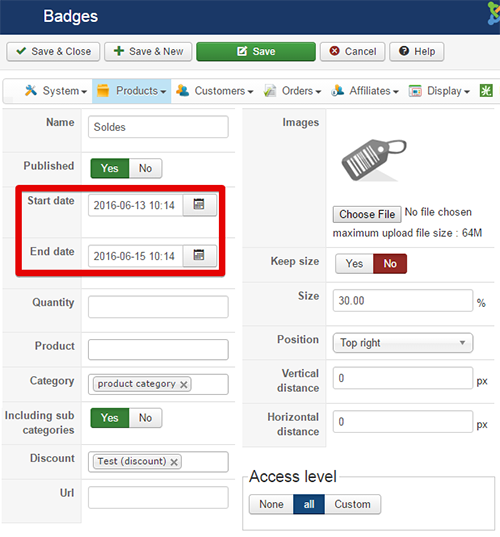
Hope this will help you.
Regards
You can have this kind of featuring with your badge with date condition.
For this follow these steps :
- Go to Components => HikaShop => Configuration
- In Products dropdown select Badges
- Create a new Badge method
- Have a look on this specific part for add date restrictions
Hope this will help you.
Regards
Last edit: 10 years 3 months ago by Philip.
Please Log in or Create an account to join the conversation.
10 years 3 months ago #243124
by french150
Replied by french150 on topic badge "new"
But in those fields i can set start and end date. This is different respect set a relative period, for example in the first 30 days from the item is published.
Please Log in or Create an account to join the conversation.
10 years 3 months ago #243159
by french150
Replied by french150 on topic badge "new"
Honestly i think that you should add the features to set several statuses of the product (new, hot, featured, updated....). Admin can set the parameters about any status (for example: the first 30 days the product is published active the NEW status or the product bought more than x times is HOT or the product edited is UPDATED for x days....). And also let admin associate for every status a badge icon so the badge and the status are managed automatically. Provide please the layout to show many and status and icons too for the same product.
What do you think?
Best regards
What do you think?
Best regards
Please Log in or Create an account to join the conversation.

10 years 3 months ago #243163
by korzo
Replied by korzo on topic badge "new"
This is the way we do it in our shop:
- create a category for new products that is not visible in your shop
- create a NEW badge for this category
- create a mass action to add new products to this category (see screenshot) that is triggered daily/hourly
- create opposite mass action to remove products older than 1 month from this category
- create a category for new products that is not visible in your shop
- create a NEW badge for this category
- create a mass action to add new products to this category (see screenshot) that is triggered daily/hourly
- create opposite mass action to remove products older than 1 month from this category
The following user(s) said Thank You: n00bster
Please Log in or Create an account to join the conversation.
10 years 3 months ago - 10 years 3 months ago #243169
by french150
Replied by french150 on topic badge "new"
Ok thanks for your reply. This feature works not so good. Two much steps to do a so simple thing. The way i suggested is easier. Like you say i have to create an hidden category, add the badge to that category, create 2 mass actions..... OMG!
I'll take a look.
Thanks
Best regards
I'll take a look.
Thanks
Best regards
Last edit: 10 years 3 months ago by french150.
Please Log in or Create an account to join the conversation.
10 years 3 months ago #243175
by french150
Replied by french150 on topic badge "new"
One question please: when you say "create a category is not visible in your shop" do you mean that i have to set the access level of the category to make it visible only to me?
Please Log in or Create an account to join the conversation.

10 years 3 months ago #243181
by Xavier
Replied by Xavier on topic badge "new"
Hi,
The best is to create a "public" category (so default status) but not listed on any listings in frontend.
The best is to create a "public" category (so default status) but not listed on any listings in frontend.
The following user(s) said Thank You: french150
Please Log in or Create an account to join the conversation.
10 years 3 months ago #243223
by french150
Replied by french150 on topic badge "new"
At this point it's better adding the actions "add badge to the product" and "remove badge from the product" in mass actions. In this way we can skip the step to create hidden category and this is more simply.
Please Log in or Create an account to join the conversation.
10 years 3 months ago #243277
by korzo
My structure of categories looks like:
product category
- Products (here are all products and categories visible in eshop)
- Sales
- New
- Promotions
Only category Products is visible in eshop. This way you can use Sales, New... categories for badges, options... and they are not visible on site.
Mass actions are very powerful and once you understand the concept, together with categories it opens endless possibilities.
Even it sounds complicated, it's matter of minutes to set it up.
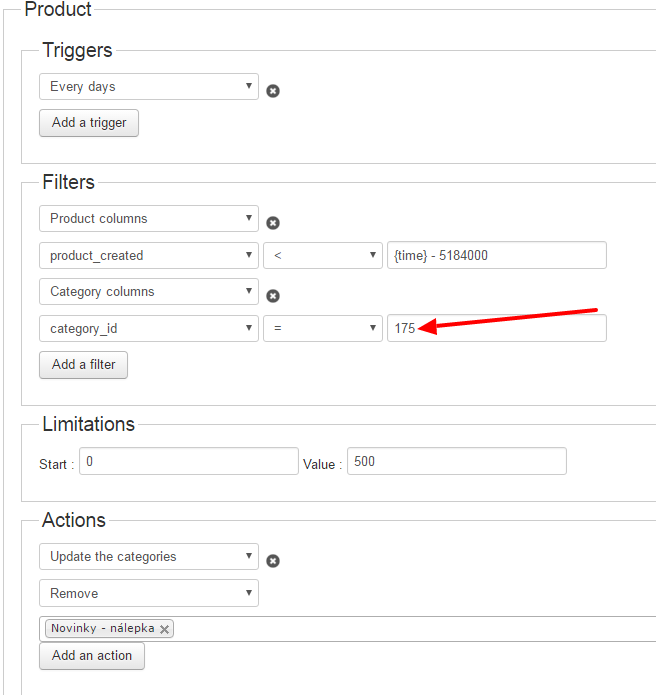
Once you created first mass action, copy it, replace > with < in filters and change action to remove category.
Here is screenshot of our mass action to remove categories. 175 is id of our category for "NEW" badge. I added it for performance reasons, because we have over 10000 products.
Replied by korzo on topic badge "new"
french150 wrote: One question please: when you say "create a category is not visible in your shop" do you mean that i have to set the access level of the category to make it visible only to me?
My structure of categories looks like:
product category
- Products (here are all products and categories visible in eshop)
- Sales
- New
- Promotions
Only category Products is visible in eshop. This way you can use Sales, New... categories for badges, options... and they are not visible on site.
Mass actions are very powerful and once you understand the concept, together with categories it opens endless possibilities.
Even it sounds complicated, it's matter of minutes to set it up.
Once you created first mass action, copy it, replace > with < in filters and change action to remove category.
Here is screenshot of our mass action to remove categories. 175 is id of our category for "NEW" badge. I added it for performance reasons, because we have over 10000 products.
Please Log in or Create an account to join the conversation.
10 years 3 months ago - 10 years 3 months ago #243303
by french150
Replied by french150 on topic badge "new"
So if i want assign several badges do i have to create hidden category for each one? And please could you explain me better the time you set? I suppose the number is 2 month in seconds, so?
Last edit: 10 years 3 months ago by french150.
Please Log in or Create an account to join the conversation.

10 years 3 months ago #243334
by nicolas
Replied by nicolas on topic badge "new"
Hi,
Yes, that's a good way of doing it. And yes, the time there is the number of seconds.
So the rule "product_created < {time}-5184000" means "only the product created more than 60 days ago".
Yes, that's a good way of doing it. And yes, the time there is the number of seconds.
So the rule "product_created < {time}-5184000" means "only the product created more than 60 days ago".
Please Log in or Create an account to join the conversation.
10 years 3 months ago #243699
by french150
Replied by french150 on topic badge "new"
Ok. Only i don't understand why do i have to create several hidden categories to assign badge. It would be more easy create the actions "assign badge to product" and "remove badge from product" and manage them with mass actions feature.
Please Log in or Create an account to join the conversation.
10 years 3 months ago - 10 years 3 months ago #244435
by french150
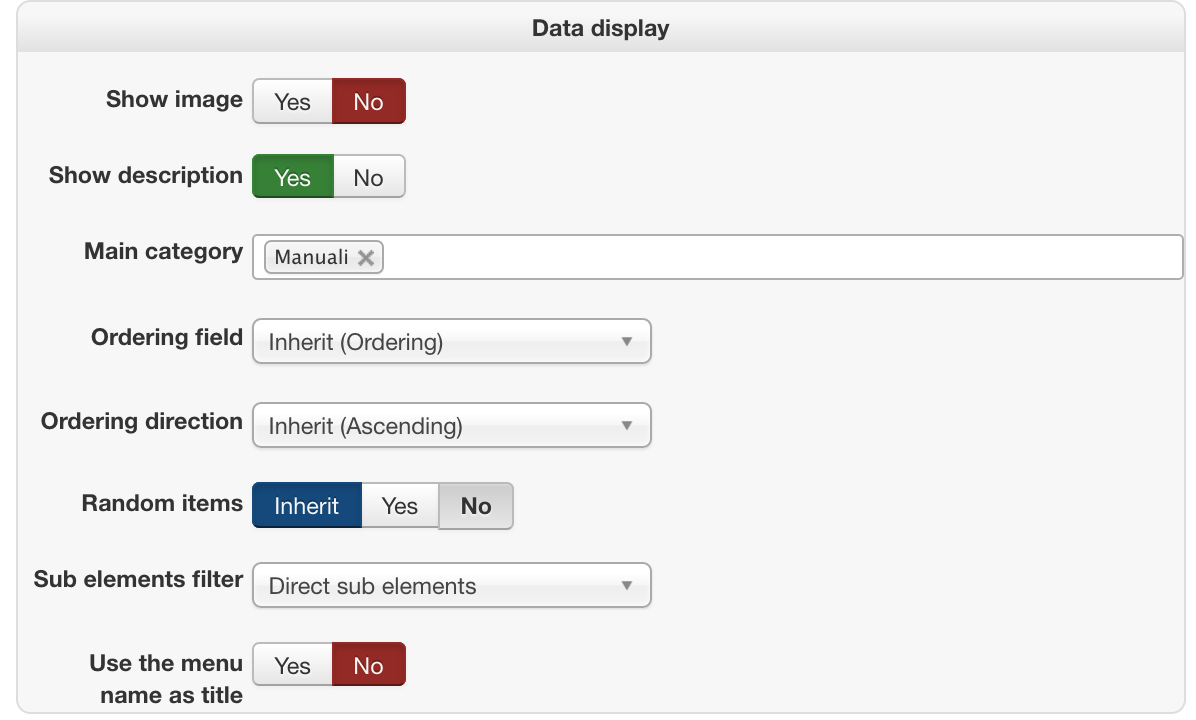
How i don't list on any listings on front end the category? It's enough don't add the category on display section of link menu?
Replied by french150 on topic badge "new"
Xavier wrote: Hi,
The best is to create a "public" category (so default status) but not listed on any listings in frontend.
How i don't list on any listings on front end the category? It's enough don't add the category on display section of link menu?
Last edit: 10 years 3 months ago by french150.
Please Log in or Create an account to join the conversation.
10 years 3 months ago #244465
by Xavier
Replied by Xavier on topic badge "new"
Hi,
It depends if the category in question is a subcategory of the "Manuali" category or not.
The best is to create two categories under the "Product category" (which is the root one), for example a categogy "common categories" and another one "hidden categories", and move all the current categories under "common categories".
This way the hidden categories will never be displayed on frontend and can be used to add the restrictions.
It depends if the category in question is a subcategory of the "Manuali" category or not.
The best is to create two categories under the "Product category" (which is the root one), for example a categogy "common categories" and another one "hidden categories", and move all the current categories under "common categories".
This way the hidden categories will never be displayed on frontend and can be used to add the restrictions.
Please Log in or Create an account to join the conversation.
10 years 3 months ago #244543
by french150
Replied by french150 on topic badge "new"
Ok i got it.
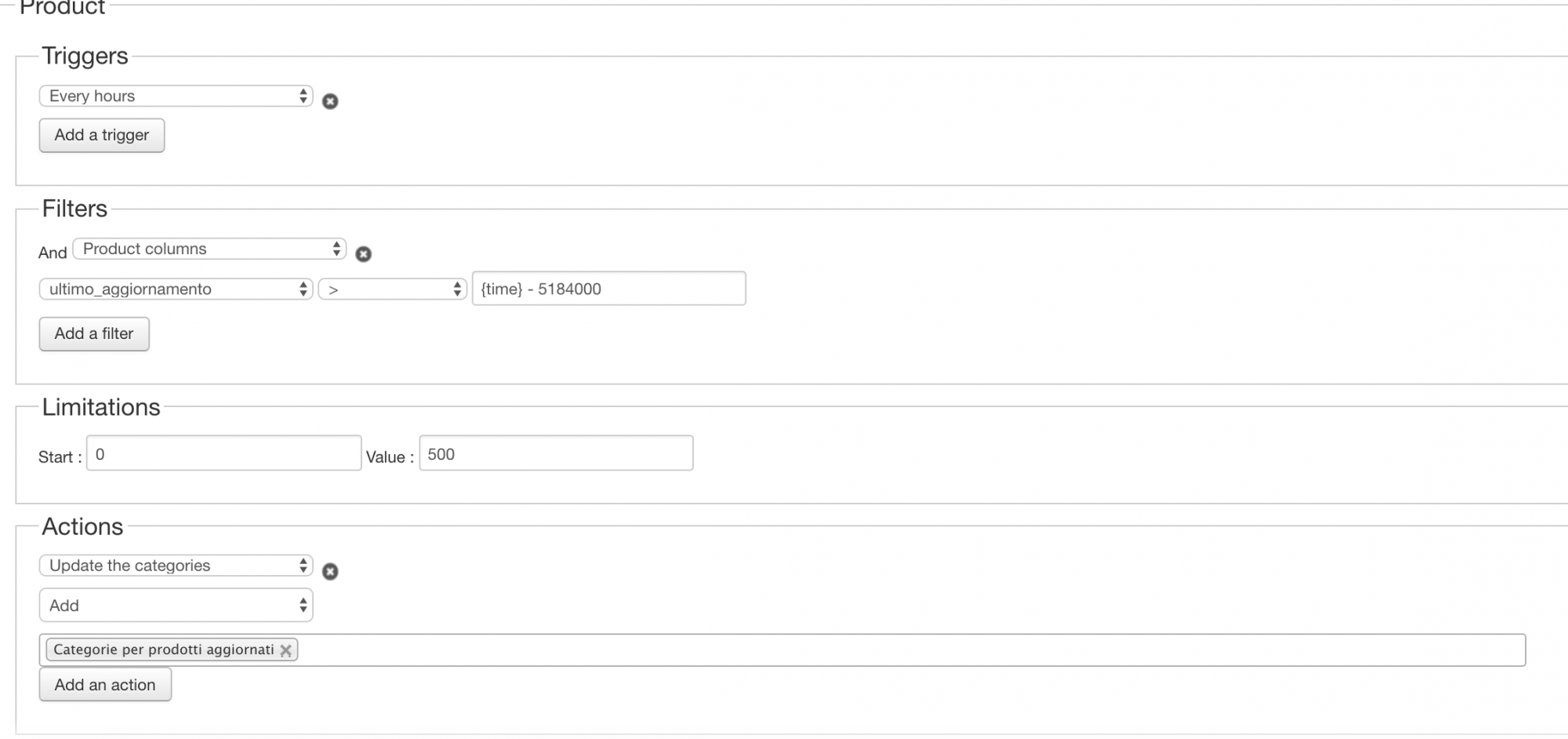
A suggestion please: i want create mass action to add or remove the updated badge to products. So i created the hidden category for updated products and i create 2 mass actions to add or remove them thanks to the advanced date picker custom field "ultimo aggiornamento" (means latest updated). This is field is not required so i set the date only when i update the product. How to update the product? In my case the product is an ebook so i delete and add the new file simply. My question is: the component knows that i updated the product like i told you above? If it is so, can i use the trigger "after the product is created" instead of the procedure i told you above?
I attach the actual procedure i use to add the "updated" badge to the product.
Best regards
A suggestion please: i want create mass action to add or remove the updated badge to products. So i created the hidden category for updated products and i create 2 mass actions to add or remove them thanks to the advanced date picker custom field "ultimo aggiornamento" (means latest updated). This is field is not required so i set the date only when i update the product. How to update the product? In my case the product is an ebook so i delete and add the new file simply. My question is: the component knows that i updated the product like i told you above? If it is so, can i use the trigger "after the product is created" instead of the procedure i told you above?
I attach the actual procedure i use to add the "updated" badge to the product.
Best regards
Please Log in or Create an account to join the conversation.
10 years 3 months ago #244565
by nicolas
Replied by nicolas on topic badge "new"
Hi,
The "after a product is created" trigger is only processed when a new product is created. So that's not what you want to use. You would have to use the "after a product is updated" trigger.
But that's not logical for what you want to do.
If you use that trigger, your mass action will only be called when you save the product.
If you set your date as today and check that the date is two month ago, it means that your mass action will only run when you click on the "save" button of the product and that the date in that field is 2 months in the past.
I don't think that it's what you want.
That's why the trigger "every hour" is adapted, so that it checks each hour if the date is 2 months in the past yet or not and only run when that's the case, when you doing something.
The "after a product is created" trigger is only processed when a new product is created. So that's not what you want to use. You would have to use the "after a product is updated" trigger.
But that's not logical for what you want to do.
If you use that trigger, your mass action will only be called when you save the product.
If you set your date as today and check that the date is two month ago, it means that your mass action will only run when you click on the "save" button of the product and that the date in that field is 2 months in the past.
I don't think that it's what you want.
That's why the trigger "every hour" is adapted, so that it checks each hour if the date is 2 months in the past yet or not and only run when that's the case, when you doing something.
The following user(s) said Thank You: french150
Please Log in or Create an account to join the conversation.
9 years 7 months ago #262282
by french150
Replied by french150 on topic badge "new"
Hi. I set the mass action to add/remove new badge to product and add/remove updated badge to products by following the above instructions. The problem is that the mass action don't work properly and i continue to see NEW (nuovo in italian) and UPDATED (aggiornato in italian) on my products.
If you want you can check on my backend to see what's wrong.
Thanks
Best regards
If you want you can check on my backend to see what's wrong.
Thanks
Best regards
Please Log in or Create an account to join the conversation.
9 years 7 months ago #262323
by nicolas
Replied by nicolas on topic badge "new"
Hi,
Can you provide a screenshot of the settings of your mass action ?
Can you also check that your cron task has been configured properly:
www.hikashop.com/support/documentation/5...cron-task.html#check
Can you provide a screenshot of the settings of your mass action ?
Can you also check that your cron task has been configured properly:
www.hikashop.com/support/documentation/5...cron-task.html#check
Please Log in or Create an account to join the conversation.
9 years 7 months ago #262402
by french150
Replied by french150 on topic badge "new"
Hi. I attach the screenshots of cron and mass action settings (remove update status)
Thanks.
Best regards
Thanks.
Best regards
Please Log in or Create an account to join the conversation.
Time to create page: 0.355 seconds