

- Posts: 490
- Thank you received: 2
how to disable add to cart button on certain field
10 years 2 months ago #246247
by ronron
how to disable add to cart button on certain field was created by ronron
-- HikaShop version -- : 2.6.3
-- Joomla version -- : 3.4.3
-- PHP version -- : 5.5
-- Error-message(debug-mod must be tuned on) -- : none
hi
how can i disable the add to cart field based on a custom field? and where exactly to place it? i have seeb add_to_cart_listing.php but not sure if this is the right one.
Example:
custom_field_add2cart = on =1
custom_field_add2cart = off =0
<?php
if($this->row->custom_field == 1)
{
$this->params->set('add_to_cart', 0);
}
else
{
$this->params->set('add_to_cart',$oldAddToCartParameter);
}
thanks
-- Joomla version -- : 3.4.3
-- PHP version -- : 5.5
-- Error-message(debug-mod must be tuned on) -- : none
hi
how can i disable the add to cart field based on a custom field? and where exactly to place it? i have seeb add_to_cart_listing.php but not sure if this is the right one.
Example:
custom_field_add2cart = on =1
custom_field_add2cart = off =0
<?php
if($this->row->custom_field == 1)
{
$this->params->set('add_to_cart', 0);
}
else
{
$this->params->set('add_to_cart',$oldAddToCartParameter);
}
thanks
Please Log in or Create an account to join the conversation.

10 years 2 months ago #246251
by nicolas
Replied by nicolas on topic how to disable add to cart button on certain field
Hi,
I would add it at the top of the "quantity" view file with such code:
I would add it at the top of the "quantity" view file with such code:
Code:
<?php
if($this->row->custom_field == 1)
{
$this->params->set('catalogue', 1);
}
else
{
$this->params->set('catalogue', 0);
}
?>
The following user(s) said Thank You: ronron
Please Log in or Create an account to join the conversation.
10 years 2 months ago #246407
by ronron
Replied by ronron on topic how to disable add to cart button on certain field
hi
its working.
but the other way around. if i set it to 1 = yes = $this->params->set('catalogue', 1); = add to cart is disabled
if i set it to 0 = no = $this->params->set('catalogue', 0); = add to cart is enabled
this is the behavior of the code above. is that correct?
thanks
its working.
but the other way around. if i set it to 1 = yes = $this->params->set('catalogue', 1); = add to cart is disabled
if i set it to 0 = no = $this->params->set('catalogue', 0); = add to cart is enabled
this is the behavior of the code above. is that correct?
thanks
Please Log in or Create an account to join the conversation.
10 years 2 months ago #246429
by nicolas
Replied by nicolas on topic how to disable add to cart button on certain field
Hi,
If you want it the other way around, just change the :
if($this->row->custom_field == 1)
to:
if($this->row->custom_field == 0)
If you want it the other way around, just change the :
if($this->row->custom_field == 1)
to:
if($this->row->custom_field == 0)
The following user(s) said Thank You: ronron
Please Log in or Create an account to join the conversation.
10 years 2 months ago - 10 years 2 months ago #246446
by ronron
Replied by ronron on topic how to disable add to cart button on certain field
the code removes both add to cart button and the add to wishlist.
how can we retain add to wish list.
i just want to remove add to cart.
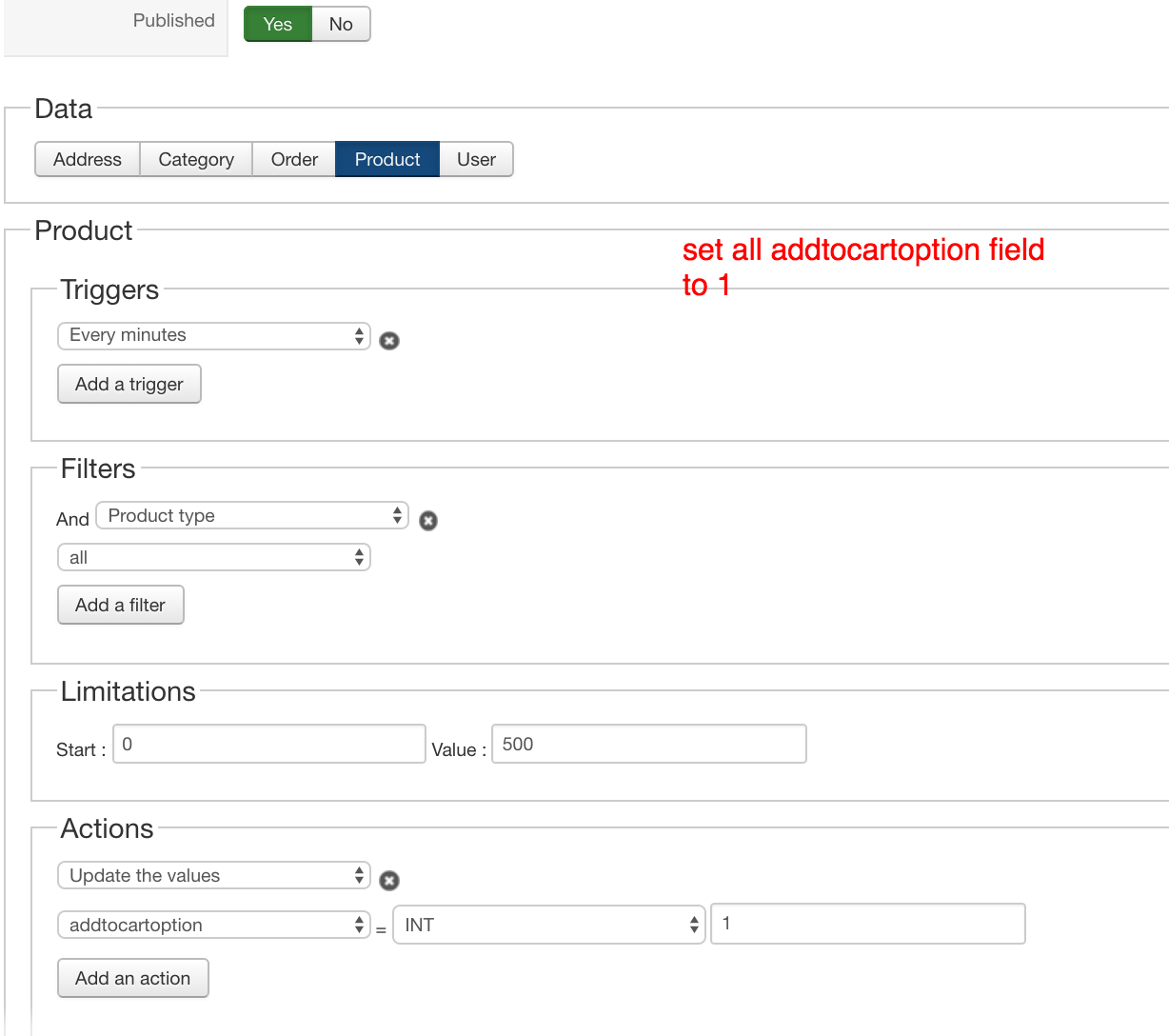
Also how do i update all the values of the other products that has been created before. can i use mass action?
this is my settings. I got it to work but not all products are affected. Do i need to increase the limatations field?
thanks
how can we retain add to wish list.
i just want to remove add to cart.
Also how do i update all the values of the other products that has been created before. can i use mass action?
this is my settings. I got it to work but not all products are affected. Do i need to increase the limatations field?
thanks
Last edit: 10 years 2 months ago by ronron.
Please Log in or Create an account to join the conversation.
10 years 2 months ago #246460
by nicolas
Replied by nicolas on topic how to disable add to cart button on certain field
Hi,
1. Then, instead of :
$this->params->set('catalogue', 1);
you can use :
$this->row->quantity = 0;
Actually, you could remove the customization and the custom field and just set the stock to 0 for the products for which you don't want the add to cart button but still want the wishlist.
2. You don't want a trigger or a filter in your mass action. Just have the action, and click on the "proceed" button. Also, note that it will only process the first 500 products you have. So you'll have to change the limitations area to process the other products after that.
1. Then, instead of :
$this->params->set('catalogue', 1);
you can use :
$this->row->quantity = 0;
Actually, you could remove the customization and the custom field and just set the stock to 0 for the products for which you don't want the add to cart button but still want the wishlist.
2. You don't want a trigger or a filter in your mass action. Just have the action, and click on the "proceed" button. Also, note that it will only process the first 500 products you have. So you'll have to change the limitations area to process the other products after that.
The following user(s) said Thank You: ronron
Please Log in or Create an account to join the conversation.
10 years 2 months ago #246837
by ronron
Replied by ronron on topic how to disable add to cart button on certain field
hi
1. it doesn't work if i try to replace this code
$this->params->set('catalogue', 1);
with this one
$this->row->quantity = 0;
i cant set the stock to 0 because my site is a multivendor site. Vendors have control over the stock of their products.
thanks
1. it doesn't work if i try to replace this code
$this->params->set('catalogue', 1);
with this one
$this->row->quantity = 0;
i cant set the stock to 0 because my site is a multivendor site. Vendors have control over the stock of their products.
thanks
Please Log in or Create an account to join the conversation.

10 years 2 months ago #246845
by Jerome
Jerome - Obsidev.com
HikaMarket & HikaSerial developer / HikaShop core dev team.
Replied by Jerome on topic how to disable add to cart button on certain field
Hi,
Changing dynamically the variable won't update the stock in the database.
It will not affect really the product and won't generate issue with HikaMarket.
Regards,
Changing dynamically the variable won't update the stock in the database.
It will not affect really the product and won't generate issue with HikaMarket.
Regards,
Jerome - Obsidev.com
HikaMarket & HikaSerial developer / HikaShop core dev team.
Please Log in or Create an account to join the conversation.
10 years 2 months ago - 10 years 2 months ago #246987
by ronron
Replied by ronron on topic how to disable add to cart button on certain field
hi
1. sorry i dont understand the last post.
i just want to display the add to wishlist button even do im using the custom code.
it doesn't work if i try to replace this code
$this->params->set('catalogue', 1);
with this one
$this->row->quantity = 0;
2. i tried to set the quantity in the back end to 0 and what you are saying worked. the add to cart is gone and the wishlist remained. unfortunately if the vendor changes the quantity the add to cart button appears again. I cant let the vendor control the add to cart button
thank you very much
1. sorry i dont understand the last post.
i just want to display the add to wishlist button even do im using the custom code.
it doesn't work if i try to replace this code
$this->params->set('catalogue', 1);
with this one
$this->row->quantity = 0;
2. i tried to set the quantity in the back end to 0 and what you are saying worked. the add to cart is gone and the wishlist remained. unfortunately if the vendor changes the quantity the add to cart button appears again. I cant let the vendor control the add to cart button
thank you very much
Last edit: 10 years 2 months ago by ronron.
Please Log in or Create an account to join the conversation.
10 years 2 months ago #246989
by nicolas
Replied by nicolas on topic how to disable add to cart button on certain field
Hi,
Jerome was just saying that using the code which set the quantity to 0 is a great idea in that case.
I don't see why it wouldn't work.
Could you provide a copy of the whole code in the view file ?
Jerome was just saying that using the code which set the quantity to 0 is a great idea in that case.
I don't see why it wouldn't work.
Could you provide a copy of the whole code in the view file ?
The following user(s) said Thank You: ronron
Please Log in or Create an account to join the conversation.
10 years 2 months ago #247087
by ronron
Replied by ronron on topic how to disable add to cart button on certain field
hi again
this is working. but the add to wishlist button is gone. how do i make this work?
i tried this. it doesnt work. both wishlist and cart appears
thanks
Code:
if($this->row->addtocartoption == 1)
{
$this->params->set('catalogue', 1);
}
else
{
$this->params->set('catalogue', 0);
}
this is working. but the add to wishlist button is gone. how do i make this work?
i tried this. it doesnt work. both wishlist and cart appears
Code:
if($this->row->addtocartoption == 1)
{
$this->row->quantity = 0;
}
else
{
$this->params->set('catalogue', 0);
}
thanks
Please Log in or Create an account to join the conversation.
10 years 2 months ago #247133
by nicolas
Replied by nicolas on topic how to disable add to cart button on certain field
Hi,
Could you provide a copy of the whole code in the view file ?
Could you provide a copy of the whole code in the view file ?
Please Log in or Create an account to join the conversation.
10 years 2 months ago #247155
by ronron
Replied by ronron on topic how to disable add to cart button on certain field
hi
here it os
thanks
here it os
Code:
<?php
/**
* @package HikaShop for Joomla!
* @version 2.6.3
* @author hikashop.com
* @copyright (C) 2010-2016 HIKARI SOFTWARE. All rights reserved.
* @license GNU/GPLv3 http://www.gnu.org/licenses/gpl-3.0.html
*/
defined('_JEXEC') or die('Restricted access');
?>
<?php
global $Itemid;
$url_itemid = '';
if(!empty($this->itemid))
$url_itemid = $this->itemid;
elseif(!empty($Itemid))
$url_itemid = '&Itemid='.$Itemid;
if($this->row->addtocartoption == 1)
{
$this->params->set('catalogue', 1);
}
else
{
$this->params->set('catalogue', 0);
}
if($this->config->get('show_quantity_field') == -2){
if(@$this->row->product_display_quantity_field == 0)
$this->row->product_display_quantity_field = 1;
$this->params->set('show_quantity_field', @$this->row->product_display_quantity_field);
}
$config =& hikashop_config();
$wishlistEnabled = $config->get('enable_wishlist', 1);
$hideForGuest = 1;
if(($config->get('hide_wishlist_guest', 1) && hikashop_loadUser() != null) || !$config->get('hide_wishlist_guest', 1))
$hideForGuest = 0;
if(!isset($this->cart))
$this->cart = hikashop_get('helper.cart');
$url = '';
$module_id = $this->params->get('from_module', 0);
if(empty($this->ajax))
$this->ajax = 'return hikashopModifyQuantity(\''.$this->row->product_id.'\',field,1,0,\'cart\','.$module_id.')';
if(@$this->row->product_sale_start || empty($this->element->main))
$start_date = @$this->row->product_sale_start;
else
$start_date = $this->element->main->product_sale_start;
if(@$this->row->product_sale_end || empty($this->element->main))
$end_date = @$this->row->product_sale_end;
else
$end_date = $this->element->main->product_sale_end;
$formName = ',0';
if(!$this->config->get('ajax_add_to_cart', 0) || ($this->config->get('show_quantity_field') >= 2 && !@$this->element->product_id)) {
if(empty($this->formName)) {
if(@$this->row->product_id)
$formName = ',\'hikashop_product_form_'.$this->row->product_id.'_'.$this->params->get('main_div_name').'\'';
else
$formName = ',\'hikashop_product_form_'.$this->params->get('main_div_name').'\'';
} else {
$formName = $this->formName;
}
}
$showFree = ($this->config->get('display_add_to_wishlist_for_free_products', 1) || (!$this->config->get('display_add_to_wishlist_for_free_products', 1) && !empty($this->row->prices) && $this->row->prices[0]->price_value != '0'));
if($end_date && $end_date < time()) {
?>
<span class="hikashop_product_sale_end">
<?php echo JText::_('ITEM_NOT_SOLD_ANYMORE'); ?>
</span>
<?php
} elseif($start_date && $start_date > time()) {
?>
<span class="hikashop_product_sale_start"><?php
echo JText::sprintf('ITEM_SOLD_ON_DATE', hikashop_getDate($start_date, $this->params->get('date_format','%d %B %Y')));
?></span>
<?php
} elseif(!$this->params->get('catalogue') && ($this->config->get('display_add_to_cart_for_free_products') || !empty($this->row->prices))) {
if(@$this->row->product_min_per_order || empty($this->element->main))
$min = @$this->row->product_min_per_order;
else
$min = @$this->element->main->product_min_per_order;
if(@$this->row->product_max_per_order || empty($this->element->main))
$max = @$this->row->product_max_per_order;
else
$max = @$this->element->main->product_max_per_order;
if($min <= 0)
$min = 1;
if($formName == ',0')
$formName = ',hikashop_product_form';
$cleanFormName = str_replace(array('\'',','),'',$formName);
$wishlistAjax = 'if(hikashopCheckChangeForm(\'item\''.$formName.')){ var typeField = document.querySelector(\'form[name='.$cleanFormName.'] input[name=cart_type]\'); if(typeField !== null){typeField.value = \'wishlist\';} return hikashopModifyQuantity(\'' . (int)@$this->row->product_id . '\',field,1' . $formName . ',\'wishlist\','.$module_id.'); } else { return false; }';
if($this->row->product_quantity == -1 && !empty($this->element->main) && $this->element->main->product_quantity != -1)
$this->row->product_quantity = $this->element->main->product_quantity;
$btnType = 'add';
if($this->row->product_quantity == -1) {
?>
<div class="hikashop_product_stock"><?php
if(!empty($this->row->has_options)) {
if($this->params->get('add_to_cart',1))
echo $this->cart->displayButton(JText::_('CHOOSE_OPTIONS'), 'choose_options', $this->params, hikashop_contentLink('product&task=show&product_id='.$this->row->product_id.'&name='.$this->row->alias.$url_itemid.$this->category_pathway,$this->row),'window.location = \''.str_replace("'","\'",hikashop_contentLink('product&task=show&product_id='.$this->row->product_id.'&name='.$this->row->alias.$url_itemid.$this->category_pathway,$this->row)).'\';return false;', '');
} else {
if($this->params->get('add_to_cart', 1)) {
echo $this->cart->displayButton(JText::_('ADD_TO_CART'), 'add', $this->params, $url, $this->ajax, '', $max, $min);
$btnType = 'wish';
}
if(hikashop_level(1) && $this->params->get('add_to_wishlist') && $wishlistEnabled && !$hideForGuest && $showFree) {
echo '<div id="hikashop_add_wishlist">' .
$this->cart->displayButton(JText::_('ADD_TO_WISHLIST'), $btnType, $this->params, $url, $wishlistAjax, '', $max, $min, '', false) .
'</div>';
}
}
} elseif($this->row->product_quantity > 0) {
?>
<div class="hikashop_product_stock">
<?php
if($this->row->product_quantity == 1 && JText::_('X_ITEM_IN_STOCK') != 'X_ITEM_IN_STOCK')
$text = JText::sprintf('X_ITEM_IN_STOCK', $this->row->product_quantity);
else
$text = JText::sprintf('X_ITEMS_IN_STOCK', $this->row->product_quantity);
echo '<span class="hikashop_product_stock_count">'.$text.'<br/></span>'
. '<span style="display: none" itemprop="availability" itemscope itemtype="http://schema.org/InStock">in stock</span>';
if($config->get('button_style', 'normal') == 'css')
echo '<br />';
if($max <= 0 || $max > $this->row->product_quantity)
$max = $this->row->product_quantity;
if(!empty($this->row->has_options)) {
if($this->params->get('add_to_cart', 1))
echo $this->cart->displayButton(JText::_('CHOOSE_OPTIONS'), 'choose_options', $this->params, hikashop_contentLink('product&task=show&product_id='.$this->row->product_id.'&name='.$this->row->alias.$url_itemid.$this->category_pathway,$this->row),'window.location = \''.str_replace("'","\'",hikashop_contentLink('product&task=show&product_id='.$this->row->product_id.'&name='.$this->row->alias.$url_itemid.$this->category_pathway,$this->row)).'\';return false;','');
} else {
if($this->params->get('add_to_cart', 1)) {
echo $this->cart->displayButton(JText::_('ADD_TO_CART'), 'add', $this->params, $url, $this->ajax, '', $max, $min);
$btnType = 'wish';
}
if(hikashop_level(1) && $this->params->get('add_to_wishlist') && $wishlistEnabled && !$hideForGuest && $showFree){
echo '<div id="hikashop_add_wishlist">' .
$this->cart->displayButton(JText::_('ADD_TO_WISHLIST'), $btnType, $this->params, $url, $wishlistAjax, '', $max, $min, '', false) .
'</div>';
}
}
} else {
?>
<div class="hikashop_product_no_stock">
<?php
echo '<span style="display: none" itemprop="availability" itemscope itemtype="http://schema.org/InStock">Out of stock</span>';
echo JText::_('NO_STOCK').'<br/>';
$waitlist = $this->config->get('product_waitlist', 0);
if(hikashop_level(1) && ($waitlist == 2 || ($waitlist == 1 && (!empty($this->row->main->product_waitlist) || !empty($this->row->product_waitlist))))) {
?>
</div>
<div id="hikashop_product_waitlist_main" class="hikashop_product_waitlist_main">
<?php
$empty = '';
jimport('joomla.html.parameter');
$params = new HikaParameter($empty);
echo $this->cart->displayButton(JText::_('ADD_ME_WAITLIST'), 'add_waitlist', $params, hikashop_completeLink('product&task=waitlist&cid='.$this->row->product_id.$url_itemid), 'window.location=\''.str_replace("'","\'",hikashop_completeLink('product&task=waitlist&cid='.$this->row->product_id.$url_itemid)).'\';return false;');
}
if(hikashop_level(1) && $this->params->get('add_to_wishlist') && $wishlistEnabled && !$hideForGuest && $showFree) {
if(!empty($this->row->has_options)) {
if($this->params->get('add_to_cart', 1))
echo $this->cart->displayButton(JText::_('CHOOSE_OPTIONS'),'choose_options',$this->params,hikashop_contentLink('product&task=show&product_id='.$this->row->product_id.'&name='.$this->row->alias.$url_itemid.$this->category_pathway,$this->row),'window.location = \''.str_replace("'","\'",hikashop_contentLink('product&task=show&product_id='.$this->row->product_id.'&name='.$this->row->alias.$url_itemid.$this->category_pathway,$this->row)).'\';return false;','');
}else{
echo '<div id="hikashop_add_wishlist">' .
$this->cart->displayButton(JText::_('ADD_TO_WISHLIST'), 'add', $this->params, $url, $wishlistAjax, '', @$this->row->product_max_per_order, 1, '', false) .
'</div>';
}
}
}
?>
</div>
<?php
} elseif(hikashop_level(1) && $wishlistEnabled && $this->params->get('add_to_wishlist', 1) && $showFree && !$hideForGuest && !$this->config->get('display_add_to_cart_for_free_products')) {
if(!empty($this->row->has_options)) {
if($this->params->get('add_to_cart', 1))
echo $this->cart->displayButton(JText::_('CHOOSE_OPTIONS'), 'choose_options', $this->params, hikashop_contentLink('product&task=show&product_id='.$this->row->product_id.'&name='.$this->row->alias.$url_itemid.$this->category_pathway,$this->row),'window.location = \''.str_replace("'","\'",hikashop_contentLink('product&task=show&product_id='.$this->row->product_id.'&name='.$this->row->alias.$url_itemid.$this->category_pathway,$this->row)).'\';return false;', '');
} else {
$wishlistAjax = 'if(hikashopCheckChangeForm(\'item\''.$formName.')){ return hikashopModifyQuantity(\'' . (int)@$this->row->product_id . '\',field,1' . $formName . ',\'wishlist\','.$module_id.'); } else { return false; }';
echo '<div id="hikashop_add_wishlist">' .
$this->cart->displayButton(JText::_('ADD_TO_WISHLIST'), 'add', $this->params, $url, $wishlistAjax, '', @$this->row->product_max_per_order, 1, '', false) .
'</div>';
}
}
thanks
Please Log in or Create an account to join the conversation.
10 years 2 months ago #247169
by nicolas
Replied by nicolas on topic how to disable add to cart button on certain field
Hi,
Instead of:
can you use instead
and provide a link to the product page where that doesn't work with a screenshot of the settings of that product ?
Instead of:
Code:
if($this->row->addtocartoption == 1)
{
$this->params->set('catalogue', 1);
}
else
{
$this->params->set('catalogue', 0);
}
Code:
if($this->row->addtocartoption == 1)
{
$this->row->quantity = 0;
}
The following user(s) said Thank You: ronron
Please Log in or Create an account to join the conversation.
10 years 1 month ago #248304
by ronron
Replied by ronron on topic how to disable add to cart button on certain field
tried you suggestion but it doesnt work. i remove the changes and used the initial code
this is the link to the page
Part of the message is hidden for the guests. Please log in or register to see it.
this is the settings
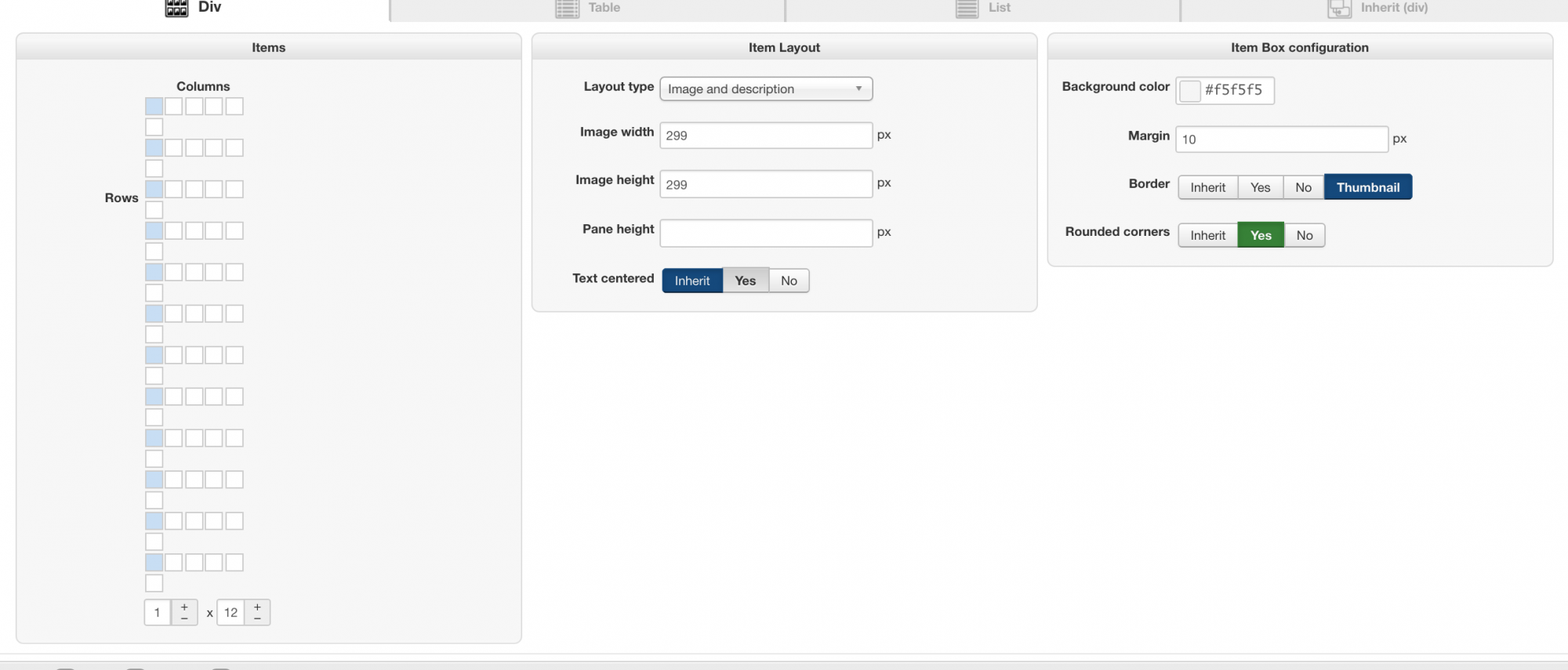
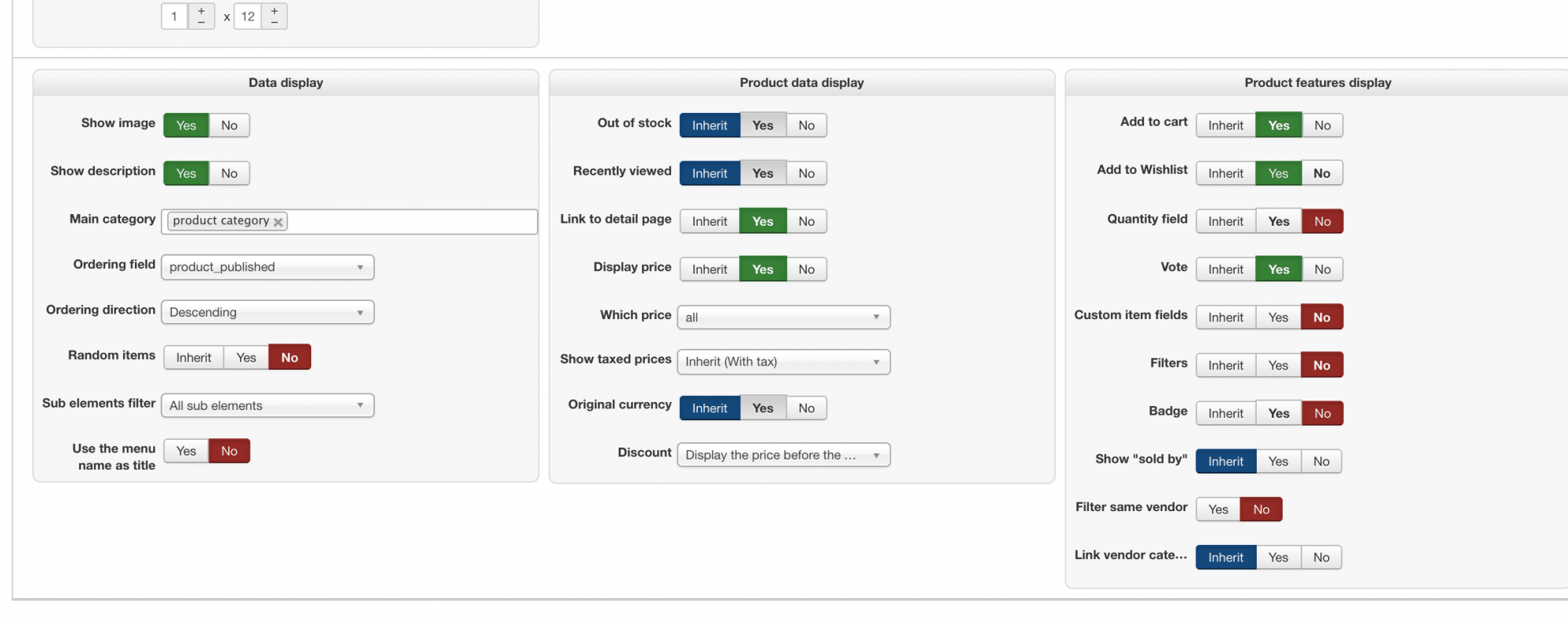
thanks again
this is the link to the page
Part of the message is hidden for the guests. Please log in or register to see it.
this is the settings
thanks again
Please Log in or Create an account to join the conversation.
10 years 1 month ago #248305
by Jerome
Jerome - Obsidev.com
HikaMarket & HikaSerial developer / HikaShop core dev team.
Replied by Jerome on topic how to disable add to cart button on certain field
Hi,
Regards,
You gave information about product listing ; not the product page.and provide a link to the product page where that doesn't work with a screenshot of the settings of that product ?
Regards,
Jerome - Obsidev.com
HikaMarket & HikaSerial developer / HikaShop core dev team.
Please Log in or Create an account to join the conversation.
10 years 1 month ago #248401
by ronron
Replied by ronron on topic how to disable add to cart button on certain field
thanks jerome
is this it?
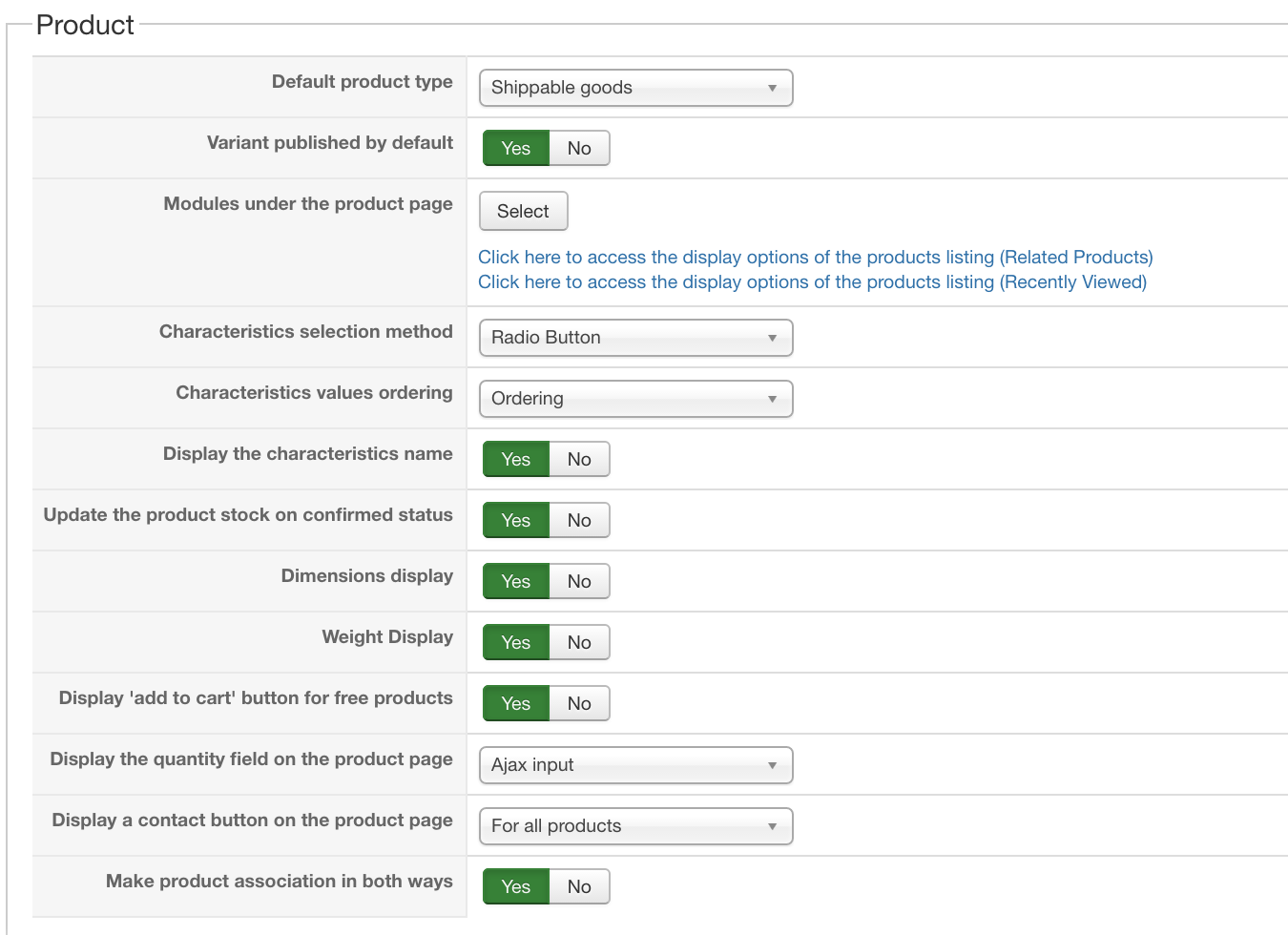
is this it?
Please Log in or Create an account to join the conversation.

10 years 1 month ago - 10 years 1 month ago #248433
by Philip
Replied by Philip on topic how to disable add to cart button on certain field
Hello,
I will guide you, first, Nicolas ask you the product page with the issue, and not the listing page (we understand that maybe the product is among the listing, but the complete product page url will able us to be sure of what we do)
Ex : YOURWEBSITE/store/product/product-name
And for the screenshot of that product, we need this :
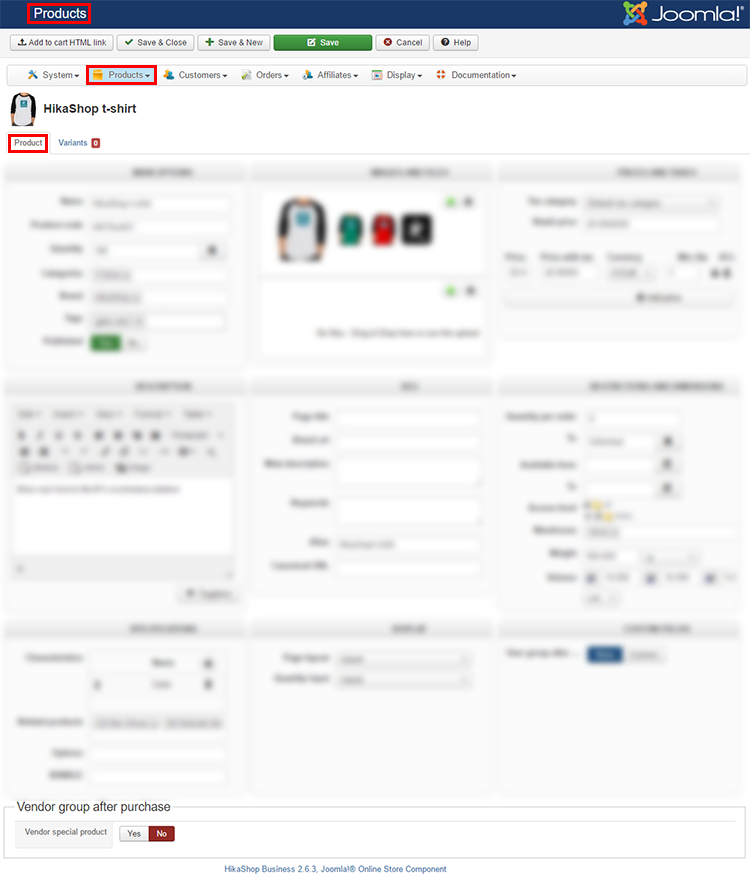
Reach it, Components => HikaShop => Products, and click on the product name (with issue) to see his configuration screen.
Awaiting news from you
Regards
I will guide you, first, Nicolas ask you the product page with the issue, and not the listing page (we understand that maybe the product is among the listing, but the complete product page url will able us to be sure of what we do)
Ex : YOURWEBSITE/store/product/product-name
And for the screenshot of that product, we need this :
Reach it, Components => HikaShop => Products, and click on the product name (with issue) to see his configuration screen.
Awaiting news from you
Regards
Last edit: 10 years 1 month ago by Philip.
Please Log in or Create an account to join the conversation.
10 years 1 month ago #248604
by ronron
Replied by ronron on topic how to disable add to cart button on certain field
oh i see, here it is.
also all products are behaving the same. Both add to cart and wishlist does not appear. Not just one when i use this code
sample product
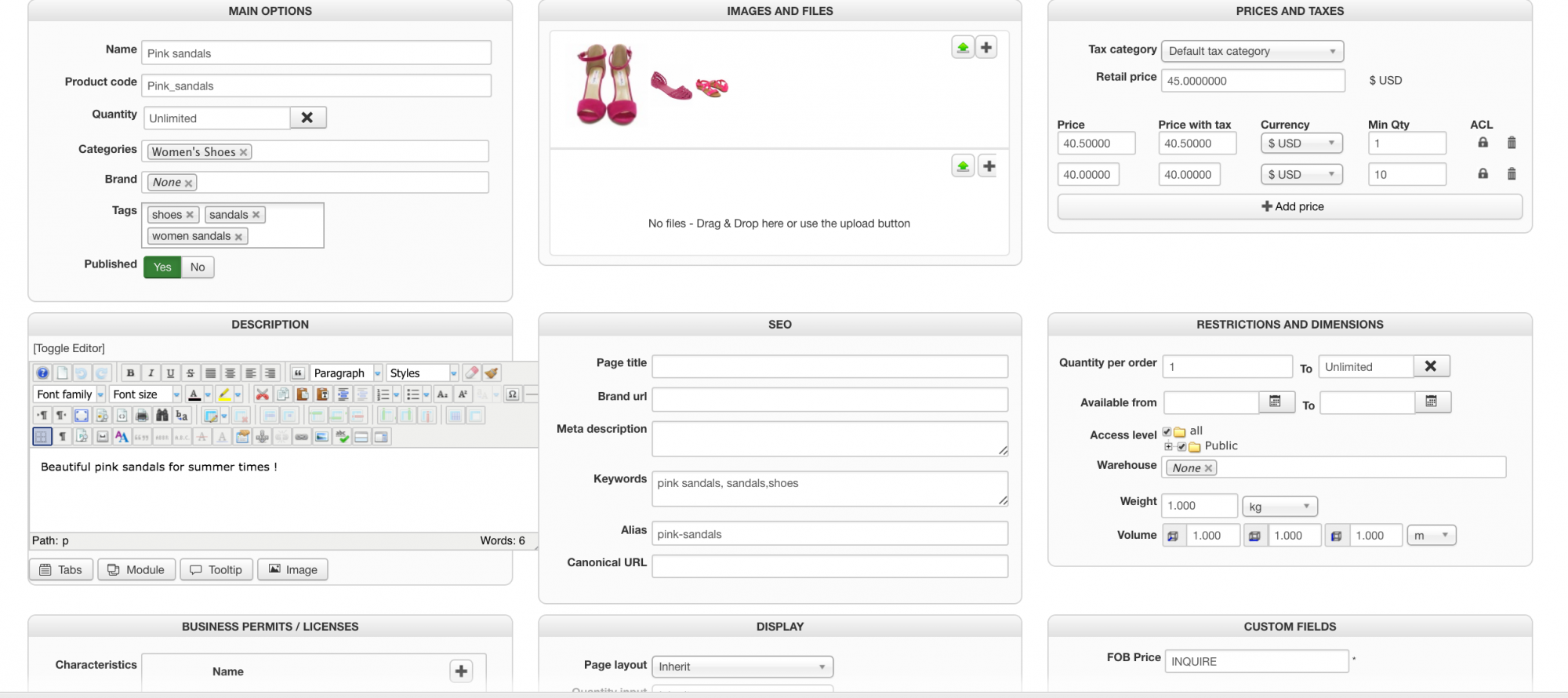
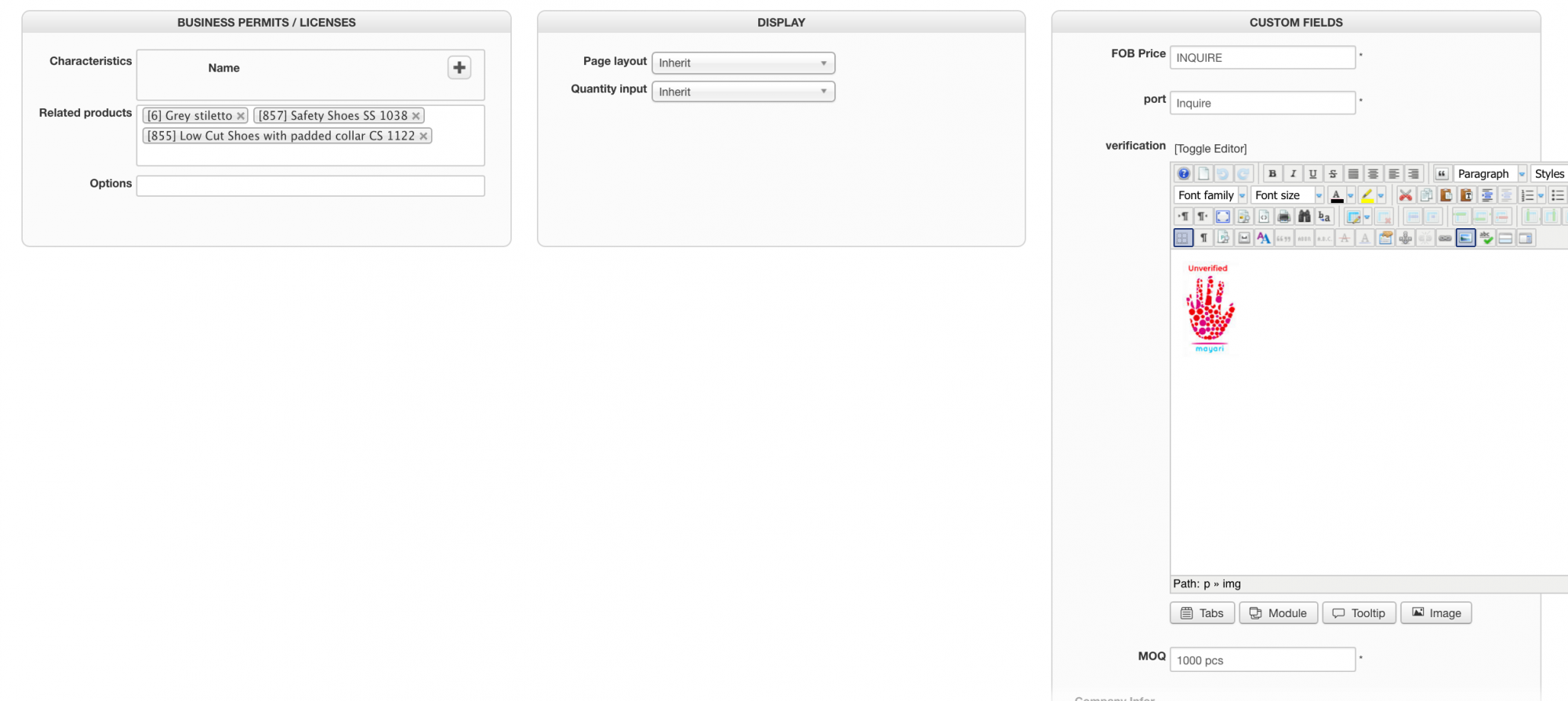
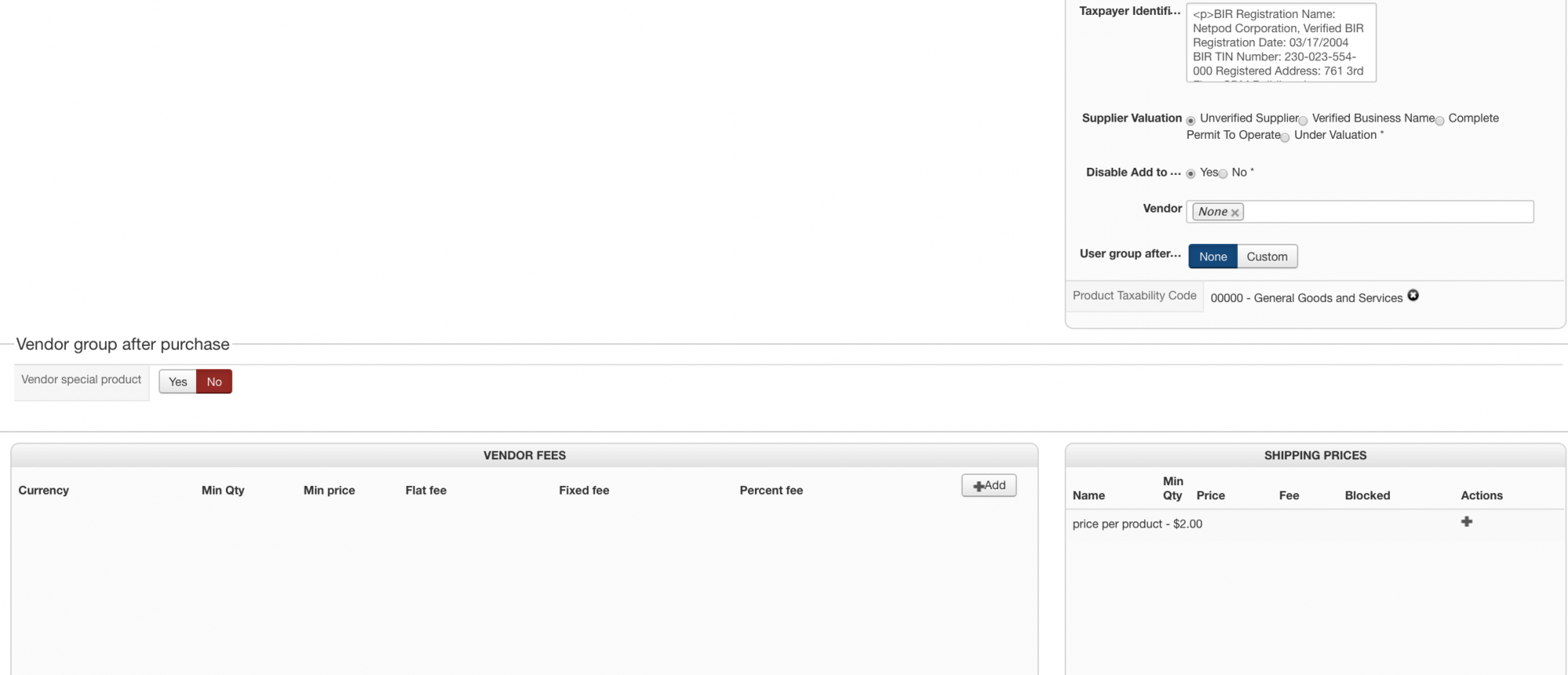
thanks
also all products are behaving the same. Both add to cart and wishlist does not appear. Not just one when i use this code
Code:
if($this->row->addtocartoption == 1)
{
$this->params->set('catalogue', 1);
}
else
{
$this->params->set('catalogue', 0);
}
sample product
thanks
Please Log in or Create an account to join the conversation.
10 years 1 month ago #248677
by nicolas
Replied by nicolas on topic how to disable add to cart button on certain field
Hi,
So I suppose that the problem is that you're not using 1 and 0 as the values of your custom field. Which explains why it never goes in the else of the condition.
Can you provide a screenshot of the settings of your custom field ?
So I suppose that the problem is that you're not using 1 and 0 as the values of your custom field. Which explains why it never goes in the else of the condition.
Can you provide a screenshot of the settings of your custom field ?
Please Log in or Create an account to join the conversation.
Time to create page: 0.341 seconds