

- Posts: 490
- Thank you received: 2
custom field State on product table is empty
9 years 10 months ago - 9 years 10 months ago #256783
by ronron
custom field State on product table is empty was created by ronron
-- HikaShop version -- : 2.6.3
-- Joomla version -- : 3.4.5
-- PHP version -- : 5.5
-- Error-message(debug-mod must be tuned on) -- : none
hi
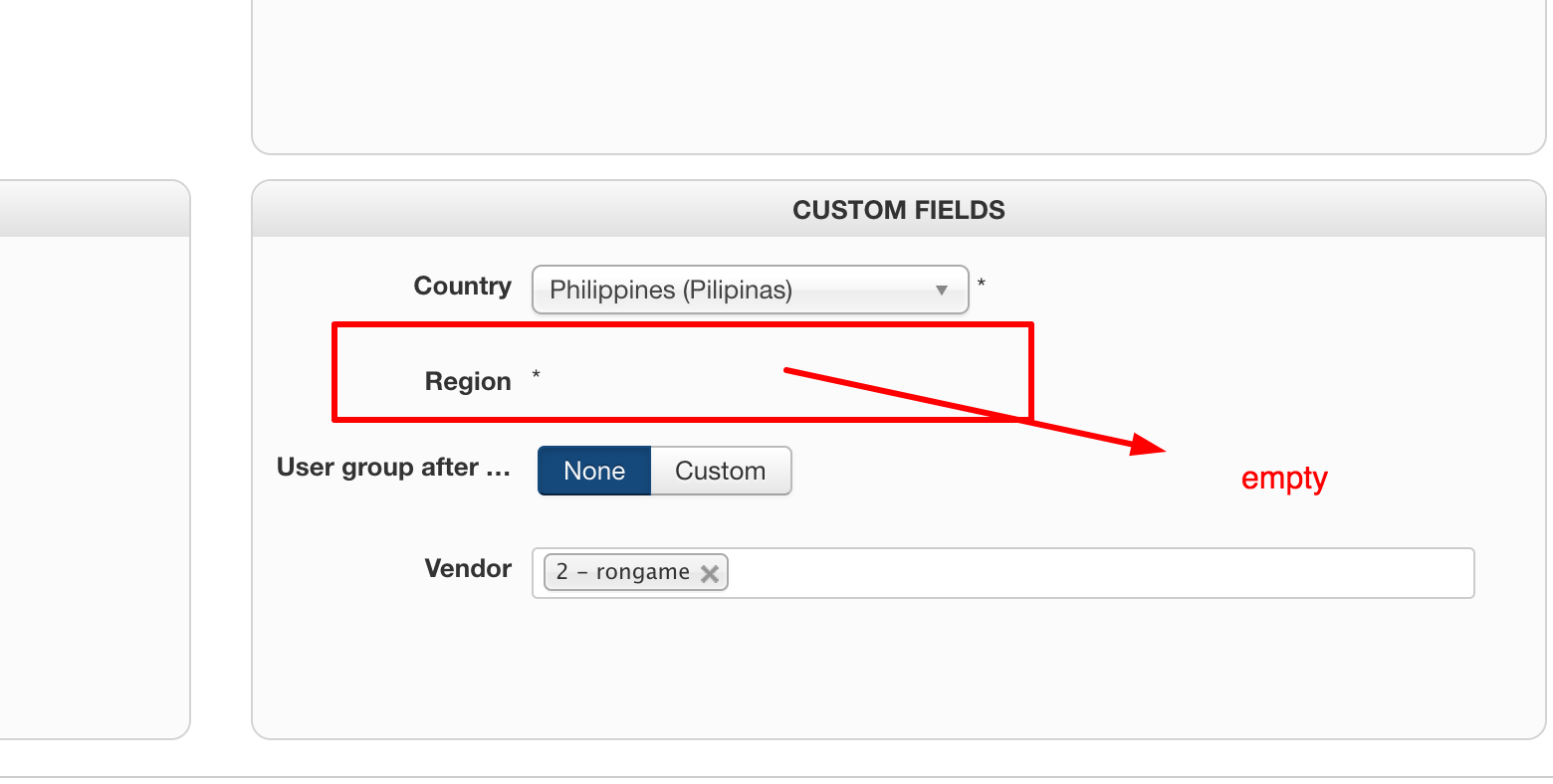
i created a custom field for the products to find out where the products are located
i created custom fields country and region to appear in the the add product form.
the country is ok but the state or in my case region is blank
what to do?
-- Joomla version -- : 3.4.5
-- PHP version -- : 5.5
-- Error-message(debug-mod must be tuned on) -- : none
hi
i created a custom field for the products to find out where the products are located
i created custom fields country and region to appear in the the add product form.
the country is ok but the state or in my case region is blank
what to do?
Last edit: 9 years 10 months ago by ronron.
Please Log in or Create an account to join the conversation.

9 years 10 months ago #256792
by Jerome
Jerome - Obsidev.com
HikaMarket & HikaSerial developer / HikaShop core dev team.
Replied by Jerome on topic custom field State on product table is empty
Hi,
Please provide details about your two zone custom fields.
Regards,
Please provide details about your two zone custom fields.
Regards,
Jerome - Obsidev.com
HikaMarket & HikaSerial developer / HikaShop core dev team.
Please Log in or Create an account to join the conversation.
9 years 10 months ago #256899
by ronron
Replied by ronron on topic custom field State on product table is empty
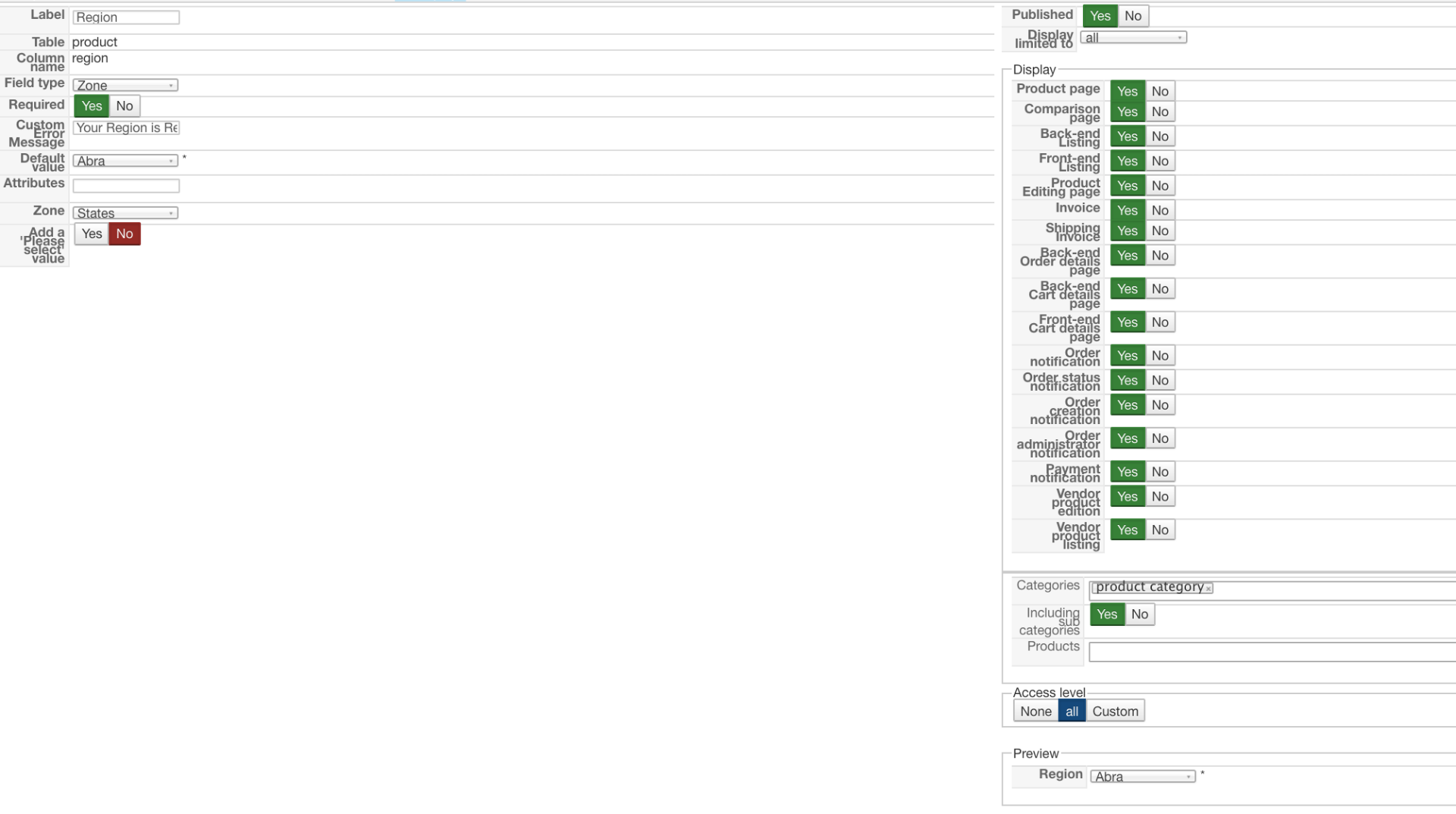
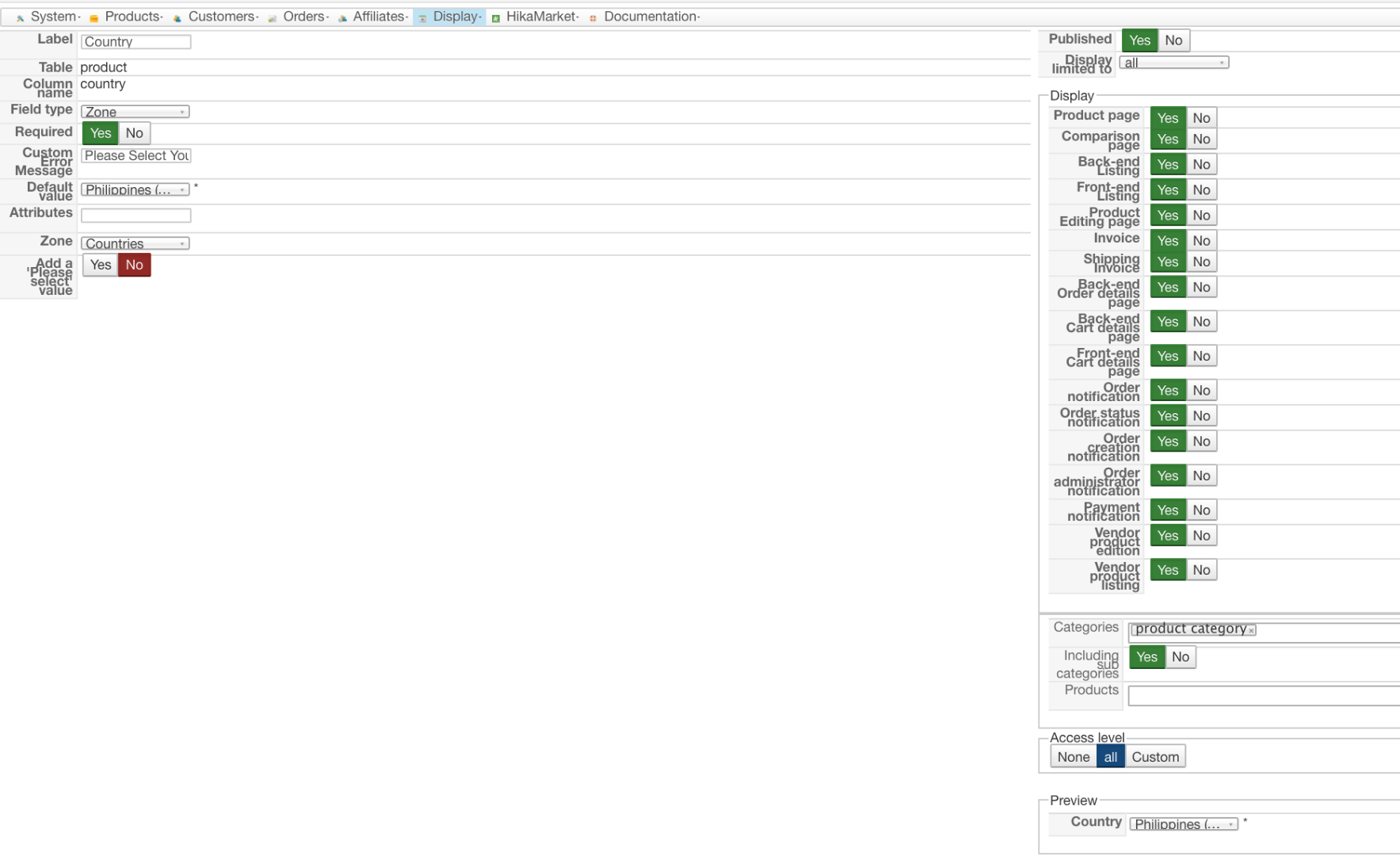
here it is
custom field region / state
custom field country
thanks
custom field region / state
custom field country
thanks
Please Log in or Create an account to join the conversation.

9 years 10 months ago - 9 years 10 months ago #256905
by Philip
Replied by Philip on topic custom field State on product table is empty
Hello,
Ok, you have to create a link between your 2 products custom fields, this will be possible in column name, here my configuration that works :
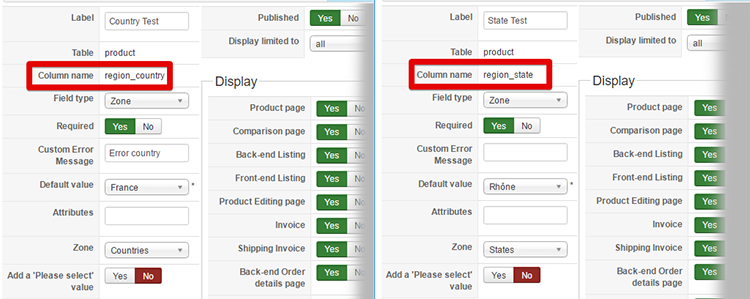
You can see that my 2 columns name use the same prefix ("region_") , in order to link them and able the first choose (country) to allow states displaying.
Hope this will help you.
Regards
Ok, you have to create a link between your 2 products custom fields, this will be possible in column name, here my configuration that works :
You can see that my 2 columns name use the same prefix ("region_") , in order to link them and able the first choose (country) to allow states displaying.
Hope this will help you.
Regards
Last edit: 9 years 10 months ago by Philip.
Please Log in or Create an account to join the conversation.
9 years 10 months ago #256979
by ronron
Replied by ronron on topic custom field State on product table is empty
it didnt work for me
i got a 404 error for the state.
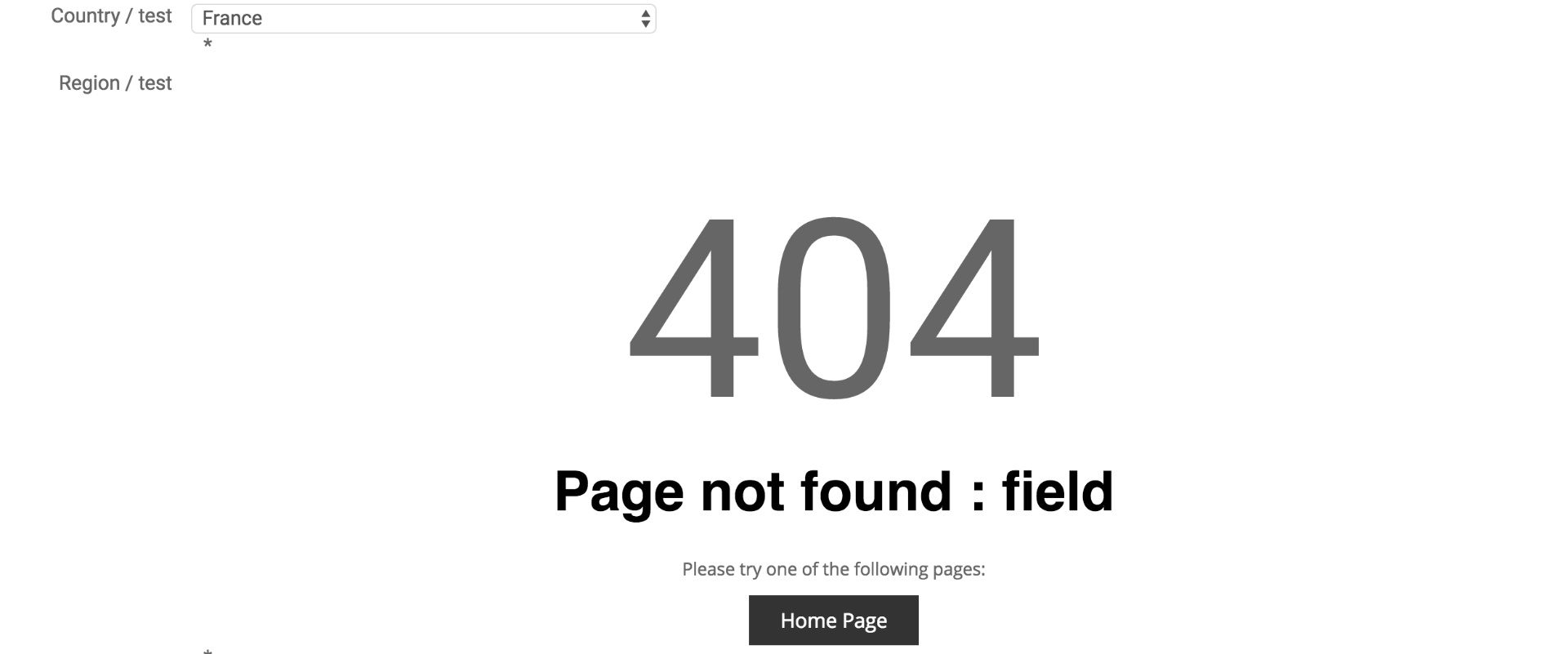
i copied the configuration

thanks
i got a 404 error for the state.
i copied the configuration
thanks
Please Log in or Create an account to join the conversation.
9 years 10 months ago - 9 years 10 months ago #257018
by Philip
Replied by Philip on topic custom field State on product table is empty
Hello,
I'm unable to reproduce your issue... Can you provide some backend access in our Contact us form.
Add in your message an Url link to this topic.
Awaiting news from you.
Regards
I'm unable to reproduce your issue... Can you provide some backend access in our Contact us form.
Add in your message an Url link to this topic.
Awaiting news from you.
Regards
Last edit: 9 years 10 months ago by Philip.
Please Log in or Create an account to join the conversation.
9 years 10 months ago - 9 years 10 months ago #257205
by Philip
Replied by Philip on topic custom field State on product table is empty
Hello,
I Get it ! You can't configure region_states WITHOUT publish region_countries !
You must understand that your first product/zone (region_country) able your region_state to works.
And so, if the first isn't published, the second won't work.
Right now, I switch off back your configuration.
Regards
I Get it ! You can't configure region_states WITHOUT publish region_countries !
You must understand that your first product/zone (region_country) able your region_state to works.
And so, if the first isn't published, the second won't work.
Right now, I switch off back your configuration.
Regards
Last edit: 9 years 10 months ago by Philip.
Please Log in or Create an account to join the conversation.
9 years 10 months ago - 9 years 10 months ago #257220
by ronron
Replied by ronron on topic custom field State on product table is empty
hi
sorry i dont understand what to do. Both custom fields are of course published. I did it here hikashop > display > custom fields > enable custom fields.
Do i have to publish them some where else?
thanks
sorry i dont understand what to do. Both custom fields are of course published. I did it here hikashop > display > custom fields > enable custom fields.
Do i have to publish them some where else?
thanks
Last edit: 9 years 10 months ago by ronron.
Please Log in or Create an account to join the conversation.
9 years 10 months ago - 9 years 10 months ago #257239
by Philip
Replied by Philip on topic custom field State on product table is empty
Hello,
Strange... Can you try to create again by following this process :
1° Create your product/custom fields => Country/ region_country/ And don't forget to published
2° Then create the second with States/region_states/ and define Zones on State, Save and if everything works you will be able to define the Default value dropdown.
Hope this will help you.
Regards
Strange... Can you try to create again by following this process :
1° Create your product/custom fields => Country/ region_country/ And don't forget to published
2° Then create the second with States/region_states/ and define Zones on State, Save and if everything works you will be able to define the Default value dropdown.
Hope this will help you.
Regards
Last edit: 9 years 10 months ago by Philip.
Please Log in or Create an account to join the conversation.
9 years 9 months ago #257539
by ronron
Replied by ronron on topic custom field State on product table is empty
hi philip
its still not working. the state is still blank.
i tried to change the column name still nothing.
what should i do
thanks
its still not working. the state is still blank.
i tried to change the column name still nothing.
what should i do
thanks
Please Log in or Create an account to join the conversation.
9 years 9 months ago #257573
by Philip
Replied by Philip on topic custom field State on product table is empty
Hello,
For a reason or another, it's now imposzsible for us to reach your backend by using the Url you provide...
Can you look this, and tell us when it's ok.
Regards
For a reason or another, it's now imposzsible for us to reach your backend by using the Url you provide...
Can you look this, and tell us when it's ok.
Regards
Please Log in or Create an account to join the conversation.
9 years 9 months ago #257679
by ronron
Replied by ronron on topic custom field State on product table is empty
can you please try again
Please Log in or Create an account to join the conversation.
9 years 9 months ago - 9 years 9 months ago #257693
by Philip
Replied by Philip on topic custom field State on product table is empty
Hello,
Ok I was able to reach your back-end, I create NEW product/custom field (Country test & States test), see by yourself :
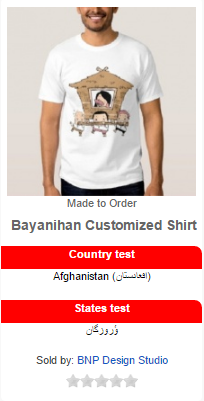
You have just modify their name in order to remove the "test" and maybe delete the previous.
Regards
Ok I was able to reach your back-end, I create NEW product/custom field (Country test & States test), see by yourself :
You have just modify their name in order to remove the "test" and maybe delete the previous.
Regards
Last edit: 9 years 9 months ago by Philip.
Please Log in or Create an account to join the conversation.
9 years 9 months ago #257751
by ronron
Replied by ronron on topic custom field State on product table is empty
thank you
did you try to change the country and state in the front end?
i tried to use what you created but i still cant choose a state
thanks
did you try to change the country and state in the front end?
i tried to use what you created but i still cant choose a state
thanks
Please Log in or Create an account to join the conversation.
9 years 9 months ago - 9 years 9 months ago #257769
by Philip
Replied by Philip on topic custom field State on product table is empty
Hello,
There is a misunderstood, product custom fields are bonus data on your product, the aim isn't to be defined by customer on the frontend, as explain in our custom fields tutorial , here I quote :
So you have to use in table Item in order to have what you need, see this screenshot, note that for other configuration points everything will be the same :
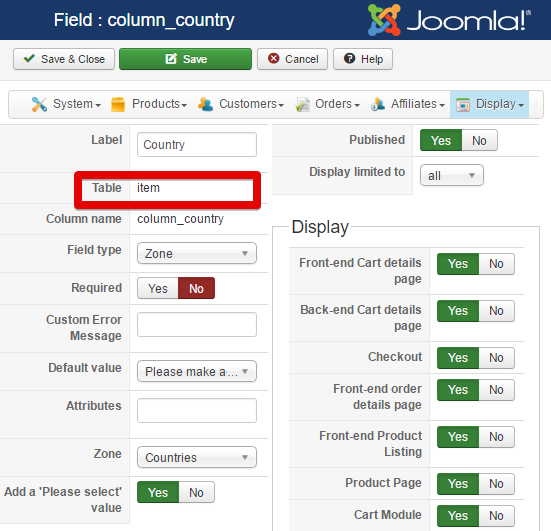
That's why, you must be more specific when there is a trouble, like this : "What I need"/"What I do"/"What don't work or seems impossible"
Hope this will help you.
Regards
There is a misunderstood, product custom fields are bonus data on your product, the aim isn't to be defined by customer on the frontend, as explain in our custom fields tutorial , here I quote :
"Front end : If set to yes, address and user customer fields will be used during the checkout process to ask more information about the customer. Product custom fields will be displayed as specifications on the product page."
So you have to use in table Item in order to have what you need, see this screenshot, note that for other configuration points everything will be the same :
That's why, you must be more specific when there is a trouble, like this : "What I need"/"What I do"/"What don't work or seems impossible"
Hope this will help you.
Regards
Last edit: 9 years 9 months ago by Philip.
Please Log in or Create an account to join the conversation.
9 years 9 months ago #257905
by ronron
Replied by ronron on topic custom field State on product table is empty
hi philip
thank you, i tried what you suggested and still it did not work. the fields were added to the cart_product as you said.
Anyway, let me clarify first,
i want vendor to select country and state when they add product in the front end.
the main purpose is for custom filters to apply on country and state. So when a buyer uses text search, they can select which country and state they will buy
i hope this has made it clear.
thanks
thank you, i tried what you suggested and still it did not work. the fields were added to the cart_product as you said.
Anyway, let me clarify first,
i want vendor to select country and state when they add product in the front end.
the main purpose is for custom filters to apply on country and state. So when a buyer uses text search, they can select which country and state they will buy
i hope this has made it clear.
thanks
Please Log in or Create an account to join the conversation.

9 years 9 months ago #257999
by nicolas
Replied by nicolas on topic custom field State on product table is empty
Hi,
The you want custom fields of the table "product".
I've created two in your backend and I'm able to see them on the backend when I edit/create a product.
However, as a vendor on the frontend I don't see the fields. I suppose that it's because I would have to add them to the ACL settings of HikaMarket, but the access you provided didn't allow me to do that. So I can't say more.
The you want custom fields of the table "product".
I've created two in your backend and I'm able to see them on the backend when I edit/create a product.
However, as a vendor on the frontend I don't see the fields. I suppose that it's because I would have to add them to the ACL settings of HikaMarket, but the access you provided didn't allow me to do that. So I can't say more.
Please Log in or Create an account to join the conversation.
9 years 9 months ago #258253
by ronron
Replied by ronron on topic custom field State on product table is empty
thank you
it still gives me an error on the front end.
i already changed the access for the account.
please try again
thanks
it still gives me an error on the front end.
i already changed the access for the account.
please try again
thanks
Please Log in or Create an account to join the conversation.
9 years 9 months ago #258258
by nicolas
Replied by nicolas on topic custom field State on product table is empty
Hi,
Thanks, I was finally able to see the problem on your website which comes from the fact that HikaMarket uses the URL index.php?option=com_hikashop&ctrl=field&task=state&tmpl=component&lang=en&field_type=product&field_id=data_product_product_state&field_namekey=product_state&namekey=country_Philippines_168 to refresh the state custom field while that URL is invalid.
It should be instead index.php?option=com_hikashop&ctrl=checkout&task=state&tmpl=component&lang=en&field_type=product&field_id=data_product_product_state&field_namekey=product_state&namekey=country_Philippines_168
This can be fixed by changing the line:
$fields = $fieldsClass->getFields('display:vendor_product_edit=1', $product, 'product', 'field&task=state');
to:
$fields = $fieldsClass->getFields('display:vendor_product_edit=1', $product, 'product', 'checkout&task=state');
in the file components/com_hikamarket/productmarket/view.html.php so please try that modification.
Thanks, I was finally able to see the problem on your website which comes from the fact that HikaMarket uses the URL index.php?option=com_hikashop&ctrl=field&task=state&tmpl=component&lang=en&field_type=product&field_id=data_product_product_state&field_namekey=product_state&namekey=country_Philippines_168 to refresh the state custom field while that URL is invalid.
It should be instead index.php?option=com_hikashop&ctrl=checkout&task=state&tmpl=component&lang=en&field_type=product&field_id=data_product_product_state&field_namekey=product_state&namekey=country_Philippines_168
This can be fixed by changing the line:
$fields = $fieldsClass->getFields('display:vendor_product_edit=1', $product, 'product', 'field&task=state');
to:
$fields = $fieldsClass->getFields('display:vendor_product_edit=1', $product, 'product', 'checkout&task=state');
in the file components/com_hikamarket/productmarket/view.html.php so please try that modification.
Please Log in or Create an account to join the conversation.
9 years 9 months ago #259226
by ronron
Replied by ronron on topic custom field State on product table is empty
hi
its already working now but the file i changed is this one. is this ok?
/.../components/com_hikamarket/views/productmarket/view.html.php
also can i make an override for this? so it wont get erased when there is an update.
thanks
its already working now but the file i changed is this one. is this ok?
/.../components/com_hikamarket/views/productmarket/view.html.php
also can i make an override for this? so it wont get erased when there is an update.
thanks
Please Log in or Create an account to join the conversation.
Time to create page: 0.318 seconds