
[SOLVED] Random view always on.

9 years 4 months ago - 9 years 4 months ago #270939
by gus
- page with issue: www.puntobenesseresrl.it
- HikaShop Business 6.4.0 [2603261144]
- Joomla! 4.4.14 Stable [ Pamoja ] 30-September-2025 16:00 GMT
- PHP 8.3.19
- Chrome Version 147.0.7727.56 (Build ufficiale) (arm64)
[SOLVED] Random view always on. was created by gus
Hi,
i think I set right into the options with a NO random products view, but every time I refresh the products page, they are shown in a different order.
Where I'm wrong?
Thanks a lot
gus
i think I set right into the options with a NO random products view, but every time I refresh the products page, they are shown in a different order.
Where I'm wrong?
Thanks a lot
gus
- page with issue: www.puntobenesseresrl.it
- HikaShop Business 6.4.0 [2603261144]
- Joomla! 4.4.14 Stable [ Pamoja ] 30-September-2025 16:00 GMT
- PHP 8.3.19
- Chrome Version 147.0.7727.56 (Build ufficiale) (arm64)
Last edit: 9 years 4 months ago by gus.
Please Log in or Create an account to join the conversation.

9 years 4 months ago #270964
by Jerome
Jerome - Obsidev.com
HikaMarket & HikaSerial developer / HikaShop core dev team.
Replied by Jerome on topic Random view always on.
Hello,
Would it be possible to have a screenshot of your menu (or module) configuration and maybe a link to see the result directly ?
Regards,
Would it be possible to have a screenshot of your menu (or module) configuration and maybe a link to see the result directly ?
Regards,
Jerome - Obsidev.com
HikaMarket & HikaSerial developer / HikaShop core dev team.
Please Log in or Create an account to join the conversation.
9 years 4 months ago #270981
by gus
- page with issue: www.puntobenesseresrl.it
- HikaShop Business 6.4.0 [2603261144]
- Joomla! 4.4.14 Stable [ Pamoja ] 30-September-2025 16:00 GMT
- PHP 8.3.19
- Chrome Version 147.0.7727.56 (Build ufficiale) (arm64)
Replied by gus on topic Random view always on.
Hello Jerome
this is the direct link to the product list
www.puntobenesseresrl.it/elenco-prodotti.html
Each time you refresh, the order of the items changes
this is the direct link to the category list
www.puntobenesseresrl.it/elenco-categorie.html
The categories are shown as I wish and how I ordered them, if you refresh the page, the ordering is always the same.
But if you enter a category, products shown inside change their order everytime you refresh
Here is the screenshot of system>display>modules main default options>random items ( "oggetti a caso" into Italian is set to NO)
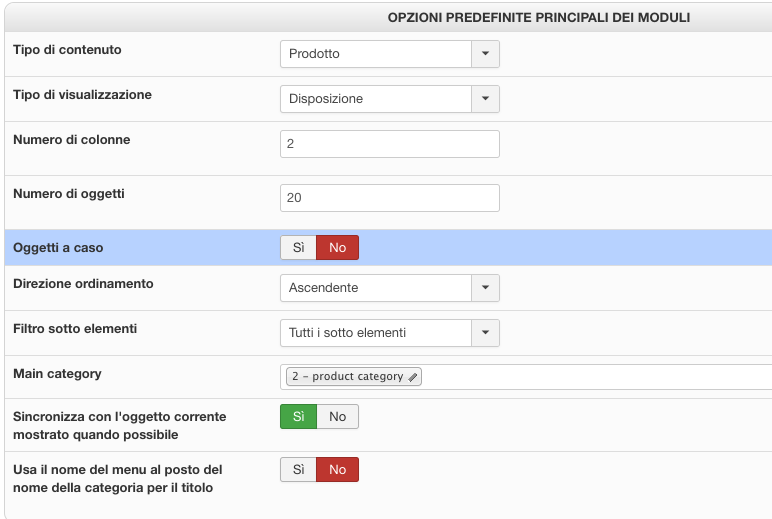
Have a nice sunday, ciao
gus
this is the direct link to the product list
www.puntobenesseresrl.it/elenco-prodotti.html
Each time you refresh, the order of the items changes
this is the direct link to the category list
www.puntobenesseresrl.it/elenco-categorie.html
The categories are shown as I wish and how I ordered them, if you refresh the page, the ordering is always the same.
But if you enter a category, products shown inside change their order everytime you refresh
Here is the screenshot of system>display>modules main default options>random items ( "oggetti a caso" into Italian is set to NO)
Have a nice sunday, ciao
gus
- page with issue: www.puntobenesseresrl.it
- HikaShop Business 6.4.0 [2603261144]
- Joomla! 4.4.14 Stable [ Pamoja ] 30-September-2025 16:00 GMT
- PHP 8.3.19
- Chrome Version 147.0.7727.56 (Build ufficiale) (arm64)
Please Log in or Create an account to join the conversation.

9 years 4 months ago #270992
by nicolas
Replied by nicolas on topic Random view always on.
Hi,
Please provide a screenshot of all the settings under the "products options" tab of your menu item.
Also, please do the screenshot while logged in in English as we don't speak Italian.
And make sure that you're prodiving a screenshot of the settings of the correct menu item.
On the page www.puntobenesseresrl.it/elenco-prodotti.html it's the menu item with the id 279 which is used so make sure that you check the settings of that menu item via the Joomla menu manager.
Please provide a screenshot of all the settings under the "products options" tab of your menu item.
Also, please do the screenshot while logged in in English as we don't speak Italian.
And make sure that you're prodiving a screenshot of the settings of the correct menu item.
On the page www.puntobenesseresrl.it/elenco-prodotti.html it's the menu item with the id 279 which is used so make sure that you check the settings of that menu item via the Joomla menu manager.
Please Log in or Create an account to join the conversation.
9 years 4 months ago #270997
by gus
- page with issue: www.puntobenesseresrl.it
- HikaShop Business 6.4.0 [2603261144]
- Joomla! 4.4.14 Stable [ Pamoja ] 30-September-2025 16:00 GMT
- PHP 8.3.19
- Chrome Version 147.0.7727.56 (Build ufficiale) (arm64)
Replied by gus on topic [SOLVED] Random view always on.
Thank you so much Nicolas, your request to me was enough to let me know where I was wrong and why you are right
Random view was YES into menu item 279 (Elenco Prodotti= Hikashop Product Listing), now everything is fine
I did not think of the menu item but only the system> display> modules main default options> random items
ps: anyway I changed my backend view in English for the future, and left the backend view of my partner in Italian
Random view was YES into menu item 279 (Elenco Prodotti= Hikashop Product Listing), now everything is fine
I did not think of the menu item but only the system> display> modules main default options> random items
ps: anyway I changed my backend view in English for the future, and left the backend view of my partner in Italian
- page with issue: www.puntobenesseresrl.it
- HikaShop Business 6.4.0 [2603261144]
- Joomla! 4.4.14 Stable [ Pamoja ] 30-September-2025 16:00 GMT
- PHP 8.3.19
- Chrome Version 147.0.7727.56 (Build ufficiale) (arm64)
The following user(s) said Thank You: Jerome
Please Log in or Create an account to join the conversation.
Time to create page: 0.204 seconds