

- Posts: 167
- Thank you received: 11
Pay button style
9 years 1 week ago #279361
by gil
Pay button style was created by gil
-- HikaShop version -- : 3.2.0
-- Joomla version -- : 3.8
-- PHP version -- : 7
Hello,
I have a small question about my css... I can find anymore how to personnalize only the "Pay" ("Payez" in French) button. I would like a nice and big button maybe with a logo , a green background color, big size text and specific color text ....
I had activate the css button in the HS config . It seems to me that this final transaction button is with an ID #hikashop_checkout_next_button.
So I added this below in my css custom templates
The border is ok on my front end but not the background...
Here is all my customs css templates
Here is the result ( the website is under construction but not inligne)
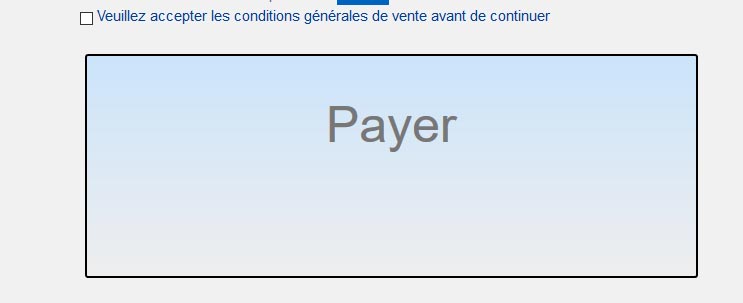
All this is on a Avanti Yoothme templates.
Would anyone have an solutions, I made it few years ago on HS but can't find on the forum the solution..
Thanks
-- Joomla version -- : 3.8
-- PHP version -- : 7
Hello,
I have a small question about my css... I can find anymore how to personnalize only the "Pay" ("Payez" in French) button. I would like a nice and big button maybe with a logo , a green background color, big size text and specific color text ....
I had activate the css button in the HS config . It seems to me that this final transaction button is with an ID #hikashop_checkout_next_button.
So I added this below in my css custom templates
Code:
#hikashop_checkout_next_button {
background-color: #21fd04 !important;
border: 2px solid #000000;
height: 100px;
float: left;
font-size : 50px;
color: #0d6601;
padding:60px;
}
The border is ok on my front end but not the background...
Here is all my customs css templates
Code:
#tm-footer
{
background-color: #959292;
}
a:hover, .uk-link:hover {
color: #905901;
text-decoration: none;
}
.uk-icon-button {
color :#f29500;
}
/* HS bordure Votre Panier */
.bordure {
border-radius: 16px;
border-style: solid;
border-width: 1px;
border-color: #000;
background-color: #e6e7e7;
padding: 8px 12px;
}
/* HS bordure Votre Panier */
/* HS Bouton ajouter produit */
.hikashop_cart_button { width: 59% !important;}
/* HS Bouton ajouter produit */
/* quantité de produit et + -*/
.hikashop_product_quantity_field_2 {
border-radius: 16px;
border-style: solid;
border-color: #000;
}
select, textarea, input[type="text"], input[type="password"], input[type="datetime"], input[type="datetime-local"], input[type="date"], input[type="month"], input[type="time"], input[type="week"], input[type="number"], input[type="email"], input[type="url"], input[type="search"], input[type="tel"], input[type="color"], .uneditable-input {
border-radius: 4px;
color: #555;
display: inline-block;
font-size: 14px;
height: 20px;
line-height: 20px;
margin-bottom: 10px;
padding: 4px 6px;
vertical-align: middle;
background-color: #bcbdbd;
}
.hikashop_product_quantity_field_change {
color:#000;
border-style: solid;
border-width: 1px;
border-color: #9c9c9c;
border-radius: 25px;
background-color: #f4f5f5 ;
margin: 2px;
padding-left: 1px;
padding-right: 1px;
}
/* quantité de produit et + - */
/* tag sur fiche produit*/
.label-info[href], .badge-info[href] {
background-color: #f39600;
}
/* tag sur fiche produit*/
/* bouton ajouter au panier */
a.hikashop_cart_button, a.hikashop_compare_button, .hikashop_cart_input_button {
background:rgba(0, 0, 0, 0) -moz-linear-gradient(center top , #cbe4fa, #eee) repeat scroll 0 0;
}
/* bouton ajouter au panier */
/* bouton payer */
#hikashop_checkout_next_button {
background-color: #21fd04 !important;
border: 2px solid #000000;
height: 100px;
float: left;
font-size : 50px;
color: #0d6601;
padding:60px;
}
/* bouton payer */
All this is on a Avanti Yoothme templates.
Would anyone have an solutions, I made it few years ago on HS but can't find on the forum the solution..
Thanks
Please Log in or Create an account to join the conversation.

9 years 1 week ago #279362
by nicolas
Replied by nicolas on topic Pay button style
Hi,
It depends if you're using the checkout legacy or the new checkout (check the "checkout legacy" setting of the HikaShop configuration).
With the new checkout system, you should rather do it like that:
.hikabtn_checkout_next{
// your css
}
It depends if you're using the checkout legacy or the new checkout (check the "checkout legacy" setting of the HikaShop configuration).
With the new checkout system, you should rather do it like that:
.hikabtn_checkout_next{
// your css
}
The following user(s) said Thank You: gil
Please Log in or Create an account to join the conversation.
9 years 1 week ago #279424
by gil
Replied by gil on topic Pay button style
Thanks Nicolas,
It work perfect. If it can help french user the path to acces to check the "checkout legacy" setting of the HikaShop configuration is Hikashop> configuration>advanced>options obsoletes>passage en caisse obsolte = non.
And there the .hikabtn_checkout_next{
// your css
} works nice !
Thanks again
It work perfect. If it can help french user the path to acces to check the "checkout legacy" setting of the HikaShop configuration is Hikashop> configuration>advanced>options obsoletes>passage en caisse obsolte = non.
And there the .hikabtn_checkout_next{
// your css
} works nice !
Thanks again
The following user(s) said Thank You: Mohamed Thelji
Please Log in or Create an account to join the conversation.

Less
More
- Posts: 12953
- Thank you received: 1778
9 years 1 week ago #279427
by Mohamed Thelji
Replied by Mohamed Thelji on topic Pay button style
Hello,
Thank you for your feedback !
Thank you for your feedback !
Please Log in or Create an account to join the conversation.
Time to create page: 0.189 seconds