
- Posts: 161
- Thank you received: 8
Product intro information
- Crashbandi
-
 Topic Author
- Offline
Less
More
7 years 4 months ago #306317
by Crashbandi
Product intro information was created by Crashbandi
-- url of the page with the problem -- :
banobathrooms-co-uk.stackstaging.com/sui...duct/16-black-cotton
-- HikaShop version -- : 4.0.2
-- Joomla version -- : 3.9.5.
-- PHP version -- : 7.1.28
Hi,
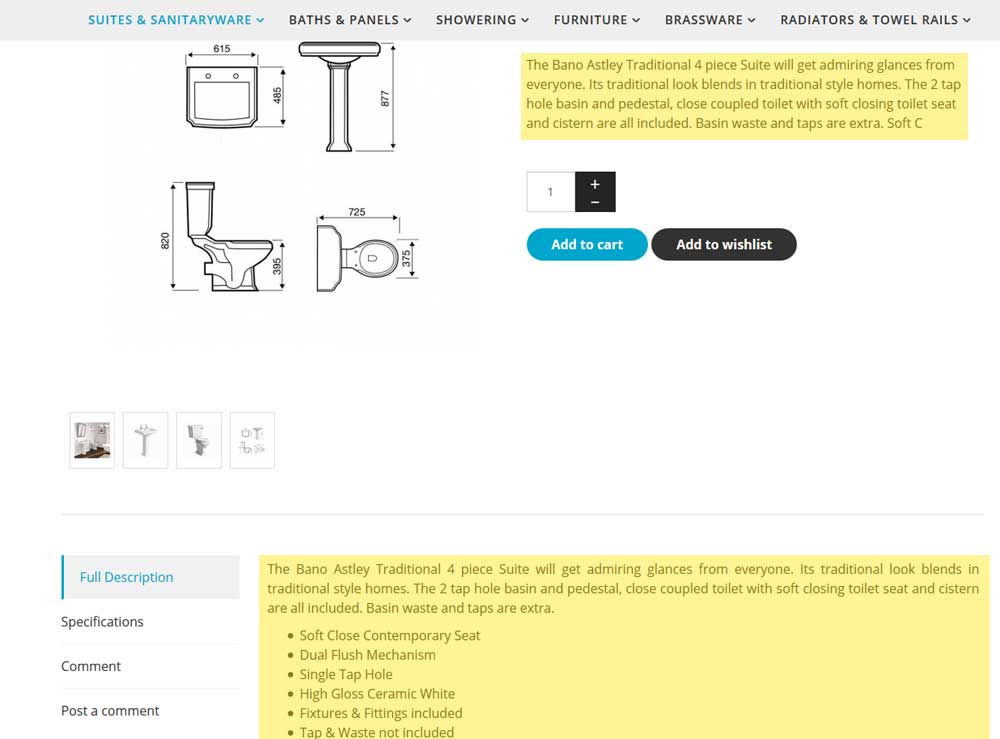
The intro information stops midway through the words (please see attached). Is there a way to have separate entries for the intro text and the full description?
-- HikaShop version -- : 4.0.2
-- Joomla version -- : 3.9.5.
-- PHP version -- : 7.1.28
Hi,
The intro information stops midway through the words (please see attached). Is there a way to have separate entries for the intro text and the full description?
Please Log in or Create an account to join the conversation.

7 years 4 months ago #306321
by nicolas
Replied by nicolas on topic Product intro information
Hi,
If you want it to cut at a certain place, you can add a read more tag to your product description.
Your product page layout is already heavily customized so I'm not sure what code you have to display the intro information.
By default, it's this code:
and if you want to use another text than the description for that intro text, then you can create a custom product field via the menu Display>Custom fields and change the product_description text to the column name of your custom product field in the code above.
That code is normally in the product/show_tabular.php view file that you can edit via the menu Display>Views.
You can use the "Display view files" setting of the HikaShop configuration to know which view file is used where in HikaShop
If you want it to cut at a certain place, you can add a read more tag to your product description.
Your product page layout is already heavily customized so I'm not sure what code you have to display the intro information.
By default, it's this code:
Code:
if(!empty($this->element->product_description)) {
$resume = substr(strip_tags(preg_replace('#<hr *id="system-readmore" */>.*#is','',$this->element->product_description)),0,300);
if (!empty($this->element->product_description) && strlen($this->element->product_description)>300)
$resume .= " ...<a href='#hikashop_show_tabular_description'>".JText::_('READ_MORE')."</a>";
echo JHTML::_('content.prepare',$resume);
}
That code is normally in the product/show_tabular.php view file that you can edit via the menu Display>Views.
You can use the "Display view files" setting of the HikaShop configuration to know which view file is used where in HikaShop
The following user(s) said Thank You: Crashbandi
Please Log in or Create an account to join the conversation.
- Crashbandi
-
Topic Author
- Offline
Less
More
- Posts: 161
- Thank you received: 8
7 years 4 months ago #306338
by Crashbandi
Replied by Crashbandi on topic Product intro information
Thanks Nicolas.
This is a bit complex for me, but I'm going to give it a go.
Can I ask, would it be possible to point the intro information to the new custom field via css? The reason I ask is because I don't want any future Hikashop updates overwriting any changes.
Regards,
Colin.
This is a bit complex for me, but I'm going to give it a go.
Can I ask, would it be possible to point the intro information to the new custom field via css? The reason I ask is because I don't want any future Hikashop updates overwriting any changes.
Regards,
Colin.
Please Log in or Create an account to join the conversation.
7 years 4 months ago #306339
by nicolas
Replied by nicolas on topic Product intro information
Hi,
It's not possible to do that via CSS. Note however that if you do view files modifications via the menu Display>Views, these modifications will be saved as view overrides and you won't loose them when you update HikaShop in the future.
It's not possible to do that via CSS. Note however that if you do view files modifications via the menu Display>Views, these modifications will be saved as view overrides and you won't loose them when you update HikaShop in the future.
Please Log in or Create an account to join the conversation.
- Crashbandi
-
Topic Author
- Offline
Less
More
- Posts: 161
- Thank you received: 8
7 years 4 months ago - 7 years 4 months ago #306771
by Crashbandi
Replied by Crashbandi on topic Product intro information
Hi,
I have added the custom field and edited the file product/show_tabular.php. Everything seems ok in the back end, but the input does not show in the front end. The custom field is in the products table and is set to show in the front-end, back-end form and back-end-listing.
Any ideas why it is not showing? Here is my code change:
Thanks.
I have added the custom field and edited the file product/show_tabular.php. Everything seems ok in the back end, but the input does not show in the front end. The custom field is in the products table and is set to show in the front-end, back-end form and back-end-listing.
Any ideas why it is not showing? Here is my code change:
Code:
if(!empty($this->element->product_intro)) {
$resume = substr(strip_tags(preg_replace('#<hr *id="system-readmore" */>.*#is','',$this->element->product_intro)),0,300);
if (!empty($this->element->product_intro) && strlen($this->element->product_intro)>300)
//$resume .= " ...<a href='#hikashop_show_tabular_description'>".JText::_('READ_MORE')."</a>";
echo JHTML::_('content.prepare',$resume);
Last edit: 7 years 4 months ago by nicolas.
Please Log in or Create an account to join the conversation.
7 years 4 months ago #306774
by nicolas
Replied by nicolas on topic Product intro information
Hi,
Your code is wrong (it will only display if you have more than 300 characters in the custom field) and you don't need all that code.
You can just do:
echo JHTML::_('content.prepare',$this->element->product_intro);
Your code is wrong (it will only display if you have more than 300 characters in the custom field) and you don't need all that code.
You can just do:
echo JHTML::_('content.prepare',$this->element->product_intro);
Please Log in or Create an account to join the conversation.
- Crashbandi
-
Topic Author
- Offline
Less
More
- Posts: 161
- Thank you received: 8
7 years 4 months ago #306797
by Crashbandi
Replied by Crashbandi on topic Product intro information
Hi,
So it should look like this?:
<div id="hikashop_product_intro_main_mini" class="hikashop_product_description_main_mini"><?php
echo JHTML::_('content.prepare',$this->element->product_intro);
?></div>
Regards,
Colin
So it should look like this?:
<div id="hikashop_product_intro_main_mini" class="hikashop_product_description_main_mini"><?php
echo JHTML::_('content.prepare',$this->element->product_intro);
?></div>
Regards,
Colin
Please Log in or Create an account to join the conversation.
- Crashbandi
-
Topic Author
- Offline
Less
More
- Posts: 161
- Thank you received: 8
7 years 4 months ago #306811
by Crashbandi
Replied by Crashbandi on topic Product intro information
Hi,
It seems to working with this code;
<div id="hikashop_product_intro_main_mini" class="hikashop_product_description_main_mini"><?php
if(!empty($this->element->product_intro)) {
echo JHTML::_('content.prepare',$this->element->product_intro);
}
?></div>
Could you just double check it for me.
Thanks very much.
It seems to working with this code;
<div id="hikashop_product_intro_main_mini" class="hikashop_product_description_main_mini"><?php
if(!empty($this->element->product_intro)) {
echo JHTML::_('content.prepare',$this->element->product_intro);
}
?></div>
Could you just double check it for me.
Thanks very much.
Please Log in or Create an account to join the conversation.
- Crashbandi
-
Topic Author
- Offline
Less
More
- Posts: 161
- Thank you received: 8
7 years 4 months ago #306824
by Crashbandi
Replied by Crashbandi on topic Product intro information
Hi,
I've just noticed that the intro text is also appearing in the 'Specification' tab?
Could you take a look please:
banobathrooms-co-uk.stackstaging.com/sui...duct/16-black-cotton
I've just noticed that the intro text is also appearing in the 'Specification' tab?
Could you take a look please:
banobathrooms-co-uk.stackstaging.com/sui...duct/16-black-cotton
Please Log in or Create an account to join the conversation.
7 years 4 months ago #306825
by nicolas
Replied by nicolas on topic Product intro information
Hi,
The code is good.
You want to turn off the display setting of the custom field (via the menu Display>Custom fields) since you're displaying it yourself. That way, it won't appear in the specifications tab.
The code is good.
You want to turn off the display setting of the custom field (via the menu Display>Custom fields) since you're displaying it yourself. That way, it won't appear in the specifications tab.
The following user(s) said Thank You: Crashbandi
Please Log in or Create an account to join the conversation.
- Crashbandi
-
Topic Author
- Offline
Less
More
- Posts: 161
- Thank you received: 8
7 years 4 months ago #306835
by Crashbandi
Replied by Crashbandi on topic Product intro information
Perfect.
Thanks for your help with this Nicolas.
Thanks for your help with this Nicolas.
Please Log in or Create an account to join the conversation.
- Crashbandi
-
Topic Author
- Offline
Less
More
- Posts: 161
- Thank you received: 8
7 years 2 months ago #308576
by Crashbandi
Replied by Crashbandi on topic Product intro information
Hi,
I am working on a site at www.luxminime.com/en/new-in/product/387-test-girls-jacket
I would like the product description to display as standard Hikashop. So, I don't want the Description or the Specifications tabs at the bottom of the page.
i have deleted the custom fields, but I'm not sure what to change in 'show_tabular'. I have attached the file and was hoping you could take a look for me.
Thanks.
Colin.
I am working on a site at www.luxminime.com/en/new-in/product/387-test-girls-jacket
I would like the product description to display as standard Hikashop. So, I don't want the Description or the Specifications tabs at the bottom of the page.
i have deleted the custom fields, but I'm not sure what to change in 'show_tabular'. I have attached the file and was hoping you could take a look for me.
Thanks.
Colin.
Please Log in or Create an account to join the conversation.
7 years 2 months ago #308577
by nicolas
Replied by nicolas on topic Product intro information
Hi,
I'm not sure what you mean.
Do you mean that you don't want tabs at all ? In that case you can change the "layout on product page" setting of the HikaShop configuration to "default".
Or do you mean you only don't want the description and specification tabs ?
In that case, you can remove that code:
But then, maybe you want to display the description elsewhere ?
Or maybe you mean you want the tabs like they are by default in HikaShop, on top of the tab content instead of being on the side ?
Or maybe something else ?
I'm not sure what you mean.
Do you mean that you don't want tabs at all ? In that case you can change the "layout on product page" setting of the HikaShop configuration to "default".
Or do you mean you only don't want the description and specification tabs ?
In that case, you can remove that code:
Code:
if(!empty($description) || !empty ($this->element->product_url)) { ?>
<div class="hikashop_tabs_content" id="hikashop_show_tabular_description">
<?php if(!empty($description)) { ?>
<div id="hikashop_product_description_main" class="hikashop_product_description_main" itemprop="description"><?php
echo $description;
?></div>
<?php } ?>
<span id="hikashop_product_url_main" class="hikashop_product_url_main"><?php
if (!empty ($this->element->product_url)) {
echo JText::sprintf('MANUFACTURER_URL', '<a href="' . $this->element->product_url . '" target="_blank">' . $this->element->product_url . '</a>');
}
?></span>
</div>
<?php } ?>
<?php if(!empty($specif_tab_content)) { ?>
<div class="hikashop_tabs_content" id="hikashop_show_tabular_specification"><?php
echo $specif_tab_content;
?></div>
<?php }
Or maybe you mean you want the tabs like they are by default in HikaShop, on top of the tab content instead of being on the side ?
Or maybe something else ?
Please Log in or Create an account to join the conversation.
- Crashbandi
-
Topic Author
- Offline
Less
More
- Posts: 161
- Thank you received: 8
7 years 2 months ago #308594
by Crashbandi
Replied by Crashbandi on topic Product intro information
Hi Nicolas,
Yes, I would like to just have the description under the price with no tabs or comments. I have attached a screenshot.
Regards,
Colin
Yes, I would like to just have the description under the price with no tabs or comments. I have attached a screenshot.
Regards,
Colin
Please Log in or Create an account to join the conversation.
7 years 2 months ago #308604
by nicolas
Replied by nicolas on topic Product intro information
Hi,
Then, turn off the votes and comments in the HikaShop configuration. That will remove the comments area.
And then, you can leave the description empty and fill in the "product_intro" custom field instead and it should display where you want it.
Finally, you can do the modification I talked previously to remove the description and specifications tabs and that should leave you with a page resembling your last image.
Then, turn off the votes and comments in the HikaShop configuration. That will remove the comments area.
And then, you can leave the description empty and fill in the "product_intro" custom field instead and it should display where you want it.
Finally, you can do the modification I talked previously to remove the description and specifications tabs and that should leave you with a page resembling your last image.
Please Log in or Create an account to join the conversation.
- Crashbandi
-
Topic Author
- Offline
Less
More
- Posts: 161
- Thank you received: 8
7 years 2 months ago #308629
by Crashbandi
Replied by Crashbandi on topic Product intro information
Hi,
OK I did everything, including the removal of the code. It looks good, but I still have the Description and Specifications tabs?
Regards,
Colin
OK I did everything, including the removal of the code. It looks good, but I still have the Description and Specifications tabs?
Regards,
Colin
Please Log in or Create an account to join the conversation.
7 years 2 months ago #308659
by nicolas
Replied by nicolas on topic Product intro information
HI,
Then, also remove that part:
Then, also remove that part:
Code:
<ul class="hikashop_tabs_ul">
<?php if(!empty($description) || !empty ($this->element->product_url)) {
if(empty($selected)) $selected = 'hikashop_show_tabular_description'; ?>
<li id="hikashop_show_tabular_description_li" class="hikashop_tabs_li ui-corner-top"><?php echo JText::_('PRODUCT_DESCRIPTION');?></li>
<?php } ?>
<?php if(!empty($specif_tab_content)) {
if(empty($selected)) $selected = 'hikashop_show_tabular_specification'; ?>
<li id="hikashop_show_tabular_specification_li" class="hikashop_tabs_li ui-corner-top"><?php echo JText::_('SPECIFICATIONS');?></li>
<?php } ?>
<?php if(in_array($status_vote, array('comment', 'two', 'both'))) {
if(empty($selected)) $selected = 'hikashop_show_tabular_comment'; ?>
<li id="hikashop_show_tabular_comment_li" class="hikashop_tabs_li ui-corner-top"><?php echo JText::_('PRODUCT_COMMENT');?></li>
<li id="hikashop_show_tabular_new_comment_li" class="hikashop_tabs_li ui-corner-top"><?php echo JText::_('PRODUCT_NEW_COMMENT');?></li>
<?php } ?>
</ul>
The following user(s) said Thank You: Crashbandi
Please Log in or Create an account to join the conversation.
- Crashbandi
-
Topic Author
- Offline
Less
More
- Posts: 161
- Thank you received: 8
7 years 1 month ago #309536
by Crashbandi
Replied by Crashbandi on topic Product intro information
Hi Nicolas,
Thanks. It seems fine now.
Regards,
Colin.
Thanks. It seems fine now.
Regards,
Colin.
Please Log in or Create an account to join the conversation.
Time to create page: 0.292 seconds