

- Posts: 221
- Thank you received: 8
Why not display product in subcategory?
6 years 10 months ago - 6 years 10 months ago #312959
by sadaf3d
Why not display product in subcategory? was created by sadaf3d
how to display products in subcategory when select parnent category in Products listing type of menu item?
i have some category and subcategory.when user select category, hikashop only show products in that category and not show products in subcategory of that category.how to config that?
i set Including sub categories to yes as you can see in the picture but it is not display product in subcategories...
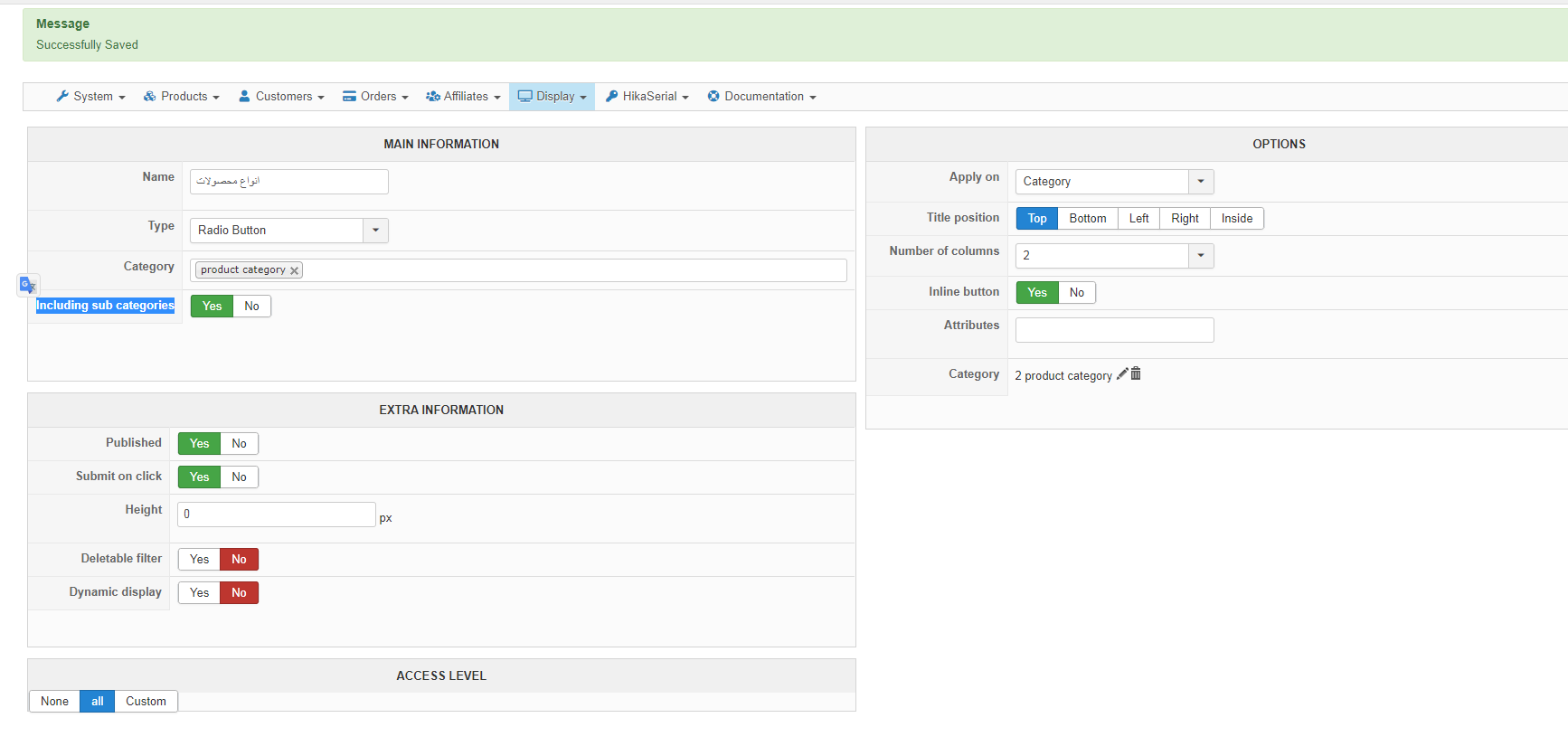
it seems a bug, because i set that in your demo but not work correctly in your demo site when i select an option in the left filter module...
i have some category and subcategory.when user select category, hikashop only show products in that category and not show products in subcategory of that category.how to config that?
i set Including sub categories to yes as you can see in the picture but it is not display product in subcategories...
it seems a bug, because i set that in your demo but not work correctly in your demo site when i select an option in the left filter module...
Last edit: 6 years 10 months ago by sadaf3d.
Please Log in or Create an account to join the conversation.

6 years 10 months ago #312981
by nicolas
Replied by nicolas on topic Why not display product in subcategory?
Hi,
The first "category" setting of the filter allows you to restrict the display of the filter to only the selected categories.
And if you activate the "include sub categories" setting below, then the filter will also display for the sub categories.
However, the filter itself will only display the products directly linked to the selected category.
There is no option in category filters to allow the display of products of subcategories of the selected category.
The first "category" setting of the filter allows you to restrict the display of the filter to only the selected categories.
And if you activate the "include sub categories" setting below, then the filter will also display for the sub categories.
However, the filter itself will only display the products directly linked to the selected category.
There is no option in category filters to allow the display of products of subcategories of the selected category.
The following user(s) said Thank You: sadaf3d
Please Log in or Create an account to join the conversation.
6 years 10 months ago #313057
by sadaf3d
Replied by sadaf3d on topic Why not display product in subcategory?
if i want develop this feature to show products in subcategory when i select a category that have subcategories in the filter, what need to do and what file must modified? is it need to create plugin to override that if it is Class? please advise me.nicolas wrote: There is no option in category filters to allow the display of products of subcategories of the selected category.
Please Log in or Create an account to join the conversation.
6 years 10 months ago #313058
by nicolas
Replied by nicolas on topic Why not display product in subcategory?
Hi,
In that case, you would have to modify the file administrator/components/com_hikashop/classes/filter.php
In it, you'll find the function addFilter with such code:
So you'll want to load the child categories of the categories in the array $categoriesList and add their ids to that array before the INNER JOIN is constructed.
And if you want to make it as an override, you can create a system plugin to load a copy of the modified file after HikaShop is loaded, before HikaShop has to load the filter class (you could load it in onAfterRoute for example).
In that case, you would have to modify the file administrator/components/com_hikashop/classes/filter.php
In it, you'll find the function addFilter with such code:
Code:
if($filter->filter_data=='category'){
if(!($infoGet[0] == $filter->filter_namekey && count($infoGet) == 1)){
$categoriesList='';
foreach($infoGet as $cat){
if($cat == $filter->filter_namekey || (int)$cat == 0)
continue;
if(is_numeric($cat)){
$categoriesList.=(int)$cat.',';
}elseif(is_string($cat)){
$cat = explode('::',$cat);
foreach($cat as $selectedCategory){
$selectedCategory = trim($selectedCategory);
if(!empty($selectedCategory))
$categoriesList.=(int)$selectedCategory.',';
}
}
}
if(!empty($categoriesList)){
$categoriesList=substr($categoriesList,0,-1);
$table = 'a';
if($a=='#__hikashop_product AS b'){
$table = 'b';
}elseif($a[0]!='(' && strpos($a,') AS b') && preg_match('#hikashop_product AS ([a-z0-9_]+)#i',$a,$matches)){
$table = $matches[1];
}
$filter->filter_namekey = str_replace('-', '_', $filter->filter_namekey);
$on.=' INNER JOIN '.hikashop_table('product_category').' AS '.$filter->filter_namekey.$i.' ON '.$filter->filter_namekey.$i.'.product_id='.$table.'.product_id AND '.$filter->filter_namekey.$i.'.category_id IN ('.$categoriesList.')';
}
}
}
And if you want to make it as an override, you can create a system plugin to load a copy of the modified file after HikaShop is loaded, before HikaShop has to load the filter class (you could load it in onAfterRoute for example).
Please Log in or Create an account to join the conversation.
Time to create page: 0.209 seconds