

- Posts: 86
- Thank you received: 3
Start and end time changes on every save
6 years 9 months ago #314165
by picht
Start and end time changes on every save was created by picht
-- HikaShop version -- : 4.2.2
-- Joomla version -- : 3.9.14
-- PHP version -- : 7.1.33
Hi
When entering an additional price with a start and end date in a product the time that I enter gets added an hour when saving the product.
On every save of this product the time gets an additional hour added.
The same happens to start ena end times of coupons, and maybe other places in the component.
Rgds
Picht
-- Joomla version -- : 3.9.14
-- PHP version -- : 7.1.33
Hi
When entering an additional price with a start and end date in a product the time that I enter gets added an hour when saving the product.
On every save of this product the time gets an additional hour added.
The same happens to start ena end times of coupons, and maybe other places in the component.
Rgds
Picht
Please Log in or Create an account to join the conversation.

6 years 9 months ago #314171
by nicolas
Replied by nicolas on topic Start and end time changes on every save
Hi,
We've added a patch for that.
Download again the install package of HikaShop on our website again and install it on your website to get the patch added and it should be good.
We've added a patch for that.
Download again the install package of HikaShop on our website again and install it on your website to get the patch added and it should be good.
The following user(s) said Thank You: dvddvd
Please Log in or Create an account to join the conversation.
6 years 9 months ago #314201
by picht
Replied by picht on topic Start and end time changes on every save
Hi
The shifting of the time has been corrected, but other problems have occurred.
1. In the product page, when adding prices to the Prices and taxes, the times selected are not always saved when pressing OK. It can not be changed, but you have save it and the edit it.
When editing more than one price somoe dissappear when saving.
It has a lot of errors on this part of the products page
The shifting of the time has been corrected, but other problems have occurred.
1. In the product page, when adding prices to the Prices and taxes, the times selected are not always saved when pressing OK. It can not be changed, but you have save it and the edit it.
When editing more than one price somoe dissappear when saving.
It has a lot of errors on this part of the products page
Please Log in or Create an account to join the conversation.

Less
More
- Posts: 12953
- Thank you received: 1778
6 years 9 months ago #314204
by Mohamed Thelji
Replied by Mohamed Thelji on topic Start and end time changes on every save
Hello,
1. I wasn't able to reproduce your issue, can you give us step by step instructions on how to reproduce it through some screenshots for example ? Thank you.
Kind regards,
Mohamed.
1. I wasn't able to reproduce your issue, can you give us step by step instructions on how to reproduce it through some screenshots for example ? Thank you.
Kind regards,
Mohamed.
Please Log in or Create an account to join the conversation.
6 years 8 months ago #314995
by picht
Replied by picht on topic Start and end time changes on every save
Sorry for the late reply
The issue wjth prices that go missing:
On the prices section (see image) I have one price saved a long time ago.
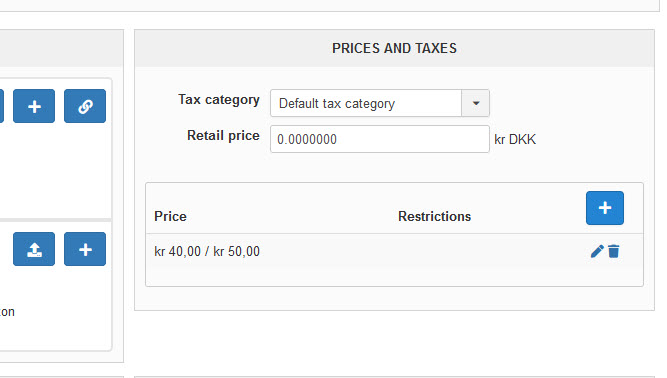
I add a price by pressing the + button. Simple only the price, no dates or other things.
Then press OK
Add another price like the first, but with another number.
Press OK and the Save the product.
Product is saved as expected.
Now edit price number 1 and press OK
(Do NOT save the product)
Edit price numver 2 and press OK.
Now save the product.
Result: One price has dissappeared
The issue wjth prices that go missing:
On the prices section (see image) I have one price saved a long time ago.
I add a price by pressing the + button. Simple only the price, no dates or other things.
Then press OK
Add another price like the first, but with another number.
Press OK and the Save the product.
Product is saved as expected.
Now edit price number 1 and press OK
(Do NOT save the product)
Edit price numver 2 and press OK.
Now save the product.
Result: One price has dissappeared
Please Log in or Create an account to join the conversation.
6 years 8 months ago #314997
by picht
Replied by picht on topic Start and end time changes on every save
The other issue could not be reproduced
Please Log in or Create an account to join the conversation.

6 years 8 months ago - 6 years 8 months ago #314998
by Philip
Replied by Philip on topic Start and end time changes on every save
Hello,
We try to reproduce your issue on our side, unfortunately without success...
Can you provide via our Contact us Form some backend references and backend url, to process some test directly on your website.
Note : Don't forget to add an Url link to this topic, and notify us, here.
Regards
We try to reproduce your issue on our side, unfortunately without success...
Can you provide via our Contact us Form some backend references and backend url, to process some test directly on your website.
Note : Don't forget to add an Url link to this topic, and notify us, here.
Regards
Last edit: 6 years 8 months ago by Philip.
Please Log in or Create an account to join the conversation.
6 years 8 months ago #315013
by picht
Replied by picht on topic Start and end time changes on every save
Message sent
Please Log in or Create an account to join the conversation.
6 years 8 months ago - 6 years 8 months ago #315019
by Philip
Replied by Philip on topic Start and end time changes on every save
Hello,
Ok now, we are unable to see it, and better understand what's going on.
To resume, the OK button is built to process one price per process, to be more precise you have to validate each price entry to avoid this issue.
We can understand that this can be confusing and not very user friendly, but once you know this, there is nothing very blocking in your product configuration.
But as your returns is relevant, we will see how we can improve this for our future release, always in order to be more user friendly.
Regards
Ok now, we are unable to see it, and better understand what's going on.
To resume, the OK button is built to process one price per process, to be more precise you have to validate each price entry to avoid this issue.
We can understand that this can be confusing and not very user friendly, but once you know this, there is nothing very blocking in your product configuration.
But as your returns is relevant, we will see how we can improve this for our future release, always in order to be more user friendly.
Regards
Last edit: 6 years 8 months ago by Philip.
Please Log in or Create an account to join the conversation.
Less
More
- Posts: 575
- Thank you received: 11
6 years 2 weeks ago #323798
by ler@singmuiheng.com
Replied by ler@singmuiheng.com on topic Start and end time changes on every save
Dear Nicholas
Is there a guide to fix this bug?
As we already have some customization on the system, reinstall will cause all the things have to redo
Can you show us the file that have the changes so we can change that particular file or classses?
Is there a guide to fix this bug?
As we already have some customization on the system, reinstall will cause all the things have to redo
Can you show us the file that have the changes so we can change that particular file or classses?
Please Log in or Create an account to join the conversation.
6 years 2 weeks ago #323814
by nicolas
Replied by nicolas on topic Start and end time changes on every save
Hi,
Well, I'm not sure as it was months ago.
I think it might be this patch:
Change the code:
to:
in the file administrator/components/com_hikashop/helpers/helper.php
Make sure you do a backup of the file before as you might have to restore it if that change is not fully compatible with your old version of HikaShop
Well, I'm not sure as it was months ago.
I think it might be this patch:
Change the code:
Code:
function hikashop_getTime($date, $format = '%d %B %Y %H:%M') {
static $timeoffset = null;
// get timezone offset from Joomla
if($timeoffset === null){
$config = JFactory::getConfig();
if(!HIKASHOP_J30){
$timeoffset = $config->getValue('config.offset');
} else {
$timeoffset = $config->get('offset');
}
$dateC = JFactory::getDate('now', $timeoffset);
$timeoffset = $dateC->getOffsetFromGMT(true);
}
if(!is_numeric($date)) {
// convert date into UTC timestamp
$format = str_replace(array('%A','%d','%B','%m','%Y','%y','%H','%M','%S','%a'), array('l','d','F','m','Y','y','H','i','s','D'), hikashop_getDateFormat($format));
try {
$dateTime = DateTime::createFromFormat($format, $date, new DateTimeZone('UTC'));
if($dateTime)
$date = $dateTime->getTimestamp();
else
$date = strtotime(str_replace('-','/', $date));
} catch( Exception $e) {
$date = strtotime(str_replace('-','/', $date));
}
}
if($date === false)
return false;
// account for timezone offset
return $date - $timeoffset *60*60 + date('Z', $date);
}
Code:
function hikashop_getTime($date, $format = '%d %B %Y %H:%M') {
static $timeoffset = null;
static $timeZone = null;
// get timezone offset from Joomla
if($timeoffset === null){
$config = JFactory::getConfig();
if(!HIKASHOP_J30){
$timeZone = $config->getValue('config.offset');
} else {
$timeZone = $config->get('offset');
}
$dateC = JFactory::getDate('now', $timeZone);
$timeoffset = $dateC->getOffsetFromGMT(true);
}
if(!is_numeric($date)) {
// convert date into UTC timestamp
$format = str_replace(array('%A','%d','%B','%m','%Y','%y','%H','%M','%S','%a'), array('l','d','F','m','Y','y','H','i','s','D'), hikashop_getDateFormat($format));
try {
$dateTime = DateTime::createFromFormat($format, $date, new DateTimeZone($timeZone));
if($dateTime) {
$date = $dateTime->getTimestamp();
}else {
$date = strtotime(str_replace('-','/', $date));
if($date === false)
return false;
// account for timezone offset
return $date - $timeoffset *60*60 + date('Z', $date);
}
} catch( Exception $e) {
$date = strtotime(str_replace('-','/', $date));
if($date === false)
return false;
// account for timezone offset
return $date - $timeoffset *60*60 + date('Z', $date);
}
}
return $date;
}
Make sure you do a backup of the file before as you might have to restore it if that change is not fully compatible with your old version of HikaShop
Please Log in or Create an account to join the conversation.
Time to create page: 0.228 seconds