

- Posts: 966
- Thank you received: 11
Replace Icons With Font Awesome
6 years 4 months ago #319143
by MyWorld
Replace Icons With Font Awesome was created by MyWorld
-- HikaShop version -- : 4.3.0
I would like to use Font Awesome icons on my website example, in the Customer Account, Wishlist, etc... Do you have any documentation on how/where to change these, and if not, can you tell me how to?
Thanks!
I would like to use Font Awesome icons on my website example, in the Customer Account, Wishlist, etc... Do you have any documentation on how/where to change these, and if not, can you tell me how to?
Thanks!
Please Log in or Create an account to join the conversation.

6 years 4 months ago #319144
by nicolas
Replied by nicolas on topic Replace Icons With Font Awesome
Hi,
Well, all the icons in HikaShop are already made with font-awesome.
So if that's you're goal, you're already good here.
Well, all the icons in HikaShop are already made with font-awesome.
So if that's you're goal, you're already good here.
Please Log in or Create an account to join the conversation.
6 years 4 months ago #319188
by MyWorld
Replied by MyWorld on topic Replace Icons With Font Awesome
My website does not appear to be using Font Awesome. Please see attached.
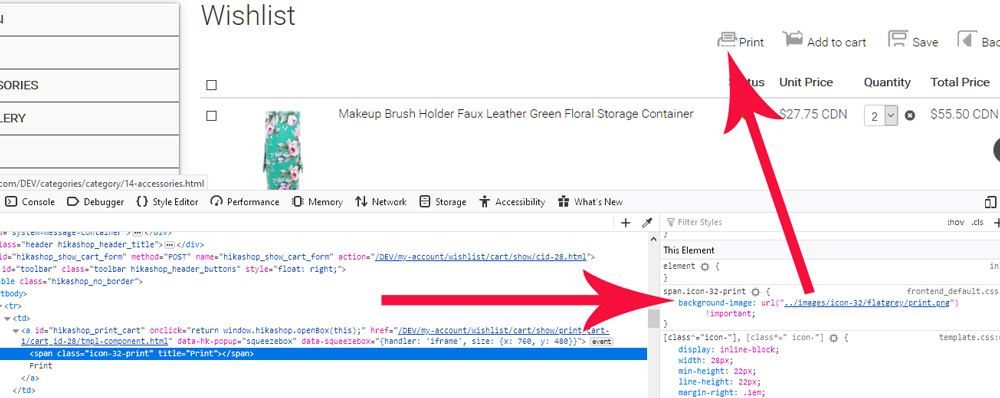
Thanks!
Thanks!
Please Log in or Create an account to join the conversation.
6 years 4 months ago #319190
by nicolas
Replied by nicolas on topic Replace Icons With Font Awesome
Hi,
These are old icons that aren't used anymore.
If you have them as I can see on your screenshot, then either you have an old version of HikaShop, or you have a view override based on an old version of HikaShop.
If you have an old version of HikaShop, then updating would solve the problem.
If that's not the case, then you can check the folder templates/YOUR_TEMPLATE/html/com_hikashop/cart/ via FTP.
There, if you see files, try renaming them to disable the view overrides and access that page again and you should see the new icons using font-awesome.
These are old icons that aren't used anymore.
If you have them as I can see on your screenshot, then either you have an old version of HikaShop, or you have a view override based on an old version of HikaShop.
If you have an old version of HikaShop, then updating would solve the problem.
If that's not the case, then you can check the folder templates/YOUR_TEMPLATE/html/com_hikashop/cart/ via FTP.
There, if you see files, try renaming them to disable the view overrides and access that page again and you should see the new icons using font-awesome.
Please Log in or Create an account to join the conversation.
Time to create page: 0.176 seconds