
- Posts: 43
- Thank you received: 1
Changing Image Size
- bruce@brucedill.com
-
 Topic Author
- Offline
Less
More
4 years 8 months ago #338487
by bruce@brucedill.com
Changing Image Size was created by bruce@brucedill.com
-- HikaShop version -- : 4.4.5
-- Joomla version -- : 3x
-- PHP version -- : 7.4.24
-- Browser(s) name and version -- : Chrome
-- Error-message(debug-mod must be tuned on) -- : None
I've tried everything I could fine,
I tried:
Product page image (width x height)
Here is a screen shot of my product page
Thanks
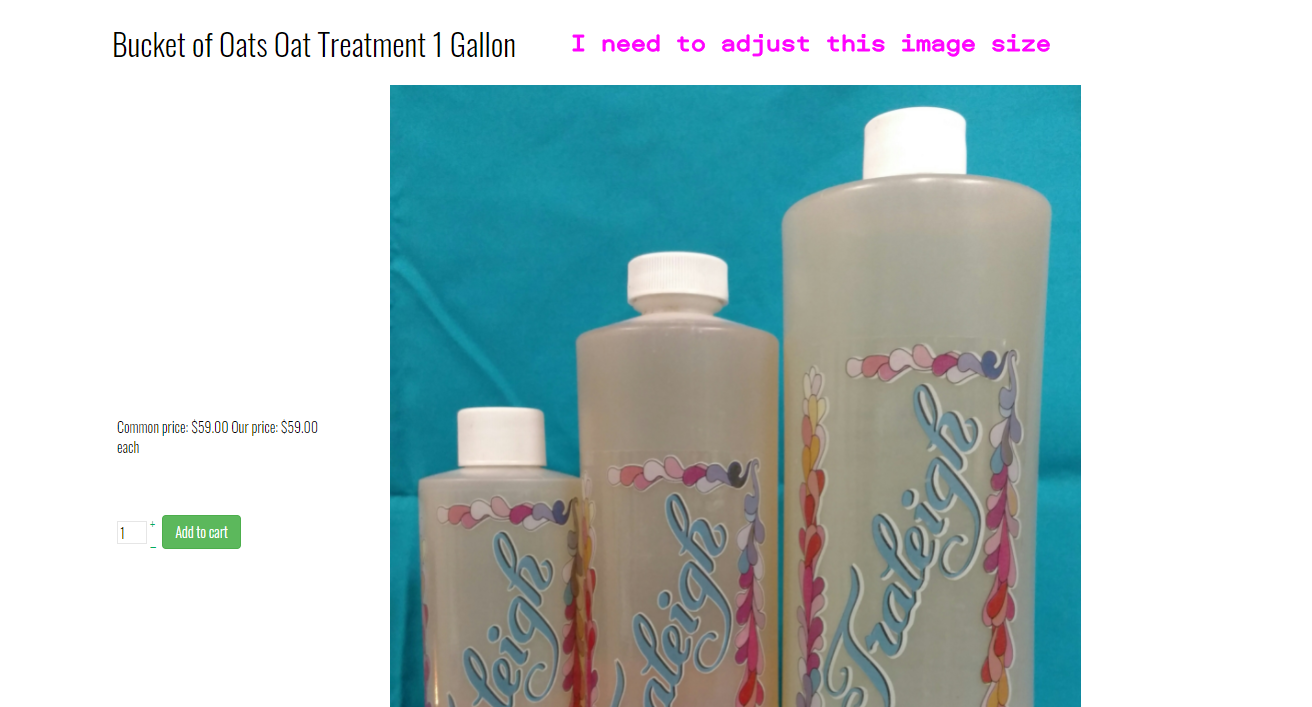
-- Joomla version -- : 3x
-- PHP version -- : 7.4.24
-- Browser(s) name and version -- : Chrome
-- Error-message(debug-mod must be tuned on) -- : None
I've tried everything I could fine,
I tried:
Product page image (width x height)
Here is a screen shot of my product page
Thanks
Please Log in or Create an account to join the conversation.

4 years 8 months ago - 4 years 8 months ago #338488
by Philip
Replied by Philip on topic Changing Image Size
Hello,
There are something that we don't understand, on your provided link we aren't able to see what you show in your screenshot.
To be more specific, we aren't able as well to recognize some HikaShop Html...
Anyway we need to see the context, in order to be able to better answer you.
Awaiting your returns to progress.
Regards
There are something that we don't understand, on your provided link we aren't able to see what you show in your screenshot.
To be more specific, we aren't able as well to recognize some HikaShop Html...
Anyway we need to see the context, in order to be able to better answer you.
Awaiting your returns to progress.
Regards
Last edit: 4 years 8 months ago by Philip.
Please Log in or Create an account to join the conversation.
- bruce@brucedill.com
-
Topic Author
- Offline
Less
More
- Posts: 43
- Thank you received: 1
4 years 8 months ago #338494
by bruce@brucedill.com
Replied by bruce@brucedill.com on topic Changing Image Size
I would be happy to send you credentials so you can login . Then I can give you the exact menu sequence. I can also make you a link to a video or zip one up and send to you.
You people are just great to help me.
Bruce
You people are just great to help me.
Bruce
Please Log in or Create an account to join the conversation.

4 years 8 months ago #338500
by nicolas
Replied by nicolas on topic Changing Image Size
Hi,
Please provide the information via our contact form with a link to this thread for reference:
www.hikashop.com/support/contact-us.html
Please provide the information via our contact form with a link to this thread for reference:
www.hikashop.com/support/contact-us.html
Please Log in or Create an account to join the conversation.
- bruce@brucedill.com
-
Topic Author
- Offline
Less
More
- Posts: 43
- Thank you received: 1
4 years 8 months ago #338501
by bruce@brucedill.com
Replied by bruce@brucedill.com on topic Changing Image Size
1) Hover over the HOME Menu item and login
2) Click on HIKASHOP
3) Click on "Shampoos"
4) Click on Bucket of Oats
5) Bucket of Oats Oat Treatment 1 Gallon
I so appreciate the help
2) Click on HIKASHOP
3) Click on "Shampoos"
4) Click on Bucket of Oats
5) Bucket of Oats Oat Treatment 1 Gallon
I so appreciate the help
Please Log in or Create an account to join the conversation.
4 years 8 months ago - 4 years 8 months ago #338508
by Philip
Replied by Philip on topic Changing Image Size
Hello,
We were able to reach the HikaShop page, first thing the displayed results leads us to ask ourselves a lot of questions, but few certainties as to the origins of your display problems...
Suddenly, several tests to do to allow us to progress on your subject:
- Did you try to edit your image option in the Main HikaShop configuration, and Images part

- Can you check that you have activated the Bootstrap V2.
=> If Yes try to switch it off

- Process some tests with a default template like ProtoStar to see if that make progress your display
=> We suspect that part of your issue come from your template, but can be sure of it.
Awaiting your returns and better be able to see your display WITH these settings will help us a lot to answer you.
Regards
We were able to reach the HikaShop page, first thing the displayed results leads us to ask ourselves a lot of questions, but few certainties as to the origins of your display problems...
Suddenly, several tests to do to allow us to progress on your subject:
- Did you try to edit your image option in the Main HikaShop configuration, and Images part
- Can you check that you have activated the Bootstrap V2.
=> If Yes try to switch it off
- Process some tests with a default template like ProtoStar to see if that make progress your display
=> We suspect that part of your issue come from your template, but can be sure of it.
Awaiting your returns and better be able to see your display WITH these settings will help us a lot to answer you.
Regards
Last edit: 4 years 8 months ago by Philip.
Please Log in or Create an account to join the conversation.
- bruce@brucedill.com
-
Topic Author
- Offline
Less
More
- Posts: 43
- Thank you received: 1
4 years 8 months ago #338535
by bruce@brucedill.com
Replied by bruce@brucedill.com on topic Changing Image Size
Hello. Thinking it might be the template I purchased a new one from
rockettheme.com/joomla/templates
. it is j3 and J4 compatible.
Bootstrap 2 is OFF
I hope this helps
Bootstrap 2 is OFF
I hope this helps
Please Log in or Create an account to join the conversation.
Time to create page: 0.225 seconds