
- Posts: 47
- Thank you received: 0
Discount not working as intended...
- ben_whitney
-
 Topic Author
- Offline
Less
More
13 years 2 months ago #117567
by ben_whitney
Discount not working as intended... was created by ben_whitney
I can't seem to get my discounts working properly. For some reason, it applies the discount to all products even though I haven't entered the discount during the checkout process.
I've set a discount called "bcjc2013" to apply a 5% discount to products in the Armor category. See the attached screenshot for details.
I also find that applying the discount by category to be problematic for the number of products I have... ideally it would be easier to apply the discount by brand/manufacturer.
I've set a discount called "bcjc2013" to apply a 5% discount to products in the Armor category. See the attached screenshot for details.
I also find that applying the discount by category to be problematic for the number of products I have... ideally it would be easier to apply the discount by brand/manufacturer.
Please Log in or Create an account to join the conversation.
- ben_whitney
-
Topic Author
- Offline
Less
More
- Posts: 47
- Thank you received: 0
13 years 2 months ago #117568
by ben_whitney
Replied by ben_whitney on topic Discount not working as intended...
I'm running Hikashop Business, version 2.2 on Joomla 3.1.5
Please Log in or Create an account to join the conversation.

13 years 2 months ago #117585
by nicolas
Replied by nicolas on topic Discount not working as intended...
Discounts apply directly on the price of products, that's normal. What you want to use are called "coupons". Change the type of your discount to "coupon" and you will see that it works like you want.
Discounts/coupons can apply onto a product or a category. There is no option to have it apply to a brand for now.
Discounts/coupons can apply onto a product or a category. There is no option to have it apply to a brand for now.
The following user(s) said Thank You: ronvonck
Please Log in or Create an account to join the conversation.
- ben_whitney
-
Topic Author
- Offline
Less
More
- Posts: 47
- Thank you received: 0
13 years 2 months ago #118618
by ben_whitney
Replied by ben_whitney on topic Discount not working as intended...
Thanks Nicolas,
Switched the Discount to a Coupon and it appears to work. However I've noticed that the restrictions aren't behaving correctly.
I've set the Category to "Armor" which means any items and sub categories in the Armor section should be discounted. However, if I add an item from another product category, the systems gives a discount for that product as well...
Try using the coupon code "bcjc2013" to see what I mean.
Our site is here:
www.badassjeeps.com
Switched the Discount to a Coupon and it appears to work. However I've noticed that the restrictions aren't behaving correctly.
I've set the Category to "Armor" which means any items and sub categories in the Armor section should be discounted. However, if I add an item from another product category, the systems gives a discount for that product as well...
Try using the coupon code "bcjc2013" to see what I mean.
Our site is here:
www.badassjeeps.com
Please Log in or Create an account to join the conversation.

Less
More
- Posts: 12953
- Thank you received: 1778
13 years 2 months ago - 13 years 2 months ago #118639
by Mohamed Thelji
Replied by Mohamed Thelji on topic Discount not working as intended...
Hi,
I think that the problem is coming from the fact that coupon are applied to your customer orders and discount are directly applied to products.
So if one of the products that are in your cart is in your coupon's product category, the coupon can be applied to this order.
I think that the problem is coming from the fact that coupon are applied to your customer orders and discount are directly applied to products.
So if one of the products that are in your cart is in your coupon's product category, the coupon can be applied to this order.
Last edit: 13 years 2 months ago by Mohamed Thelji.
Please Log in or Create an account to join the conversation.
- ben_whitney
-
Topic Author
- Offline
Less
More
- Posts: 47
- Thank you received: 0
13 years 2 months ago #118763
by ben_whitney
Replied by ben_whitney on topic Discount not working as intended...
So with that in mind, if I revert it back to a discount, can I force it to only show the discounted price in the cart after the discount has been applied via the Enter Coupon Code box, rather than the way it behaves now where it automatically applies the discount across the board without even entering in the coupon code.
Please Log in or Create an account to join the conversation.

13 years 2 months ago #118792
by Xavier
Replied by Xavier on topic Discount not working as intended...
Hi,
When you set it to "coupon" you have more options displayed, thanks to enable the option "Coupon percentage applies to product only ". This will affect only the discounted products and not all the cart.
When you set it to "coupon" you have more options displayed, thanks to enable the option "Coupon percentage applies to product only ". This will affect only the discounted products and not all the cart.
Please Log in or Create an account to join the conversation.
- ben_whitney
-
Topic Author
- Offline
Less
More
- Posts: 47
- Thank you received: 0
13 years 2 months ago #118931
by ben_whitney
Replied by ben_whitney on topic Discount not working as intended...
I set the option "Coupon percentage applies to product only " to "Yes" and it still seems to apply to all products regardless of Category. Do I have to individually select the products perhaps? That would be a pain to do as I have several hundred products in the database at this point.
Thanks in advance,
Ben
Thanks in advance,
Ben
Please Log in or Create an account to join the conversation.

13 years 2 months ago - 13 years 2 months ago #118992
by Jerome
Jerome - Obsidev.com
HikaMarket & HikaSerial developer / HikaShop core dev team.
Replied by Jerome on topic Discount not working as intended...
Hi,
I have reproduced your problem. We will provide a patch as soon as possible.
Regards,
I have reproduced your problem. We will provide a patch as soon as possible.
Regards,
Jerome - Obsidev.com
HikaMarket & HikaSerial developer / HikaShop core dev team.
Last edit: 13 years 2 months ago by Jerome.
Please Log in or Create an account to join the conversation.
13 years 2 months ago #119063
by Jerome
Jerome - Obsidev.com
HikaMarket & HikaSerial developer / HikaShop core dev team.
Replied by Jerome on topic Discount not working as intended...
Hi,
Well, I have finally find some time to make the debug. I am alone today for the support (bank holiday) so there is a lot to do.
So ! Please edit the file "administrator/components/com_hikashop/classes/discount.php" and replace
By:
And it will reset the discount system right, as before.
Regards,
Well, I have finally find some time to make the debug. I am alone today for the support (bank holiday) so there is a lot to do.
So ! Please edit the file "administrator/components/com_hikashop/classes/discount.php" and replace
Code:
if(!$product->cart_product_option_parent_id) {
foreach ($id as $productid) {
if(!$product->product_id == $productid[0]){
Code:
if(!$product->cart_product_option_parent_id) {
foreach ($id as $productid) {
if($product->product_id !== $productid[0]){
Regards,
Jerome - Obsidev.com
HikaMarket & HikaSerial developer / HikaShop core dev team.
Please Log in or Create an account to join the conversation.
- ben_whitney
-
Topic Author
- Offline
Less
More
- Posts: 47
- Thank you received: 0
13 years 2 months ago #119064
by ben_whitney
Replied by ben_whitney on topic Discount not working as intended...
I was looking into it a little more myself and found that if you 1st add a product outside the Armor category, the coupon is denied, which is correct. However, if you add a 2nd product to the cart from a category that the coupon accepts, then it discounts BOTH products instead of just the one.
Please Log in or Create an account to join the conversation.
13 years 2 months ago #119068
by Jerome
Jerome - Obsidev.com
HikaMarket & HikaSerial developer / HikaShop core dev team.
Replied by Jerome on topic Discount not working as intended...
Hi,
Please apply the patch from my previous post.
Regards,
Please apply the patch from my previous post.
Regards,
Jerome - Obsidev.com
HikaMarket & HikaSerial developer / HikaShop core dev team.
Please Log in or Create an account to join the conversation.
- ben_whitney
-
Topic Author
- Offline
Less
More
- Posts: 47
- Thank you received: 0
13 years 2 months ago #119111
by ben_whitney
Replied by ben_whitney on topic Discount not working as intended...
Thanks Jerome! Appreciate the quick response. I'll let you know how the patch goes.
Cheers,
Ben
Cheers,
Ben
Please Log in or Create an account to join the conversation.
- ben_whitney
-
Topic Author
- Offline
Less
More
- Posts: 47
- Thank you received: 0
13 years 2 months ago #119124
by ben_whitney
Replied by ben_whitney on topic Discount not working as intended...
Bug fix worked, thanks Jerome!
Please Log in or Create an account to join the conversation.
Less
More
- Posts: 7
- Thank you received: 0
12 years 10 months ago - 12 years 10 months ago #134929
by sarahoxford
Replied by sarahoxford on topic Discount not working as intended...
I see this message was 3 months ago, has this patch been added to the last update?
I'm having exactly the same problem, coupon being incorrectly applied to first category if the second products added are from a category that has a valid coupon, do I need to add the fix you've provided?
Please help as our customers are getting massive discounts on a category which does not have a coupon attached!
Thanks
I'm having exactly the same problem, coupon being incorrectly applied to first category if the second products added are from a category that has a valid coupon, do I need to add the fix you've provided?
Please help as our customers are getting massive discounts on a category which does not have a coupon attached!
Thanks
Last edit: 12 years 10 months ago by sarahoxford.
Please Log in or Create an account to join the conversation.
Less
More
- Posts: 12953
- Thank you received: 1778
12 years 10 months ago #134955
by Mohamed Thelji
Replied by Mohamed Thelji on topic Discount not working as intended...
Hi,
Sure this patch has been added through the last last Hikashop version, so can you download it through our website and test it again ?
Sure this patch has been added through the last last Hikashop version, so can you download it through our website and test it again ?
Please Log in or Create an account to join the conversation.
Less
More
- Posts: 7
- Thank you received: 0
12 years 10 months ago - 12 years 10 months ago #134969
by sarahoxford
Replied by sarahoxford on topic Discount not working as intended...
I'm running the latest version HikaShop Business: 2.2.2 and I've checked the code which is now this (your fix and some additional code)
if(!$product->cart_product_option_parent_id) {
foreach ($id as $productid) {
if($product->product_id !== $productid[0] && empty($coupon->discount_coupon_product_only)){
BUT I am still getting this bug what can i do?
thanks
if(!$product->cart_product_option_parent_id) {
foreach ($id as $productid) {
if($product->product_id !== $productid[0] && empty($coupon->discount_coupon_product_only)){
BUT I am still getting this bug what can i do?
thanks
Last edit: 12 years 10 months ago by sarahoxford. Reason: added code info
Please Log in or Create an account to join the conversation.
12 years 10 months ago #135055
by Xavier
Replied by Xavier on topic Discount not working as intended...
Hi,
Even without your custom code it's not working ?
This patch should be working fine. Are you sure that you coupon/discount configuration is correct ?
Even without your custom code it's not working ?
This patch should be working fine. Are you sure that you coupon/discount configuration is correct ?
Please Log in or Create an account to join the conversation.
12 years 10 months ago #135228
by Shope2
Replied by Shope2 on topic Discount not working as intended...
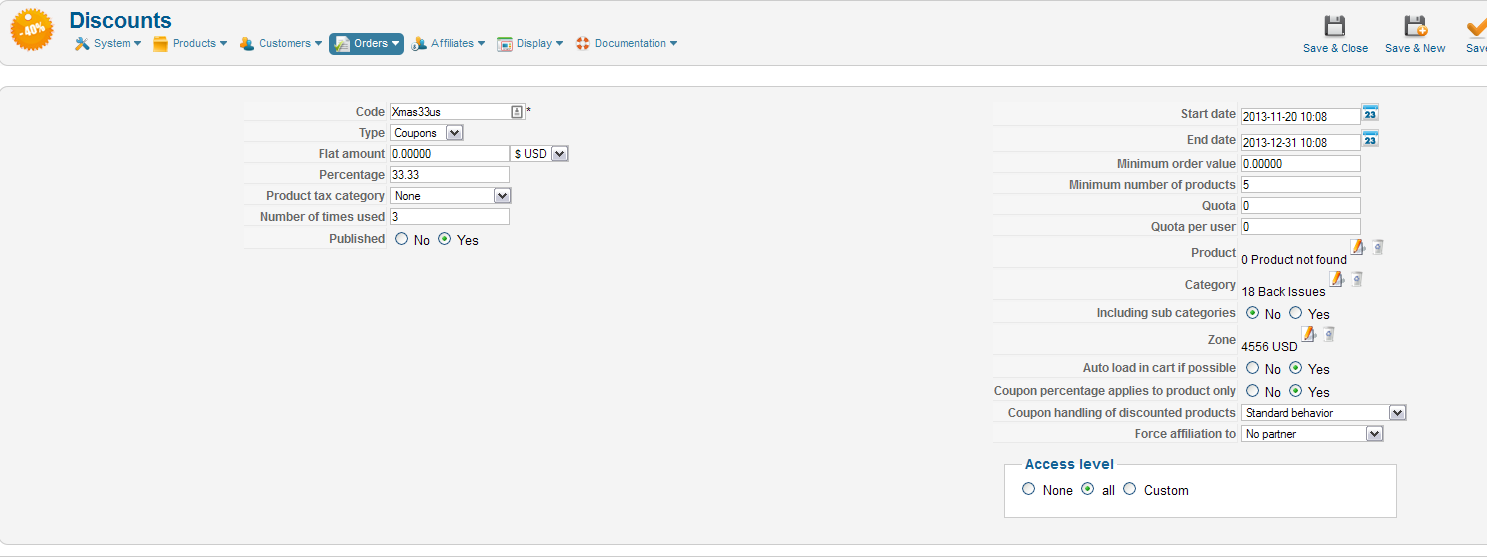
Hi, Yes as sure as I can be, attached a screen shot.
The discount is on the back issues category only. If the order is only for back issues (5 or more) it's working fine, but an order for 2 x back issues and a product from another category triggered the discount. This shouldn't be possible the other category product should have been at full price and no discount for the 2 x back issues as the number was under 5.
Thanks
Hope
(Replying from linked subscription)
The discount is on the back issues category only. If the order is only for back issues (5 or more) it's working fine, but an order for 2 x back issues and a product from another category triggered the discount. This shouldn't be possible the other category product should have been at full price and no discount for the 2 x back issues as the number was under 5.
Thanks
Hope
(Replying from linked subscription)
Please Log in or Create an account to join the conversation.
12 years 10 months ago #135714
by Shope2
Replied by Shope2 on topic Discount not working as intended...
Please could you look at this problem, still need a solution to this discount bug.
Please Log in or Create an account to join the conversation.
Time to create page: 0.569 seconds