

- Posts: 1
- Thank you received: 0
Not receiving email after purchase
12 years 6 months ago #152430
by joac1424
Not receiving email after purchase was created by joac1424
-- url of the page with the problem -- :
c-value.dk/c-value-webshop
-- HikaShop version -- : 2.3.0
-- Joomla version -- : 2.5
-- PHP version -- : 5.5.8
-- Browser(s) name and version -- : Chrome
Hello guys
I hope you can help me out with this issue. I have just installed hikashop and it seems to be working perfectly except for one important feature. When I buy a product in the "webshop" I don't receive an email with the confirmation. I have entered an email address in Global Configuration --> Server --> Mail settings.
What could the problem be?
-- HikaShop version -- : 2.3.0
-- Joomla version -- : 2.5
-- PHP version -- : 5.5.8
-- Browser(s) name and version -- : Chrome
Hello guys
I hope you can help me out with this issue. I have just installed hikashop and it seems to be working perfectly except for one important feature. When I buy a product in the "webshop" I don't receive an email with the confirmation. I have entered an email address in Global Configuration --> Server --> Mail settings.
What could the problem be?
Please Log in or Create an account to join the conversation.

12 years 6 months ago #152436
by Xavier
Replied by Xavier on topic Not receiving email after purchase
Hi,
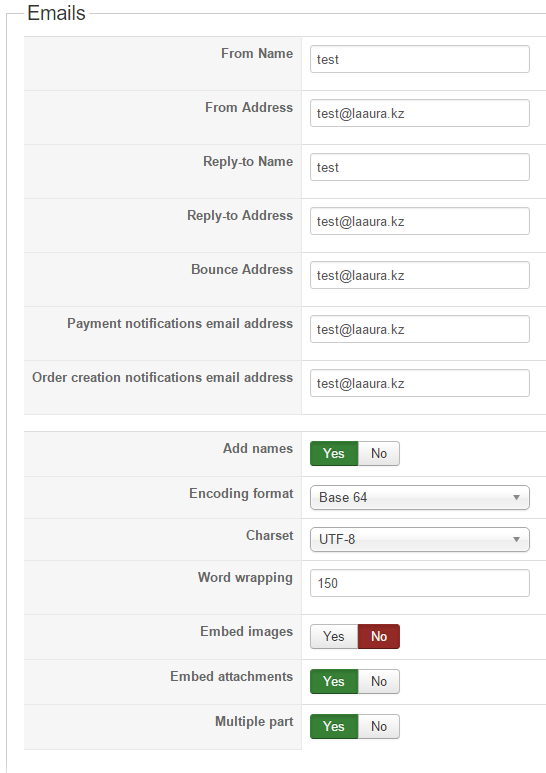
You have to fill the options fields in HikaShop > Configuration > Main > Emails.
You have to fill the options fields in HikaShop > Configuration > Main > Emails.
Please Log in or Create an account to join the conversation.

10 years 4 months ago - 10 years 4 months ago #242187
by alikon1
Replied by alikon1 on topic Not receiving email after purchase
Updated to 2.6.3 and now don't receive order creation emails. Nothing change in hikashop configuration. Main -> Emails still filled. But no mails receive. Joomlas's test mail works fine.
Before, on 2.2.3 everything was OK.
Before, on 2.2.3 everything was OK.
Last edit: 10 years 4 months ago by alikon1.
Please Log in or Create an account to join the conversation.
10 years 4 months ago #242188
by alikon1
Replied by alikon1 on topic Not receiving email after purchase
Compare settings with backup of 2.2.3 - all the same.
Please help, we can't receive orders.
Please help, we can't receive orders.
Please Log in or Create an account to join the conversation.
10 years 4 months ago #242196
by alikon1
Replied by alikon1 on topic Not receiving email after purchase
Configuration before update was the same.
Old configuration:
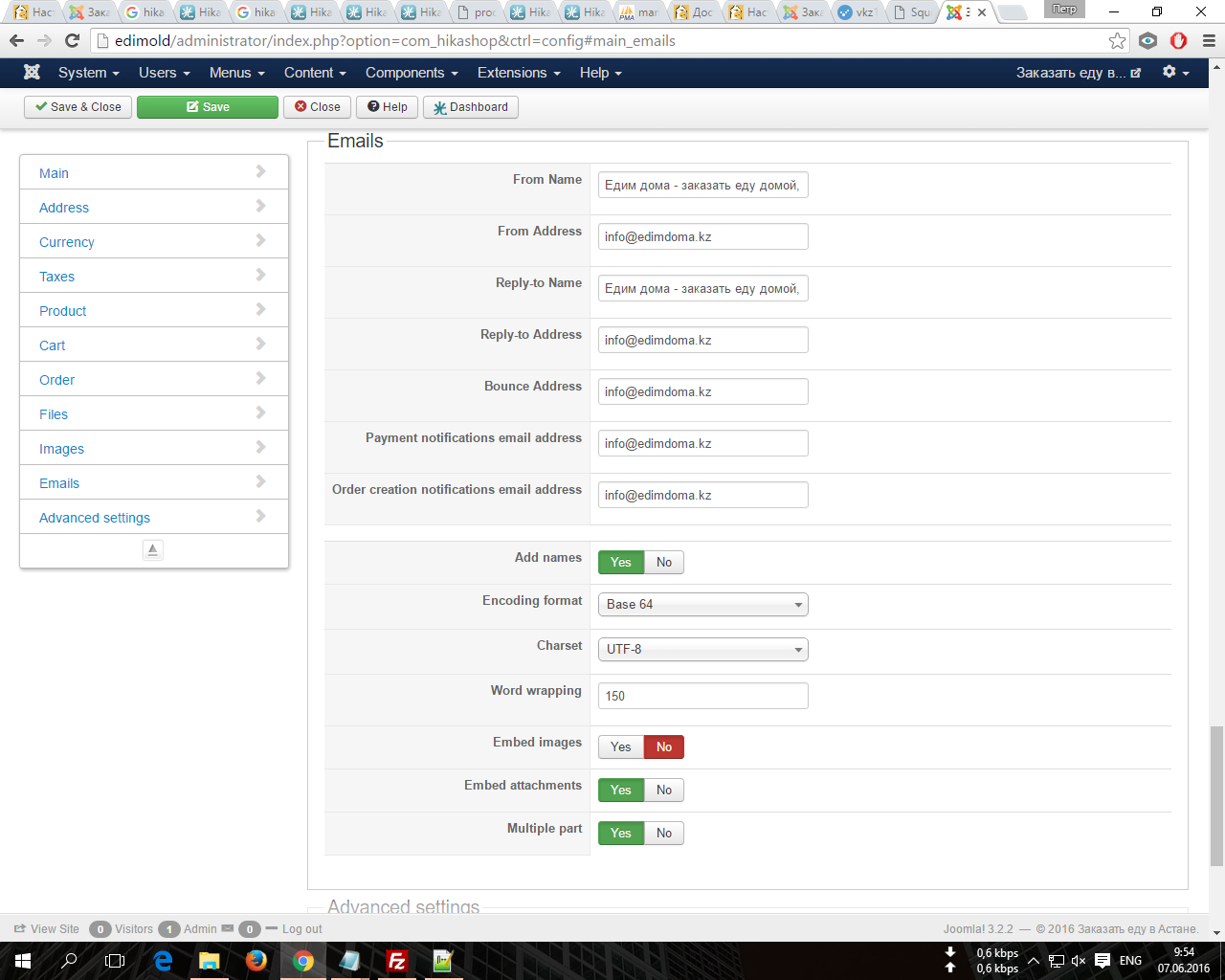
New configuration:
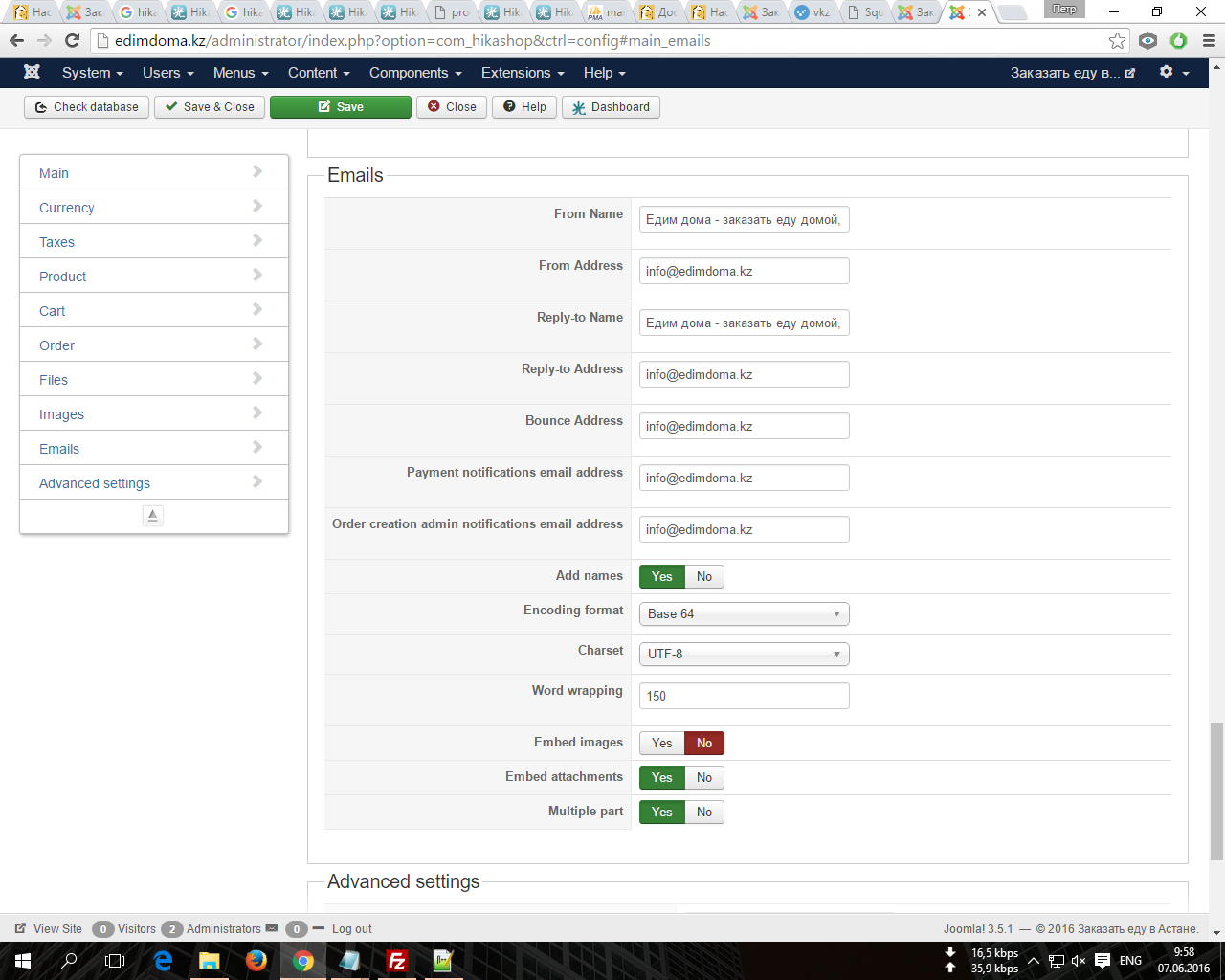
Old configuration:
New configuration:
Please Log in or Create an account to join the conversation.
10 years 4 months ago #242197
by alikon1
Replied by alikon1 on topic Not receiving email after purchase
Try PHP mail, Sendmail, SMTP - with all configurations I receive Joomla test messages. But not hikashop order mail.
Please Log in or Create an account to join the conversation.
10 years 4 months ago - 10 years 4 months ago #242201
by alikon1
Replied by alikon1 on topic Not receiving email after purchase
Install new clean Joomla 3.5.1 and Hikashop 2.6.3.
In System -> Payment methods check only Collect on delivery
In System -> Shipping methods check only Manual shipping
Enable Allow User Registration, create Test user and make order. I receive confirmation email.
But we do not use any registration, customer write his phone and address and thats all.
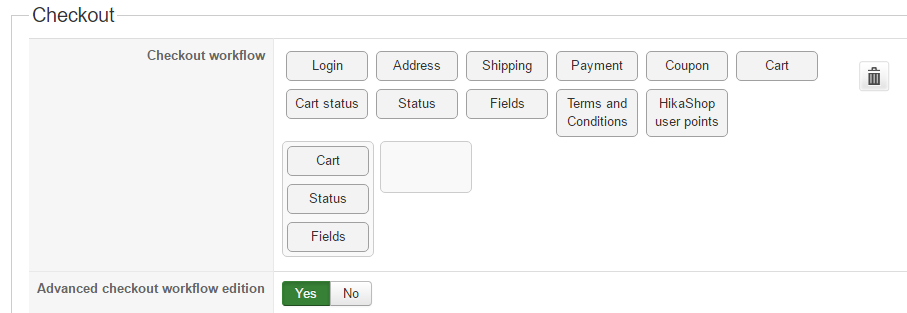
So try change Checkout workflow as it was in 2.2.3:
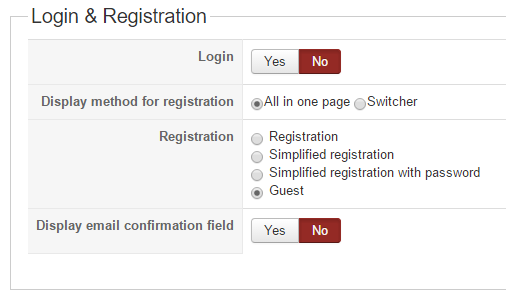
Login & Registration -> Login -> No
Login & Registration -> Registration -> Simplified registration with password
Checkout workflow: remove Login and Address.
Try to create new order. And no confirmation mail received. Why?
In 2.2.3 configuration was:
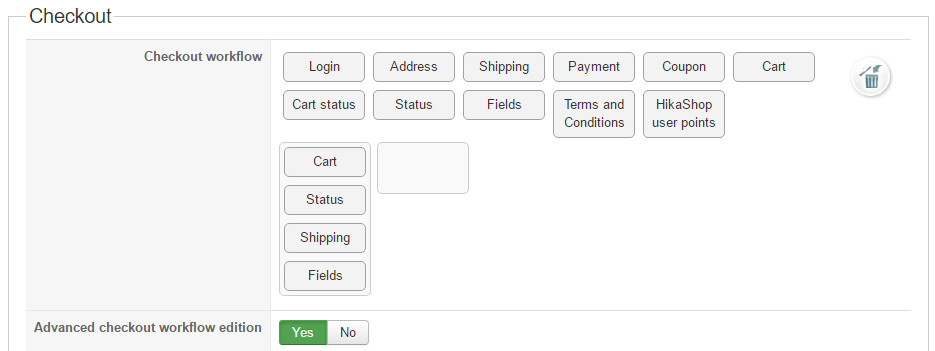
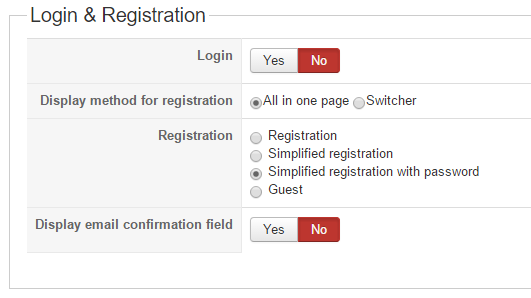
And everything worked fine.
In System -> Payment methods check only Collect on delivery
In System -> Shipping methods check only Manual shipping
Enable Allow User Registration, create Test user and make order. I receive confirmation email.
But we do not use any registration, customer write his phone and address and thats all.
So try change Checkout workflow as it was in 2.2.3:
Login & Registration -> Login -> No
Login & Registration -> Registration -> Simplified registration with password
Checkout workflow: remove Login and Address.
Try to create new order. And no confirmation mail received. Why?
In 2.2.3 configuration was:
And everything worked fine.
Last edit: 10 years 4 months ago by alikon1.
Please Log in or Create an account to join the conversation.
10 years 4 months ago #242203
by alikon1
Replied by alikon1 on topic Not receiving email after purchase
It's food delivery. We have only 1 hour to ship order. So now operator manually once a minute check orders in hikashop menu. It's impossible. How to return guest order creation?
Please Log in or Create an account to join the conversation.
10 years 4 months ago #242273
by alikon1
Replied by alikon1 on topic Not receiving email after purchase
You remove in 2.6.3 possibility to create order without registration and email? Should I return to 2.2.3 for email notifications to admin? I 13 hours refresh Orders page every 2-5 minutes and you not say why.
Please Log in or Create an account to join the conversation.

10 years 4 months ago #242266
by nicolas
Replied by nicolas on topic Not receiving email after purchase
Hi,
The "login" view is where the customer enters his email address to be notified.
If you remove the view, then HikaShop is not collecting the user's email address and no email is sent to the customer. That has always been the case, in HikaShop 2.6.3, and HikaShop 2.2.3
If you install HikaShop 2.2.3 with with the same settings, you'll have the same result: no email will be sent to the customer.
However, the order admin notification should still be sent when the order is created, even with these settings.
If that's not the case, I can only think that the "order admin notification" email has been disabled via the menu System>Emails, or that you have a custom plugin implementing the onAfterOrderCreate trigger and setting the second parameter $send_email to false.
That's normal.So try change Checkout workflow as it was in 2.2.3:
Login & Registration -> Login -> No
Login & Registration -> Registration -> Simplified registration with password
Checkout workflow: remove Login and Address.
Try to create new order. And no confirmation mail received. Why?
The "login" view is where the customer enters his email address to be notified.
If you remove the view, then HikaShop is not collecting the user's email address and no email is sent to the customer. That has always been the case, in HikaShop 2.6.3, and HikaShop 2.2.3
If you install HikaShop 2.2.3 with with the same settings, you'll have the same result: no email will be sent to the customer.
However, the order admin notification should still be sent when the order is created, even with these settings.
If that's not the case, I can only think that the "order admin notification" email has been disabled via the menu System>Emails, or that you have a custom plugin implementing the onAfterOrderCreate trigger and setting the second parameter $send_email to false.
Please Log in or Create an account to join the conversation.
10 years 4 months ago #242292
by alikon1
Replied by alikon1 on topic Not receiving email after purchase
We don't need customer notification. Only admin.
Install new clean Joomla 3.5.1 and Hikashop 2.6.3.
In System -> Payment methods check only Collect on delivery
In System -> Shipping methods check only Manual shipping
Checkout workflow and Login & Registration setting as on images.
It's all changes and it doesn't work, no admin mails after order creation.
Install new clean Joomla 3.5.1 and Hikashop 2.6.3.
In System -> Payment methods check only Collect on delivery
In System -> Shipping methods check only Manual shipping
Checkout workflow and Login & Registration setting as on images.
It's all changes and it doesn't work, no admin mails after order creation.
Please Log in or Create an account to join the conversation.
10 years 4 months ago - 10 years 4 months ago #242294
by alikon1
Replied by alikon1 on topic Not receiving email after purchase
When add Login block to Checkout workflow - admin receive order notification. Remove Login block - no emails to admin.
Part of the message is hidden for the guests. Please log in or register to see it.
Try to create order and there will be no mail to admin.
Part of the message is hidden for the guests. Please log in or register to see it.
Try to create order and there will be no mail to admin.
Last edit: 10 years 4 months ago by alikon1.
Please Log in or Create an account to join the conversation.
10 years 4 months ago #242314
by alikon1
Replied by alikon1 on topic Not receiving email after purchase
Install sendmail trap on localhost and enable in joomla's configuration mailer -> sendmail.
It see all joomla's mails but no mail for admin in order creation end.
It see all joomla's mails but no mail for admin in order creation end.
Please Log in or Create an account to join the conversation.
10 years 4 months ago #242342
by alikon1
Replied by alikon1 on topic Not receiving email after purchase
Record
youtube video
. Where I did mistake?
Please Log in or Create an account to join the conversation.
10 years 4 months ago #242344
by alikon1
Replied by alikon1 on topic Not receiving email after purchase
Found new menu Customers -> Email History, but there NO mail was sent for order without Login.
Please Log in or Create an account to join the conversation.
10 years 4 months ago - 10 years 4 months ago #242353
by alikon1
Replied by alikon1 on topic Not receiving email after purchase
Have old Hikashop 2.3.0 installer and try to install it with
patch
and emails works fine:
With login receive admin mail and Mail delivery failed (I wrote nonexistent buyer email in checkout)
Then try make order without login and receive admin mail too.
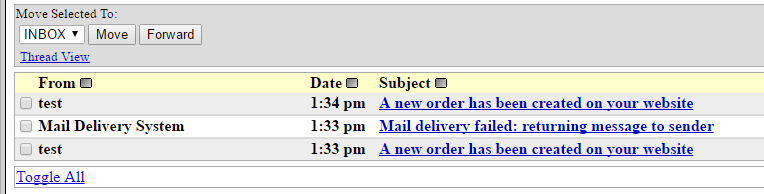
It's a bug in 2.6.3?
With login receive admin mail and Mail delivery failed (I wrote nonexistent buyer email in checkout)
Then try make order without login and receive admin mail too.
It's a bug in 2.6.3?
Last edit: 10 years 4 months ago by alikon1.
Please Log in or Create an account to join the conversation.
10 years 4 months ago #242356
by alikon1
Replied by alikon1 on topic Not receiving email after purchase
These are 2.3.0 configuration screens. The same as it was in 2.6.3, but works OK.
Please Log in or Create an account to join the conversation.
10 years 4 months ago #242547
by alikon1
Replied by alikon1 on topic Not receiving email after purchase
Why support don't help me? I'm waiting answer 3rd day why hikashop doesn't work
Please Log in or Create an account to join the conversation.
10 years 4 months ago #242742
by alikon1
Replied by alikon1 on topic Not receiving email after purchase
Emails still don't work.
Please Log in or Create an account to join the conversation.
10 years 4 months ago #242764
by alikon1
Replied by alikon1 on topic Not receiving email after purchase
If change System -> Configuration -> Main -> Order -> Default order status for example to Confirmed, it will no affect new order status. It still will be Created. When no Login in Checkout workflow - it doesn't work too.
Please Log in or Create an account to join the conversation.
Time to create page: 0.687 seconds