

- Posts: 32
- Thank you received: 0
No shipping method found
10 years 10 months ago #223159
by johnh823
No shipping method found was created by johnh823
-- HikaShop version -- : 2.64
-- Joomla version -- : 3.4
-- PHP version -- : 5.4.4
-- Browser(s) name and version -- : Chrome 46.0.2490.86m
I configured UPS with Access Key, ID, Password, Shipper and it's published, but at check out still says No shipping method found. Any ideas?
Thanks
-- Joomla version -- : 3.4
-- PHP version -- : 5.4.4
-- Browser(s) name and version -- : Chrome 46.0.2490.86m
I configured UPS with Access Key, ID, Password, Shipper and it's published, but at check out still says No shipping method found. Any ideas?
Thanks
Please Log in or Create an account to join the conversation.

10 years 10 months ago #223202
by nicolas
Replied by nicolas on topic No shipping method found
Hi,
Did you set a weight and dimensions in your products ?
Did you already entered an address on your checkout ?
Did you set any restrictions in your shipping method ?
Did you set a weight and dimensions in your products ?
Did you already entered an address on your checkout ?
Did you set any restrictions in your shipping method ?
Please Log in or Create an account to join the conversation.
10 years 10 months ago #223209
by johnh823
Replied by johnh823 on topic No shipping method found
I have attached a screenshot.
1. Did you set a weight and dimensions in your products ? - I entered weight, but we are not using dimensions and have indicated this on UPS set-up.
2. Did you already entered an address on your checkout ? I try to check out using an address of a test customer. Get "No shipping method found" each time I try.
3. Did you set any restrictions in your shipping method ? No (see screen shot).
I did set a Warehouse in UPS set-up (Do you have to?) but it is not set in Products and doesn't not show as an option.
Thanks
1. Did you set a weight and dimensions in your products ? - I entered weight, but we are not using dimensions and have indicated this on UPS set-up.
2. Did you already entered an address on your checkout ? I try to check out using an address of a test customer. Get "No shipping method found" each time I try.
3. Did you set any restrictions in your shipping method ? No (see screen shot).
I did set a Warehouse in UPS set-up (Do you have to?) but it is not set in Products and doesn't not show as an option.
Thanks
Please Log in or Create an account to join the conversation.
10 years 10 months ago #223219
by nicolas
Replied by nicolas on topic No shipping method found
Hi,
Could you provide a screenshot of your shipping method settings ? (you can hide the credentials)
Could you provide a screenshot of your shipping method settings ? (you can hide the credentials)
Please Log in or Create an account to join the conversation.
10 years 10 months ago #223263
by johnh823
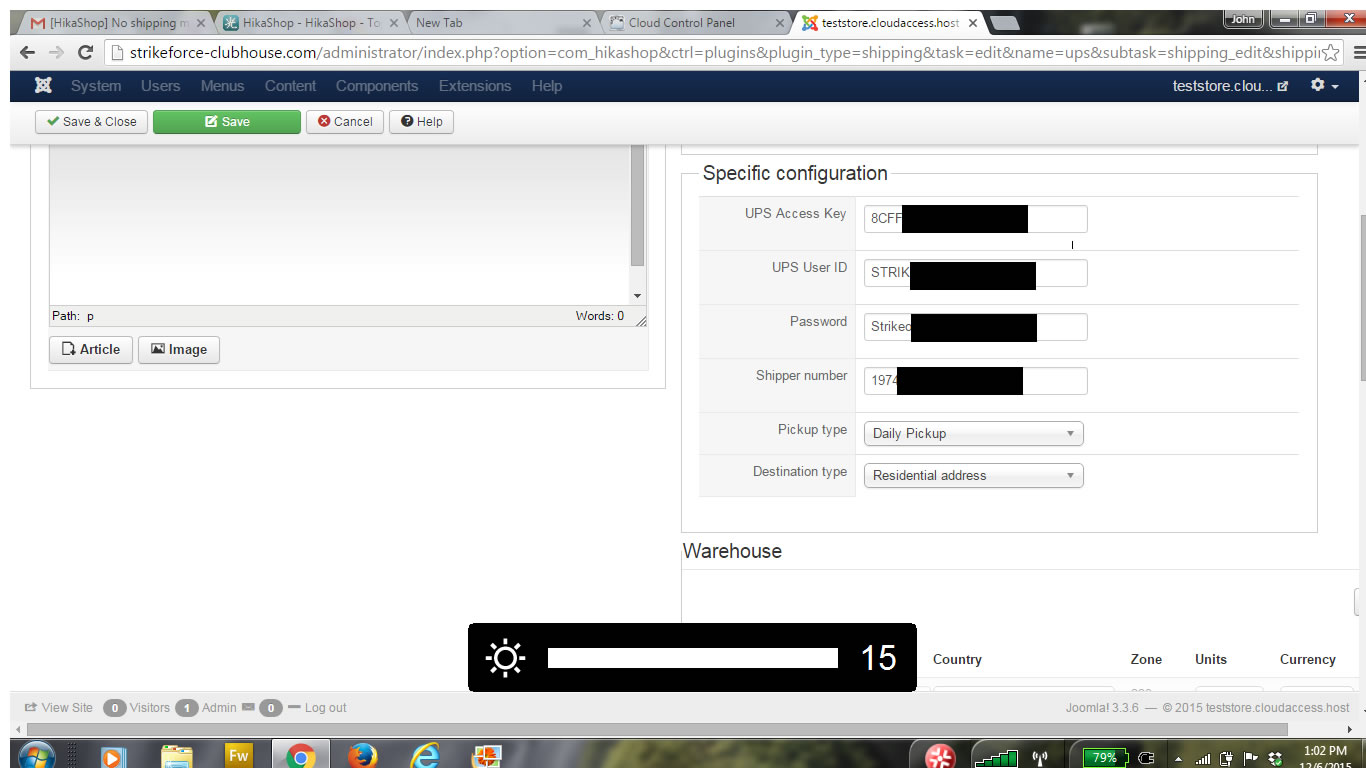
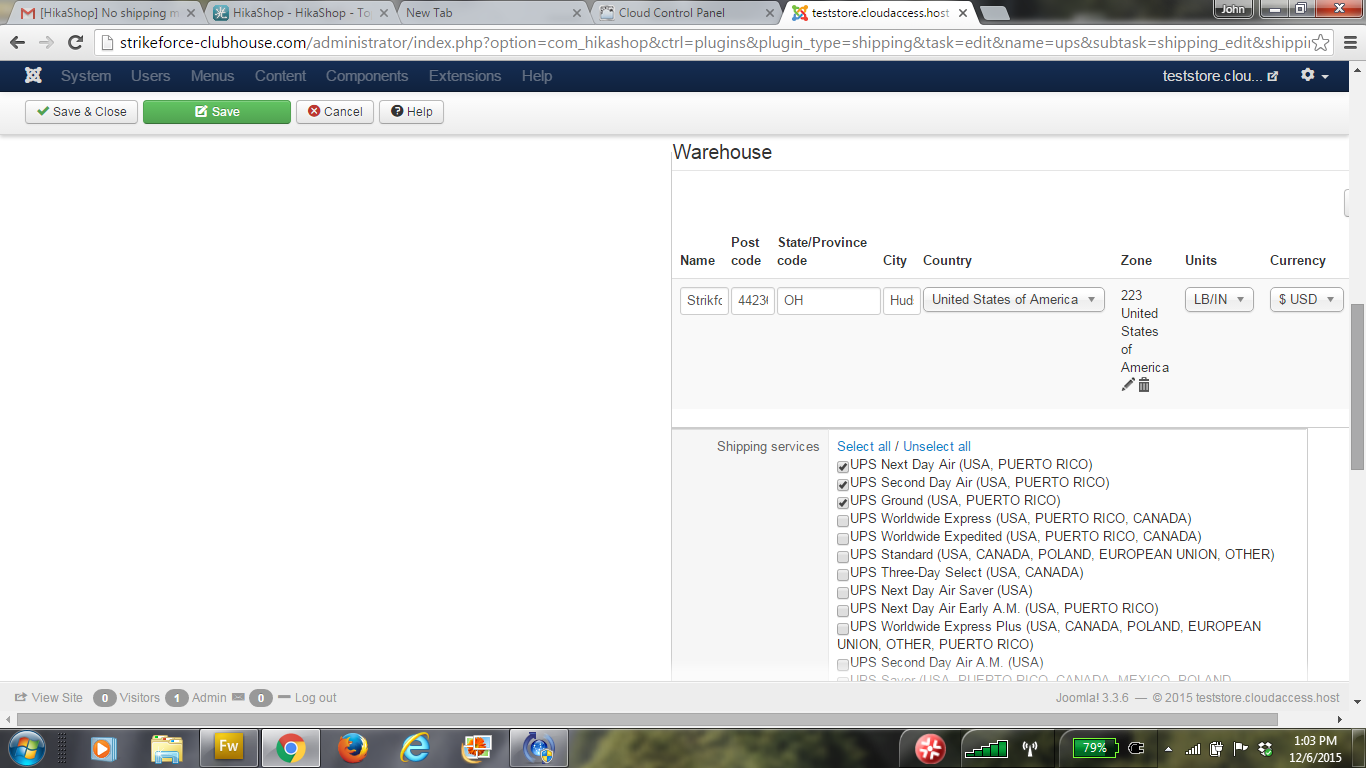
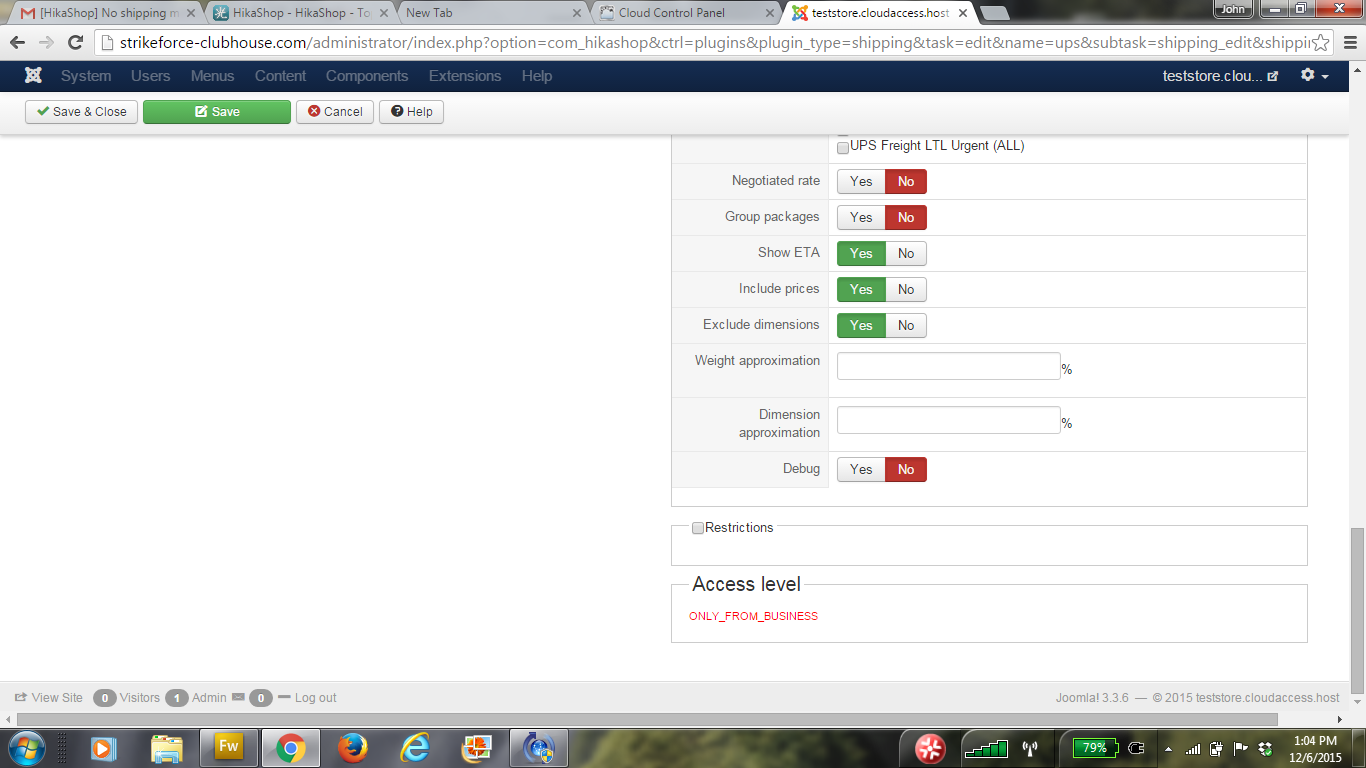
I have attached 3 screenshots of all but the generic information at top of the Shipping page.
Thanks
Replied by johnh823 on topic No shipping method found
I have attached 3 screenshots of all but the generic information at top of the Shipping page.
Thanks
Please Log in or Create an account to join the conversation.

Less
More
- Posts: 12953
- Thank you received: 1778
10 years 10 months ago #223295
by Mohamed Thelji
Replied by Mohamed Thelji on topic No shipping method found
Hello,
Your issue is probably coming from the fact that you have restricted your UPS warehouse to USA by usin the "Zone" option.
You should probably remove that option.
Your issue is probably coming from the fact that you have restricted your UPS warehouse to USA by usin the "Zone" option.
You should probably remove that option.
Please Log in or Create an account to join the conversation.
10 years 10 months ago - 10 years 10 months ago #223379
by johnh823
Replied by johnh823 on topic No shipping method found
Thanks it worked. I deleted the Zone USA. I have the warehouse still listed though.
1. Do I need this in the Shipping config.?
2. No warehouse is set in each product still though. In the RESTRICTIONS AND DIMENSIONS it says None and no Warehouse shows to pick in product settings. (see number 3 below).
3. I just saw where to add a Warehouse in the Hikashop config. and when I did this and added it to a product No Shipping Method showed when this product was added to cart. If you only have one place where your products are shipped from and they are in the Main config. and in the Shipping config.(as shown in attachment). Do you need to publish and choose one?
Thanks
1. Do I need this in the Shipping config.?
2. No warehouse is set in each product still though. In the RESTRICTIONS AND DIMENSIONS it says None and no Warehouse shows to pick in product settings. (see number 3 below).
3. I just saw where to add a Warehouse in the Hikashop config. and when I did this and added it to a product No Shipping Method showed when this product was added to cart. If you only have one place where your products are shipped from and they are in the Main config. and in the Shipping config.(as shown in attachment). Do you need to publish and choose one?
Thanks
Last edit: 10 years 10 months ago by johnh823. Reason: Found more information
Please Log in or Create an account to join the conversation.
Less
More
- Posts: 12953
- Thank you received: 1778
10 years 10 months ago - 10 years 10 months ago #223461
by Mohamed Thelji
Replied by Mohamed Thelji on topic No shipping method found
Hello,
What do you exactly mean by "I have the warehouse still listed though." ? Can you show me what do you have, and what you exactly want through some screenshots for example ?
Thanks
What do you exactly mean by "I have the warehouse still listed though." ? Can you show me what do you have, and what you exactly want through some screenshots for example ?
Thanks
Last edit: 10 years 10 months ago by Mohamed Thelji.
Please Log in or Create an account to join the conversation.
10 years 10 months ago #223512
by johnh823
Replied by johnh823 on topic No shipping method found
I mean in the UPS set-up see (attached)
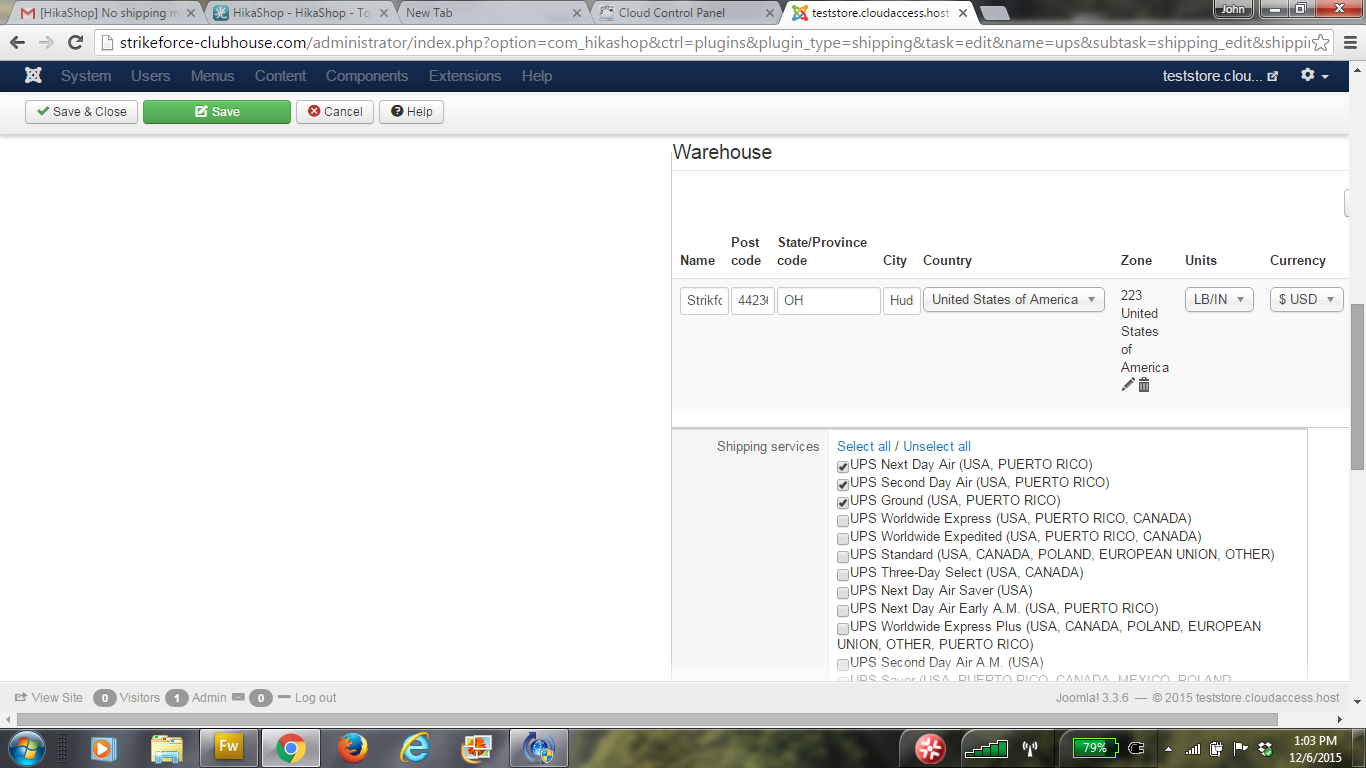
Looks like the Warehouse in each product doesn't need to be added. Is that true?
I did notice when testing today, that if I have a couple of shipping methods i.e. Pick-up at Store (manual shipping) and UPS (3 UPS options - Ground,....) they all don't show until the "Finish' button is pressed twice and then all options show. Any ideas?
THANKS!
Looks like the Warehouse in each product doesn't need to be added. Is that true?
I did notice when testing today, that if I have a couple of shipping methods i.e. Pick-up at Store (manual shipping) and UPS (3 UPS options - Ground,....) they all don't show until the "Finish' button is pressed twice and then all options show. Any ideas?
THANKS!
Please Log in or Create an account to join the conversation.
Less
More
- Posts: 12953
- Thank you received: 1778
10 years 10 months ago #223585
by Mohamed Thelji
Replied by Mohamed Thelji on topic No shipping method found
Hello,
Thanks.
YesLooks like the Warehouse in each product doesn't need to be added. Is that true?
That's probably coming from the way you have configured your checkout workflow via "Hikashop->System->Configuration->Checkout" can you show me how you configured it through some screenshots ?I did notice when testing today, that if I have a couple of shipping methods i.e. Pick-up at Store (manual shipping) and UPS (3 UPS options - Ground,....) they all don't show until the "Finish' button is pressed twice and then all options show. Any ideas?
Thanks.
Please Log in or Create an account to join the conversation.
10 years 10 months ago #223620
by johnh823
Replied by johnh823 on topic No shipping method found
Here is the checkout screenshot.
Thanks
Thanks
Please Log in or Create an account to join the conversation.
Less
More
- Posts: 12953
- Thank you received: 1778
10 years 10 months ago #223634
by Mohamed Thelji
Replied by Mohamed Thelji on topic No shipping method found
Hello,
Sorry but you didn't attached the checkout workflow screenshot.
Sorry but you didn't attached the checkout workflow screenshot.
Please Log in or Create an account to join the conversation.
10 years 10 months ago #223687
by johnh823
Replied by johnh823 on topic No shipping method found
Here it is.
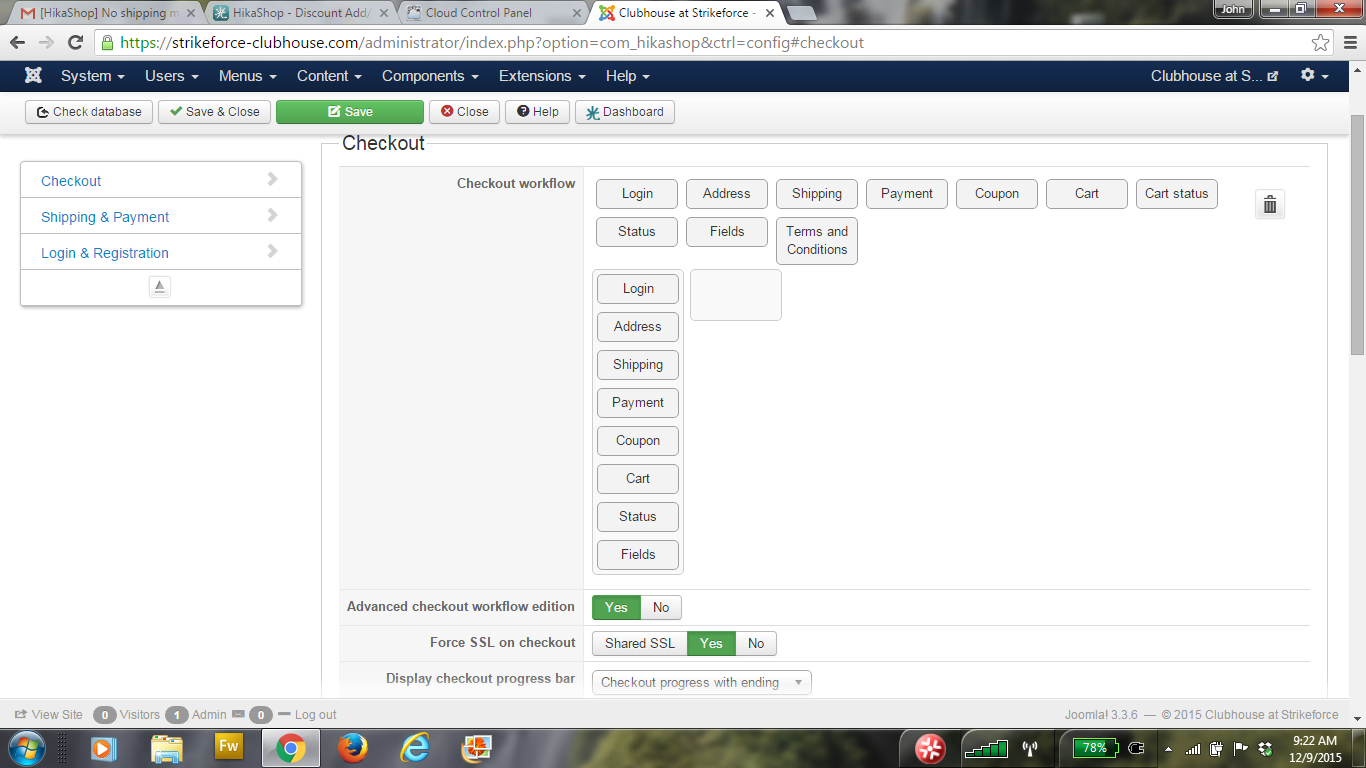
Thanks
Thanks
Please Log in or Create an account to join the conversation.
Less
More
- Posts: 12953
- Thank you received: 1778
10 years 10 months ago #223702
by Mohamed Thelji
Replied by Mohamed Thelji on topic No shipping method found
Hi,
Does it work if you set the "Auto submit shipping and payment methods selection" option to Yes via "Hikashop->System->Configuration->Checkout" ?
Does it work if you set the "Auto submit shipping and payment methods selection" option to Yes via "Hikashop->System->Configuration->Checkout" ?
Please Log in or Create an account to join the conversation.
10 years 10 months ago #223778
by johnh823
Replied by johnh823 on topic No shipping method found
I don't see this option. Here is a screenshot of the HikaShop - System - Confirguration - Checkout
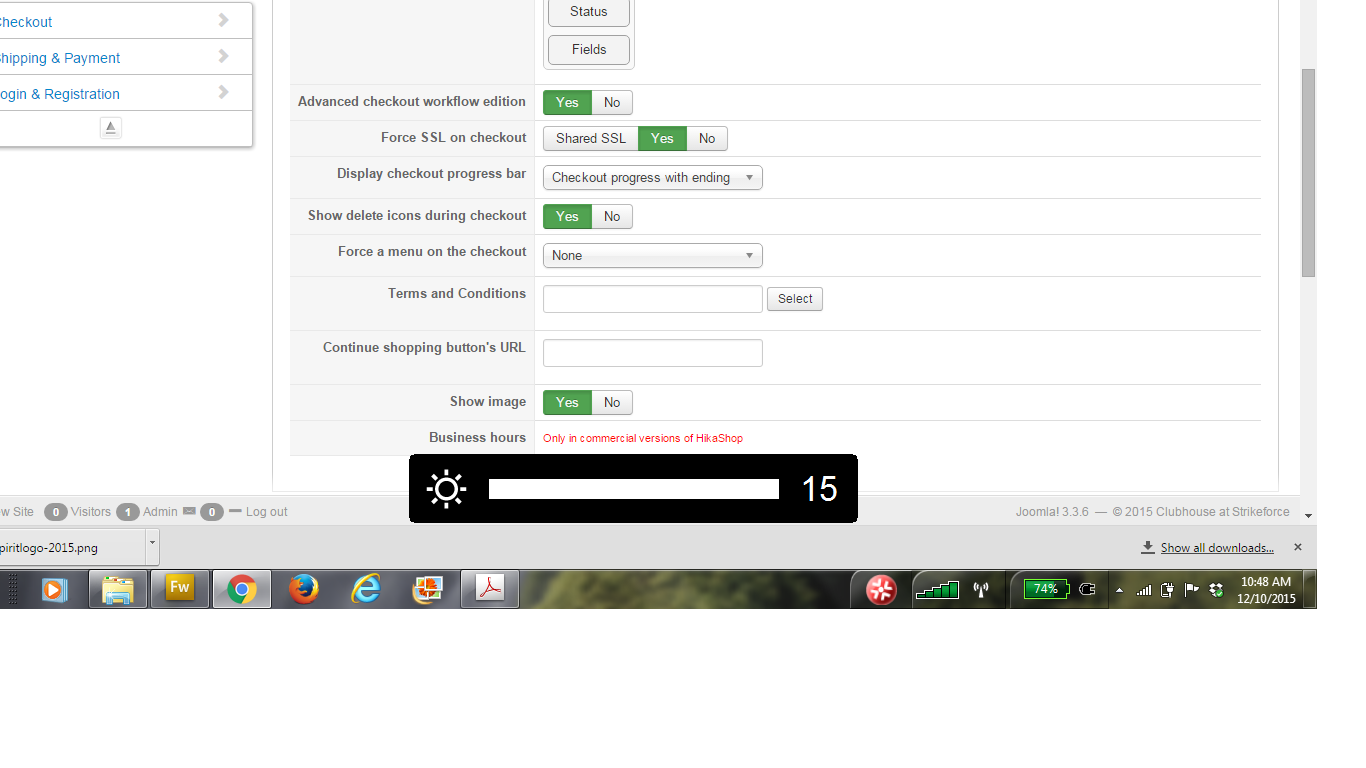
Let me know if I can send you the website address privately if you want to see for yourself.
I really appreciate your help.
THANKS!
Let me know if I can send you the website address privately if you want to see for yourself.
I really appreciate your help.
THANKS!
Please Log in or Create an account to join the conversation.
10 years 10 months ago - 10 years 10 months ago #223812
by johnh823
Replied by johnh823 on topic No shipping method found
I tried to check out the Pay Pay Pro plugin mode and got the a Security Header 10002 which according to another post looks like a plugin credential error. I'm getting this checked by my client and Pay Pal.
But I don't know if the other "notice: undefined propert.y is the same issue.
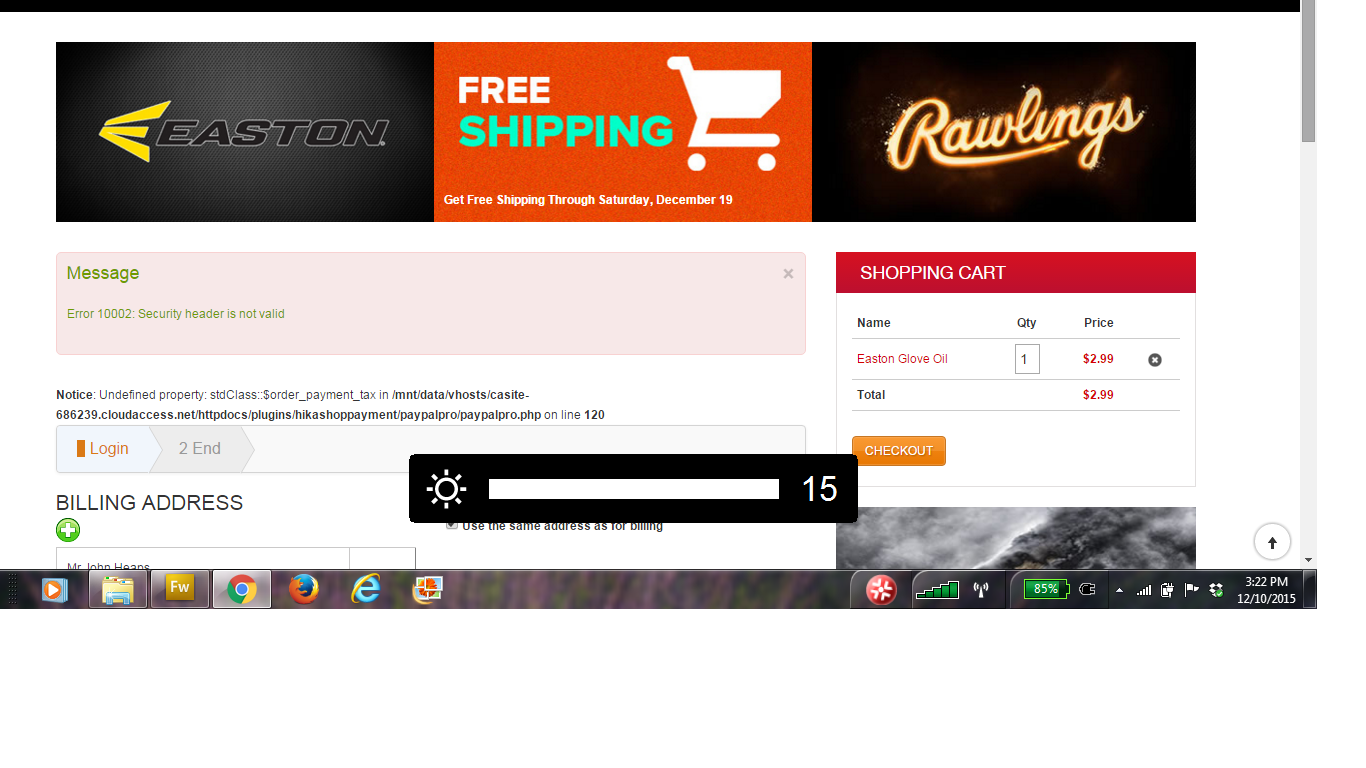
Just found PHP line error above refers to:
$vars = round($tax+$order->order_shipping_tax+$order->order_payment_tax-$order->order_discount_tax,(int)$this->currency->currency_locale);
Thanks again.
But I don't know if the other "notice: undefined propert.y is the same issue.
Just found PHP line error above refers to:
$vars = round($tax+$order->order_shipping_tax+$order->order_payment_tax-$order->order_discount_tax,(int)$this->currency->currency_locale);
Thanks again.
Last edit: 10 years 10 months ago by johnh823. Reason: found PHP line
Please Log in or Create an account to join the conversation.
Less
More
- Posts: 12953
- Thank you received: 1778
10 years 10 months ago #223849
by Mohamed Thelji
Replied by Mohamed Thelji on topic No shipping method found
Hello,
1. You SHOULD have it through the "Shipping & Payment" tab of the page "Hikashop->System->Configuration->Checkout".
2. Thanks for your feedback, also note that in production mode, you should set the Joomla "Error reporting" to none.
1. You SHOULD have it through the "Shipping & Payment" tab of the page "Hikashop->System->Configuration->Checkout".
2. Thanks for your feedback, also note that in production mode, you should set the Joomla "Error reporting" to none.
Please Log in or Create an account to join the conversation.
10 years 10 months ago #223906
by johnh823
Replied by johnh823 on topic No shipping method found
1. I turned off the PHP error reporting - now the error is gone
2. Found the auto submit shipping payments - Still when I press checkout the Shipping Payment is blank until after I put my credit info. in and then press finish - Flat Rate Shipping or Free over $50 then appears (it is already calculated in total) depending on amount then it seems like I need to press finish again - strikeforce-clubhouse .com
3. I retyped the Pay Pal Pro credentials into the payment plugin and still get the Security Header 10002 error. I don't know if payment goes through.
Please help as we want to open store a.s.a.p.
Big Thanks!
2. Found the auto submit shipping payments - Still when I press checkout the Shipping Payment is blank until after I put my credit info. in and then press finish - Flat Rate Shipping or Free over $50 then appears (it is already calculated in total) depending on amount then it seems like I need to press finish again - strikeforce-clubhouse .com
3. I retyped the Pay Pal Pro credentials into the payment plugin and still get the Security Header 10002 error. I don't know if payment goes through.
Please help as we want to open store a.s.a.p.
Big Thanks!
Please Log in or Create an account to join the conversation.
Less
More
- Posts: 12953
- Thank you received: 1778
10 years 10 months ago #223918
by Mohamed Thelji
Replied by Mohamed Thelji on topic No shipping method found
Hello,
2.
3. You'll probably find more information about that issue through that thread : www.hikashop.com/forum/4-how-to/31001-er...0is20not20valid.html
2.
What do you exactly mean about it ? Can you give me more informations about it through some screenshots for example so that I can totally understand your issue ?Still when I press checkout the Shipping Payment is blank until after I put my credit info
3. You'll probably find more information about that issue through that thread : www.hikashop.com/forum/4-how-to/31001-er...0is20not20valid.html
Hi,
It's a standard PayPal error when you didn't setup properly paypal pro or the paypal pro plugin.
I see that you're using the sandbox environment. Do you know that you need different credentials than your paypal pro account in order to use the sandbox ? You can find all that explained on that link:
www.x.com/developers/paypal/forums/intro...ity-header-not-valid
Please Log in or Create an account to join the conversation.
10 years 10 months ago #223988
by johnh823
Replied by johnh823 on topic No shipping method found
Thanks.
1. I don't have Pay Pal pro in Sandbox mode now. But, when I tried my client's card it came back as confirmed in the back end of HikaShop, but I still get the Header Error. I have my one tax zone in the Generic PayPal Pro config - Ohio Tax Zone (where store is) is this ok?
2. To see the check out process go to strikeforce-clubhouse.com use Pay Pal Standard.
Thanks for your continued help
1. I don't have Pay Pal pro in Sandbox mode now. But, when I tried my client's card it came back as confirmed in the back end of HikaShop, but I still get the Header Error. I have my one tax zone in the Generic PayPal Pro config - Ohio Tax Zone (where store is) is this ok?
2. To see the check out process go to strikeforce-clubhouse.com use Pay Pal Standard.
Thanks for your continued help
Please Log in or Create an account to join the conversation.
Time to create page: 0.687 seconds