

- Posts: 42
- Thank you received: 1
Additional fields and conditional fields problems
10 years 8 months ago #228111
by marto42
Additional fields and conditional fields problems was created by marto42
-- HikaShop version -- : 2.6.1
-- Joomla version -- : 3.4.8
-- PHP version -- : 5.5.14
-- Browser(s) name and version -- : chrome
-- Error-message(debug-mod must be tuned on) -- : shop.advanciumbg.com/hikashop-menu-for-hikashop-registration
I have problem with new hikashop version 2.6.1.
shop.advanciumbg.com/hikashop-menu-for-c...ies-listing/checkout - this link work correct with custom conditional fields. I`ve made custom fileds for registration for both users- personal & companies. But in new version doesn`t work. I have fields called "ЕГН", witch must show only when the radio button from the top is checked "физическо лице".
p.s. After upgrade to last version the conditional fields does`n work and every fields are shown and radio button not functional correctly.
-- Joomla version -- : 3.4.8
-- PHP version -- : 5.5.14
-- Browser(s) name and version -- : chrome
-- Error-message(debug-mod must be tuned on) -- : shop.advanciumbg.com/hikashop-menu-for-hikashop-registration
I have problem with new hikashop version 2.6.1.
shop.advanciumbg.com/hikashop-menu-for-c...ies-listing/checkout - this link work correct with custom conditional fields. I`ve made custom fileds for registration for both users- personal & companies. But in new version doesn`t work. I have fields called "ЕГН", witch must show only when the radio button from the top is checked "физическо лице".
p.s. After upgrade to last version the conditional fields does`n work and every fields are shown and radio button not functional correctly.
Please Log in or Create an account to join the conversation.

Less
More
- Posts: 12953
- Thank you received: 1778
10 years 8 months ago #228184
by Mohamed Thelji
Replied by Mohamed Thelji on topic Additional fields and conditional fields problems
Hello,
Can you show us through some screenshots how did you configured the field that are supposed to be displayed only if the radio button from the top is checked "физическо лице" ?
Thanks.
Can you show us through some screenshots how did you configured the field that are supposed to be displayed only if the radio button from the top is checked "физическо лице" ?
Thanks.
Please Log in or Create an account to join the conversation.
10 years 8 months ago - 10 years 8 months ago #228305
by EnerW
Replied by EnerW on topic Additional fields and conditional fields problems
Afternoon, same problem here on the customer registration page.
Please check the text/javascript file in the header of the page that will start with:
This should, at least, contain your conditional fields as listed in a previous, unsolved, post:
In the current version the conditional fields are missing on the registration page and Hikashop will display all the fields.
The address form, on the order check-out page is working correctly and the javascript will display the conditional fields:
Also check your user account page in Hikashop, you need to login as a user and it should display the custom fields and the conditional fields:
I will go back to the backup, since I do not want to spend more time on this issue, that did work fine in Hikashop 2.5 but is broken from version 2.6
Please check the text/javascript file in the header of the page that will start with:
Code:
<!--
function hikashopSubmitForm(form, action)
between line 123 and 131 you will find the following:
<!--
function hikashopToggleFields(new_value, namekey, field_type, id, prefix) {
if(!window.hikashop)
return false;
if(!window.hikashop.fields_data && window.hikashopFieldsJs)
window.hikashop.fields_data = window.hikashopFieldsJs;
return window.hikashop.toggleField(new_value, namekey, field_type, id, prefix);
}
//-->
Code:
<!--
function hikashopToggleFields(new_value, namekey, field_type, id, prefix) {
if(!window.hikashop)
return false;
if(!window.hikashop.fields_data && window.hikashopFieldsJs)
window.hikashop.fields_data = window.hikashopFieldsJs;
return window.hikashop.toggleField(new_value, namekey, field_type, id, prefix);
}
window.hikashopFieldsJs = {};
window.hikashopFieldsJs = {};
window.hikashopFieldsJs = {};
window.hikashopFieldsJs = 'eet_nootjes';
window.hikashopFieldsJs = {};
window.hikashopFieldsJs = 'eet_wortels';
window.hikashop.ready(function(){
hikashopToggleFields('','keuze_1_2','user',0);
});
//-->
The address form, on the order check-out page is working correctly and the javascript will display the conditional fields:
Code:
<!--
function hikashopToggleFields(new_value, namekey, field_type, id, prefix) {
if(!window.hikashop)
return false;
if(!window.hikashop.fields_data && window.hikashopFieldsJs)
window.hikashop.fields_data = window.hikashopFieldsJs;
return window.hikashop.toggleField(new_value, namekey, field_type, id, prefix);
}
window.hikashopFieldsJs['address'] = {};
window.hikashopFieldsJs['address']['customertype'] = {};
window.hikashopFieldsJs['address']['customertype']['B'] = {};
window.hikashopFieldsJs['address']['customertype']['B']['address_company'] = 'address_company';
window.hikashopFieldsJs['address']['customertype']['B']['address_bedrijfsnaam2'] = 'address_bedrijfsnaam2';
window.hikashopFieldsJs['address']['customertype']['1'] = {};
window.hikashopFieldsJs['address']['customertype']['1']['address_street2'] = 'address_street2';
window.hikashopFieldsJs['address']['customertype']['1']['address_post_code2'] = 'address_post_code2';
window.hikashopFieldsJs['address']['customertype']['1']['address_plaats2'] = 'address_plaats2';
window.hikashopFieldsJs['address']['customertype']['1']['address_telephone2'] = 'address_telephone2';
window.hikashopFieldsJs['address']['customertype']['1']['address_vat'] = 'address_vat';
window.hikashopFieldsJs['address']['customertype']['1']['address_kvk'] = 'address_kvk';
window.hikashopFieldsJs['address']['customertype']['1']['address_website'] = 'address_website';
window.hikashopFieldsJs['address']['customertype']['1']['customtext_332_23_25_42'] = 'customtext_332_23_25_42';
window.hikashopFieldsJs['address']['customertype']['1']['address_facturatie_email1'] = 'address_facturatie_email1';
window.hikashopFieldsJs['address']['customertype']['1']['address_facturatie_iban'] = 'address_facturatie_iban';
window.hikashopFieldsJs['address']['customertype']['0'] = {};
window.hikashopFieldsJs['address']['customertype']['0']['address_street'] = 'address_street';
window.hikashopFieldsJs['address']['customertype']['0']['address_post_code'] = 'address_post_code';
window.hikashopFieldsJs['address']['customertype']['0']['address_city'] = 'address_city';
window.hikashopFieldsJs['address']['address_facturatie_email1'] = {};
window.hikashopFieldsJs['address']['address_facturatie_email1']['1'] = {};
window.hikashopFieldsJs['address']['address_facturatie_email1']['1']['address_facturatie_email2'] = 'address_facturatie_email2';
window.hikashop.ready(function(){
hikashopToggleFields('A','customertype','address',0);
hikashopToggleFields('1','address_facturatie_email1','address',0);
});
//-->
Code:
<!--
function hikashopToggleFields(new_value, namekey, field_type, id, prefix) {
if(!window.hikashop)
return false;
if(!window.hikashop.fields_data && window.hikashopFieldsJs)
window.hikashop.fields_data = window.hikashopFieldsJs;
return window.hikashop.toggleField(new_value, namekey, field_type, id, prefix);
}
window.hikashopFieldsJs['address'] = {};
window.hikashopFieldsJs['address']['customertype'] = {};
window.hikashopFieldsJs['address']['customertype']['B'] = {};
window.hikashopFieldsJs['address']['customertype']['B']['address_company'] = 'address_company';
window.hikashopFieldsJs['address']['customertype']['B']['address_bedrijfsnaam2'] = 'address_bedrijfsnaam2';
window.hikashopFieldsJs['address']['customertype']['1'] = {};
window.hikashopFieldsJs['address']['customertype']['1']['address_street2'] = 'address_street2';
window.hikashopFieldsJs['address']['customertype']['1']['address_post_code2'] = 'address_post_code2';
window.hikashopFieldsJs['address']['customertype']['1']['address_plaats2'] = 'address_plaats2';
window.hikashopFieldsJs['address']['customertype']['1']['address_telephone2'] = 'address_telephone2';
window.hikashopFieldsJs['address']['customertype']['1']['address_vat'] = 'address_vat';
window.hikashopFieldsJs['address']['customertype']['1']['address_kvk'] = 'address_kvk';
window.hikashopFieldsJs['address']['customertype']['1']['address_website'] = 'address_website';
window.hikashopFieldsJs['address']['customertype']['1']['customtext_332_23_25_42'] = 'customtext_332_23_25_42';
window.hikashopFieldsJs['address']['customertype']['1']['address_facturatie_email1'] = 'address_facturatie_email1';
window.hikashopFieldsJs['address']['customertype']['1']['address_facturatie_iban'] = 'address_facturatie_iban';
window.hikashopFieldsJs['address']['customertype']['0'] = {};
window.hikashopFieldsJs['address']['customertype']['0']['address_street'] = 'address_street';
window.hikashopFieldsJs['address']['customertype']['0']['address_post_code'] = 'address_post_code';
window.hikashopFieldsJs['address']['customertype']['0']['address_city'] = 'address_city';
window.hikashopFieldsJs['address']['address_facturatie_email1'] = {};
window.hikashopFieldsJs['address']['address_facturatie_email1']['1'] = {};
window.hikashopFieldsJs['address']['address_facturatie_email1']['1']['address_facturatie_email2'] = 'address_facturatie_email2';
window.hikashop.ready(function(){
hikashopToggleFields('A','customertype','address',0);
hikashopToggleFields('1','address_facturatie_email1','address',0);
});
//-->
Last edit: 10 years 8 months ago by nicolas.
Please Log in or Create an account to join the conversation.
10 years 8 months ago #228350
by marto42
Replied by marto42 on topic Additional fields and conditional fields problems
I`ve configured both registration pages, one personal ans one company edition. Everything`s work great at hikashop version 2.4 but after upgarde to last 2.6.1 in the registration form was shown all the fields, of cource the radio button not worked. After restore backup to 2.4 version, the fields worked correctly. So I thing than the problem isn`t how I configured my custom registration form, the problem with contional fields according to me is in version 2.6.

Please Log in or Create an account to join the conversation.
Less
More
- Posts: 12953
- Thank you received: 1778
10 years 8 months ago #228443
by Mohamed Thelji
Replied by Mohamed Thelji on topic Additional fields and conditional fields problems
Hello,
In your case the best solution will probably be to directly give us more information about your configuration through some screenshots so that we can reproduce it on our end.
@EnerW : We'll try to reproduce it on our end so that we can fix it.
I tested it with different configuration through the last version of Hikashop and it worked fine, each time I selected a value for my custom field "c1" for example, the limited custom fields correctly displayed regarding the value of the "c1" custom field.So I thing than the problem isn`t how I configured my custom registration form, the problem with contional fields according to me is in version 2.6.
In your case the best solution will probably be to directly give us more information about your configuration through some screenshots so that we can reproduce it on our end.
@EnerW : We'll try to reproduce it on our end so that we can fix it.
Please Log in or Create an account to join the conversation.
10 years 8 months ago - 10 years 8 months ago #228499
by marto42
Replied by marto42 on topic Additional fields and conditional fields problems
The link
shop.advanciumbg.com/hikashop-menu-for-hikashop-registration
is from standart login joomla module in right possition-7.
In this case radio button from the form desn`t work correctly, but if I buy some product the form display worked fine. Here are the correctly link shop.advanciumbg.com/hikashop-menu-for-c...ies-listing/checkout .
I think than my problem is in the plugin - Hikashop Registration Redirect Plugin.
p.s. After I migrate from 2.4 to 2.6.1 the both working form stopped work correctly. I do not configure anything - I`ve just update.
In this case radio button from the form desn`t work correctly, but if I buy some product the form display worked fine. Here are the correctly link shop.advanciumbg.com/hikashop-menu-for-c...ies-listing/checkout .
I think than my problem is in the plugin - Hikashop Registration Redirect Plugin.
p.s. After I migrate from 2.4 to 2.6.1 the both working form stopped work correctly. I do not configure anything - I`ve just update.
Last edit: 10 years 8 months ago by marto42.
Please Log in or Create an account to join the conversation.
10 years 8 months ago - 10 years 8 months ago #228562
by EnerW
Replied by EnerW on topic Additional fields and conditional fields problems
@marto42
you have the same problem like me, the fields are missing from the javascript file (see below).
Please note that in Hikashop 2.6 at least the default values for the radio button(s) are displayed but they do not trigger the depending fields when you load the page.
Regards, Rene
you have the same problem like me, the fields are missing from the javascript file (see below).
Please note that in Hikashop 2.6 at least the default values for the radio button(s) are displayed but they do not trigger the depending fields when you load the page.
Code:
<!--
function hikashopToggleFields(new_value, namekey, field_type, id, prefix) {
if(!window.hikashop)
return false;
if(!window.hikashop.fields_data && window.hikashopFieldsJs)
window.hikashop.fields_data = window.hikashopFieldsJs;
return window.hikashop.toggleField(new_value, namekey, field_type, id, prefix);
}
[color=#ff0000]window.hikashopFieldsJs = {};[/color] <<= these fields are missing
});
//-->
<!--
window.hikashopFieldsJs['reqFieldsComp']['register'] = ['email','password','password2'];
window.hikashopFieldsJs['validFieldsComp']['register'] = ['Моля въведете стойност за полето E-mail','Моля въведете стойност за полето Парола','Моля въведете стойност за полето Проверка на паролата'];
window.hikashopFieldsJs['password_different'] = 'Паролите не съвпадат';
window.hikashopFieldsJs['valid_email'] = 'Моля въведете валиден e-mail адрес';
window.hikashopFieldsJs['reqFieldsComp']['address'] = ['address_status','address_title','address_firstname','address_middle_name','address_lastname','address_egn','address_company','address_street','address_city','address_telephone','address_country','address_state'];
window.hikashopFieldsJs['validFieldsComp']['address'] = ['Моля въведете стойност за полето Статус','Моля въведете стойност за полето Наименование','Моля въведете стойност за полето Име','Моля въведете стойност за полето Презиме','Моля въведете стойност за полето Фамилия','Моля въведете стойност за полето ЕГН','Моля въведете стойност за полето Фирма','Моля въведете стойност за полето Улица','Моля въведете стойност за полето Град','Моля въведете стойност за полето Телефон','Моля въведете стойност за полето Държава','Моля въведете стойност за полето Област'];
window.hikashopFieldsJs['valid_phone'] = 'Моля въведете валиден телефон';
//-->
Last edit: 10 years 8 months ago by nicolas.
Please Log in or Create an account to join the conversation.

10 years 8 months ago #229054
by nicolas
Replied by nicolas on topic Additional fields and conditional fields problems
Hi,
As Mohamed, I also tried to have a radio custom address field and another one to be limited to one value of that radio custom field and it worked just fine with HikaShop 2.6.1
I went on your website and the JS code I see on that page shop.advanciumbg.com/hikashop-menu-for-hikashop-registration indicates that there are no "display limited to" configured in the custom fields displayed on the page.
So from what I can see, the issue is a setting issue of your custom fields. Could you please check them ?
As Mohamed, I also tried to have a radio custom address field and another one to be limited to one value of that radio custom field and it worked just fine with HikaShop 2.6.1
I went on your website and the JS code I see on that page shop.advanciumbg.com/hikashop-menu-for-hikashop-registration indicates that there are no "display limited to" configured in the custom fields displayed on the page.
So from what I can see, the issue is a setting issue of your custom fields. Could you please check them ?
Please Log in or Create an account to join the conversation.
10 years 8 months ago - 10 years 8 months ago #229132
by marto42
Hi, if you try to buy a product
will generated a link which is shop.advanciumbg.com/hikashop-menu-for-c...ies-listing/checkout and at this link, the radio button works correctly. I do not know why in main registration joomla form doesn`t wants to work, see my configuration fields below.
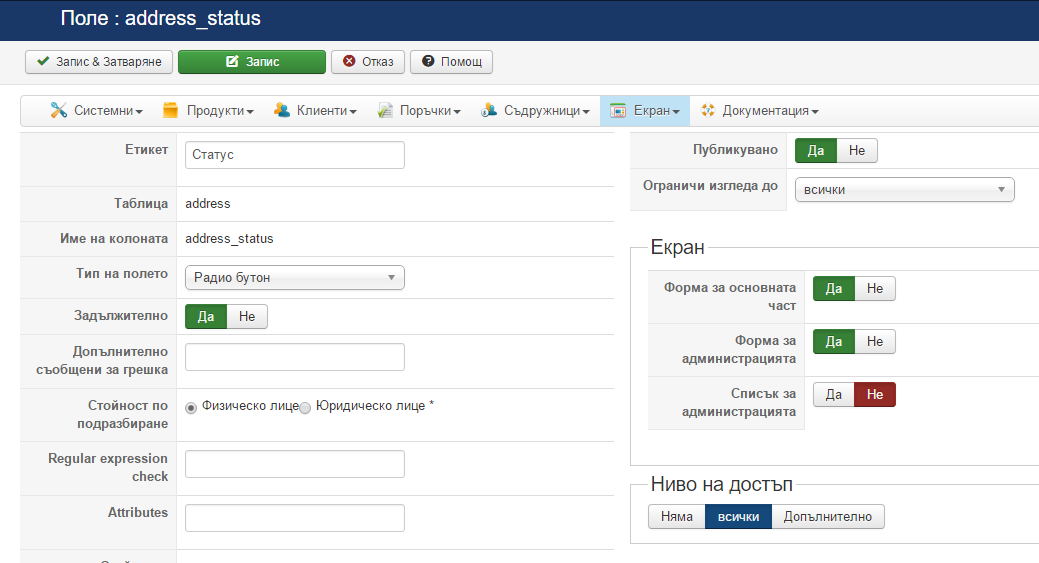
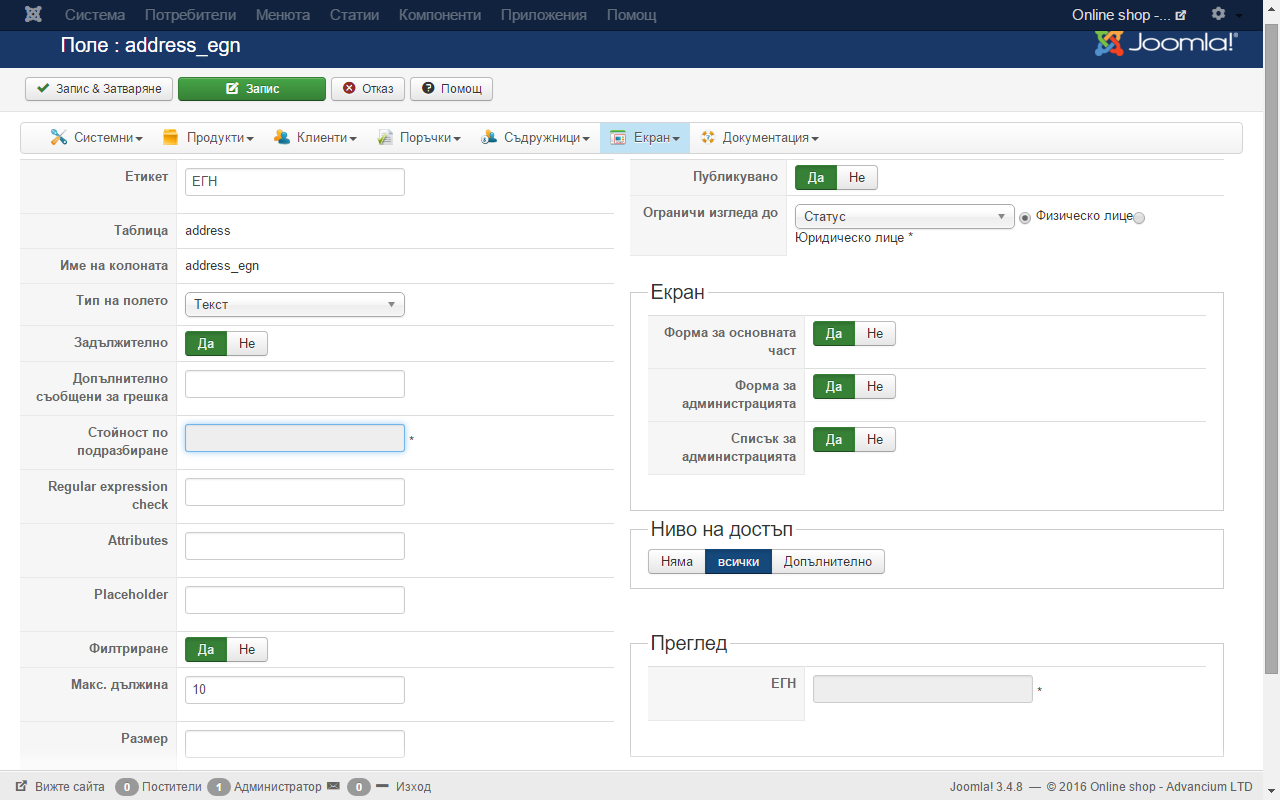
Replied by marto42 on topic Additional fields and conditional fields problems
nicolas wrote: Hi,
As Mohamed, I also tried to have a radio custom address field and another one to be limited to one value of that radio custom field and it worked just fine with HikaShop 2.6.1
I went on your website and the JS code I see on that page shop.advanciumbg.com/hikashop-menu-for-hikashop-registration indicates that there are no "display limited to" configured in the custom fields displayed on the page.
So from what I can see, the issue is a setting issue of your custom fields. Could you please check them ?
Hi, if you try to buy a product
will generated a link which is shop.advanciumbg.com/hikashop-menu-for-c...ies-listing/checkout and at this link, the radio button works correctly. I do not know why in main registration joomla form doesn`t wants to work, see my configuration fields below.
Last edit: 10 years 8 months ago by marto42.
Please Log in or Create an account to join the conversation.
10 years 8 months ago #229165
by nicolas
Replied by nicolas on topic Additional fields and conditional fields problems
Hi,
Thank you for the additional information.
Change the code:
to:
in the file components/com_hikashop/views/user/view.html.php and that will fix the problem.
We're going to add that patch on our end too.
Thank you for the additional information.
Change the code:
Code:
$this->assignRef('address',$address);
$fieldsClass->jsToggle($this->extraFields['address'],$address,0);
Code:
$fieldsClass->jsToggle($extraFields['address'],$address,0);
$this->assignRef('address',$address);
We're going to add that patch on our end too.
Please Log in or Create an account to join the conversation.
10 years 8 months ago #229188
by marto42
Replied by marto42 on topic Additional fields and conditional fields problems
Thanks, great support.
Now everything works correctly.
Now everything works correctly.
Please Log in or Create an account to join the conversation.
Time to create page: 0.294 seconds