

- Posts: 8
- Thank you received: 0
!!!! finish button suddenly disappeared
10 years 3 months ago #243077
by ctran
!!!! finish button suddenly disappeared was created by ctran
-- url of the page with the problem -- :
sushimaison.be/commander/checkout/task-step/step-0
-- HikaShop version -- : 2.6.3
-- Joomla version -- : 3
-- PHP version -- : 5.5
-- Browser(s) name and version -- : chrome
Dear hikashop
I have a big problem with the checkout page, the button "finsh" suddenly disappeared and customers cannot order anymore.
I changed, removed and reset the checkout configuration in the same way and tried other configuration but the "finish" button does not come back... please find the url in the link and a screenshot
Please help me,
we have 4-5 orders per day and customers are not happy about that
thank you in advance for the help
-- HikaShop version -- : 2.6.3
-- Joomla version -- : 3
-- PHP version -- : 5.5
-- Browser(s) name and version -- : chrome
Dear hikashop
I have a big problem with the checkout page, the button "finsh" suddenly disappeared and customers cannot order anymore.
I changed, removed and reset the checkout configuration in the same way and tried other configuration but the "finish" button does not come back... please find the url in the link and a screenshot
Please help me,
we have 4-5 orders per day and customers are not happy about that
thank you in advance for the help
Please Log in or Create an account to join the conversation.
10 years 3 months ago #243089
by ctran
Replied by ctran on topic !!!! finish button suddenly disappeared
I checked again,
here is the problem:
Users have to "register" and activate their account to be able to access to the finish button and order, however once they have logged in they can only order via the same computer as there is not "login form"
therefore customers that have ordered once and want to make a new order cannot login again as their user name and email has already be taken
--> HOW to put a login form ? so users can connect when they come back on the website
(however as it discourage people from ordering)
--> HOW to remove the login form? i configured the login to "no" , i only need the address, email, phone number and name, however the address field is not showing unless login is showing as well
Thank you very much
It is a sushi website, we receive 4-5 orders a day, and i beleive that removing the activation account will be easier for customers and encourage them to order
here is the problem:
Users have to "register" and activate their account to be able to access to the finish button and order, however once they have logged in they can only order via the same computer as there is not "login form"
therefore customers that have ordered once and want to make a new order cannot login again as their user name and email has already be taken
--> HOW to put a login form ? so users can connect when they come back on the website
(however as it discourage people from ordering)
--> HOW to remove the login form? i configured the login to "no" , i only need the address, email, phone number and name, however the address field is not showing unless login is showing as well
Thank you very much
It is a sushi website, we receive 4-5 orders a day, and i beleive that removing the activation account will be easier for customers and encourage them to order
Please Log in or Create an account to join the conversation.

10 years 3 months ago - 10 years 3 months ago #243097
by Philip
Replied by Philip on topic !!!! finish button suddenly disappeared
Hello,
You can add a login module like this :
- Go to Extensions => Modules
- Look for Login Form module
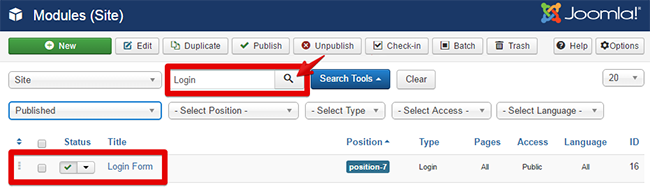
- Configure it and published it, in this module configuration you will be able to define where you want this module to be displayed.
To learn more, see this tutorial .
Note : That You have already a login form in your checkout process.
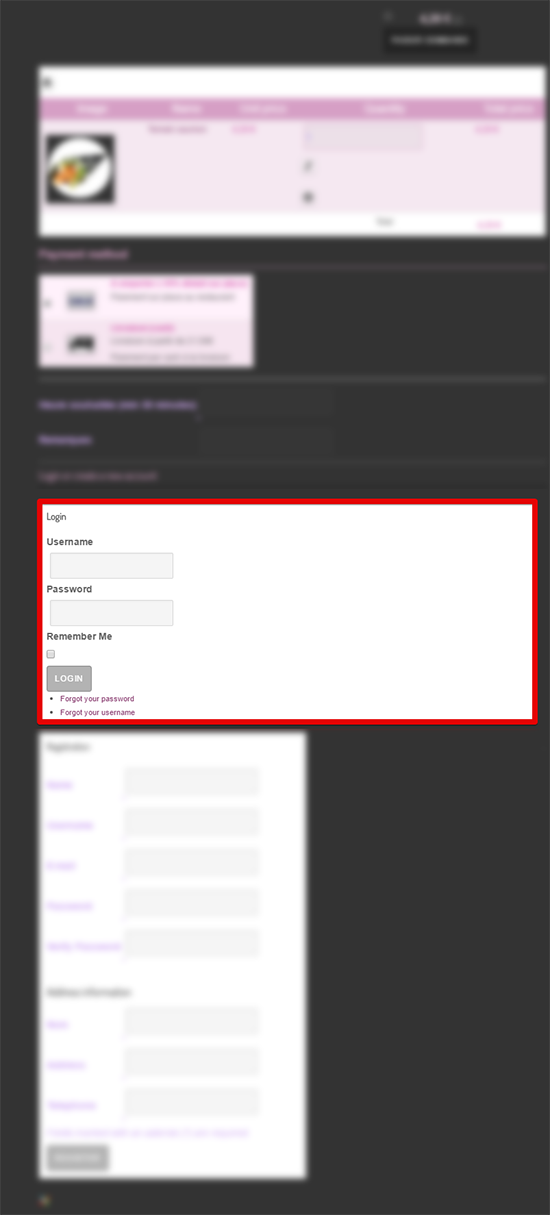
Reproduce this configuration on this screenshot :
- For your checkout workflow :
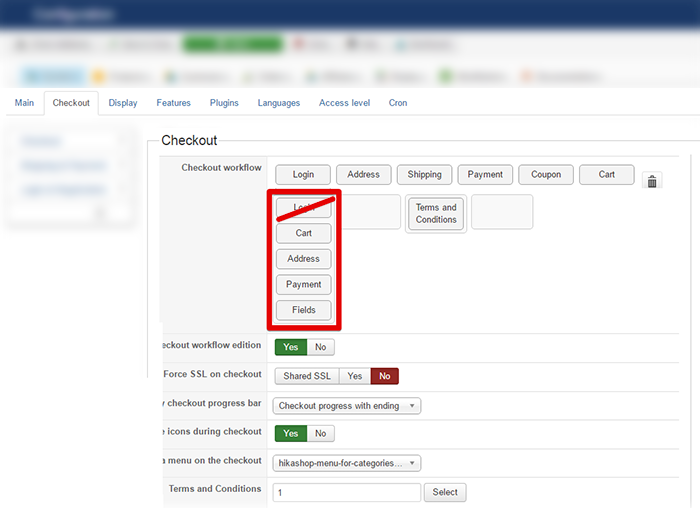
Note : I suppress the login part
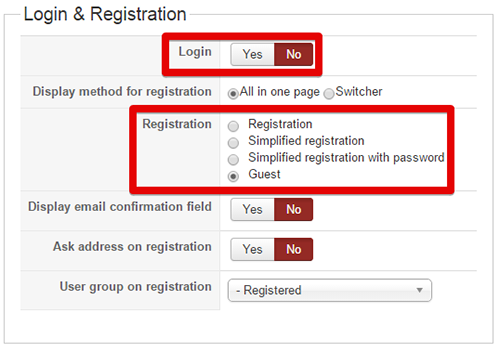
- And for your registration processing :
Hope this will help you
Regards.
--> HOW to put a login form ? so users can connect when they come back on the website
You can add a login module like this :
- Go to Extensions => Modules
- Look for Login Form module
- Configure it and published it, in this module configuration you will be able to define where you want this module to be displayed.
To learn more, see this tutorial .
Note : That You have already a login form in your checkout process.
--> HOW to remove the login form? i configured the login to "no" , i only need the address, email, phone number and name, however the address field is not showing unless login is showing as well
Reproduce this configuration on this screenshot :
- For your checkout workflow :
Note : I suppress the login part
- And for your registration processing :
Hope this will help you
Regards.
Last edit: 10 years 3 months ago by Philip.
The following user(s) said Thank You: ctran
Please Log in or Create an account to join the conversation.
10 years 3 months ago #244700
by ctran
Replied by ctran on topic !!!! finish button suddenly disappeared
Thank you for the explanation !! :lol: !! it works perfectly 
Please Log in or Create an account to join the conversation.
Time to create page: 0.194 seconds