

- Posts: 94
- Thank you received: 3
checkout layout
9 years 3 days ago #279733
by tataye
checkout layout was created by tataye
hello
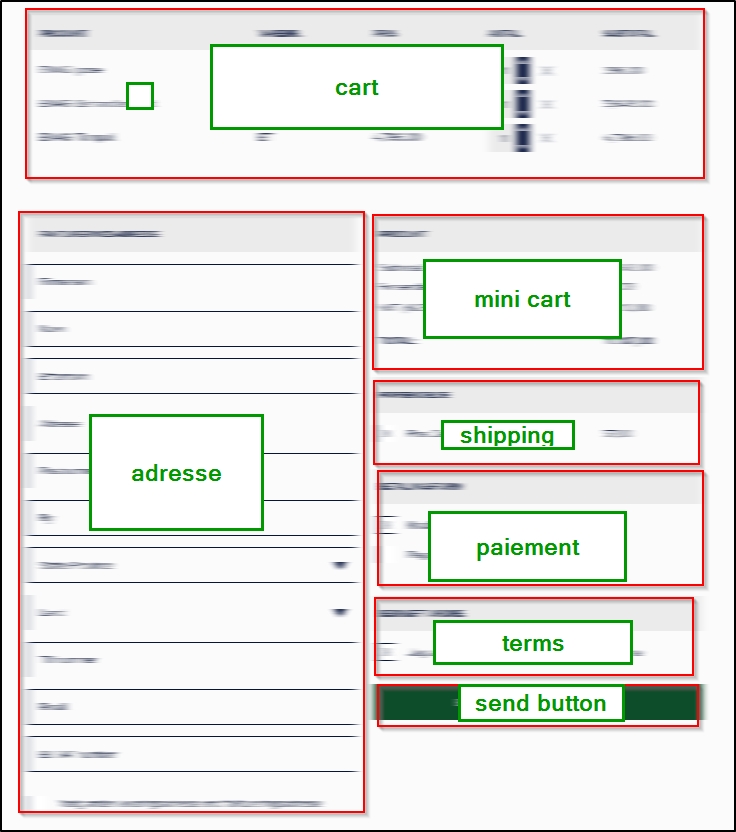
where can I find easy doc to change my checkout layout ?
I need to have somme blocks aside each others
or is there an extension that do that ( dragaand drop blocks to modify layout of checkout) ?
Thanks
where can I find easy doc to change my checkout layout ?
I need to have somme blocks aside each others
or is there an extension that do that ( dragaand drop blocks to modify layout of checkout) ?
Thanks
Please Log in or Create an account to join the conversation.
9 years 3 days ago #279738
by tataye
Replied by tataye on topic checkout layout
here is the way i'd like to have my view
Please Log in or Create an account to join the conversation.

Less
More
- Posts: 12953
- Thank you received: 1778
9 years 3 days ago #279743
by Mohamed Thelji
Replied by Mohamed Thelji on topic checkout layout
Hello,
Checking that documentation will probably help :
www.hikashop.com/support/documentation/1...-display.html#layout
Checking that documentation will probably help :
www.hikashop.com/support/documentation/1...-display.html#layout
Please Log in or Create an account to join the conversation.
9 years 2 days ago #279847
by tataye
Replied by tataye on topic checkout layout
ok, but that does not explain what are the files for the checkout ( and how to change it for my need )
checkout layout is modified by javascript and calls in the backend, it is not the same thing as product or list layouts.
checkout layout is modified by javascript and calls in the backend, it is not the same thing as product or list layouts.
Please Log in or Create an account to join the conversation.

9 years 2 days ago #279859
by nicolas
Replied by nicolas on topic checkout layout
Hi,
It does explain you that if you want to know what are the files involved, you can just turn on the "display view files" setting of the HikaShop configuration.
Also, I don't even think that you need to edit the code of the views. You should be able to do that with only CSS by having each block's main div floated left or right, and its width limited to 50% of the page.
And the top of the page of the link Mohamed gave you explains how to edit the CSS in HikaShop.
So if you know CSS, you should be able to pull this off.
Otherwise, you might want to contact our partners for a quote on that customization:
www.hikashop.com/home/our-partners.html
It does explain you that if you want to know what are the files involved, you can just turn on the "display view files" setting of the HikaShop configuration.
Also, I don't even think that you need to edit the code of the views. You should be able to do that with only CSS by having each block's main div floated left or right, and its width limited to 50% of the page.
And the top of the page of the link Mohamed gave you explains how to edit the CSS in HikaShop.
So if you know CSS, you should be able to pull this off.
Otherwise, you might want to contact our partners for a quote on that customization:
www.hikashop.com/home/our-partners.html
Please Log in or Create an account to join the conversation.
Time to create page: 0.231 seconds