

- Posts: 36
- Thank you received: 0
Formatting Shipping cost in the Checkout table
7 years 4 months ago #306130
by janos
Formatting Shipping cost in the Checkout table was created by janos
-- HikaShop version -- : 4.0.3 Business
-- Joomla version -- : 3.9.5
-- PHP version -- : 7.2.17
-- Browser(s) name and version -- : Firefox 66.0.3
-- Error-message(debug-mod must be tuned on) -- : no
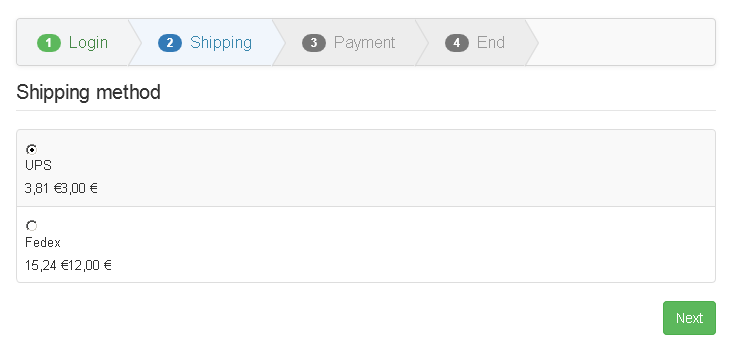
Tell me please which 'view' file(s) determine(s) the appearance of the shipping cost(s) in the checkout table. They should be rearranged, reformatted, etc.
/screenshot attached/
-- Joomla version -- : 3.9.5
-- PHP version -- : 7.2.17
-- Browser(s) name and version -- : Firefox 66.0.3
-- Error-message(debug-mod must be tuned on) -- : no
Tell me please which 'view' file(s) determine(s) the appearance of the shipping cost(s) in the checkout table. They should be rearranged, reformatted, etc.
/screenshot attached/
Please Log in or Create an account to join the conversation.

7 years 4 months ago #306131
by nicolas
Replied by nicolas on topic Formatting Shipping cost in the Checkout table
Hi,
You can activate the "show display files" setting of the HikaShop configuration to know which view file is used where on your website and then you can edit it via the menu Display>Views.
For the shipping methods selection, if you have the "checkout legacy" setting activated in the Hikashop configuration, it's the checkout/shipping.php view file, if not, it's the checkout/show_block_shipping.php view file.
You can activate the "show display files" setting of the HikaShop configuration to know which view file is used where on your website and then you can edit it via the menu Display>Views.
For the shipping methods selection, if you have the "checkout legacy" setting activated in the Hikashop configuration, it's the checkout/shipping.php view file, if not, it's the checkout/show_block_shipping.php view file.
Please Log in or Create an account to join the conversation.
7 years 4 months ago - 7 years 4 months ago #306161
by janos
Replied by janos on topic Formatting Shipping cost in the Checkout table
Hi,
Right, but where to format:
Just as I did in the cart, e.g. like this:
49,00 € (62,23 € incl. VAT)
Right, but where to format:
Code:
echo $this->checkoutHelper->getDisplayPrice($shipping, 'shipping', $this->options);
Just as I did in the cart, e.g. like this:
49,00 € (62,23 € incl. VAT)
Last edit: 7 years 4 months ago by janos.
Please Log in or Create an account to join the conversation.
7 years 4 months ago #306163
by nicolas
Replied by nicolas on topic Formatting Shipping cost in the Checkout table
Hi,
That function is defined in the file administrator/components/com_hikashop/helpers/checkout.php
However, I would recommend to not modify the function there.
If you want to change how that function works, it's better to copy its code in your view override (and change the variable names) so that you can customize it how you want. That will avoid loosing your changes when you update your HikaShop.
That function is defined in the file administrator/components/com_hikashop/helpers/checkout.php
However, I would recommend to not modify the function there.
If you want to change how that function works, it's better to copy its code in your view override (and change the variable names) so that you can customize it how you want. That will avoid loosing your changes when you update your HikaShop.
Please Log in or Create an account to join the conversation.
Time to create page: 0.195 seconds