

- Posts: 21
- Thank you received: 0
No payment methods found
14 years 11 months ago - 14 years 11 months ago #27953
by kiwi2b
No payment methods found was created by kiwi2b
Hi, just installed hikashop business 1.5.4 on joomla 1.7.2. and doing one of the tutorials but, a problem.
I've set up payment methods 'bank transfer' and paypal, enabled them. When I go to the frontend and click buy I get the message "No payment methods found" and "Please enable your payment methods". Any ideas on this??
Thanks in advance for your help!
I've set up payment methods 'bank transfer' and paypal, enabled them. When I go to the frontend and click buy I get the message "No payment methods found" and "Please enable your payment methods". Any ideas on this??
Thanks in advance for your help!
Last edit: 14 years 11 months ago by kiwi2b.
Please Log in or Create an account to join the conversation.
14 years 11 months ago #27961
by kiwi2b
Replied by kiwi2b on topic Re: No payment methods found
From another thread, I set my default currency to AUS$, loggged in and out, and with euro disabled, I have my 'Bank Transfer' payment method showing!! But not Paypal.
Half way there, any ideas though on how to get paypal to show??
Half way there, any ideas though on how to get paypal to show??
Please Log in or Create an account to join the conversation.

14 years 11 months ago #27963
by nicolas
Replied by nicolas on topic Re: No payment methods found
If you don't see a payment method it's because you didn't configure it properly.
Please check that FAQ which explains the different possibilities:
www.hikashop.com/en/support/documentatio...ins-listing.html#faq
Please check that FAQ which explains the different possibilities:
www.hikashop.com/en/support/documentatio...ins-listing.html#faq
Please Log in or Create an account to join the conversation.
14 years 11 months ago #28043
by kiwi2b
Replied by kiwi2b on topic Re: No payment methods found
Hi thanks for that, it was this:
By deleting a zone I had set, the payment method appeared. Great! (I just need paypal for everybody at this stage.)
But I'm missing how should zones work in relation to shipping.
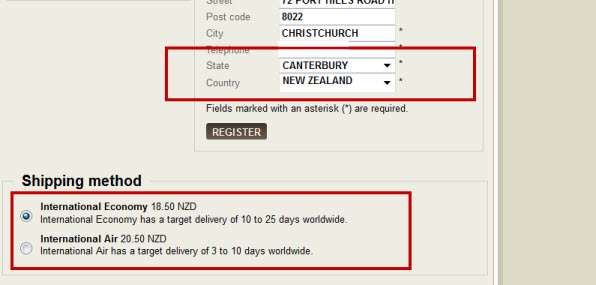
If I make a shipping inside New Zealand method and an international shipping method, I'm expecting there will be no shipping displayed until they enter their address on the first checkout page. Instead internationl shipping is displayed (see screenshot). How do I hide shipping options here?
Then, on the next page I'm expecting just New Zealand options to be shown. Instead, although the New Zealand options appear, the international options remain. How do I make these international options disappear for NZ people and remain for others?
And in the config, I see there is a place to put the store address. Is there a place to set its zone too?
Thanks for your help!
If you restricted your payment methods to zones, check that the address you're using is inside those zones ! Otherwise the payment methods will be filtered out.
By deleting a zone I had set, the payment method appeared. Great! (I just need paypal for everybody at this stage.)
But I'm missing how should zones work in relation to shipping.
If I make a shipping inside New Zealand method and an international shipping method, I'm expecting there will be no shipping displayed until they enter their address on the first checkout page. Instead internationl shipping is displayed (see screenshot). How do I hide shipping options here?
Then, on the next page I'm expecting just New Zealand options to be shown. Instead, although the New Zealand options appear, the international options remain. How do I make these international options disappear for NZ people and remain for others?
And in the config, I see there is a place to put the store address. Is there a place to set its zone too?
Thanks for your help!
Please Log in or Create an account to join the conversation.
14 years 11 months ago #28084
by nicolas
Replied by nicolas on topic Re: No payment methods found
In the configuration, you can configure the "main tax zone" option. That's the zone which will be used before the user enter his address. So it's normal that you still see shipping methods before your register if the zone in that option is in the zones of your shipping methods.
How dod you configure your international shipping method ? If you still see it when the address is new zealand, it's because either you didn't set a zone restriction, or the zone you set in there contains new zealand as a sub zone of it.
You can manage your zones via the menu System>Zones.
The "Store address" option in the configuration is just for you to enter your details for invoices.
How dod you configure your international shipping method ? If you still see it when the address is new zealand, it's because either you didn't set a zone restriction, or the zone you set in there contains new zealand as a sub zone of it.
You can manage your zones via the menu System>Zones.
The "Store address" option in the configuration is just for you to enter your details for invoices.
Please Log in or Create an account to join the conversation.
14 years 11 months ago #28153
by kiwi2b
Replied by kiwi2b on topic Re: No payment methods found
Hi, thanks for the quick answer again.
I think it's because I don't have any zone restrictions set at all for my international shipping options. With my main tax zone set for New Zealand and default country field as New Zealand, then the shipping set for New Zealand shows because it has New Zealand as the zone, and the international shipping shows because it doesn't have any zones set for it.
So I'm hoping setting the international options as everything but New Zealand should make them disappear, unless the customer gives an international address. But how do I set the international shipping zone as everything but New Zealand?? The select all option only works for one page and there are 44 pages !! :ohmy:
And where do I find the sub-zone settings, if I want to make New Zealand a sub-zone of Pacific for example?
Much appreciate your help!
I think it's because I don't have any zone restrictions set at all for my international shipping options. With my main tax zone set for New Zealand and default country field as New Zealand, then the shipping set for New Zealand shows because it has New Zealand as the zone, and the international shipping shows because it doesn't have any zones set for it.
So I'm hoping setting the international options as everything but New Zealand should make them disappear, unless the customer gives an international address. But how do I set the international shipping zone as everything but New Zealand?? The select all option only works for one page and there are 44 pages !! :ohmy:
And where do I find the sub-zone settings, if I want to make New Zealand a sub-zone of Pacific for example?
Much appreciate your help!
Please Log in or Create an account to join the conversation.
14 years 11 months ago #28164
by nicolas
Replied by nicolas on topic Re: No payment methods found
You need to go in System->Zones and create a new shipping zone that you will call "international". When you do, you will have a sub zone area where you will have to enter all the countries except new zealand. Then, you will be able to use that shipping zone in you international shipping method so that it displays only for addresses outside new zealand.
Please Log in or Create an account to join the conversation.
14 years 10 months ago #28366
by kiwi2b
Replied by kiwi2b on topic Re: No payment methods found
Great, the shipping options are coming up as expected now, thanks!
Do I need to set 2/3 letter codes for this entry? And how does the currency setting work for zones? Can I leave it as 'None'?
Do I need to set 2/3 letter codes for this entry? And how does the currency setting work for zones? Can I leave it as 'None'?
Please Log in or Create an account to join the conversation.
14 years 10 months ago #28382
by nicolas
Replied by nicolas on topic Re: No payment methods found
No, you don't need to set any 2/3 letter codes. They are only useful for countries and sometimes for states.
The currency setting is only used in combination with the geolocation plugin in order to set the currency of the user based on his location. You can leave it to None.
The currency setting is only used in combination with the geolocation plugin in order to set the currency of the user based on his location. You can leave it to None.
Please Log in or Create an account to join the conversation.
Less
More
- Posts: 19
- Thank you received: 0
14 years 10 months ago #28606
by identitycreative
Replied by identitycreative on topic Re: No payment methods found
I am getting the same message on Paypal.. even though Zones and Taxes are setting correctly.
I only want to use one country.
Please help urgently
I only want to use one country.
Please help urgently
Please Log in or Create an account to join the conversation.
14 years 10 months ago #28617
by nicolas
Replied by nicolas on topic Re: No payment methods found
Taxes do not influence the display of payment plugins.
Could you do a screenshot of the options of the paypal plugin ?
Could you try to save the joomla options of the paypal plugin in the joomla plugins manager and see if that helps ?
Could you do a screenshot of the options of the paypal plugin ?
Could you try to save the joomla options of the paypal plugin in the joomla plugins manager and see if that helps ?
Please Log in or Create an account to join the conversation.
Less
More
- Posts: 19
- Thank you received: 0
14 years 10 months ago #28657
by identitycreative
Replied by identitycreative on topic Re: No payment methods found
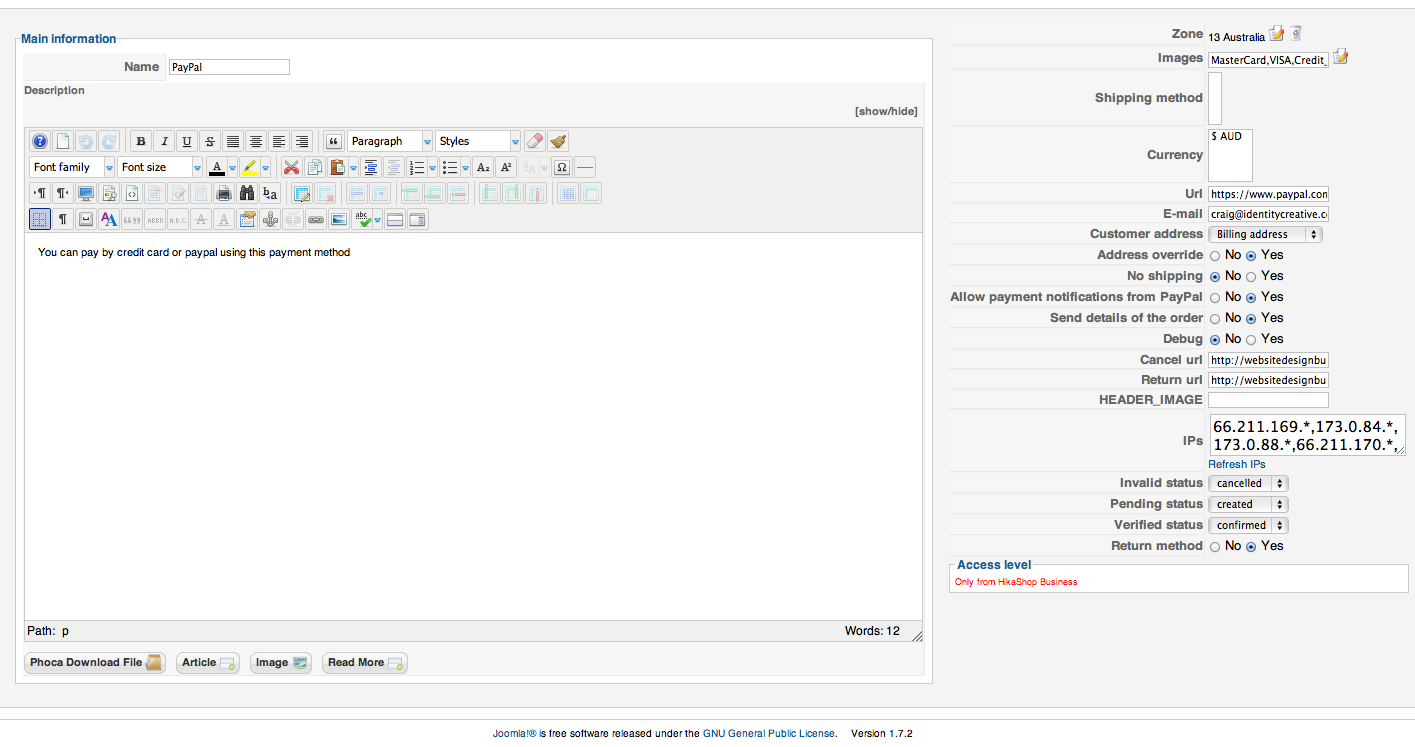
Hi.. I've attached a screen shot of the Paypal plugin.
I also have Hikahop on another site, and I've mirrored settings as the other one works.
The only difference is, is that this new site has the newer version.
But it keeps saying ' no payment methods found' when I've got the Plugin enabled.
Cheers
I also have Hikahop on another site, and I've mirrored settings as the other one works.
The only difference is, is that this new site has the newer version.
But it keeps saying ' no payment methods found' when I've got the Plugin enabled.
Cheers
Please Log in or Create an account to join the conversation.
14 years 10 months ago #28663
by nicolas
Replied by nicolas on topic Re: No payment methods found
I see that you limited the plugin to australia.
Is your main tax zone set to australia in the configuration ? If no, you should do that.
Also, is the address of your user in australia ?
Otherwise, that would also explain why it's not displaying.
Lastly, could you try to save the joomla options of the paypal plugin in the joomla plugins manager and see if that helps ?
Is your main tax zone set to australia in the configuration ? If no, you should do that.
Also, is the address of your user in australia ?
Otherwise, that would also explain why it's not displaying.
Lastly, could you try to save the joomla options of the paypal plugin in the joomla plugins manager and see if that helps ?
Please Log in or Create an account to join the conversation.
Less
More
- Posts: 19
- Thank you received: 0
14 years 10 months ago #28665
by identitycreative
Replied by identitycreative on topic Re: No payment methods found
Hi Yes.. it is limited to Australia... as the site is not international. Aus based.
Same as the Tax Zone is set to Australia as well.
And the address is set to Aus... these are the settings I require for the site.
How come it's not displaying. As I only need these settings. Not other countries.
I checked the Joomla pluggins manager and all is fine.
Please help me get it to work in Aus. Cheers, Craig
Same as the Tax Zone is set to Australia as well.
And the address is set to Aus... these are the settings I require for the site.
How come it's not displaying. As I only need these settings. Not other countries.
I checked the Joomla pluggins manager and all is fine.
Please help me get it to work in Aus. Cheers, Craig
Please Log in or Create an account to join the conversation.
14 years 10 months ago #28680
by nicolas
Replied by nicolas on topic Re: No payment methods found
The problem have to be in the list of possible problems of the FAQ.
Please send a back end access and I will check them.
Please send a back end access and I will check them.
Please Log in or Create an account to join the conversation.
Less
More
- Posts: 19
- Thank you received: 0
14 years 10 months ago - 14 years 10 months ago #28684
by identitycreative
Replied by identitycreative on topic Re: No payment methods found
Hi You can login temporally by
UN=*******
PW=*******
Thanks
UN=*******
PW=*******
Thanks
Last edit: 14 years 10 months ago by nicolas.
Please Log in or Create an account to join the conversation.
14 years 10 months ago #28686
by nicolas
Replied by nicolas on topic Re: No payment methods found
I would need your website URL for that.
Please Log in or Create an account to join the conversation.
Less
More
- Posts: 19
- Thank you received: 0
14 years 10 months ago #28687
by identitycreative
Replied by identitycreative on topic Re: No payment methods found
Oopps... Try
websitedesignbusiness.com.au/administrator
websitedesignbusiness.com.au/administrator
Please Log in or Create an account to join the conversation.
14 years 10 months ago #28688
by nicolas
Replied by nicolas on topic Re: No payment methods found
You hadn't save the paypal plugin joomla options in the joomla plugin manager. I've done it for you and it's OK now.
Please Log in or Create an account to join the conversation.
Less
More
- Posts: 19
- Thank you received: 0
14 years 10 months ago #28690
by identitycreative
Replied by identitycreative on topic Re: No payment methods found
Hmm... I thought I had. Thanks so much for that. Craig
Please Log in or Create an account to join the conversation.
Time to create page: 0.313 seconds