
- Posts: 44
- Thank you received: 0
No Payment Method Found! HELP!!
- michaelbuttitta
-
 Topic Author
- Offline
Less
More
14 years 10 months ago #30811
by michaelbuttitta
Michael Buttitta
Hot Picks USA
No Payment Method Found! HELP!! was created by michaelbuttitta
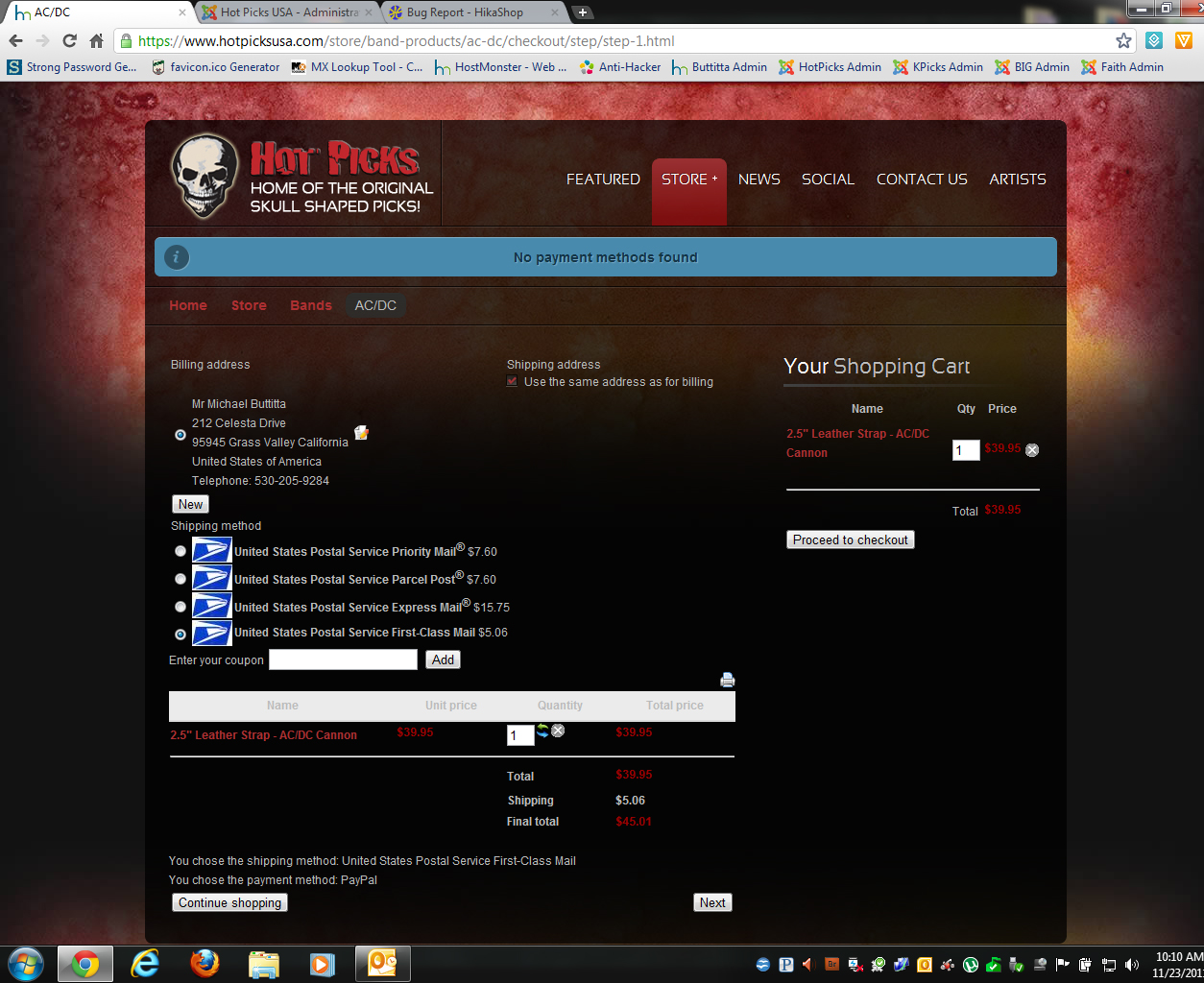
I have both PayPal and PayPal Pro enabled in my cart, and I am getting this error "No Payment Method Found" when a user goes to checkout and they CLEARLY have PayPal indicated for payment.
This is becomito leave. PLEASE! I need help getting these issues fixed!
This is becomito leave. PLEASE! I need help getting these issues fixed!
Michael Buttitta
Hot Picks USA
Please Log in or Create an account to join the conversation.

14 years 10 months ago #30824
by nicolas
Replied by nicolas on topic Re: No Payment Method Found! HELP!!
That's because in your payment methods options, you restricted them to only one shipping method.
I've unselected that restriction as you already gave us a back end access and the problem is solved.
I've unselected that restriction as you already gave us a back end access and the problem is solved.
Please Log in or Create an account to join the conversation.

14 years 10 months ago #30863
by pekuiper
Replied by pekuiper on topic Re: No Payment Method Found! HELP!!
I just up dated to the Business and now I am getting the "No payment methods found" error. Can you help me
Please Log in or Create an account to join the conversation.
14 years 10 months ago #30864
by nicolas
Replied by nicolas on topic Re: No Payment Method Found! HELP!!
That always comes from one of the points of that FAQ:
www.hikashop.com/en/support/documentatio...ins-listing.html#faq
Please check them out. If you don't find the answer there, please post a screenshot of your payment method options.
www.hikashop.com/en/support/documentatio...ins-listing.html#faq
Please check them out. If you don't find the answer there, please post a screenshot of your payment method options.
Please Log in or Create an account to join the conversation.
14 years 10 months ago #30865
by pekuiper
Replied by pekuiper on topic Re: No Payment Method Found! HELP!!
I checked them all. If I activate my Authorize.net payment plugin is shows up but not my paypal. Problem is my Authorize.new is not completed yet.
Everything was working till I up-grated to HikaShop business this morning.

Everything was working till I up-grated to HikaShop business this morning.
Please Log in or Create an account to join the conversation.
14 years 10 months ago #30866
by pekuiper
Replied by pekuiper on topic Re: No Payment Method Found! HELP!!
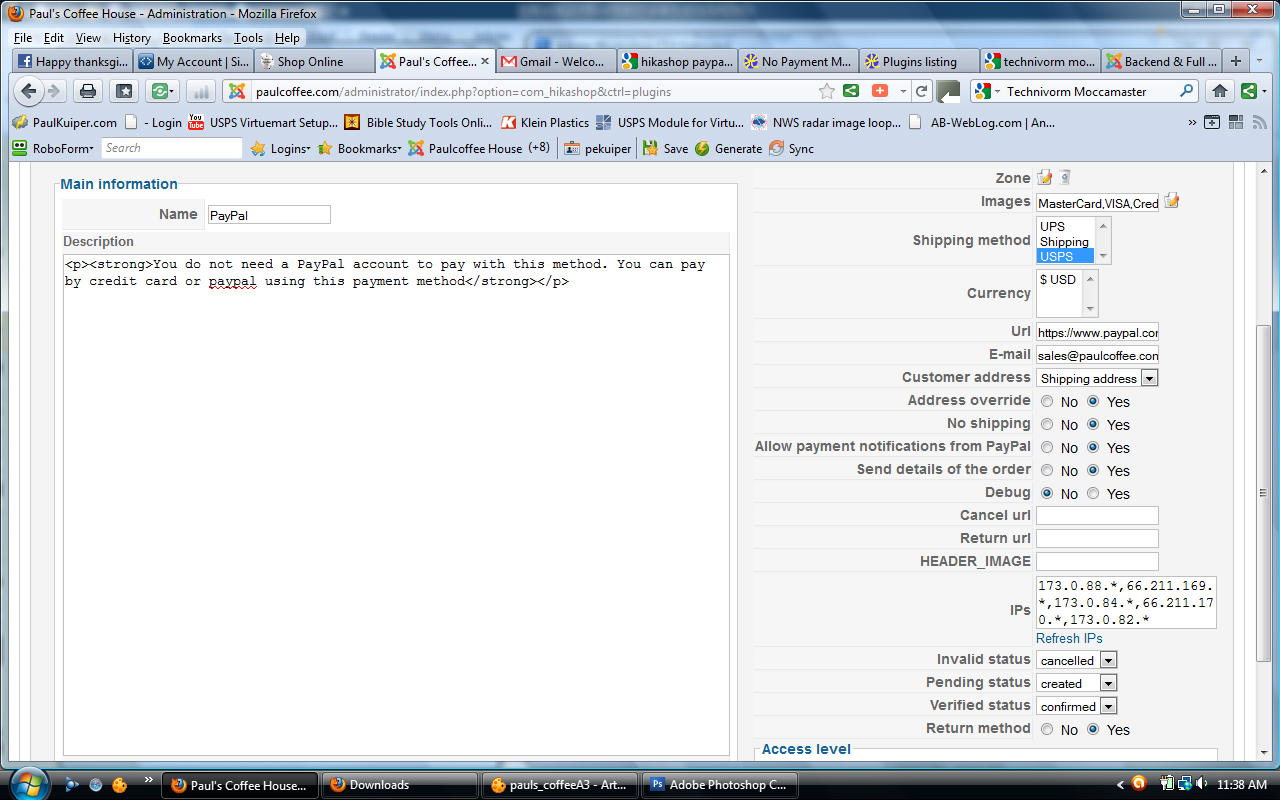
Must not have taken my photo the first time, sorry
Please Log in or Create an account to join the conversation.
14 years 10 months ago #30867
by nicolas
Replied by nicolas on topic Re: No Payment Method Found! HELP!!
You should deselect the shipping method restriction you set there and try again.
Please Log in or Create an account to join the conversation.
14 years 10 months ago #30869
by pekuiper
Replied by pekuiper on topic Re: No Payment Method Found! HELP!!
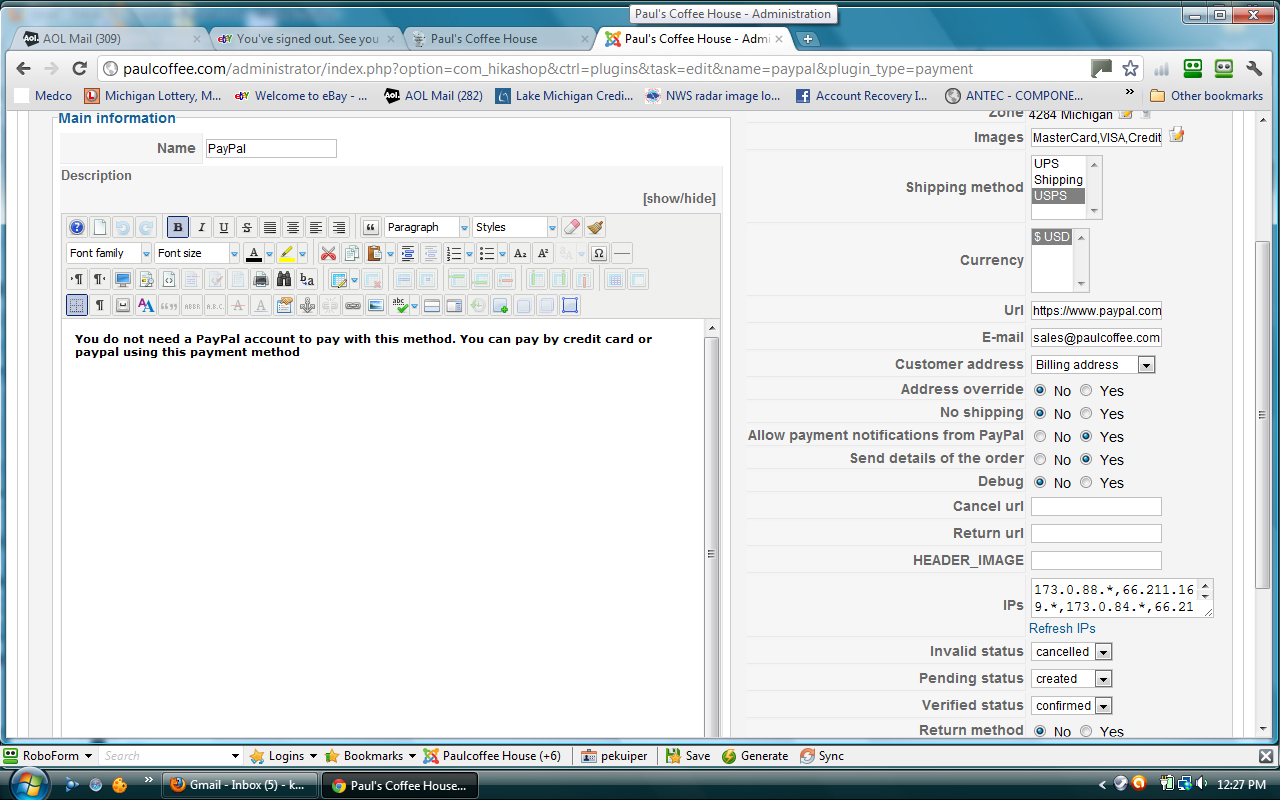
No luck.
Please Log in or Create an account to join the conversation.
14 years 10 months ago #30870
by nicolas
Replied by nicolas on topic Re: No Payment Method Found! HELP!!
Now I see that you selected both a shipping method AND a currency restriction.
To deselect a selection in a multi select, you should maintained pressed the ctrl key on your keyboard and then click on the selected items. Then, save the payment method and it should work.
To deselect a selection in a multi select, you should maintained pressed the ctrl key on your keyboard and then click on the selected items. Then, save the payment method and it should work.
Please Log in or Create an account to join the conversation.
14 years 10 months ago #30871
by pekuiper
Replied by pekuiper on topic Re: No Payment Method Found! HELP!!
WOW, brain fart - yes it worked. Don't know why I clicked it in the first place. Thanks for your awesome help.
Please Log in or Create an account to join the conversation.

14 years 9 months ago #33303
by Jabatec
Javier Ballester
Replied by Jabatec on topic Re: No Payment Method Found! HELP!!
No payment methods found
a solution
HikaShop -> configuration
disable auo submit.....
by
Javier

a solution
HikaShop -> configuration
disable auo submit.....
by
Javier
Javier Ballester
Please Log in or Create an account to join the conversation.
Less
More
- Posts: 18
- Thank you received: 0
13 years 10 months ago - 13 years 10 months ago #74834
by g5_macdaddy
Replied by g5_macdaddy on topic Re: No Payment Method Found! HELP!!
Hi,
I have read threw the forms and tried everything that could stop the "Authorize.net payment plugin" from working.
I had upgraded the HikaShop so that I allow users not to have to register and just buy products...
Anyways now my Authorize.net payment plugin wont work.
Please see screen shot. And may I just give you access to the site Nicolas?
Thanks
Dan
I have read threw the forms and tried everything that could stop the "Authorize.net payment plugin" from working.
I had upgraded the HikaShop so that I allow users not to have to register and just buy products...
Anyways now my Authorize.net payment plugin wont work.
Please see screen shot. And may I just give you access to the site Nicolas?
Thanks
Dan
Last edit: 13 years 10 months ago by g5_macdaddy. Reason: Spelling
Please Log in or Create an account to join the conversation.
Less
More
- Posts: 18
- Thank you received: 0
13 years 10 months ago #74847
by g5_macdaddy
Replied by g5_macdaddy on topic Re: No Payment Method Found! HELP!!
turns out "Authorize.net payment plugin" is for USA currency only and if your main currency is set to anything other the us dollar it will not work.
So two places to make sure you have USD.
Configuration / System / Main "Main currency" $USD
Configuration / System / payment methods / HikaShop Authorize.net payment plugin / "price" USD
Now this is an issue for Canadian shopping carts.
If you have a work around please let me know.
So two places to make sure you have USD.
Configuration / System / Main "Main currency" $USD
Configuration / System / payment methods / HikaShop Authorize.net payment plugin / "price" USD
Now this is an issue for Canadian shopping carts.
If you have a work around please let me know.
Please Log in or Create an account to join the conversation.
13 years 10 months ago #74861
by nicolas
Replied by nicolas on topic Re: No Payment Method Found! HELP!!
The Authorize.net payment gateway is only for USA based merchants. There is no work around for that. You'll have to use another payment gateway if you're in Canada.
Please Log in or Create an account to join the conversation.
Less
More
- Posts: 18
- Thank you received: 0
13 years 10 months ago #74868
by g5_macdaddy
Replied by g5_macdaddy on topic Re: No Payment Method Found! HELP!!
Just to let you know I am using a Canadian and US merchant "federatedgateway.com"
They use authorize.net plugin to enable their cart. By replacing the fields with Federated gateway merchant info the cart works. Virtuemart also has the same deal with authorize.net plugin.
I am stuck with this merchant because the client wants to use them.
Sigh
They use authorize.net plugin to enable their cart. By replacing the fields with Federated gateway merchant info the cart works. Virtuemart also has the same deal with authorize.net plugin.
I am stuck with this merchant because the client wants to use them.
Sigh
Please Log in or Create an account to join the conversation.
13 years 10 months ago #74877
by nicolas
Replied by nicolas on topic Re: No Payment Method Found! HELP!!
In that case remove the code
in plugins/hikashoppayment/authorize/authorize.php and the plugin should work for CAD.
Code:
if(!empty($currency) && @$currency[$currency_id]->currency_code != 'USD'){
return true;
}
Please Log in or Create an account to join the conversation.
Time to create page: 0.264 seconds