
- Posts: 9
- Thank you received: 0
Registration Showing but no Registraiton Selected
- dupree1015
-
 Topic Author
- Offline
Less
More
14 years 7 months ago #36942
by dupree1015
Registration Showing but no Registraiton Selected was created by dupree1015
Hi,
I just purchased the Essential package. And in the configuration/checkout I have selected "No Registration" however, when I go to checkout, it's still asking me to register. I have registration turned off in Joomla because I'm using CB for membership registration and I don't want people who purchase to be signed up with a CB account.
In the checkout workflow I have the following and not sure if login should be removed: login,address_shipping_payment_confirm_cart_status_fields,end
You guys have always been so helpful in the past and I really appreciate all the assistance you've provided even prior to purchasing your product.
Thanks,
Cat'
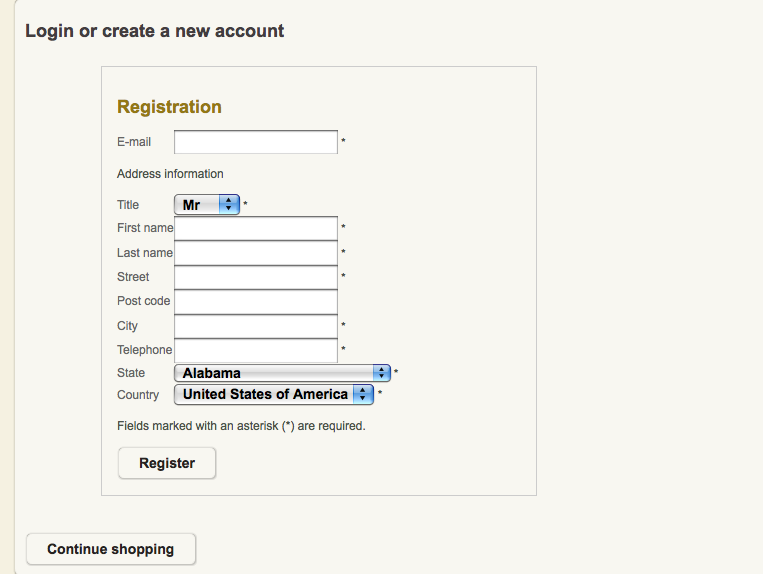
I just purchased the Essential package. And in the configuration/checkout I have selected "No Registration" however, when I go to checkout, it's still asking me to register. I have registration turned off in Joomla because I'm using CB for membership registration and I don't want people who purchase to be signed up with a CB account.
In the checkout workflow I have the following and not sure if login should be removed: login,address_shipping_payment_confirm_cart_status_fields,end
You guys have always been so helpful in the past and I really appreciate all the assistance you've provided even prior to purchasing your product.
Thanks,
Cat'
Please Log in or Create an account to join the conversation.

14 years 7 months ago #37065
by nicolas
Replied by nicolas on topic Re: Registration Showing but no Registraiton Selected
Hi,
Your screenshot shows that the user account creation has been turned off as you need.
You don't have the username/password fields on that form.
It's just that the button says register, but it's not really a registration to the website, it's just a registration to the shop. So no account will be created.
In any cases, if you want to change the wording, you can do a translation override:
www.hikashop.com/en/download/languages.html#modify
Your screenshot shows that the user account creation has been turned off as you need.
You don't have the username/password fields on that form.
It's just that the button says register, but it's not really a registration to the website, it's just a registration to the shop. So no account will be created.
In any cases, if you want to change the wording, you can do a translation override:
www.hikashop.com/en/download/languages.html#modify
Please Log in or Create an account to join the conversation.
14 years 7 months ago #40571
by bubiny
Replied by bubiny on topic Re: Registration Showing but no Registraiton Selected
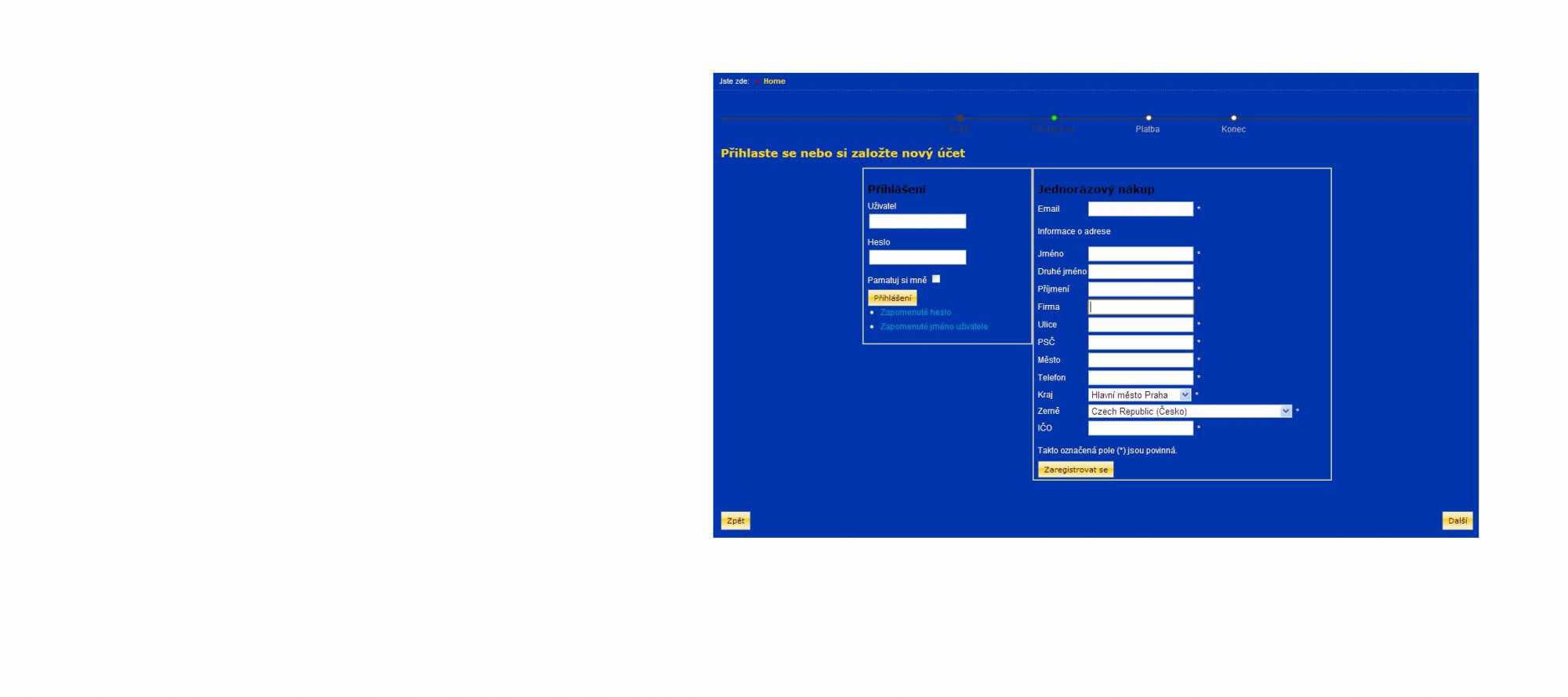
Same situation with me, but what If I would like to hide the register button since there is already next button displayed at the right bottom and I do not need it for the guest checkout? thank you
Please Log in or Create an account to join the conversation.
14 years 7 months ago #40572
by nicolas
Replied by nicolas on topic Re: Registration Showing but no Registraiton Selected
The register button can be hidden by adding the CSS below in the front end CSS file of HikaShop via the Display tab of the configuration (don't forget to save the configuration after your modification):
.hikashop_checkout_login_right_part a{
display:none;
}
.hikashop_checkout_login_right_part a{
display:none;
}
Please Log in or Create an account to join the conversation.
14 years 7 months ago #40573
by bubiny
Replied by bubiny on topic Re: Registration Showing but no Registraiton Selected
super fast answer. thank you that worked  One more question to this view. I would like to add the option to register. I have the login option for existing customers, now the guest checkout, but missing a link under the login window for example where is now forgot password and etc... an option to register. Can you help me with that? Asking again since I am not entirely understanding your reply on this. Thank you for great support.
"If you want an option for the customer to register, you can just put a link to the joomla user registration page. Than can either be done by adding your HTML link in the file registration of the view user via the menu Display->Views or with a joomla menu item of the type user registration."
One more question to this view. I would like to add the option to register. I have the login option for existing customers, now the guest checkout, but missing a link under the login window for example where is now forgot password and etc... an option to register. Can you help me with that? Asking again since I am not entirely understanding your reply on this. Thank you for great support."If you want an option for the customer to register, you can just put a link to the joomla user registration page. Than can either be done by adding your HTML link in the file registration of the view user via the menu Display->Views or with a joomla menu item of the type user registration."
Please Log in or Create an account to join the conversation.
14 years 7 months ago #40579
by nicolas
Replied by nicolas on topic Re: Registration Showing but no Registraiton Selected
Well, my previous answer already explains what you do.
You should put some HTML like below in the file registration of the view user via the menu Display->Views:
<a href="URL_OF_JOOMLA_REGISTRATION_PAGE">Register</a>
You should put some HTML like below in the file registration of the view user via the menu Display->Views:
<a href="URL_OF_JOOMLA_REGISTRATION_PAGE">Register</a>
Please Log in or Create an account to join the conversation.

12 years 8 months ago #140270
by moraelin
Can you tell me which file I add the css to to remove the register button?
Thanks
Replied by moraelin on topic Re: Registration Showing but no Registraiton Selected
nicolas wrote: The register button can be hidden by adding the CSS below in the front end CSS file of HikaShop via the Display tab of the configuration (don't forget to save the configuration after your modification):
.hikashop_checkout_login_right_part a{
display:none;
}
Can you tell me which file I add the css to to remove the register button?
Thanks
Please Log in or Create an account to join the conversation.
12 years 8 months ago #140282
by nicolas
Replied by nicolas on topic Re: Registration Showing but no Registraiton Selected
You can add it to the frontend CSS file:
www.hikashop.com/support/support/documen...ize-the-display.html
www.hikashop.com/support/support/documen...ize-the-display.html
Please Log in or Create an account to join the conversation.
12 years 8 months ago #140429
by moraelin
Replied by moraelin on topic Re: Registration Showing but no Registraiton Selected
I tried adding the line of css to the bottom of the Frontend CSS file.
But the register button still appears in the checkout page.
But the register button still appears in the checkout page.
Please Log in or Create an account to join the conversation.
12 years 8 months ago #140436
by nicolas
Replied by nicolas on topic Re: Registration Showing but no Registraiton Selected
Then it means that you set the "button display" option to "normal" and not "css" in the configuration, and in that case you would need that CSS instead:
.hikashop_checkout_login_right_part input{
display:none;
}
.hikashop_checkout_login_right_part input{
display:none;
}
Please Log in or Create an account to join the conversation.
12 years 8 months ago #140457
by moraelin
Replied by moraelin on topic Re: Registration Showing but no Registraiton Selected
Thanks for the quick reply.
I tried adding this to the bottom of the frontend css file.
But the register button is still visible.
I tried adding this to the bottom of the frontend css file.
But the register button is still visible.
Please Log in or Create an account to join the conversation.

12 years 7 months ago #141313
by Jerome
Jerome - Obsidev.com
HikaMarket & HikaSerial developer / HikaShop core dev team.
Also helping the HikaShop support team when having some time or couldn't sleep.
By the way, do not send me private message, use the "contact us" form instead.
Replied by Jerome on topic Re: Registration Showing but no Registraiton Selected
Hi,
Without a link to your website (to the page which have the problem) it will be difficult for us to understand what is the exact problem, see what has be done and see what should be done now.
Would it be possible to have a link ?
Regards,
Without a link to your website (to the page which have the problem) it will be difficult for us to understand what is the exact problem, see what has be done and see what should be done now.
Would it be possible to have a link ?
Regards,
Jerome - Obsidev.com
HikaMarket & HikaSerial developer / HikaShop core dev team.
Also helping the HikaShop support team when having some time or couldn't sleep.
By the way, do not send me private message, use the "contact us" form instead.
Please Log in or Create an account to join the conversation.
Time to create page: 0.210 seconds