
- Posts: 57
- Thank you received: 2
HikaShop WorldPay Business Gateway payment plugin
- expertbeginner
-
 Topic Author
- Offline
Less
More
14 years 5 months ago #45748
by expertbeginner
HikaShop WorldPay Business Gateway payment plugin was created by expertbeginner
Hi,
I'm just setting up the WorldPay plug-in. In the Plugin Manger the call back address is not displaying correctly.
It looks like the closing tag is the wrong way around.
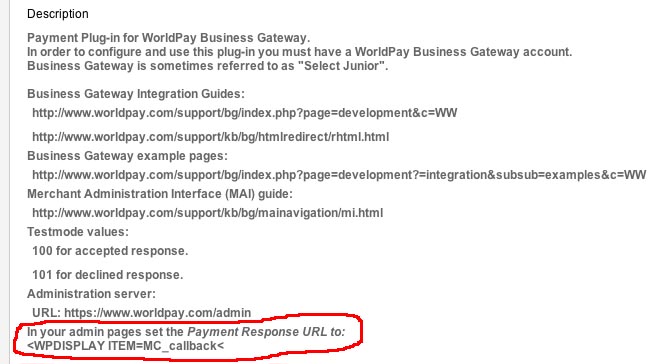
What is the call back url that should be used?
Regards,
Martyn.
I'm just setting up the WorldPay plug-in. In the Plugin Manger the call back address is not displaying correctly.
It looks like the closing tag is the wrong way around.
What is the call back url that should be used?
Regards,
Martyn.
Please Log in or Create an account to join the conversation.
- expertbeginner
-
Topic Author
- Offline
Less
More
- Posts: 57
- Thank you received: 2
14 years 5 months ago #45761
by expertbeginner
Replied by expertbeginner on topic Re: HikaShop WorldPay Business Gateway payment plugin
Hi,
I've been doing some testing and further trawling through the forum for similar issues.
There is one such case from about six months ago. The call back url was being modified like so ...&task=notify¬if_payment=bf'...
I turned on the show parameters option and have found that mine is the same issue.
I then turned off the 'Allow payment notifications from Worldpay Business Gateway' option and entered the corrected url www.xxxx.xx.xx/index.php?option=com_hika...pl=component&lang=en into the Payment response URL in the WorldPay Admin panel. The xes are edited in
It looks as though the call back is attempted but results in a white screen - the url still shows as WorldPay, though. Entering the callback url in the address bar results in a white screen which is generated from the following html.
I'm guessing the call back is wrong. Any pointers as to what it should be?
By the way, I'm currently using Chrome.
Regards,
Martyn.
HTML of results page:
The xes throughout are edits that I've made.
I've been doing some testing and further trawling through the forum for similar issues.
There is one such case from about six months ago. The call back url was being modified like so ...&task=notify¬if_payment=bf'...
I turned on the show parameters option and have found that mine is the same issue.
I then turned off the 'Allow payment notifications from Worldpay Business Gateway' option and entered the corrected url www.xxxx.xx.xx/index.php?option=com_hika...pl=component&lang=en into the Payment response URL in the WorldPay Admin panel. The xes are edited in
It looks as though the call back is attempted but results in a white screen - the url still shows as WorldPay, though. Entering the callback url in the address bar results in a white screen which is generated from the following html.
I'm guessing the call back is wrong. Any pointers as to what it should be?
By the way, I'm currently using Chrome.
Regards,
Martyn.
HTML of results page:
Code:
<!DOCTYPE html PUBLIC "-//W3C//DTD XHTML 1.0 Transitional//EN" "http://www.w3.org/TR/xhtml1/DTD/xhtml1-transitional.dtd">
<html xmlns="http://www.w3.org/1999/xhtml" xml:lang="en-gb" lang="en-gb" dir="ltr">
<head>
<meta http-equiv="content-type" content="text/html; charset=utf-8" />
<meta name="generator" content="Joomla! - Open Source Content Management" />
<title>Peaklander</title>
<link rel="stylesheet" href="/media/com_hikashop/css/frontend_custom.css" type="text/css" />
<script src="/media/com_hikashop/js/hikashop.js" type="text/javascript"></script>
<link rel="stylesheet" href="/templates/system/css/general.css" type="text/css" />
<link rel="stylesheet" href="/templates/system/css/template.css" type="text/css" />
<!-- Google Analytics for Joomla 1.6 by Analytics For Joomla v1.0 | http://www.analyticsforjoomla.com/ -->
<script type="text/javascript">
var _gaq = _gaq || [];
_gaq.push(['_setAccount', 'UA-28377986-1']);
_gaq.push(['_trackPageview']);
(function() {
var ga = document.createElement('script'); ga.type = 'text/javascript'; ga.async = true;
ga.src = ('https:' == document.location.protocol ? 'https://ssl' : 'http://www') + '.google-analytics.com/ga.js';
var s = document.getElementsByTagName('script')[0]; s.parentNode.insertBefore(ga, s);
})();
</script>
<!-- End of Google Analytics for Joomla 1.6 by Analytics For Joomla v1.0 -->
</head>
<body class="contentpane">
<div id="system-message-container">
</div>
</body>
</html>
Array
(
[instId] => 277530
[cartId] => 3
[amount] => 56.5
[currency] => GBP
[desc] =>
[MC_callback] => www.xxx.xx.xx/index.php?option=com_hikas...pl=component&lang=en
[name] => xxxx
[address] => xxxx
[postcode] => xxxx
[country] => GB
The xes throughout are edits that I've made.
Please Log in or Create an account to join the conversation.

14 years 5 months ago #45763
by nicolas
Replied by nicolas on topic Re: HikaShop WorldPay Business Gateway payment plugin
The payment response URL should indeed be:
<WPDISPLAY ITEM=MC_callback>
We'll change that for next version.
Be careful, the callback URL has a wrong character. It should not be:
¬
but:
¬
instead
<WPDISPLAY ITEM=MC_callback>
We'll change that for next version.
Be careful, the callback URL has a wrong character. It should not be:
¬
but:
¬
instead
Please Log in or Create an account to join the conversation.
- expertbeginner
-
Topic Author
- Offline
Less
More
- Posts: 57
- Thank you received: 2
14 years 5 months ago #45765
by expertbeginner
Replied by expertbeginner on topic Re: HikaShop WorldPay Business Gateway payment plugin
Hi Nicolas,
I have corrected the ¬ to ¬ but it is still not working
(domainname)/index.php?option=com_hikashop&ctrl=checkout&task=notify¬if_payment=bf_rbsbusinessgateway&tmpl=component&lang=en
Do you know if there are any POST/GET values that are passed back to identify the transaction that has been completed?
I have corrected the ¬ to ¬ but it is still not working
(domainname)/index.php?option=com_hikashop&ctrl=checkout&task=notify¬if_payment=bf_rbsbusinessgateway&tmpl=component&lang=en
Do you know if there are any POST/GET values that are passed back to identify the transaction that has been completed?
Please Log in or Create an account to join the conversation.
14 years 5 months ago #45769
by nicolas
Replied by nicolas on topic Re: HikaShop WorldPay Business Gateway payment plugin
Yes, worldpay will send a lot of information in the post so that the plugin can identify the transaction and confirm the order.
Please Log in or Create an account to join the conversation.
- expertbeginner
-
Topic Author
- Offline
Less
More
- Posts: 57
- Thank you received: 2
14 years 5 months ago #45853
by expertbeginner
Replied by expertbeginner on topic Re: HikaShop WorldPay Business Gateway payment plugin
Hi,
Thanks for the help on this. With further assistance from ianspeed the issue has been resolved.
Resolution:
1. WorldPay Call Back URL - <WPDISPLAY ITEM=MC_callback> (I mistakenly thought that the plug-in page would replace this from a configuration setting with the qualified URL for copying and pasting. Because it incorrectly shows as <WPDISPLAY ITEM=MC_callback< I thought it wasn't doing it's job, so I tried all sorts of return addresses, when in fact all it needed was <WPDISPLAY ITEM=MC_callback>)
2. Turn on Allow Payment notification from world pay.
As a note of possible interest, with show parameters turned on the return url still shows with ¬if_ in it rather than the expected notif_. There must be some conversion going on somewhere as it works just fine.
Again, Thanks.
Thanks for the help on this. With further assistance from ianspeed the issue has been resolved.
Resolution:
1. WorldPay Call Back URL - <WPDISPLAY ITEM=MC_callback> (I mistakenly thought that the plug-in page would replace this from a configuration setting with the qualified URL for copying and pasting. Because it incorrectly shows as <WPDISPLAY ITEM=MC_callback< I thought it wasn't doing it's job, so I tried all sorts of return addresses, when in fact all it needed was <WPDISPLAY ITEM=MC_callback>)
2. Turn on Allow Payment notification from world pay.
As a note of possible interest, with show parameters turned on the return url still shows with ¬if_ in it rather than the expected notif_. There must be some conversion going on somewhere as it works just fine.
Again, Thanks.
Please Log in or Create an account to join the conversation.
- expertbeginner
-
Topic Author
- Offline
Less
More
- Posts: 57
- Thank you received: 2
14 years 5 months ago #46041
by expertbeginner
Replied by expertbeginner on topic Re: HikaShop WorldPay Business Gateway payment plugin
HI,
Here's an update and something that may be worth looking at.
I tried some more test transactions last night and again this morning to find that the call back wan't working, again. After completing or cancelling the transaction at WorldPay, the screen would go white and remain so. The source of the white screen shows a header generated by Joomla, including a link to a css file that doesn't exist (/templates/css/template.css) and empty content divs.
To help in finding the cause I turned on the 'debug' and 'show parameters' options in the WorldPay plug-in and then tried another transaction. The call back worked perfectly. I turned off the 'show parameters' option and did another test, it too worked perfectly. Debug was then turned off, a test done and the call back failed.
It appears that only by having the 'debug' option turned on does the call back complete successfully. In all cases the sale shows up as 'confirmed' or 'cancelled' in the database as would be expected on a successful call back.
I tried the same on another (fresh) installation and got the exact same behaviour.
Any thoughts?
Regards,
Martyn.
Here's an update and something that may be worth looking at.
I tried some more test transactions last night and again this morning to find that the call back wan't working, again. After completing or cancelling the transaction at WorldPay, the screen would go white and remain so. The source of the white screen shows a header generated by Joomla, including a link to a css file that doesn't exist (/templates/css/template.css) and empty content divs.
To help in finding the cause I turned on the 'debug' and 'show parameters' options in the WorldPay plug-in and then tried another transaction. The call back worked perfectly. I turned off the 'show parameters' option and did another test, it too worked perfectly. Debug was then turned off, a test done and the call back failed.
It appears that only by having the 'debug' option turned on does the call back complete successfully. In all cases the sale shows up as 'confirmed' or 'cancelled' in the database as would be expected on a successful call back.
I tried the same on another (fresh) installation and got the exact same behaviour.
Any thoughts?
Regards,
Martyn.
Please Log in or Create an account to join the conversation.
14 years 5 months ago #46046
by nicolas
Replied by nicolas on topic Re: HikaShop WorldPay Business Gateway payment plugin
Could you try to change the line:
$order->history->history_data = ob_get_clean();
to:
$order->history->history_data = '';
in the file plugins/hikashoppayment/bf_rbsbusinessgateway.php and try again ?
$order->history->history_data = ob_get_clean();
to:
$order->history->history_data = '';
in the file plugins/hikashoppayment/bf_rbsbusinessgateway.php and try again ?
Please Log in or Create an account to join the conversation.
- expertbeginner
-
Topic Author
- Offline
Less
More
- Posts: 57
- Thank you received: 2
14 years 5 months ago - 14 years 5 months ago #46055
by expertbeginner
Replied by expertbeginner on topic Re: HikaShop WorldPay Business Gateway payment plugin
Hi,
After changing the line I'm getting the same result: debug = off, white screen, stays with WorldPay URL in address bar. The source behind it is:
With debug = ON after a couple of WorldPay pages are displayed, the return to the website is successful.
Thanks,
Martyn.
After changing the line I'm getting the same result: debug = off, white screen, stays with WorldPay URL in address bar. The source behind it is:
Code:
<!DOCTYPE html PUBLIC "-//W3C//DTD XHTML 1.0 Strict//EN" "http://www.w3.org/TR/xhtml1/DTD/xhtml1-strict.dtd">
<html> <head> <base href="http://peaklander.co.uk/index.php" /> <meta content="text/html; charset=utf-8" http-equiv="content-type" /> <meta content="Joomla! - Open Source Content Management" /> <title>Peaklander</title> <link href="/media/com_hikashop/css/frontend_custom.css" rel="stylesheet" type="text/css" /> <link href="/templates/system/css/general.css" rel="stylesheet" type="text/css" /> <link href="/templates/system/css/template.css" rel="stylesheet" type="text/css" /> </head> <body class="contentpane"> <div id="system-message-container"> </div> </body></html>
With debug = ON after a couple of WorldPay pages are displayed, the return to the website is successful.
Thanks,
Martyn.
Last edit: 14 years 5 months ago by expertbeginner. Reason: missing word
Please Log in or Create an account to join the conversation.
14 years 5 months ago #46147
by nicolas
Replied by nicolas on topic Re: HikaShop WorldPay Business Gateway payment plugin
Could you try with that plugin instead:
Please Log in or Create an account to join the conversation.
- expertbeginner
-
Topic Author
- Offline
Less
More
- Posts: 57
- Thank you received: 2
14 years 5 months ago #46160
by expertbeginner
Replied by expertbeginner on topic Re: HikaShop WorldPay Business Gateway payment plugin
Hi Nicolas,
Installed the plug-in and carried out a number of test transactions and can confirm that it is working (with debug = off ) perfectly.
Many thanks for your assistance.
Regards,
Martyn.
Installed the plug-in and carried out a number of test transactions and can confirm that it is working (with debug = off ) perfectly.
Many thanks for your assistance.
Regards,
Martyn.
Please Log in or Create an account to join the conversation.
14 years 2 months ago #57301
by juzooi
Replied by juzooi on topic Re: HikaShop WorldPay Business Gateway payment plugin
Greetings,
Is bf_rbsbusinessgateway_2012-04-06.zip the latest version?
Am getting "http://.../index.php?option=com_hikashop&ctrl=checkout&task=notify¬if_payment=bf_rbsbusinessgateway&tmpl=component&lang=en" issue too.
Please help.
Thanks
Is bf_rbsbusinessgateway_2012-04-06.zip the latest version?
Am getting "http://.../index.php?option=com_hikashop&ctrl=checkout&task=notify¬if_payment=bf_rbsbusinessgateway&tmpl=component&lang=en" issue too.
Please help.
Thanks
Please Log in or Create an account to join the conversation.
14 years 2 months ago #57375
by nicolas
Replied by nicolas on topic Re: HikaShop WorldPay Business Gateway payment plugin
No the latest version is in the HikaShop package when you install it. That's the one your should use, not the one in this thread.
Please Log in or Create an account to join the conversation.
Less
More
- Posts: 1
- Thank you received: 0
13 years 11 months ago - 13 years 11 months ago #69592
by mildredolson
Replied by mildredolson on topic Re: HikaShop WorldPay Business Gateway payment plugin
For better business gateway payment option I am using merchantinc.com and you will be surprise about their processing rates that are much affordable rate. They have been just nice and perfect for me as they supports a affordable plugins. They made very easy selling and also I had not to wait long for my money.
Last edit: 13 years 11 months ago by mildredolson.
Please Log in or Create an account to join the conversation.

13 years 5 months ago #97065
by haxx
The K is on the way!
Replied by haxx on topic HikaShop WorldPay Business Gateway payment plugin
Hi
I'm trying to use this plugin an am using Hikashop 2.1.1 and am getting the white screen.
The site is getting a payment response and orders are being confirmed but its not telling the customer.
Any help would be appreciated as I would like to get WorldPay to activate our installation ASAP.
Many thanks
Paul
I'm trying to use this plugin an am using Hikashop 2.1.1 and am getting the white screen.
The site is getting a payment response and orders are being confirmed but its not telling the customer.
Any help would be appreciated as I would like to get WorldPay to activate our installation ASAP.
Many thanks
Paul
The K is on the way!
Please Log in or Create an account to join the conversation.
13 years 5 months ago #97399
by nicolas
Replied by nicolas on topic HikaShop WorldPay Business Gateway payment plugin
Hi,
So you're saying that the order are confirmed but that the users don't get the order confirmation notification ?
In that case, it means that the email is not sent either by HikaShop or by your email server and it has nothing to do with WorldPay.
HikaShop won't send the email if it is unpublished in the menu System>Emails.
Your email server will not send the the email if the email configuration in joomla or Hikashop is not compatible with it. And so you should check your email settings with your hosting provider.
So you're saying that the order are confirmed but that the users don't get the order confirmation notification ?
In that case, it means that the email is not sent either by HikaShop or by your email server and it has nothing to do with WorldPay.
HikaShop won't send the email if it is unpublished in the menu System>Emails.
Your email server will not send the the email if the email configuration in joomla or Hikashop is not compatible with it. And so you should check your email settings with your hosting provider.
Please Log in or Create an account to join the conversation.
13 years 5 months ago #97419
by haxx
The K is on the way!
Replied by haxx on topic HikaShop WorldPay Business Gateway payment plugin
Hi
No sorry, my bad explanation.
Let me step through it,
Customer places item in cart & goes through checkout, that works fine.
They go to the WorldPay site and enter card details, that's fine.
Then they are supposed to get a screen on the WorldPay site with Merchants referenc, transaction confirmation but we don't, we get a white blank page.
The site gets that the order is created, but no confirmation.
Paul
No sorry, my bad explanation.
Let me step through it,
Customer places item in cart & goes through checkout, that works fine.
They go to the WorldPay site and enter card details, that's fine.
Then they are supposed to get a screen on the WorldPay site with Merchants referenc, transaction confirmation but we don't, we get a white blank page.
The site gets that the order is created, but no confirmation.
Paul
The K is on the way!
Please Log in or Create an account to join the conversation.
13 years 5 months ago #97466
by nicolas
Replied by nicolas on topic HikaShop WorldPay Business Gateway payment plugin
In that case, it sounds that you didn't configure the callback URL properly on the WorldPay website.
Did you follow the explanations on this thread about entering the <WPDISPLAY ITEM=MC_callback> ?
Did you follow the explanations on this thread about entering the <WPDISPLAY ITEM=MC_callback> ?
Please Log in or Create an account to join the conversation.
13 years 5 months ago #97491
by haxx
The K is on the way!
Replied by haxx on topic HikaShop WorldPay Business Gateway payment plugin
Hi Nicolas
Yep I went through the explanation in this thread & the callback URL is correct as in your last post.
I've been through the plugin and made sure it was updated properly so is definitely the latest version so I'm pretty much stumped.
The only thing I can see that could be preventing it is that in our gateway settings we have a callback password, but no option to set this in the Hikashop plugin?
Paul
Yep I went through the explanation in this thread & the callback URL is correct as in your last post.
I've been through the plugin and made sure it was updated properly so is definitely the latest version so I'm pretty much stumped.
The only thing I can see that could be preventing it is that in our gateway settings we have a callback password, but no option to set this in the Hikashop plugin?
Paul
The K is on the way!
Please Log in or Create an account to join the conversation.
13 years 5 months ago #97573
by nicolas
Replied by nicolas on topic HikaShop WorldPay Business Gateway payment plugin
Hi,
You should contact worldpay support and see with them if your worldpay account is properly configured as it's probably something on that end.
You should contact worldpay support and see with them if your worldpay account is properly configured as it's probably something on that end.
Please Log in or Create an account to join the conversation.
Time to create page: 0.283 seconds