

- Posts: 27
- Thank you received: 0
edit subcontainer
14 years 3 months ago #53751
by chubby
edit subcontainer was created by chubby
i try resize the subcontainer to display my product..but my product is on the left part and the subcontainer still very big. How can i solve this problem?
Please Log in or Create an account to join the conversation.

14 years 3 months ago #53836
by nicolas
Replied by nicolas on topic Re: edit subcontainer
You don't need to change CSS for that.
The subcontainer width is automatically calculated by your browser based on the number of columns and the margin settings of your menu/module. Just change them to adapt to what you want.
The subcontainer width is automatically calculated by your browser based on the number of columns and the margin settings of your menu/module. Just change them to adapt to what you want.
Please Log in or Create an account to join the conversation.
14 years 3 months ago #53878
by chubby
Replied by chubby on topic Re: edit subcontainer
i edit d column n it seems like dis...
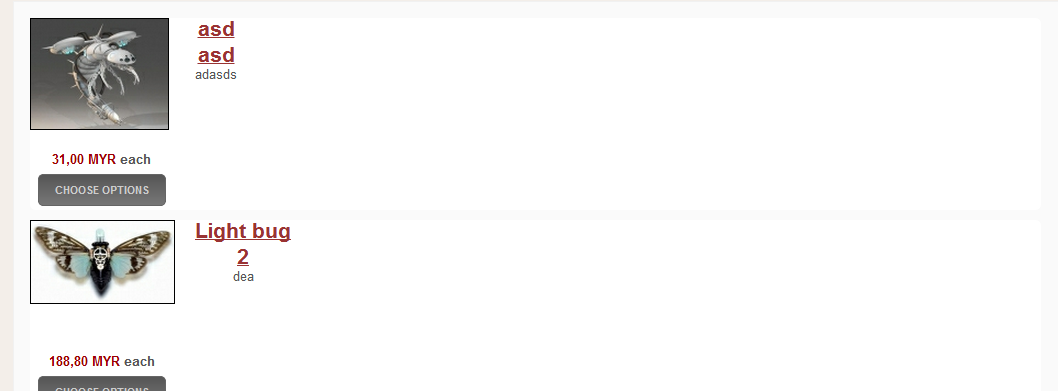
i try to make those item in a same row can u guide me?
i try to make those item in a same row can u guide me?
Please Log in or Create an account to join the conversation.
14 years 3 months ago #53951
by nicolas
Replied by nicolas on topic Re: edit subcontainer
Go in the hikashop options of your products listing menu/module and increase the "number of columns" option.
Please Log in or Create an account to join the conversation.
14 years 3 months ago #54051
by chubby
Replied by chubby on topic Re: edit subcontainer
cant also..or any idea i can reset d file?cos d payment method cant link to the page and i think i mess d css code ady
Please Log in or Create an account to join the conversation.
14 years 3 months ago #54124
by nicolas
Replied by nicolas on topic Re: edit subcontainer
Can you do a screenshot of the options of your menu/module ?
Could you give a link to that page ?
That would allow us to see if you did it properly.
For the payment methods, if you don't see them during the checkout, you should check that FAQ:
www.hikashop.com/en/support/documentatio...ins-listing.html#faq
Could you give a link to that page ?
That would allow us to see if you did it properly.
For the payment methods, if you don't see them during the checkout, you should check that FAQ:
www.hikashop.com/en/support/documentatio...ins-listing.html#faq
Please Log in or Create an account to join the conversation.
14 years 3 months ago #54340
by chubby
Replied by chubby on topic Re: edit subcontainer
www.artgergasi.com/
i really mess up d thing LOL...or shud i gv u d admin can u help me c wat happen to my website?
btw dere are some content i unpublish so u will unable to c d content
i really mess up d thing LOL...or shud i gv u d admin can u help me c wat happen to my website?
btw dere are some content i unpublish so u will unable to c d content
Please Log in or Create an account to join the conversation.
14 years 3 months ago #54360
by nicolas
Replied by nicolas on topic Re: edit subcontainer
Go in the menu Display->Content menus and edit the menu with the id 544. There, reduce the number of columns and it should display better on that page:
www.artgergasi.com/index.php/order-now
www.artgergasi.com/index.php/order-now
Please Log in or Create an account to join the conversation.
14 years 3 months ago #54579
by chubby
Replied by chubby on topic Re: edit subcontainer
wow thx alot..but my payment method still like tat= ||.. i check the FAQ n it still like that
||.. i check the FAQ n it still like that Please Log in or Create an account to join the conversation.
14 years 3 months ago #54580
by chubby
Replied by chubby on topic Re: edit subcontainer
btw i check my paypal plug in the "ordering" there display 0.Hikashop Western Union payment.. would it be the one that cause problem?i try to change bac to the paypal but cant
Please Log in or Create an account to join the conversation.
14 years 3 months ago #54581
by chubby
Replied by chubby on topic Re: edit subcontainer
1more question that how can i do like the demo, when i change the colour the price and image will change oso?
www.demo.hikashop.com/index.php?option=c...ow&Itemid=82&lang=en
www.demo.hikashop.com/index.php?option=c...ow&Itemid=82&lang=en
Please Log in or Create an account to join the conversation.
14 years 3 months ago #54606
by nicolas
Replied by nicolas on topic Re: edit subcontainer
I can see your PayPal plugin before login but not after.
It means that you either restricted your payment method to shipping methods AND/OR you restricted to only some zone.
Remove these restrictions in the options of the payment plugin and it will display.
For the information changing per characteristic value, you can create a characteristic, associate it to your product and then edit each variant to modify the information for each variant of the product. More information here:
www.hikashop.com/en/support/documentatio...html#characteristics
It means that you either restricted your payment method to shipping methods AND/OR you restricted to only some zone.
Remove these restrictions in the options of the payment plugin and it will display.
For the information changing per characteristic value, you can create a characteristic, associate it to your product and then edit each variant to modify the information for each variant of the product. More information here:
www.hikashop.com/en/support/documentatio...html#characteristics
Please Log in or Create an account to join the conversation.
14 years 3 months ago #54719
by chubby
Replied by chubby on topic Re: edit subcontainer
the variant i manage to do it but when i select change the color etc"from blue to red" the image din change,others can function just the image din change only
Please Log in or Create an account to join the conversation.
14 years 3 months ago #54720
by chubby
Replied by chubby on topic Re: edit subcontainer
Problem solve i think i get it haha thx alot u really help alot 
Please Log in or Create an account to join the conversation.
14 years 3 months ago #54728
by chubby
Replied by chubby on topic Re: edit subcontainer
erm nicolas i having problem:
1) when a new user register and after it say a email will send to you for activation. but i din receive any activation mail.
2)"The cart items combined weight is too big for all the possible shipping methods" but the weight item din over than the one i set
1) when a new user register and after it say a email will send to you for activation. but i din receive any activation mail.
2)"The cart items combined weight is too big for all the possible shipping methods" but the weight item din over than the one i set
Please Log in or Create an account to join the conversation.
14 years 3 months ago #54769
by nicolas
Replied by nicolas on topic Re: edit subcontainer
1. It's because your emails settings are not configured properly, either in the joomla configuration, or in the hikashop configuration.
Either fix your email settings or disable the activation email (it's an option in the joomla user manager).
2. Could you do a screenshot of your shipping methods and more information of the weight you set in your products and what product you had in the cart when you got that error ?
Either fix your email settings or disable the activation email (it's an option in the joomla user manager).
2. Could you do a screenshot of your shipping methods and more information of the weight you set in your products and what product you had in the cart when you got that error ?
Please Log in or Create an account to join the conversation.
14 years 3 months ago #54846
by chubby
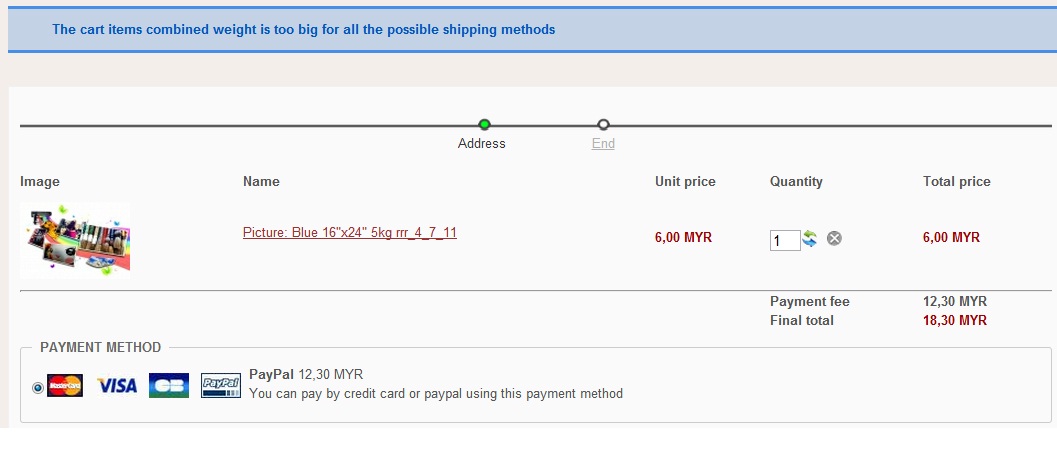
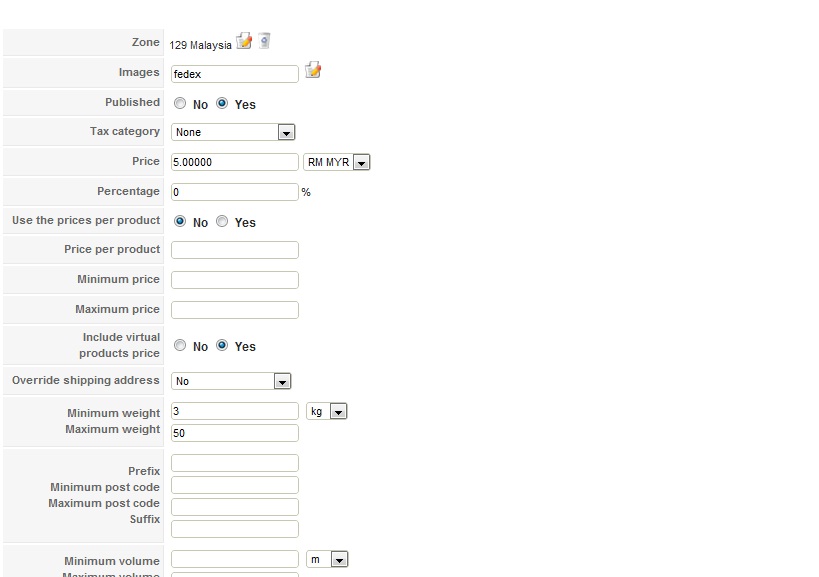
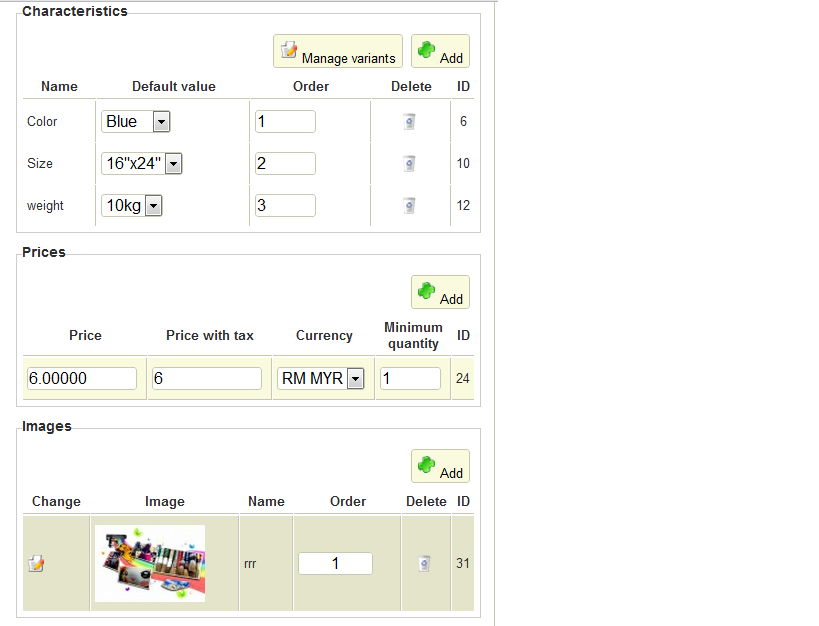
d email i ady settle dy, if i wan my customer send me his image of his own can he upload in my website?i mean by using hikashop of cos
Replied by chubby on topic Re: edit subcontainer
d email i ady settle dy, if i wan my customer send me his image of his own can he upload in my website?i mean by using hikashop of cos
Please Log in or Create an account to join the conversation.
14 years 3 months ago #54940
by nicolas
Replied by nicolas on topic Re: edit subcontainer
Please check that you set a weight in your product and if that doesn't work in each one of the variants (via the "manage variants button"). That should help avoid that error message.
If you want your users to upload pictures when buying your products, you can create a custom field of the table "item" via the menu Display->Custom fields in the business edition.
If you want your users to upload pictures when buying your products, you can create a custom field of the table "item" via the menu Display->Custom fields in the business edition.
Please Log in or Create an account to join the conversation.
14 years 3 months ago #55138
by chubby
Replied by chubby on topic Re: edit subcontainer
i got set weight for all of them like d print scrn below i got show it for u...but now wen i delete it, it show no value found...
btw did business edition hv any demosite for me to refer?
btw did business edition hv any demosite for me to refer?
Please Log in or Create an account to join the conversation.
14 years 3 months ago #55186
by nicolas
Replied by nicolas on topic Re: edit subcontainer
If it shows the "no value found" message you should follow that step by step:
1. Delete all the variants of the product on the listing of variants that you can access via the button "manage variants" on the product edition screen.
2. Delete the characteristics of the product.
3. Save the product.
4. Add the characteristics again.
5. The system will regenerate all the variants automatically and you should be able to see the dropdowns properly on the front end.
The business edition is installed on our demo website:
demo.hikashop.com
You can try it there.
1. Delete all the variants of the product on the listing of variants that you can access via the button "manage variants" on the product edition screen.
2. Delete the characteristics of the product.
3. Save the product.
4. Add the characteristics again.
5. The system will regenerate all the variants automatically and you should be able to see the dropdowns properly on the front end.
The business edition is installed on our demo website:
demo.hikashop.com
You can try it there.
Please Log in or Create an account to join the conversation.
Time to create page: 0.257 seconds