

- Posts: 10
- Thank you received: 0
No Payment Method - Paypal Payment Method Plugin
13 years 10 months ago #73128
by richm
No Payment Method - Paypal Payment Method Plugin was created by richm
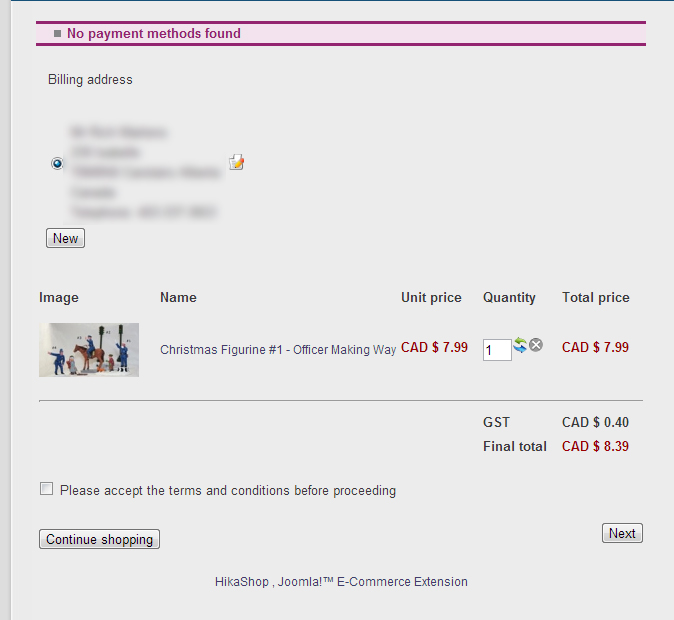
I am having issues with the paypal plugin, I have attached a screen shot of the error
I have been working through the following FAQ answer, that I have seen posted.
www.hikashop.com/en/support/documentatio...plugins-listing.html
I have added my comments with each item. As far as I can tell, I have completed each step, unless I am misunderstanding something.
Thanks for your assistance!
Rich
I don't see any payment methods during the checkout, or I don't see some of them, what is the problem ?
There are several things which you could have missed.
1/ Check that the payments plugins are installed and published
Yes it is
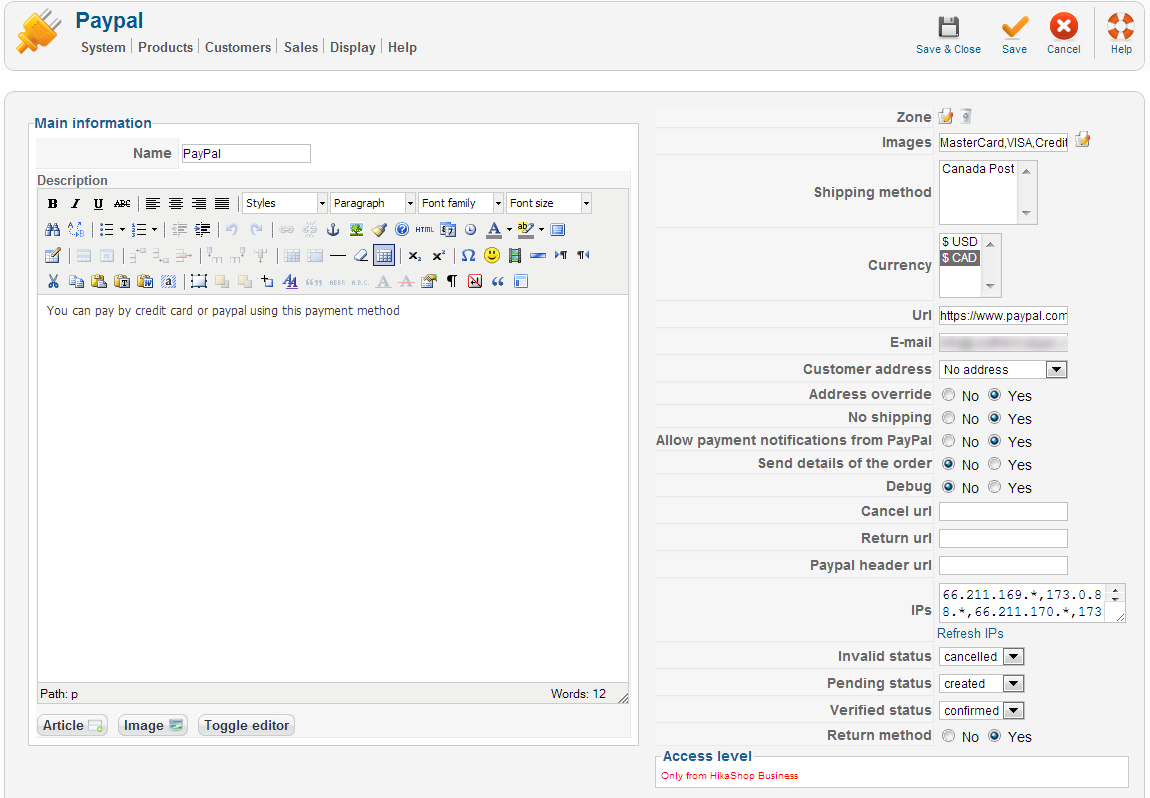
2/ Check that you have configured your payment plugins (edit it and save its configuration)
Done to the best of my ability, see screen capture
3/ Check that your template is able to display error messages: www.hikashop.com/en/support/documentation/61.html
Shows the following error message "No payment methods found"
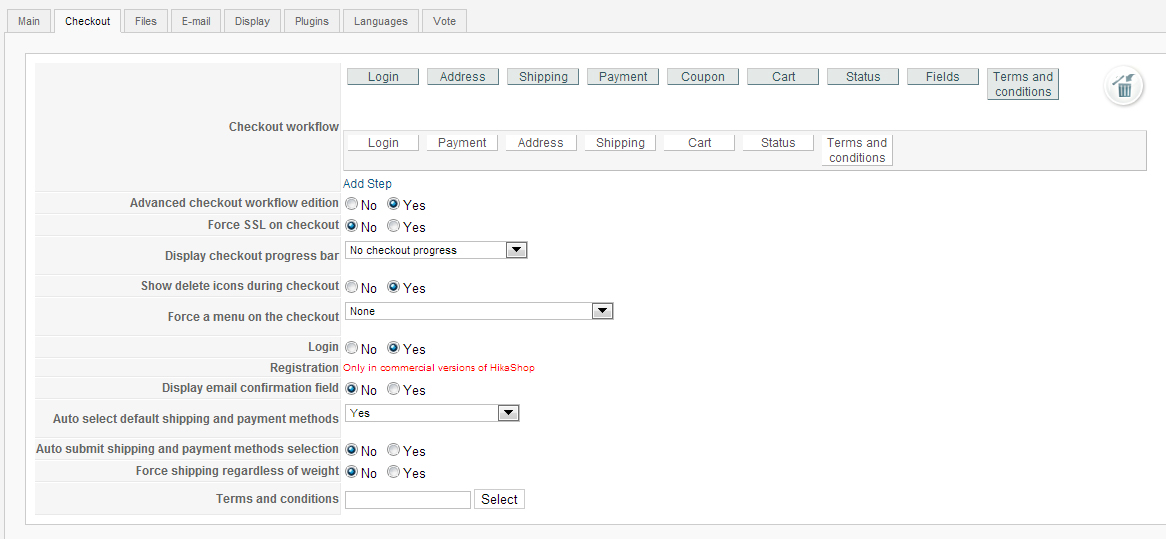
4/ Check that you have the payment view in the checkout workflow option of the configuration
Complete, see screen capture
5/ If you restricted your payment methods to zones, check that the address you're using is inside those zones ! Otherwise the payment methods will be filtered out.
No zone restrictions
6/ Check that the currency you're using is supported by the payment plugins you're using. Some payment plugins only supports a limited number of currencies. You should check that with the support of the payment gateways you're using.
Using Canadian Dollar - CAD
7/ Please make sure that you didn't change the currency code of your currency. Otherwise, the payment plugins won't recognize your currency. If you want to change the display of your currency, we invite you to use the "format" option on the right of the currency options screen as well as the symbol field.
Didn't change it
8/ When you select a currency or a shipping method in the options of the payment method, the payment method won't display unless that currency or shipping method is selected during the checkout. In most cases, these parameters shouldn't be selected so make sure they are unselected. To unselect them, you need to press the ctrl key and click on the selected currencies or shipping methods.
This is unselected, see above screen capture.
9/ Please check that you didn't set the access option of the plugin (via the plugins manager of Joomla) to something else than public.
No restriction
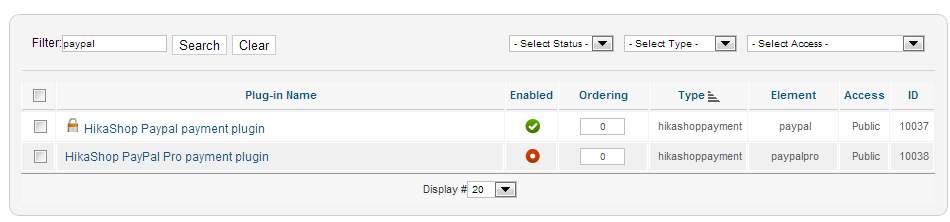
10/ It can happen that the plugin's access is not set properly in the database. Please go in the Joomla plugins manager and edit the plugin and save it. That will sett the access if not present and might help solve your problem.
Tried this, no change.
Completed this step, no change
I have been working through the following FAQ answer, that I have seen posted.
www.hikashop.com/en/support/documentatio...plugins-listing.html
I have added my comments with each item. As far as I can tell, I have completed each step, unless I am misunderstanding something.
Thanks for your assistance!
Rich
I don't see any payment methods during the checkout, or I don't see some of them, what is the problem ?
There are several things which you could have missed.
1/ Check that the payments plugins are installed and published
Yes it is
2/ Check that you have configured your payment plugins (edit it and save its configuration)
Done to the best of my ability, see screen capture
3/ Check that your template is able to display error messages: www.hikashop.com/en/support/documentation/61.html
Shows the following error message "No payment methods found"
4/ Check that you have the payment view in the checkout workflow option of the configuration
Complete, see screen capture
5/ If you restricted your payment methods to zones, check that the address you're using is inside those zones ! Otherwise the payment methods will be filtered out.
No zone restrictions
6/ Check that the currency you're using is supported by the payment plugins you're using. Some payment plugins only supports a limited number of currencies. You should check that with the support of the payment gateways you're using.
Using Canadian Dollar - CAD
7/ Please make sure that you didn't change the currency code of your currency. Otherwise, the payment plugins won't recognize your currency. If you want to change the display of your currency, we invite you to use the "format" option on the right of the currency options screen as well as the symbol field.
Didn't change it
8/ When you select a currency or a shipping method in the options of the payment method, the payment method won't display unless that currency or shipping method is selected during the checkout. In most cases, these parameters shouldn't be selected so make sure they are unselected. To unselect them, you need to press the ctrl key and click on the selected currencies or shipping methods.
This is unselected, see above screen capture.
9/ Please check that you didn't set the access option of the plugin (via the plugins manager of Joomla) to something else than public.
No restriction
10/ It can happen that the plugin's access is not set properly in the database. Please go in the Joomla plugins manager and edit the plugin and save it. That will sett the access if not present and might help solve your problem.
Tried this, no change.
Completed this step, no change
Please Log in or Create an account to join the conversation.

Less
More
- Posts: 12953
- Thank you received: 1778
13 years 10 months ago #73136
by Mohamed Thelji
Replied by Mohamed Thelji on topic Re: No Payment Method - Paypal Payment Method Plugin
Hi,
Can you try to use paypal for all currencies ? (without any currency limitation)
Can you try to use paypal for all currencies ? (without any currency limitation)
Please Log in or Create an account to join the conversation.
13 years 10 months ago - 13 years 10 months ago #73155
by richm
Replied by richm on topic Re: No Payment Method - Paypal Payment Method Plugin
I have nothing selected in the currency list. But it still lists US and CAN currency. Same result, won't show any payment method.
Last edit: 13 years 10 months ago by richm.
Please Log in or Create an account to join the conversation.

13 years 10 months ago #73240
by nicolas
Replied by nicolas on topic Re: No Payment Method - Paypal Payment Method Plugin
In the currency option of your payment plugin options, we can see that you have the CAD currency selected (looking at your screenshot), so it means that the payment method will only display for the CAD and not the USD currency.
To unselect the currencies, you need to press the ctrl key and click on the selected currencies. Then, just save.
To unselect the currencies, you need to press the ctrl key and click on the selected currencies. Then, just save.
Please Log in or Create an account to join the conversation.
13 years 10 months ago #73375
by richm
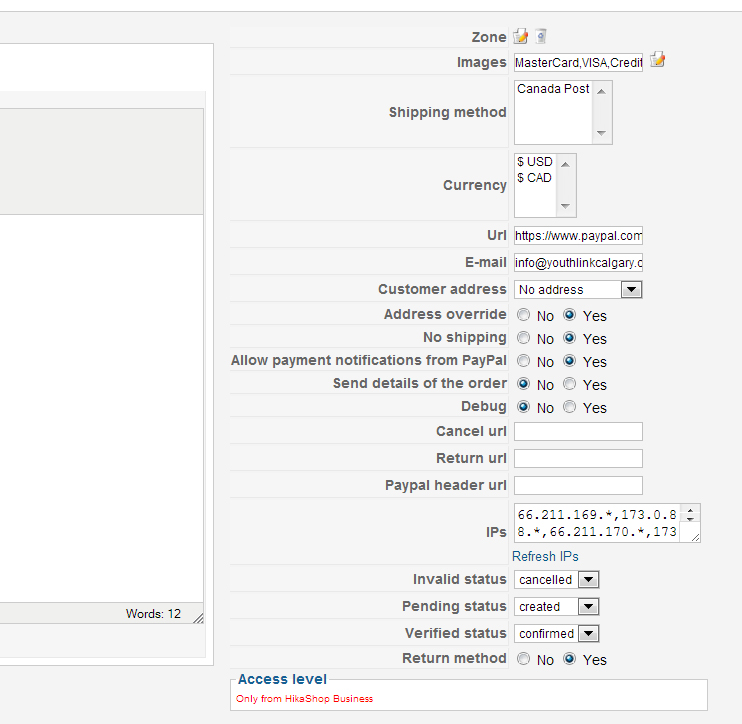
Hi Nicolas, I should have posted another screen capture after I deselected the currency in the paypal payments settings.
Unfortunately I am still getting the same error.
Thanks for the assistance.
Replied by richm on topic Re: No Payment Method - Paypal Payment Method Plugin
Hi Nicolas, I should have posted another screen capture after I deselected the currency in the paypal payments settings.
Unfortunately I am still getting the same error.
Thanks for the assistance.
Please Log in or Create an account to join the conversation.
13 years 10 months ago #73612
by nicolas
Replied by nicolas on topic Re: No Payment Method - Paypal Payment Method Plugin
I don't see anything else in your configuration.
Try to set an ordering maybe in your payment plugins.
Also, turn on the debug mode of the joomla configuration and try again. Maybe that will display an error on the checkout explaining why you don't see the payment plugin.
Try to set an ordering maybe in your payment plugins.
Also, turn on the debug mode of the joomla configuration and try again. Maybe that will display an error on the checkout explaining why you don't see the payment plugin.
Please Log in or Create an account to join the conversation.
13 years 10 months ago #73773
by richm
Replied by richm on topic Re: No Payment Method - Paypal Payment Method Plugin
Still only says "No payment methods found"
Is there another place that the error message might be posted? Maybe on the admin side. Something I can copy and paste here?
Thanks for all your help.
I might try a clean joomla install as a test and install hikashop, so see if it works on a plain site. Maybe it is a server issue.
Is there another place that the error message might be posted? Maybe on the admin side. Something I can copy and paste here?
Thanks for all your help.
I might try a clean joomla install as a test and install hikashop, so see if it works on a plain site. Maybe it is a server issue.
Please Log in or Create an account to join the conversation.
13 years 10 months ago #74039
by nicolas
Replied by nicolas on topic Re: No Payment Method - Paypal Payment Method Plugin
No that should display on the checkout.
We could check your settings directly on your website if you would provide an access but as far as I can see from your screenshots, the settings are fine. I don't have any other idea but as far as we know, each time someone had that error message, it come from one of the points listed in the FAQ.
We could check your settings directly on your website if you would provide an access but as far as I can see from your screenshots, the settings are fine. I don't have any other idea but as far as we know, each time someone had that error message, it come from one of the points listed in the FAQ.
Please Log in or Create an account to join the conversation.

13 years 10 months ago #74102
by toolie
Replied by toolie on topic Re: No Payment Method - Paypal Payment Method Plugin
I too am getting the same errors, and have followed the same checklist to ensure that my settings are correct.
Are you investigating to see whether PayPal has changed something that requires an update to your plugin?
Toolie
Are you investigating to see whether PayPal has changed something that requires an update to your plugin?
Toolie
Please Log in or Create an account to join the conversation.
13 years 10 months ago #74381
by nicolas
Replied by nicolas on topic Re: No Payment Method - Paypal Payment Method Plugin
No. PayPal has not change anything. We would be flooded with help requests and even our website wouldn't accept payments if that was the case so I can tell you that we would be quick to fix that 
There is no problem in the PayPal plugin code. If it doesn't work, it has to come from one of the points listed in the FAQ.
If you could give a screenshot of the options of your payment method, we could probably tell you what is not ok.
There is no problem in the PayPal plugin code. If it doesn't work, it has to come from one of the points listed in the FAQ.
If you could give a screenshot of the options of your payment method, we could probably tell you what is not ok.
Please Log in or Create an account to join the conversation.
13 years 10 months ago #75112
by richm
Replied by richm on topic Re: No Payment Method - Paypal Payment Method Plugin
Hi Nicolas,
Sent you access information for my site,
Thanks!
Sent you access information for my site,
Thanks!
Please Log in or Create an account to join the conversation.
13 years 10 months ago #75560
by nicolas
Replied by nicolas on topic Re: No Payment Method - Paypal Payment Method Plugin
Your settings are ok as far as I can see.
I see that you're using an old version of HikaShop so I would recommend first to update, that might help.
I see that you're using an old version of HikaShop so I would recommend first to update, that might help.
Please Log in or Create an account to join the conversation.
Less
More
- Posts: 26
- Thank you received: 1
13 years 10 months ago #76434
by Vanderburgh
Replied by Vanderburgh on topic Re: No Payment Method - Paypal Payment Method Plugin
I am having the identical problem as above.
Can anyone help solve this? I can give access to my site.
Thanks
Can anyone help solve this? I can give access to my site.
Thanks
Please Log in or Create an account to join the conversation.
Less
More
- Posts: 42
- Thank you received: 0
13 years 10 months ago #76496
by LeslieNeedsHelp
Replied by LeslieNeedsHelp on topic No Payment Method - Paypal Payment Method Plugin
I too am having this problem..
I had 3 orders come through fine on Sunday and since then I've had 3 people contact me trying to place an order and said they couldn't because of this error.
I have not changed anything since Sunday except for the update.
The payment method shows fine until you log in
PLEASE help!
www.atozalpacas.com
I can give access to my site
I had 3 orders come through fine on Sunday and since then I've had 3 people contact me trying to place an order and said they couldn't because of this error.
I have not changed anything since Sunday except for the update.
The payment method shows fine until you log in
PLEASE help!
www.atozalpacas.com
I can give access to my site
Please Log in or Create an account to join the conversation.
Less
More
- Posts: 26
- Thank you received: 1
13 years 10 months ago #76500
by Vanderburgh
Replied by Vanderburgh on topic No Payment Method - Paypal Payment Method Plugin
This is a huge problem right now that we need solved. Please address this for all of us!
Thanks
Thanks
Please Log in or Create an account to join the conversation.
Less
More
- Posts: 26
- Thank you received: 1
13 years 10 months ago #76502
by Vanderburgh
Replied by Vanderburgh on topic No Payment Method - Paypal Payment Method Plugin
All three of us I believe are from Canada. This must have to do with Canadian funds or something...
Please Log in or Create an account to join the conversation.
13 years 10 months ago #76545
by toolie
Replied by toolie on topic No Payment Method - Paypal Payment Method Plugin
I am based in the USA.
Toolie
Toolie
Please Log in or Create an account to join the conversation.

13 years 10 months ago #76661
by Jerome
Jerome - Obsidev.com
HikaMarket & HikaSerial developer / HikaShop core dev team.
Also helping the HikaShop support team when having some time or couldn't sleep.
By the way, do not send me private message, use the "contact us" form instead.
Replied by Jerome on topic No Payment Method - Paypal Payment Method Plugin
Hi,
If "Paypal" is display for guests and disappear while logged, I think there is a zone/currency/shipping restriction in the paypal plugin configuration.
A customer have an address, so he have a country and would have a shipping method selected by default.
Regards,
If "Paypal" is display for guests and disappear while logged, I think there is a zone/currency/shipping restriction in the paypal plugin configuration.
A customer have an address, so he have a country and would have a shipping method selected by default.
Regards,
Jerome - Obsidev.com
HikaMarket & HikaSerial developer / HikaShop core dev team.
Also helping the HikaShop support team when having some time or couldn't sleep.
By the way, do not send me private message, use the "contact us" form instead.
Please Log in or Create an account to join the conversation.
13 years 10 months ago #76713
by richm
Replied by richm on topic No Payment Method - Paypal Payment Method Plugin
Ok, I was able to get the paypal payment method to appear, when I did the following.
System>Configuration
Changed the Main currency from CAD to USD
Then it came up. If I changed it back it disappeared
I've tested:
USD
EUR
JPY
AUD
All of these display the paypal payment option fine.
So it is something to do with CAD.
Hope this helps somehow.
System>Configuration
Changed the Main currency from CAD to USD
Then it came up. If I changed it back it disappeared
I've tested:
USD
EUR
JPY
AUD
All of these display the paypal payment option fine.
So it is something to do with CAD.
Hope this helps somehow.
Please Log in or Create an account to join the conversation.
13 years 10 months ago #76716
by richm
Replied by richm on topic No Payment Method - Paypal Payment Method Plugin
I've set it up so that my Hikashop only has
USD
CAD
Default is USD. I set up the content switched module on the right hand side of my page.
When it is set to USD the paypal payment shows, and when I change it to CAD, it disappears.
I need the default currency to be set to CAD. Hope this sheds some light.
Thanks for the help!
USD
CAD
Default is USD. I set up the content switched module on the right hand side of my page.
When it is set to USD the paypal payment shows, and when I change it to CAD, it disappears.
I need the default currency to be set to CAD. Hope this sheds some light.
Thanks for the help!
Please Log in or Create an account to join the conversation.
Time to create page: 0.318 seconds