
- Posts: 36
- Thank you received: 0
Coupon Code Doesn't Show Immediately in Cart
- arashsayadi
-
 Topic Author
- Offline
Less
More
13 years 10 months ago #78690
by arashsayadi
Coupon Code Doesn't Show Immediately in Cart was created by arashsayadi
My customers are experiencing an issue with entering coupon codes. Here's what they see:
Why isn't the coupon showing up on the first try (step 5 above)?
- Customer enters site and adds items to purchase
- Customer proceeds to checkout
- Customer logs in
- Customer enters shipping preference, method of payment and enters coupon code (payment_shipping_coupon step)
- Once the page reloads after entering coupon code, the coupon doesn't seem to be applied and the coupon box is still available for new entry
- Customer navigates to another page on site
- Customer proceeds to checkout and upon entering the payment_shipping_coupon step, sees the coupon applied
Why isn't the coupon showing up on the first try (step 5 above)?
Please Log in or Create an account to join the conversation.

Less
More
- Posts: 12953
- Thank you received: 1778
13 years 10 months ago #78719
by Mohamed Thelji
Replied by Mohamed Thelji on topic Coupon Code Doesn't Show Immediately in Cart
Hi,
Can you give me a link to your web site then I'll maybe be able understand what is happening ?
Can you give me a link to your web site then I'll maybe be able understand what is happening ?
Please Log in or Create an account to join the conversation.
- arashsayadi
-
Topic Author
- Offline
Less
More
- Posts: 36
- Thank you received: 0
13 years 10 months ago #78818
by arashsayadi
Replied by arashsayadi on topic Coupon Code Doesn't Show Immediately in Cart
I apologize I didn't provide the website. It's
canvaspet.com
and our items are under the menu named "Stuff".
Please Log in or Create an account to join the conversation.

13 years 9 months ago #78888
by Jerome
Jerome - Obsidev.com
HikaMarket & HikaSerial developer / HikaShop core dev team.
Also helping the HikaShop support team when having some time or couldn't sleep.
By the way, do not send me private message, use the "contact us" form instead.
Replied by Jerome on topic Coupon Code Doesn't Show Immediately in Cart
Hi,
Without an account and a coupon code we can't test it.
Are you sure that your coupon code is valid ? Does your template display the "joomla application messages correctly ?
Regards,
Without an account and a coupon code we can't test it.
Are you sure that your coupon code is valid ? Does your template display the "joomla application messages correctly ?
Regards,
Jerome - Obsidev.com
HikaMarket & HikaSerial developer / HikaShop core dev team.
Also helping the HikaShop support team when having some time or couldn't sleep.
By the way, do not send me private message, use the "contact us" form instead.
Please Log in or Create an account to join the conversation.
- arashsayadi
-
Topic Author
- Offline
Less
More
- Posts: 36
- Thank you received: 0
13 years 9 months ago #78899
by arashsayadi
Replied by arashsayadi on topic Coupon Code Doesn't Show Immediately in Cart
Yes, all codes are valid. Per description earlier, you can make a code work:
As to a user profile, feel free to create a user during the checkout process and use the code HikashopTest .
- Customer enters site and adds items to purchase
- Customer proceeds to checkout
- Customer logs in
- Customer enters shipping preference, method of payment and enters coupon code (payment_shipping_coupon step)
- Once the page reloads after entering coupon code, the coupon doesn't seem to be applied and the coupon box is still available for new entry
- Customer navigates to another page on site
- Customer proceeds to checkout and upon entering the payment_shipping_coupon step, sees the coupon applied
As to a user profile, feel free to create a user during the checkout process and use the code HikashopTest .
Please Log in or Create an account to join the conversation.

13 years 9 months ago #78947
by Xavier
Replied by Xavier on topic Coupon Code Doesn't Show Immediately in Cart
Hi,
It's maybe a cache issue, try to disable the Joomla cache, and to clear it.
And try again to see if it's working better or not.
It's maybe a cache issue, try to disable the Joomla cache, and to clear it.
And try again to see if it's working better or not.
Please Log in or Create an account to join the conversation.
- arashsayadi
-
Topic Author
- Offline
Less
More
- Posts: 36
- Thank you received: 0
13 years 9 months ago #79051
by arashsayadi
Replied by arashsayadi on topic Coupon Code Doesn't Show Immediately in Cart
Xavier,
Thank you for the note. However, we already have Joomla CACHE disabled. I confirmed this and ran the test again. We still have the same issue.
What else could be causing this?
Arash
Thank you for the note. However, we already have Joomla CACHE disabled. I confirmed this and ran the test again. We still have the same issue.
What else could be causing this?
Arash
Please Log in or Create an account to join the conversation.
13 years 9 months ago #79408
by Jerome
Jerome - Obsidev.com
HikaMarket & HikaSerial developer / HikaShop core dev team.
Also helping the HikaShop support team when having some time or couldn't sleep.
By the way, do not send me private message, use the "contact us" form instead.
Replied by Jerome on topic Coupon Code Doesn't Show Immediately in Cart
Hi,
I saw that the test account that we have create does not work anymore.
Would it be possible to have a test account in your website in order to make test and check your configuration ?
Regards,
I saw that the test account that we have create does not work anymore.
Would it be possible to have a test account in your website in order to make test and check your configuration ?
Regards,
Jerome - Obsidev.com
HikaMarket & HikaSerial developer / HikaShop core dev team.
Also helping the HikaShop support team when having some time or couldn't sleep.
By the way, do not send me private message, use the "contact us" form instead.
Please Log in or Create an account to join the conversation.
- arashsayadi
-
Topic Author
- Offline
Less
More
- Posts: 36
- Thank you received: 0
13 years 9 months ago #79894
by arashsayadi
Replied by arashsayadi on topic Coupon Code Doesn't Show Immediately in Cart
I show Xavier account still active. I reset the password to hikashop.
Please try again.
Please try again.
Please Log in or Create an account to join the conversation.
13 years 9 months ago #79977
by Xavier
Replied by Xavier on topic Coupon Code Doesn't Show Immediately in Cart
Hi,
The first try was working fine, the coupon was added with success.
But for the other try, it's not added in the cart.
It's maybe due to the restriction applied on the coupon, could you give us a screenshot of your coupon configuration, and a backend access ?
The first try was working fine, the coupon was added with success.
But for the other try, it's not added in the cart.
It's maybe due to the restriction applied on the coupon, could you give us a screenshot of your coupon configuration, and a backend access ?
Please Log in or Create an account to join the conversation.
- arashsayadi
-
Topic Author
- Offline
Less
More
- Posts: 36
- Thank you received: 0
13 years 9 months ago #80091
by arashsayadi
Replied by arashsayadi on topic Coupon Code Doesn't Show Immediately in Cart
See attached for a screenshot.
What type of backend access would you like?
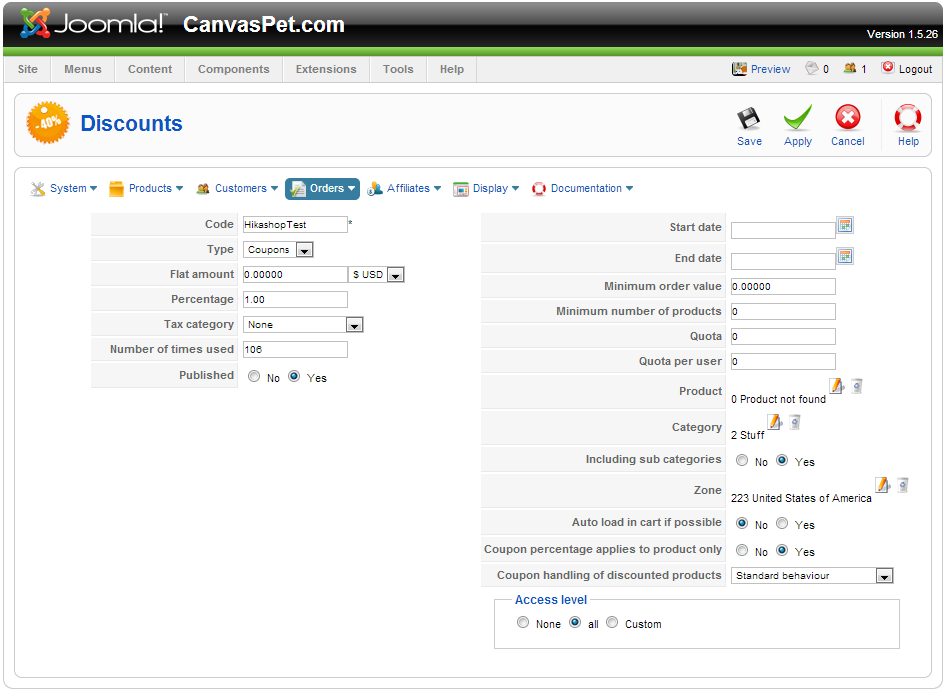
What type of backend access would you like?
Please Log in or Create an account to join the conversation.
13 years 9 months ago #80189
by Xavier
Replied by Xavier on topic Coupon Code Doesn't Show Immediately in Cart
Hi,
An access which allow us to access all the HikaShop configuration.
you can send it by pm.
An access which allow us to access all the HikaShop configuration.
you can send it by pm.
Please Log in or Create an account to join the conversation.
- arashsayadi
-
Topic Author
- Offline
Less
More
- Posts: 36
- Thank you received: 0
13 years 9 months ago #80951
by arashsayadi
Replied by arashsayadi on topic Coupon Code Doesn't Show Immediately in Cart
You mentioned sending it "by pm." Do you mean by evening or via another medium like email? If you're asking me to send it via another medium, can you provide specifics on how to contact you/send it to you?
Please Log in or Create an account to join the conversation.
13 years 9 months ago #81021
by Jerome
Jerome - Obsidev.com
HikaMarket & HikaSerial developer / HikaShop core dev team.
Also helping the HikaShop support team when having some time or couldn't sleep.
By the way, do not send me private message, use the "contact us" form instead.
Replied by Jerome on topic Coupon Code Doesn't Show Immediately in Cart
Hi,
We have an account for Xavier but this account does not have access to your backend.
So we can't check your configuration and fix your problem.
Regards,
We have an account for Xavier but this account does not have access to your backend.
So we can't check your configuration and fix your problem.
Regards,
Jerome - Obsidev.com
HikaMarket & HikaSerial developer / HikaShop core dev team.
Also helping the HikaShop support team when having some time or couldn't sleep.
By the way, do not send me private message, use the "contact us" form instead.
Please Log in or Create an account to join the conversation.
- arashsayadi
-
Topic Author
- Offline
Less
More
- Posts: 36
- Thank you received: 0
13 years 9 months ago #81146
by arashsayadi
Replied by arashsayadi on topic Coupon Code Doesn't Show Immediately in Cart
You should now have access via /administrator/index.php
Please Log in or Create an account to join the conversation.
- arashsayadi
-
Topic Author
- Offline
Less
More
- Posts: 36
- Thank you received: 0
13 years 9 months ago #81147
by arashsayadi
Replied by arashsayadi on topic Coupon Code Doesn't Show Immediately in Cart
Please let me know when you're done so that I can revert the access.
Also, please inform me what changes were made so that we can record this for future reference.
Also, please inform me what changes were made so that we can record this for future reference.
Please Log in or Create an account to join the conversation.
13 years 9 months ago #81472
by Jerome
Jerome - Obsidev.com
HikaMarket & HikaSerial developer / HikaShop core dev team.
Also helping the HikaShop support team when having some time or couldn't sleep.
By the way, do not send me private message, use the "contact us" form instead.
Replied by Jerome on topic Coupon Code Doesn't Show Immediately in Cart
Hi,
I have made more tests and we changed nothing.
There are some troubles with the USPS plugin which could block the checkout workflow. That's why you may require to validate twice the first step and that's why the coupon code is not read.
We have to make other tests on local website and tried to reproduce your problem. For the moment, I can't reproduce it.
Regards,
I have made more tests and we changed nothing.
There are some troubles with the USPS plugin which could block the checkout workflow. That's why you may require to validate twice the first step and that's why the coupon code is not read.
We have to make other tests on local website and tried to reproduce your problem. For the moment, I can't reproduce it.
Regards,
Jerome - Obsidev.com
HikaMarket & HikaSerial developer / HikaShop core dev team.
Also helping the HikaShop support team when having some time or couldn't sleep.
By the way, do not send me private message, use the "contact us" form instead.
Please Log in or Create an account to join the conversation.
13 years 9 months ago #81735
by Jerome
Jerome - Obsidev.com
HikaMarket & HikaSerial developer / HikaShop core dev team.
Also helping the HikaShop support team when having some time or couldn't sleep.
By the way, do not send me private message, use the "contact us" form instead.
Replied by Jerome on topic Coupon Code Doesn't Show Immediately in Cart
Hi,
By changing a little your checkout workflow, the coupon code now works great.
I am still investigating on my local website without reproduce the bug. So I still looking at your configuration, looking for the option or the plugin which would made the difference.
But your coupon is working fine in your website
Regards,
By changing a little your checkout workflow, the coupon code now works great.
I am still investigating on my local website without reproduce the bug. So I still looking at your configuration, looking for the option or the plugin which would made the difference.
But your coupon is working fine in your website
Regards,
Jerome - Obsidev.com
HikaMarket & HikaSerial developer / HikaShop core dev team.
Also helping the HikaShop support team when having some time or couldn't sleep.
By the way, do not send me private message, use the "contact us" form instead.
Please Log in or Create an account to join the conversation.
- arashsayadi
-
Topic Author
- Offline
Less
More
- Posts: 36
- Thank you received: 0
13 years 9 months ago #81746
by arashsayadi
Replied by arashsayadi on topic Coupon Code Doesn't Show Immediately in Cart
Thank you for the update.
I just tried it and it doesn't work. Were you logged in when you tried the code?
I just tried it and it doesn't work. Were you logged in when you tried the code?
Please Log in or Create an account to join the conversation.
13 years 9 months ago #81751
by Jerome
Jerome - Obsidev.com
HikaMarket & HikaSerial developer / HikaShop core dev team.
Also helping the HikaShop support team when having some time or couldn't sleep.
By the way, do not send me private message, use the "contact us" form instead.
Replied by Jerome on topic Coupon Code Doesn't Show Immediately in Cart
Hi,
Yes I was logged. It is not possible to go in step 2 without being logged.
I made another test on another computer, it works too.
Do you know that you have some spam link at the right of your website ?
I see in your html page some hidden iframe and some link for "cheap via***".
Regards,
Yes I was logged. It is not possible to go in step 2 without being logged.
I made another test on another computer, it works too.
Do you know that you have some spam link at the right of your website ?
I see in your html page some hidden iframe and some link for "cheap via***".
Regards,
Jerome - Obsidev.com
HikaMarket & HikaSerial developer / HikaShop core dev team.
Also helping the HikaShop support team when having some time or couldn't sleep.
By the way, do not send me private message, use the "contact us" form instead.
Please Log in or Create an account to join the conversation.
Time to create page: 0.342 seconds