

- Posts: 6
- Thank you received: 0
Manual Shipping - how to select only one match
13 years 9 months ago #79322
by tdilkie
Manual Shipping - how to select only one match was created by tdilkie
Is there a way, in the manual shipping plugin, so that only the 1st valid shipping price is displayed, not all matching prices?
I want to provide special local shipping pricing, based on the postal code. I've added a method (see attached) to filter on the postal code. That method is first on the list, however the plugin still selects and shows all the matching methods (see the other attached image)
thanks
Trent
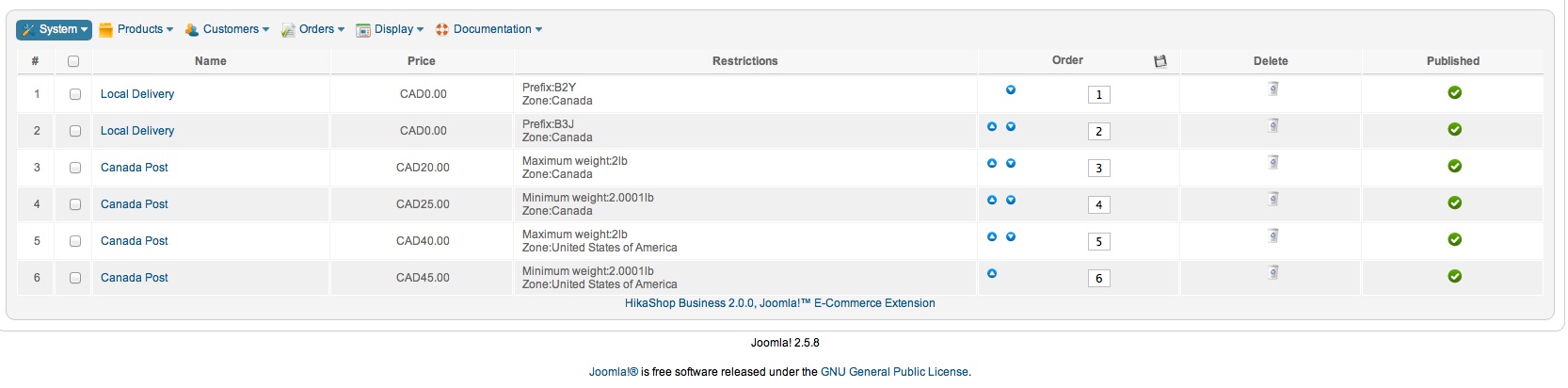
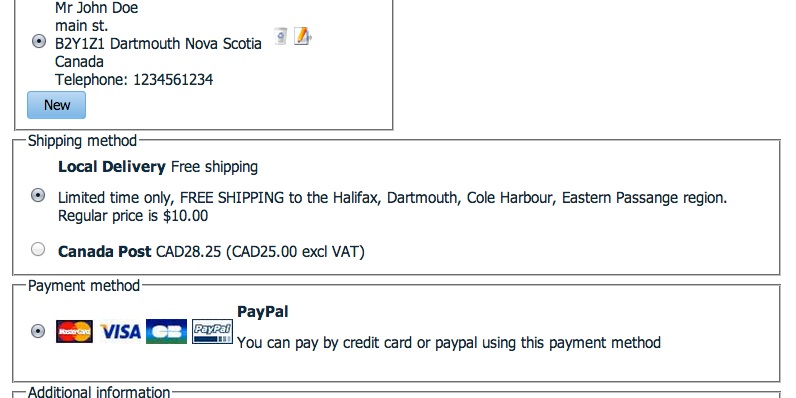
I want to provide special local shipping pricing, based on the postal code. I've added a method (see attached) to filter on the postal code. That method is first on the list, however the plugin still selects and shows all the matching methods (see the other attached image)
thanks
Trent
Please Log in or Create an account to join the conversation.

13 years 9 months ago #79382
by Xavier
Replied by Xavier on topic Manual Shipping - how to select only one match
Hi,
You could add more Canada Post shipping method and restrict the post code in these methods too.
For example, if the local post code is B2Y, then restrict a Canada post to the post code from A1A to B2X, and another one from B2Z to Y9Z.
By this way no canada post shipping methods will be displayed.
PS: I don't know how the Canadian post codes work. It's just for example.
You could add more Canada Post shipping method and restrict the post code in these methods too.
For example, if the local post code is B2Y, then restrict a Canada post to the post code from A1A to B2X, and another one from B2Z to Y9Z.
By this way no canada post shipping methods will be displayed.
PS: I don't know how the Canadian post codes work. It's just for example.
Please Log in or Create an account to join the conversation.
13 years 9 months ago #79441
by tdilkie
Replied by tdilkie on topic Manual Shipping - how to select only one match
Thanks, that's a good idea, but I only showed 2 of the local delivery postal codes, in fact their are 12 of them, and they are not consecutive. I fact, I had to had the manual.php program a little bit for it even to work properly. I guess that I'll try to hack it a little bit more.
I will make an enhancement request -- an option that would allow the administrator to select if they want all matches, or only return the first matching manual shipping method
-Trent
I will make an enhancement request -- an option that would allow the administrator to select if they want all matches, or only return the first matching manual shipping method
-Trent
Please Log in or Create an account to join the conversation.
13 years 9 months ago #79472
by Xavier
Replied by Xavier on topic Manual Shipping - how to select only one match
Another solution could be to create a new zone, with all the city wanted but the 12.
And apply this zone for the canada post shipping methods.
And apply this zone for the canada post shipping methods.
Please Log in or Create an account to join the conversation.
13 years 9 months ago #79475
by tdilkie
Replied by tdilkie on topic Manual Shipping - how to select only one match
I had thought of that, but I didn't see any way to add a CITY (or POSTAL CODE) as a sub-zone... I only see country, state, tax zone, shipping zone, discount zone and payment zone, none of which would let me specify a city or postal code
Please Log in or Create an account to join the conversation.

13 years 9 months ago #79532
by Jerome
Jerome - Obsidev.com
HikaMarket & HikaSerial developer / HikaShop core dev team.
Also helping the HikaShop support team when having some time or couldn't sleep.
By the way, do not send me private message, use the "contact us" form instead.
Replied by Jerome on topic Manual Shipping - how to select only one match
Hi,
That's right, it's not possible to put a city as a zone.
So the best way would be to override the "checkout | shipping" view
If you just want to display the first shipping method, you can replace
By
Regards,
That's right, it's not possible to put a city as a zone.
So the best way would be to override the "checkout | shipping" view
If you just want to display the first shipping method, you can replace
Code:
foreach($this->rates as $rate){
Code:
$rate = reset($this->rates);
if(!empty($rate)){
Jerome - Obsidev.com
HikaMarket & HikaSerial developer / HikaShop core dev team.
Also helping the HikaShop support team when having some time or couldn't sleep.
By the way, do not send me private message, use the "contact us" form instead.
The following user(s) said Thank You: tdilkie
Please Log in or Create an account to join the conversation.
Time to create page: 0.186 seconds