
- Posts: 142
- Thank you received: 3
calendar
- ePower2007
-
 Topic Author
- Offline
Less
More
13 years 9 months ago #81802
by ePower2007
calendar was created by ePower2007
Hi
I have the business edition.
I'm using the calendar in the checkout to choose the delivery date. This means the arrival date of the parcel at the customers place and not the shipping date. This is very common in Japan and necessary.
But if no date is selected then today's date is automatically set.
Is there any way to take away the date if there is no date selected?
Best regards
Raphael
I have the business edition.
I'm using the calendar in the checkout to choose the delivery date. This means the arrival date of the parcel at the customers place and not the shipping date. This is very common in Japan and necessary.
But if no date is selected then today's date is automatically set.
Is there any way to take away the date if there is no date selected?
Best regards
Raphael
Please Log in or Create an account to join the conversation.

13 years 9 months ago #81846
by Jerome
Jerome - Obsidev.com
HikaMarket & HikaSerial developer / HikaShop core dev team.
Also helping the HikaShop support team when having some time or couldn't sleep.
By the way, do not send me private message, use the "contact us" form instead.
Hi,
In HikaShop you can set a date restriction in order to not select past dates or futures dates.
If you want more restriction options, like forbidden some specific days, add "waiting days"... You can use the plugin "Dynamic Calendar".
You can read a little more about it in this thread: www.hikashop.com/forum/4-how-to/76125-se...t.html?lang=en#78607
Regards,
In HikaShop you can set a date restriction in order to not select past dates or futures dates.
If you want more restriction options, like forbidden some specific days, add "waiting days"... You can use the plugin "Dynamic Calendar".
You can read a little more about it in this thread: www.hikashop.com/forum/4-how-to/76125-se...t.html?lang=en#78607
Regards,
Jerome - Obsidev.com
HikaMarket & HikaSerial developer / HikaShop core dev team.
Also helping the HikaShop support team when having some time or couldn't sleep.
By the way, do not send me private message, use the "contact us" form instead.
Please Log in or Create an account to join the conversation.
- ePower2007
-
Topic Author
- Offline
Less
More
- Posts: 142
- Thank you received: 3
13 years 9 months ago #81955
by ePower2007
Replied by ePower2007 on topic calendar
Hi Jerome
I'm using the dynamic calender. There I have the correct settings. Today and the next day are not selectable.
My problem is that if no date is selected by the customer then the "today's" date fills in automatically, even these days are not selectable.
I believe that if no date is selected by the customer no date should appear.
Best regards
Raphael
I'm using the dynamic calender. There I have the correct settings. Today and the next day are not selectable.
My problem is that if no date is selected by the customer then the "today's" date fills in automatically, even these days are not selectable.
I believe that if no date is selected by the customer no date should appear.
Best regards
Raphael
Please Log in or Create an account to join the conversation.
13 years 9 months ago #81958
by Jerome
Jerome - Obsidev.com
HikaMarket & HikaSerial developer / HikaShop core dev team.
Also helping the HikaShop support team when having some time or couldn't sleep.
By the way, do not send me private message, use the "contact us" form instead.
Hi,
Is the option "Autofield first day" enabled ?
This option would override the default value for the custom field and set the first day which the user could select.
Regards,
Is the option "Autofield first day" enabled ?
This option would override the default value for the custom field and set the first day which the user could select.
Regards,
Jerome - Obsidev.com
HikaMarket & HikaSerial developer / HikaShop core dev team.
Also helping the HikaShop support team when having some time or couldn't sleep.
By the way, do not send me private message, use the "contact us" form instead.
Please Log in or Create an account to join the conversation.
- ePower2007
-
Topic Author
- Offline
Less
More
- Posts: 142
- Thank you received: 3
13 years 9 months ago #81965
by ePower2007
Replied by ePower2007 on topic calendar
Hi Jerome
look at my setting, I guess that all is all right.
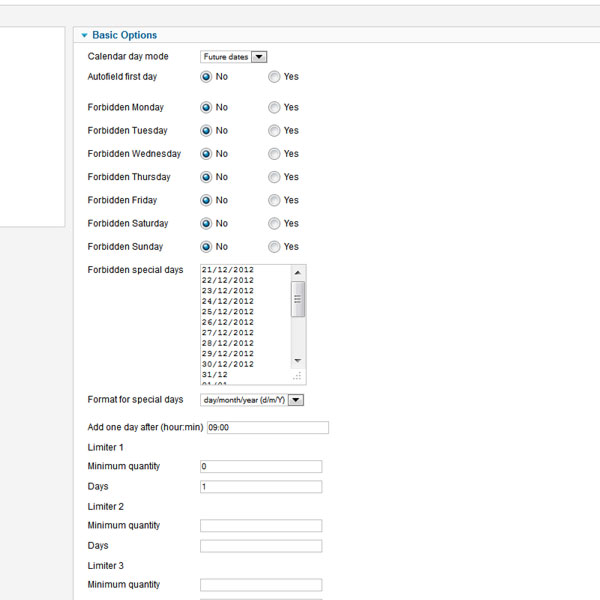
look at my setting, I guess that all is all right.
Please Log in or Create an account to join the conversation.
13 years 9 months ago #81966
by Jerome
Jerome - Obsidev.com
HikaMarket & HikaSerial developer / HikaShop core dev team.
Also helping the HikaShop support team when having some time or couldn't sleep.
By the way, do not send me private message, use the "contact us" form instead.
Hi,
For the result you want, the second option ("Autofield first day") should be "Yes".
Regards,
For the result you want, the second option ("Autofield first day") should be "Yes".
Regards,
Jerome - Obsidev.com
HikaMarket & HikaSerial developer / HikaShop core dev team.
Also helping the HikaShop support team when having some time or couldn't sleep.
By the way, do not send me private message, use the "contact us" form instead.
Please Log in or Create an account to join the conversation.
- ePower2007
-
Topic Author
- Offline
Less
More
- Posts: 142
- Thank you received: 3
13 years 9 months ago - 13 years 9 months ago #81967
by ePower2007
Replied by ePower2007 on topic calendar
Hi Jerome
I found out the mistake! :ohmy:
I had the date in the Default value in the order custom fields! :blush:
Took this out and now it is working fine.
Thanks a lot for your quick respond.
Raphael
I found out the mistake! :ohmy:
I had the date in the Default value in the order custom fields! :blush:
Took this out and now it is working fine.
Thanks a lot for your quick respond.
Raphael
Last edit: 13 years 9 months ago by ePower2007.
Please Log in or Create an account to join the conversation.
- ePower2007
-
Topic Author
- Offline
Less
More
- Posts: 142
- Thank you received: 3
13 years 9 months ago #81971
by ePower2007
Replied by ePower2007 on topic calendar
Hi Jerome
No if the ("Autofield first day") is set to yes then the date is set even the customer does not select a date.
I need the field to be empty if the customer does not select a date.
Anyway thank you!
Raphael
No if the ("Autofield first day") is set to yes then the date is set even the customer does not select a date.
I need the field to be empty if the customer does not select a date.
Anyway thank you!
Raphael
Please Log in or Create an account to join the conversation.
Time to create page: 0.201 seconds