

- Posts: 11
- Thank you received: 0
Missing State from Registration Form
13 years 8 months ago #84133
by Bassam
Missing State from Registration Form was created by Bassam
I need to ship to only a couple of states but when I disable the countries and states that I dob't wish to ship to due to licencing limitation for now. My (State) * disappear from the form.
Please see attached file and and advice of a remedy
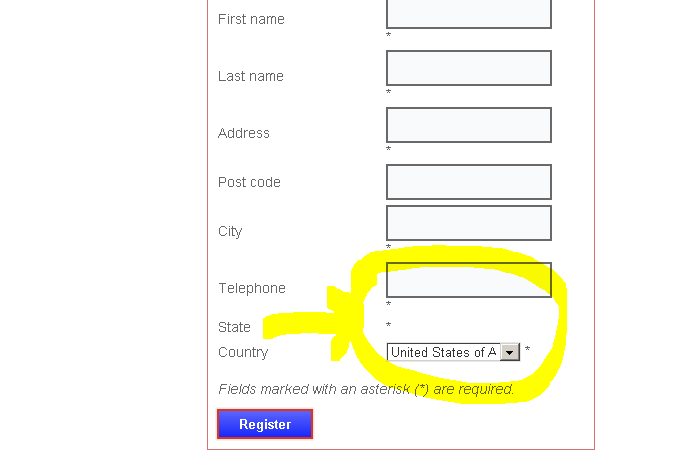
Please see attached file and and advice of a remedy
Please Log in or Create an account to join the conversation.

13 years 8 months ago #84242
by nicolas
Replied by nicolas on topic Missing State from Registration Form
Hi,
That's because you need to first select the default value for your fields via the menu Display->Custom fields. Then, disable the one you don't need.
That's because you need to first select the default value for your fields via the menu Display->Custom fields. Then, disable the one you don't need.
Please Log in or Create an account to join the conversation.
13 years 8 months ago #84306
by Bassam
Replied by Bassam on topic Missing State from Registration Form
Thank You, I just open and closed the State and then it showed up.
also I changed the language to reflect (Must Login to view shipping information (Please Register if you do not have and an account))
insted of no shipping warehouse in your area
also I changed the language to reflect (Must Login to view shipping information (Please Register if you do not have and an account))
insted of no shipping warehouse in your area
Please Log in or Create an account to join the conversation.
13 years 8 months ago #84941
by cymacs
Replied by cymacs on topic Missing State from Registration Form
Hi
I am having the same issue
I have only selected Australia as country and states are all published but in display - custom fields there is nothing showing to select as default value (see attachments)
any help greatly appreciated
I am having the same issue
I have only selected Australia as country and states are all published but in display - custom fields there is nothing showing to select as default value (see attachments)
any help greatly appreciated
Please Log in or Create an account to join the conversation.

13 years 8 months ago #85056
by Jerome
Jerome - Obsidev.com
HikaMarket & HikaSerial developer / HikaShop core dev team.
Also helping the HikaShop support team when having some time or couldn't sleep.
By the way, do not send me private message, use the "contact us" form instead.
Replied by Jerome on topic Missing State from Registration Form
Hi,
If you have just one country published, you have to re-save the default value of your "country" zone custom field.
I think that the default value is another country but, because there is just one country published, your single country would be selected.
But the state zone read the default value and load his states. Because the default value is unpublished, it's not possible to load his states, so you have an empty field.
So, you just have to edit the "country" field, and click on save.
We would made a patch in order to add some checks for the state field.
Regards,
If you have just one country published, you have to re-save the default value of your "country" zone custom field.
I think that the default value is another country but, because there is just one country published, your single country would be selected.
But the state zone read the default value and load his states. Because the default value is unpublished, it's not possible to load his states, so you have an empty field.
So, you just have to edit the "country" field, and click on save.
We would made a patch in order to add some checks for the state field.
Regards,
Jerome - Obsidev.com
HikaMarket & HikaSerial developer / HikaShop core dev team.
Also helping the HikaShop support team when having some time or couldn't sleep.
By the way, do not send me private message, use the "contact us" form instead.
Please Log in or Create an account to join the conversation.
13 years 8 months ago #85061
by cymacs
Replied by cymacs on topic Missing State from Registration Form
i'm sorry.. i have no idea what you mean
If you mean edit the zone australia.. how do i edit.. all looks ok
if you mean edit display custom field - country or state.. please advise what i should edit
yes i only have australia selected as country because service is for local area in victoria ( state of australia only)
please advise what needs changing..much appreciated
If you mean edit the zone australia.. how do i edit.. all looks ok
if you mean edit display custom field - country or state.. please advise what i should edit
yes i only have australia selected as country because service is for local area in victoria ( state of australia only)
please advise what needs changing..much appreciated
Please Log in or Create an account to join the conversation.
13 years 8 months ago #85063
by Jerome
Jerome - Obsidev.com
HikaMarket & HikaSerial developer / HikaShop core dev team.
Also helping the HikaShop support team when having some time or couldn't sleep.
By the way, do not send me private message, use the "contact us" form instead.
Replied by Jerome on topic Missing State from Registration Form
Hi,
1 - go into HikaShop backend
2 - Menu Display > Custom field
3 - Click on the link "address_country" to edit it
4 - You would see "Default value : Australia"
5 - Click on "Save & Close"
6 - Problem solved !
Regards,
1 - go into HikaShop backend
2 - Menu Display > Custom field
3 - Click on the link "address_country" to edit it
4 - You would see "Default value : Australia"
5 - Click on "Save & Close"
6 - Problem solved !
Regards,
Jerome - Obsidev.com
HikaMarket & HikaSerial developer / HikaShop core dev team.
Also helping the HikaShop support team when having some time or couldn't sleep.
By the way, do not send me private message, use the "contact us" form instead.
The following user(s) said Thank You: cymacs
Please Log in or Create an account to join the conversation.
13 years 8 months ago #85105
by cymacs
Replied by cymacs on topic Missing State from Registration Form
Thank you Jerome
It works!..
It works!..
Please Log in or Create an account to join the conversation.
Time to create page: 0.228 seconds