

- Posts: 10
- Thank you received: 0
UPS Shipping method not showing up on front end
13 years 2 months ago #112003
by jbarkacs
UPS Shipping method not showing up on front end was created by jbarkacs
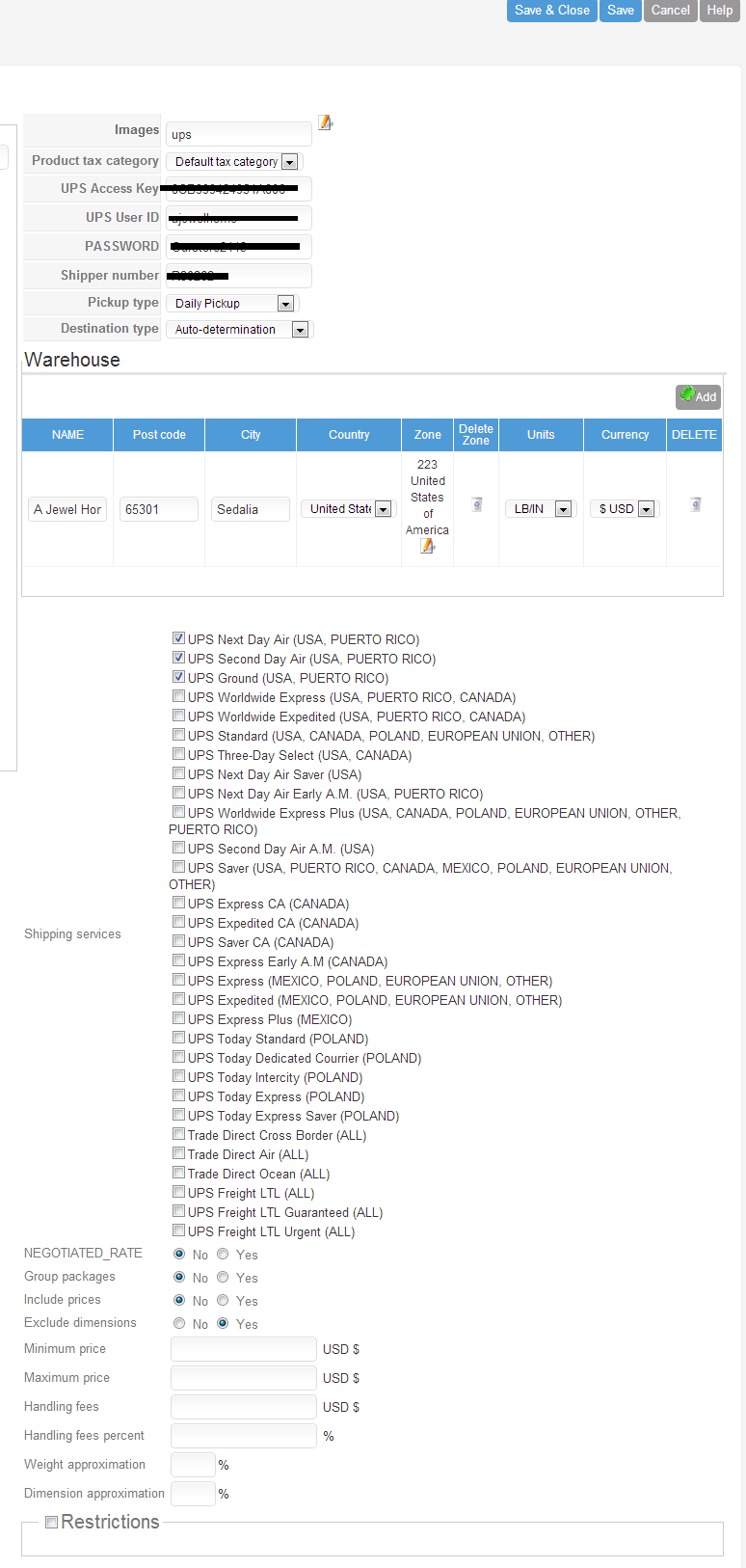
I've read the forums and docs and can't seem to find where I'm going wrong. I have all required info (see attached), it's enabled, but not showing up. Only manual (In-store pickup) is showing. Please help.
ajewelhomedecor.com/our-store/shop-online
Let me know if you need access.
Thanks.
ajewelhomedecor.com/our-store/shop-online
Let me know if you need access.
Thanks.
Please Log in or Create an account to join the conversation.

13 years 2 months ago #112048
by Eliot
Replied by Eliot on topic UPS Shipping method not showing up on front end
Hi there,
Did you set a weight and dimensions for your products? And do you have the last Hikashop version?
Also, it may come from the fact UPS doesn't found anything which could fit your product.
Did you set a weight and dimensions for your products? And do you have the last Hikashop version?
Also, it may come from the fact UPS doesn't found anything which could fit your product.
Please Log in or Create an account to join the conversation.
13 years 2 months ago - 13 years 2 months ago #114707
by jbarkacs
Replied by jbarkacs on topic UPS Shipping method not showing up on front end
Hi. I was on vacation, so I'm just now getting back.
Yes, there are weights and dimensions in the details. I don't understand your last comment about UPS can't find something.
And I do have the latest version.
Yes, there are weights and dimensions in the details. I don't understand your last comment about UPS can't find something.
And I do have the latest version.
Last edit: 13 years 2 months ago by jbarkacs.
Please Log in or Create an account to join the conversation.
13 years 2 months ago #114709
by jbarkacs
Replied by jbarkacs on topic UPS Shipping method not showing up on front end
Is it because I'm not using the paid version?
Please Log in or Create an account to join the conversation.

Less
More
- Posts: 12953
- Thank you received: 1778
13 years 2 months ago - 13 years 2 months ago #114714
by Mohamed Thelji
Replied by Mohamed Thelji on topic UPS Shipping method not showing up on front end
Last edit: 13 years 2 months ago by Mohamed Thelji.
Please Log in or Create an account to join the conversation.
13 years 2 months ago #114730
by jbarkacs
Replied by jbarkacs on topic UPS Shipping method not showing up on front end
OK, I've checked the FAQs line by line. All that shows is manual which is in-store pick up. The client is getting pissed, as am I. I don't understand why this is so hard to get going.
Also, in the registration, the default country/state id French, with the option to choose US or Serbia. WTH? I just need US. How do I do that?
I could give you access, if you think you could help.
Also, in the registration, the default country/state id French, with the option to choose US or Serbia. WTH? I just need US. How do I do that?
I could give you access, if you think you could help.
Please Log in or Create an account to join the conversation.

13 years 2 months ago #114761
by Jerome
Jerome - Obsidev.com
HikaMarket & HikaSerial developer / HikaShop core dev team.
Replied by Jerome on topic UPS Shipping method not showing up on front end
Hi,
The default country/state are stored in the address custom field.
Please edit your address custom fields in the HikaShop backend and change the "default value" then re-save the custom field.
About the UPS configuration, be sure that your products have weight configured.
The plugin lists all products with a weight in the cart and uses this product for his webservice call to UPS.
UPS requires a total weight in order to give you a shipping price (and with dimensions, it is better).
If there is no weight, UPS won't be called because the order weight will be null.
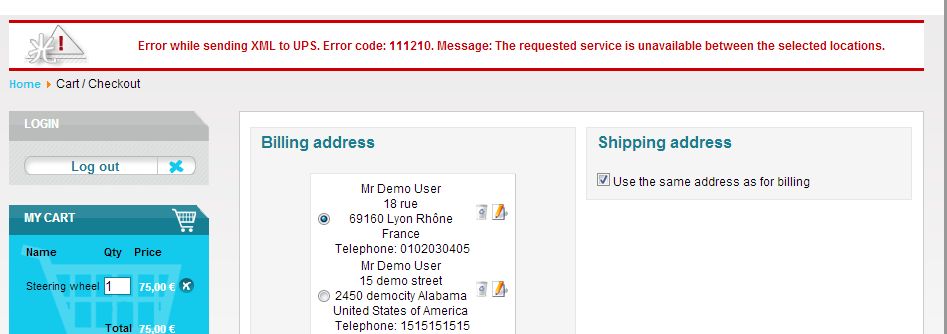
After that, be sure that the Joomla messages are right displayed in your website. You might have a UPS error message if there is a problem, like I had with my little test in the demo website:
Regards,
The default country/state are stored in the address custom field.
Please edit your address custom fields in the HikaShop backend and change the "default value" then re-save the custom field.
About the UPS configuration, be sure that your products have weight configured.
The plugin lists all products with a weight in the cart and uses this product for his webservice call to UPS.
UPS requires a total weight in order to give you a shipping price (and with dimensions, it is better).
If there is no weight, UPS won't be called because the order weight will be null.
After that, be sure that the Joomla messages are right displayed in your website. You might have a UPS error message if there is a problem, like I had with my little test in the demo website:
Regards,
Jerome - Obsidev.com
HikaMarket & HikaSerial developer / HikaShop core dev team.
Please Log in or Create an account to join the conversation.
Time to create page: 0.233 seconds