

- Posts: 128
- Thank you received: 3
Set group packages for shipping based on backorder
10 years 5 months ago - 10 years 5 months ago #235028
by deuce4884
Set group packages for shipping based on backorder was created by deuce4884
-- HikaShop version -- : 2.6.1
-- Joomla version -- : 3.5.0
-- PHP version -- : 5.3.24
I have a custom field that allows me to set an item to backorder. What I want to be able to do is if someone places an item in the cart that is on backorder, they can select how to handle the order; whether to hold the order until the backorder items are available or to send the items in stock and send the backorder items later (this would mean I need to disable group packages for the shipping methods). What I currently have is in my checkout->cart view I have changed the code:
to
In the same file I added the code:
How can I get the backordered_items variable into the shipping methods to change the group packages variable value?
-- Joomla version -- : 3.5.0
-- PHP version -- : 5.3.24
I have a custom field that allows me to set an item to backorder. What I want to be able to do is if someone places an item in the cart that is on backorder, they can select how to handle the order; whether to hold the order until the backorder items are available or to send the items in stock and send the backorder items later (this would mean I need to disable group packages for the shipping methods). What I currently have is in my checkout->cart view I have changed the code:
Code:
foreach($this->rows as $i => $row){
if(empty($row->cart_product_quantity)) continue;
if($group && $row->cart_product_option_parent_id) continue;
to
Code:
$backordered_items = false;
foreach($this->rows as $i => $row){
if(empty($row->cart_product_quantity)) continue;
if($group && $row->cart_product_option_parent_id) continue;
if($row->advance_orders !== 'NA') $backordered_items = true;
In the same file I added the code:
Code:
if($backordered_items){?>
<div class="block">
<p>
Your order contains items that are currently not in stock. Please select how you would like us to handle your order.
</p>
<select class="span6" name="backordered_items">
<option value="hold" selected>Hold my order until all items are in stock</option>
<option value="send">Send the items that are in stock and the rest when available</option>
</select>
</div>
<?php } ?>
How can I get the backordered_items variable into the shipping methods to change the group packages variable value?
Last edit: 10 years 5 months ago by deuce4884.
Please Log in or Create an account to join the conversation.

Less
More
- Posts: 12953
- Thank you received: 1778
10 years 5 months ago #235034
by Mohamed Thelji
Replied by Mohamed Thelji on topic Set group packages for shipping based on backorder
Hello,
Also, using warehouses will probably do the job to do what you want, you can :
- Create 2 warehouses, one for available/"groupable" products and one for backordered_items
- Then you'll have to set the correct warehouse through your product configuration page but also through your shipping method configuration page
- And finally you'll just have to create and configuration different shipping methods for both kind of products
The solution will probably be to directly edit the "onShippingDisplay" function the shipping plugin that you are actually using.How can I get the backordered_items variable into the shipping methods to change the group packages variable value?
Also, using warehouses will probably do the job to do what you want, you can :
- Create 2 warehouses, one for available/"groupable" products and one for backordered_items
- Then you'll have to set the correct warehouse through your product configuration page but also through your shipping method configuration page
- And finally you'll just have to create and configuration different shipping methods for both kind of products
Please Log in or Create an account to join the conversation.
10 years 5 months ago #235066
by deuce4884
Replied by deuce4884 on topic Set group packages for shipping based on backorder
I would rather directly edit the appropriate function in the plugin. If I do different warehouses it won't give the customer a choice on how to handle the order. This is a little new to me so, exactly what do I need to do to make this work?
Please Log in or Create an account to join the conversation.

10 years 5 months ago #235108
by nicolas
Replied by nicolas on topic Set group packages for shipping based on backorder
Hi,
Well, the exact solution depends on the shipping method your using and you didn't tell us what it is. That's why I can only repeat what Mohamed said:
Well, the exact solution depends on the shipping method your using and you didn't tell us what it is. That's why I can only repeat what Mohamed said:
Probably with a foreach on $order->products to check the advance_orders value of the products and then force the configuration value ( 0 or 1 ) of the group package option in $rate->shipping_params->group_package (the exact name might vary based on your shipping plugin).The solution will probably be to directly edit the "onShippingDisplay" function the shipping plugin that you are actually using.
Please Log in or Create an account to join the conversation.
10 years 5 months ago #235122
by deuce4884
Replied by deuce4884 on topic Set group packages for shipping based on backorder
I'm sorry I forgot to mention the shipping method; didn't think anything about it. I'm using the UPS and Fedex shipping methods.
Please Log in or Create an account to join the conversation.
10 years 5 months ago #235139
by nicolas
Replied by nicolas on topic Set group packages for shipping based on backorder
In both, you'll find that line:
foreach($local_usable_rates as $k => $rate){
in the function onShippingDisplay of the plugins main file plugins/hikashopshipping/fedex/fedex.php and plugins/hikashopshipping/ups/ups.php
You can replace these with such code:
$backordered_items = false;
$config = hikashop_config();
$group = $config->get('group_options', 0);
foreach($order->products as $i => $row){
if(empty($row->cart_product_quantity)) continue;
if($group && $row->cart_product_option_parent_id) continue;
if($row->advance_orders !== 'NA') $backordered_items = true;
}
foreach($local_usable_rates as $k => $rate){
$rate->shipping_params->group_package = $backordered_items;
foreach($local_usable_rates as $k => $rate){
in the function onShippingDisplay of the plugins main file plugins/hikashopshipping/fedex/fedex.php and plugins/hikashopshipping/ups/ups.php
You can replace these with such code:
$backordered_items = false;
$config = hikashop_config();
$group = $config->get('group_options', 0);
foreach($order->products as $i => $row){
if(empty($row->cart_product_quantity)) continue;
if($group && $row->cart_product_option_parent_id) continue;
if($row->advance_orders !== 'NA') $backordered_items = true;
}
foreach($local_usable_rates as $k => $rate){
$rate->shipping_params->group_package = $backordered_items;
Please Log in or Create an account to join the conversation.
10 years 5 months ago - 10 years 5 months ago #235164
by deuce4884
Replied by deuce4884 on topic Set group packages for shipping based on backorder
Thank you for your extensive help on this. I wanted to make the decision up to the customer to choose, not just up to the advance_orders status. I ended up adding a custom item field that is a single dropdown with the values of hold or send. Hold will hold all items in the order until the backordered items become available therefore grouping the packages, and send will send in stock items now and backorder items when they become available therefore not grouping the packages. I went into my product/show_block_custom_item view and replaced the code
with this
Then I did as you said
I just change the code to use to
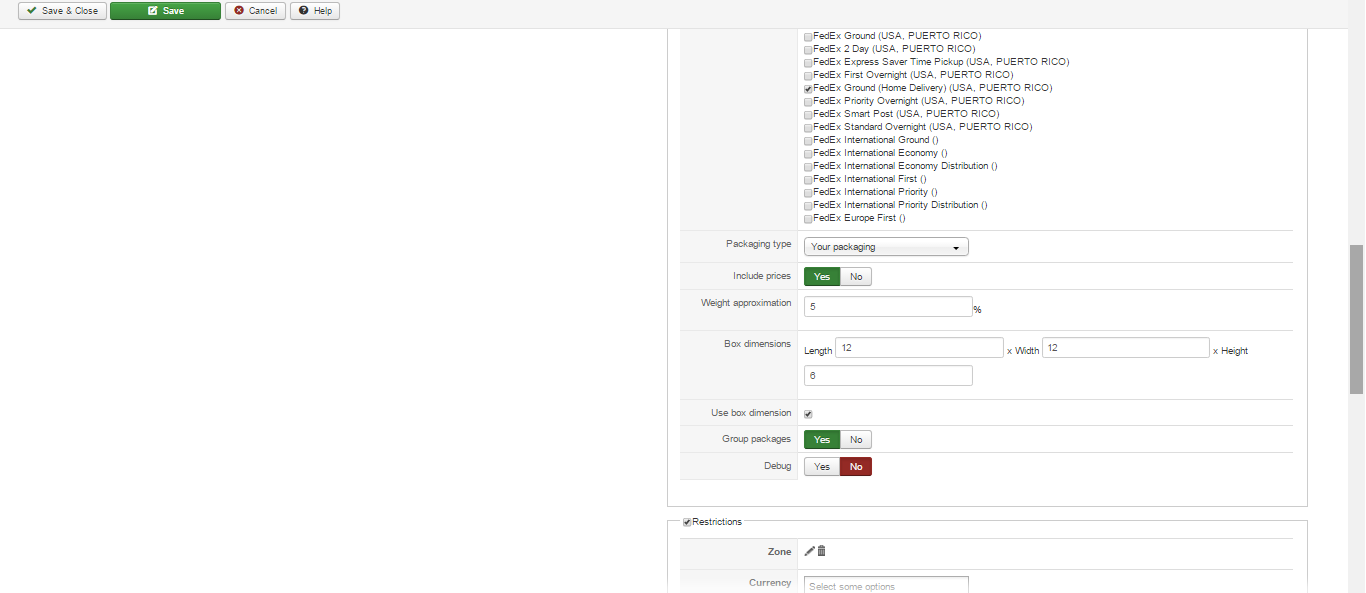
For UPS it works great. When someone chooses send instead of hold the shipping is almost double. For Fedex however, I'm not seeing any changes in the price whether it is set to hold or send. Is there a special way I have to setup the Fedex plugin to where the group packages will be set up right? Also about the Fedex plugin, I had a customer place an order yesterday and chose Fedex as their shipping method. When I went to Fedex to create the shipment, the service (Home Delivery) is not even available in their area. My question is if the service that the plugin is setup for is not available in that person's location why is it coming back with a shipping rate? Shouldn't it not even show up as an option? I've attached a screenshot of how I currently have it setup. One other question, is there a way to setup where custom item fields can be changed in the cart?
Code:
foreach ($this->itemFields as $fieldName => $oneExtraField) {
$itemData = JRequest::getString('item_data_' . $fieldName, $this->element->$fieldName);
?>
<tr id="hikashop_item_<?php echo $oneExtraField->field_namekey; ?>" class="hikashop_item_<?php echo $oneExtraField->field_namekey;?>_line">
<td class="key">
<span id="hikashop_product_custom_item_name_<?php echo $oneExtraField->field_id;?>" class="hikashop_product_custom_item_name">
<?php
if($oneExtraField->field_required==1){
echo str_replace('</label>','<span class="star"> *</span></label>',$this->fieldsClass->getFieldName($oneExtraField));
}else{
echo $this->fieldsClass->getFieldName($oneExtraField);
}?>
</span>
</td>
<td>
<span id="hikashop_product_custom_item_value_<?php echo $oneExtraField->field_id;?>" class="hikashop_product_custom_item_value"><?php
$onWhat='onchange';
if($oneExtraField->field_type=='radio')
$onWhat='onclick';
$oneExtraField->product_id = $this->element->product_id;
if($fieldName == "reloading_powder"){
echo str_replace('<span class="hikashop_field_required">*</span>','',$this->fieldsClass->display(
$oneExtraField,
$itemData,
'data[item]['.$oneExtraField->field_namekey.']',
false,
' '.$onWhat.'="minimumPowder(jQuery(\'#hikashop_product_quantity_main input[id*=hikashop_product_quantity_field_]\').val());hikashopToggleFields(this.value,\''.$fieldName.'\',\'item\',0);"'
));
}else{
echo str_replace('<span class="hikashop_field_required">*</span>','',$this->fieldsClass->display(
$oneExtraField,
$itemData,
'data[item]['.$oneExtraField->field_namekey.']',
false,
' '.$onWhat.'="hikashopToggleFields(this.value,\''.$fieldName.'\',\'item\',0);"'
));
}
?></span>
<div id="hikashop_invalid_field_<?php echo $fieldName; ?>" class="alert alert-error">
</div>
</td>
</tr>
<?php }
with this
Code:
if($this->element->advance_orders == 'Backorder'){
foreach ($this->itemFields as $fieldName => $oneExtraField) {
$itemData = JRequest::getString('item_data_' . $fieldName, $this->element->$fieldName);
?>
<tr id="hikashop_item_<?php echo $oneExtraField->field_namekey; ?>" class="hikashop_item_<?php echo $oneExtraField->field_namekey;?>_line">
<td class="key">
<span id="hikashop_product_custom_item_name_<?php echo $oneExtraField->field_id;?>" class="hikashop_product_custom_item_name">
<?php
if($oneExtraField->field_required==1){
echo str_replace('</label>','<span class="star"> *</span></label>',$this->fieldsClass->getFieldName($oneExtraField));
}else{
echo $this->fieldsClass->getFieldName($oneExtraField);
}?>
</span>
</td>
<td>
<span id="hikashop_product_custom_item_value_<?php echo $oneExtraField->field_id;?>" class="hikashop_product_custom_item_value"><?php
$onWhat='onchange';
if($oneExtraField->field_type=='radio')
$onWhat='onclick';
$oneExtraField->product_id = $this->element->product_id;
if($fieldName == "reloading_powder"){
echo str_replace('<span class="hikashop_field_required">*</span>','',$this->fieldsClass->display(
$oneExtraField,
$itemData,
'data[item]['.$oneExtraField->field_namekey.']',
false,
' '.$onWhat.'="minimumPowder(jQuery(\'#hikashop_product_quantity_main input[id*=hikashop_product_quantity_field_]\').val());hikashopToggleFields(this.value,\''.$fieldName.'\',\'item\',0);"'
));
}else{
echo str_replace('<span class="hikashop_field_required">*</span>','',$this->fieldsClass->display(
$oneExtraField,
$itemData,
'data[item]['.$oneExtraField->field_namekey.']',
false,
' '.$onWhat.'="hikashopToggleFields(this.value,\''.$fieldName.'\',\'item\',0);"'
));
}
?></span>
<div id="hikashop_invalid_field_<?php echo $fieldName; ?>" class="alert alert-error">
</div>
</td>
</tr>
<?php }
}else{
foreach ($this->itemFields as $fieldName => $oneExtraField) {
$itemData = JRequest::getString('item_data_' . $fieldName, $this->element->$fieldName);
if($oneExtraField->field_namekey == "customtext_93_13_54_27" || $oneExtraField->field_namekey == "backordered_item"){
continue;
}else{
?>
<tr id="hikashop_item_<?php echo $oneExtraField->field_namekey; ?>" class="hikashop_item_<?php echo $oneExtraField->field_namekey;?>_line">
<td class="key">
<span id="hikashop_product_custom_item_name_<?php echo $oneExtraField->field_id;?>" class="hikashop_product_custom_item_name">
<?php
if($oneExtraField->field_required==1){
echo str_replace('</label>','<span class="star"> *</span></label>',$this->fieldsClass->getFieldName($oneExtraField));
}else{
echo $this->fieldsClass->getFieldName($oneExtraField);
}?>
</span>
</td>
<td>
<span id="hikashop_product_custom_item_value_<?php echo $oneExtraField->field_id;?>" class="hikashop_product_custom_item_value"><?php
$onWhat='onchange';
if($oneExtraField->field_type=='radio')
$onWhat='onclick';
$oneExtraField->product_id = $this->element->product_id;
if($fieldName == "reloading_powder"){
echo str_replace('<span class="hikashop_field_required">*</span>','',$this->fieldsClass->display(
$oneExtraField,
$itemData,
'data[item]['.$oneExtraField->field_namekey.']',
false,
' '.$onWhat.'="minimumPowder(jQuery(\'#hikashop_product_quantity_main input[id*=hikashop_product_quantity_field_]\').val());hikashopToggleFields(this.value,\''.$fieldName.'\',\'item\',0);"'
));
}else{
echo str_replace('<span class="hikashop_field_required">*</span>','',$this->fieldsClass->display(
$oneExtraField,
$itemData,
'data[item]['.$oneExtraField->field_namekey.']',
false,
' '.$onWhat.'="hikashopToggleFields(this.value,\''.$fieldName.'\',\'item\',0);"'
));
}
?></span>
<div id="hikashop_invalid_field_<?php echo $fieldName; ?>" class="alert alert-error">
</div>
</td>
</tr>
<?php }
} //added div id="hikashop_invalid_field_ above to show the required fields error message before adding to cart
}
Then I did as you said
In both, you'll find that line:
foreach($local_usable_rates as $k => $rate){
in the function onShippingDisplay of the plugins main file plugins/hikashopshipping/fedex/fedex.php and plugins/hikashopshipping/ups/ups.php
You can replace these with such code:
$backordered_items = false;
$config = hikashop_config();
$group = $config->get('group_options', 0);
foreach($order->products as $i => $row){
if(empty($row->cart_product_quantity)) continue;
if($group && $row->cart_product_option_parent_id) continue;
if($row->advance_orders !== 'NA') $backordered_items = true;
}
foreach($local_usable_rates as $k => $rate){
$rate->shipping_params->group_package = $backordered_items;
I just change the code to use to
Code:
$backordered_items = false;
$config = hikashop_config();
$group = $config->get('group_options', 0);
foreach($order->products as $i => $row){
if(empty($row->cart_product_quantity)) continue;
if($group && $row->cart_product_option_parent_id) continue;
if($row->backordered_item == 'hold') $backordered_items = true;
}
foreach($local_usable_rates as $k => $rate){
$rate->shipping_params->group_package = $backordered_items;
For UPS it works great. When someone chooses send instead of hold the shipping is almost double. For Fedex however, I'm not seeing any changes in the price whether it is set to hold or send. Is there a special way I have to setup the Fedex plugin to where the group packages will be set up right? Also about the Fedex plugin, I had a customer place an order yesterday and chose Fedex as their shipping method. When I went to Fedex to create the shipment, the service (Home Delivery) is not even available in their area. My question is if the service that the plugin is setup for is not available in that person's location why is it coming back with a shipping rate? Shouldn't it not even show up as an option? I've attached a screenshot of how I currently have it setup. One other question, is there a way to setup where custom item fields can be changed in the cart?
Last edit: 10 years 5 months ago by deuce4884.
Please Log in or Create an account to join the conversation.
Less
More
- Posts: 12953
- Thank you received: 1778
10 years 5 months ago #235204
by Mohamed Thelji
Replied by Mohamed Thelji on topic Set group packages for shipping based on backorder
Hello,
We don't have any control on the rate returned from the FedEx shipping platform, so if a shipping rate is returned then the shipping plugin will just display it. If you want to move the "Custom field" block through your checkout workflow, you'll have to do it through "Hikashop->System->Configuration->Checkout". If you want to edit the content of the field block you can edit the "Fields" file of the "Checkout" view of your front-end template.
Using your code customization should also do the job for the FedEx shipping method, so if you don't see any difference you should try it with your browser's cache cleared. If you still see no differences, then it probably means that the package size/weight restriction of a FedEx shipping package is too low to contain 2 of your products.
My question is if the service that the plugin is setup for is not available in that person's location why is it coming back with a shipping rate? Shouldn't it not even show up as an option? I've attached a screenshot of how I currently have it setup. One other question, is there a way to setup where custom item fields can be changed in the cart?
We don't have any control on the rate returned from the FedEx shipping platform, so if a shipping rate is returned then the shipping plugin will just display it. If you want to move the "Custom field" block through your checkout workflow, you'll have to do it through "Hikashop->System->Configuration->Checkout". If you want to edit the content of the field block you can edit the "Fields" file of the "Checkout" view of your front-end template.
Using your code customization should also do the job for the FedEx shipping method, so if you don't see any difference you should try it with your browser's cache cleared. If you still see no differences, then it probably means that the package size/weight restriction of a FedEx shipping package is too low to contain 2 of your products.
Please Log in or Create an account to join the conversation.
10 years 5 months ago #235252
by deuce4884
Replied by deuce4884 on topic Set group packages for shipping based on backorder
If I change my custom field to the order table instead of the item table and move "Fields" to be with "Cart" on my checkout workflow I could handle these backorder items all at one time instead of on a per product basis. If I try this can I access the custom field in my order table in my shipping plugin? Would it be available in the row object as laid out in the code
or would I need to change something?
Code:
$backordered_items = false;
$config = hikashop_config();
$group = $config->get('group_options', 0);
foreach($order->products as $i => $row){
if(empty($row->cart_product_quantity)) continue;
if($group && $row->cart_product_option_parent_id) continue;
if($row->backordered_item == 'hold') $backordered_items = true;
}
foreach($local_usable_rates as $k => $rate){
$rate->shipping_params->group_package = $backordered_items;
Please Log in or Create an account to join the conversation.
Less
More
- Posts: 12953
- Thank you received: 1778
10 years 5 months ago - 10 years 5 months ago #235254
by Mohamed Thelji
Replied by Mohamed Thelji on topic Set group packages for shipping based on backorder
Hello,
$You'll probably find your order custom field value through the "$order->backordered_item" variable, and then you'll probably just need these lines :
Note that it will be good if you could check the content of your $order variable by using a var_dump for example.
$You'll probably find your order custom field value through the "$order->backordered_item" variable, and then you'll probably just need these lines :
Code:
$backordered_items = false;
if($order->backordered_item == 'hold') $backordered_items = true;
foreach($local_usable_rates as $k => $rate){
$rate->shipping_params->group_package = $backordered_items;
Note that it will be good if you could check the content of your $order variable by using a var_dump for example.
Last edit: 10 years 5 months ago by Mohamed Thelji.
Please Log in or Create an account to join the conversation.
10 years 5 months ago #235338
by deuce4884
Replied by deuce4884 on topic Set group packages for shipping based on backorder
Did a var_dump on $order like you suggested and the backordered_item is not there. Is there something else I can do here?
Please Log in or Create an account to join the conversation.
Less
More
- Posts: 12953
- Thank you received: 1778
10 years 5 months ago - 10 years 5 months ago #235363
by Mohamed Thelji
Replied by Mohamed Thelji on topic Set group packages for shipping based on backorder
Hello,
My bad, "Order" custom fields are stocked in the session until the order is created, so you should retrieve it using that kind of code :
My bad, "Order" custom fields are stocked in the session until the order is created, so you should retrieve it using that kind of code :
Code:
$app = JFactory::getApplication();
$app->getUserState(HIKASHOP_COMPONENT . '.checkout_fields.backordered_item'));
Last edit: 10 years 5 months ago by Mohamed Thelji.
Please Log in or Create an account to join the conversation.
10 years 5 months ago #235547
by deuce4884
Replied by deuce4884 on topic Set group packages for shipping based on backorder
This is the code I ended up with
It works, but the only thing I see wrong is that whatever value is selected the first time is the way it will stay no matter what you select after that. What I mean is when someone comes to the cart and they choose to hold the order until all items are in stock. They then go to the next step and it gives a shipping rate. If they change their mind and decide to go back to the beginning of the cart and choose send the items that are in stock now when they go to the next step it still shows the shipping rate for if they chose to hold the order. I'm guessing this is because it is stored in the session. Is there a way to reset the variable if they go back to the beginning of the cart?
Code:
$backordered_items = false;
$app = JFactory::getApplication();
$order_handling = $app->getUserState(HIKASHOP_COMPONENT . '.checkout_fields.backordered_items');
if($order_handling == 'hold') $backordered_items = true;
foreach($local_usable_rates as $k => $rate){
$rate->shipping_params->group_package = $backordered_items;
It works, but the only thing I see wrong is that whatever value is selected the first time is the way it will stay no matter what you select after that. What I mean is when someone comes to the cart and they choose to hold the order until all items are in stock. They then go to the next step and it gives a shipping rate. If they change their mind and decide to go back to the beginning of the cart and choose send the items that are in stock now when they go to the next step it still shows the shipping rate for if they chose to hold the order. I'm guessing this is because it is stored in the session. Is there a way to reset the variable if they go back to the beginning of the cart?
Please Log in or Create an account to join the conversation.
Less
More
- Posts: 12953
- Thank you received: 1778
10 years 5 months ago #235618
by Mohamed Thelji
Replied by Mohamed Thelji on topic Set group packages for shipping based on backorder
Hello,
If you don't want to use the shipping cache, you'll probably find your solution via :
www.hikashop.com/forum/4-how-to/81210-de...html?start=40#207977
If you don't want to use the shipping cache, you'll probably find your solution via :
www.hikashop.com/forum/4-how-to/81210-de...html?start=40#207977
Please Log in or Create an account to join the conversation.
10 years 5 months ago #235719
by deuce4884
Replied by deuce4884 on topic Set group packages for shipping based on backorder
This worked perfect for UPS, but for some reason the Fedex plugin is still not changing prices at all and it has the exact same restrictions as the UPS plugin. Does it have something to do with the box dimensions being set or the "use box dimensions" being set?
Please Log in or Create an account to join the conversation.
Less
More
- Posts: 12953
- Thank you received: 1778
10 years 5 months ago #235732
by Mohamed Thelji
Replied by Mohamed Thelji on topic Set group packages for shipping based on backorder
Hello,
It's probably coming from dimensions limitation on the code of the FedEx plugin and which are based on the box limitations that we can find through the FedEx documentation.
Can you tell me the dimensions of the products that are on your cart when you test it ?
Thanks.
It's probably coming from dimensions limitation on the code of the FedEx plugin and which are based on the box limitations that we can find through the FedEx documentation.
Can you tell me the dimensions of the products that are on your cart when you test it ?
Thanks.
Please Log in or Create an account to join the conversation.
10 years 5 months ago #235867
by deuce4884
Replied by deuce4884 on topic Set group packages for shipping based on backorder
When I tested it and it was working for UPS and not working for Fedex I had 2 products in the cart. One was a backordered item and the other wasn't. They both had the same dimensions:
-4.375 inches long X 2.625 inches wide X 1.875 inches tall
For the Fedex plugin I have the "box dimensions" set as 12 inches long X 12 inches wide X 6 inches tall and I have the "use box dimensions" checked. I thought it may have something to do with these settings, but I don't know.
-4.375 inches long X 2.625 inches wide X 1.875 inches tall
For the Fedex plugin I have the "box dimensions" set as 12 inches long X 12 inches wide X 6 inches tall and I have the "use box dimensions" checked. I thought it may have something to do with these settings, but I don't know.
Please Log in or Create an account to join the conversation.
Less
More
- Posts: 12953
- Thank you received: 1778
10 years 5 months ago #235877
by Mohamed Thelji
Replied by Mohamed Thelji on topic Set group packages for shipping based on backorder
Hello,
Can you test it without the "Box dimensions" option and unset the "Use box dimensions" ?
Thanks.
Can you test it without the "Box dimensions" option and unset the "Use box dimensions" ?
Thanks.
Please Log in or Create an account to join the conversation.
10 years 5 months ago #235938
by deuce4884
Replied by deuce4884 on topic Set group packages for shipping based on backorder
I emptied all the box dimensions and unset the "use box dimensions" and it is still not changing the price like the UPS plugin does
Please Log in or Create an account to join the conversation.
Less
More
- Posts: 12953
- Thank you received: 1778
10 years 5 months ago #236154
by Mohamed Thelji
Replied by Mohamed Thelji on topic Set group packages for shipping based on backorder
Hello,
I just checked the FedEx code and in your case the problem is coming from the fact that FedEx limitations are actually too big for your product, here is the limitation of the FedEx Ground service for example :
We don't have any control on what is returned from the FedEx shipping platform and at this point the solution will probably be to change the FedEx shipping plugin :
- Dimension/Weight limits
- Way of grouping your product and sending it to the FedEx platform.
But doing it isn't recommended unless you change the dimension limitation to smaller one.
I just checked the FedEx code and in your case the problem is coming from the fact that FedEx limitations are actually too big for your product, here is the limitation of the FedEx Ground service for example :
With FedEx Ground®
services, you can ship packages
up to 150 lbs.; up to 108" in length and 165" in length
plus girth.
We don't have any control on what is returned from the FedEx shipping platform and at this point the solution will probably be to change the FedEx shipping plugin :
- Dimension/Weight limits
- Way of grouping your product and sending it to the FedEx platform.
But doing it isn't recommended unless you change the dimension limitation to smaller one.
Please Log in or Create an account to join the conversation.
Time to create page: 0.308 seconds