

- Posts: 1184
- Thank you received: 13
Skip address in manual shipping plugin
9 years 6 months ago #265912
by verzevoul
Skip address in manual shipping plugin was created by verzevoul
Hi!
I have a shipping method (manual shipping plugin I used) where I saw pickup from my physical store. So there is no need to make client to use the address form. How can I do that?
I have a shipping method (manual shipping plugin I used) where I saw pickup from my physical store. So there is no need to make client to use the address form. How can I do that?
Please Log in or Create an account to join the conversation.

9 years 6 months ago #265955
by nicolas
Replied by nicolas on topic Skip address in manual shipping plugin
Hi,
In the settings of your shipping method, set the "Override shipping address" setting to "hide" and your customers won't have the shipping address area after selecting that shipping method.
In the settings of your shipping method, set the "Override shipping address" setting to "hide" and your customers won't have the shipping address area after selecting that shipping method.
Please Log in or Create an account to join the conversation.
9 years 6 months ago #265971
by verzevoul
Replied by verzevoul on topic Skip address in manual shipping plugin
I tried , it doens t hide
Please check it. Add something in the cart, enter an email as guest. And you ll see the first option
This message contains confidential information
.Please check it. Add something in the cart, enter an email as guest. And you ll see the first option
Please Log in or Create an account to join the conversation.
9 years 6 months ago #265975
by nicolas
Replied by nicolas on topic Skip address in manual shipping plugin
Hi,
Thanks. I was able to reproduce the problem. I've added a patch on our end. You can download the install package on our website and install it on yours to get the fix.
Thanks. I was able to reproduce the problem. I've added a patch on our end. You can download the install package on our website and install it on yours to get the fix.
Please Log in or Create an account to join the conversation.
9 years 6 months ago #266030
by verzevoul
Replied by verzevoul on topic Skip address in manual shipping plugin
I tried, still the same. I cleared cache also. I remarked that fields depending on other fields (display on) is working now. Before it wasnt
Please Log in or Create an account to join the conversation.

9 years 6 months ago #266031
by Jerome
Jerome - Obsidev.com
HikaMarket & HikaSerial developer / HikaShop core dev team.
Also helping the HikaShop support team when having some time or couldn't sleep.
By the way, do not send me private message, use the "contact us" form instead.
Replied by Jerome on topic Skip address in manual shipping plugin
Hi,
I'm sorry but I don't understand your last message.
Please also check that you do not have view overrides ; because one part of the part was an improvement in the view.
Regards,
I'm sorry but I don't understand your last message.
Please also check that you do not have view overrides ; because one part of the part was an improvement in the view.
Regards,
Jerome - Obsidev.com
HikaMarket & HikaSerial developer / HikaShop core dev team.
Also helping the HikaShop support team when having some time or couldn't sleep.
By the way, do not send me private message, use the "contact us" form instead.
Please Log in or Create an account to join the conversation.
9 years 6 months ago #266059
by verzevoul
Replied by verzevoul on topic Skip address in manual shipping plugin
I have some overrides that I cant delete. Which overide are you reffering to?
Please Log in or Create an account to join the conversation.
9 years 6 months ago #266061
by nicolas
Replied by nicolas on topic Skip address in manual shipping plugin
Hi,
We had to modify the "show_block_address" view file in order to fix that problem.
We had to modify the "show_block_address" view file in order to fix that problem.
Please Log in or Create an account to join the conversation.
9 years 5 months ago #266129
by verzevoul
Replied by verzevoul on topic Skip address in manual shipping plugin
Do I have to re download? Because its not fixed on our end
Please Log in or Create an account to join the conversation.
9 years 5 months ago #266131
by verzevoul
Replied by verzevoul on topic Skip address in manual shipping plugin
i replaced the mentioned file, but still the same
Please Log in or Create an account to join the conversation.
9 years 5 months ago #266134
by verzevoul
Replied by verzevoul on topic Skip address in manual shipping plugin
also checked with all overiddes temporeraly disabled
Please Log in or Create an account to join the conversation.
9 years 5 months ago #266132
by nicolas
Replied by nicolas on topic Skip address in manual shipping plugin
You had to do it when I wrote this message:
www.hikashop.com/forum/shipping-methods/...g-plugin.html#265975
If you did since then, then you have the patch we talked about to fix the problem.
We're saying that if you have an override on that view, then you won't see the fix.
So if you have the file templates/YOUR_TEMPLATE/html/com_hikashop/checkout/show_block_address.php rename it and it should help.
If you still have the problem after those two things, then you have another problem than the problem we found a fixed and we're not able to reproduce it.
In that case, please provide instructions to reproduce the problem on your website and a backend access so that we can check your settings.
If you did since then, then you have the patch we talked about to fix the problem.
We're saying that if you have an override on that view, then you won't see the fix.
So if you have the file templates/YOUR_TEMPLATE/html/com_hikashop/checkout/show_block_address.php rename it and it should help.
If you still have the problem after those two things, then you have another problem than the problem we found a fixed and we're not able to reproduce it.
In that case, please provide instructions to reproduce the problem on your website and a backend access so that we can check your settings.
Please Log in or Create an account to join the conversation.
9 years 5 months ago #266295
by verzevoul
Replied by verzevoul on topic Skip address in manual shipping plugin
I tried both.
I ll send you admin access
I ll send you admin access
Please Log in or Create an account to join the conversation.
9 years 5 months ago #266319
by nicolas
Replied by nicolas on topic Skip address in manual shipping plugin
Hi,
Unfortunately, I'm not able to access your website for some reason:
monosnap.com/file/BOEZuYIbafnandtlWVY4Tyyz9LKjk5
Also, since I don't know how your checkout looks like, you might be talking about the fact that the address view doesn't refresh automatically to remove/add the shipping address area when the shipping method is changed based on the shipping address override setting. I've actually found about that today and added a patch for it. So you might want to download again the install package on our website to get the fix for that.
Unfortunately, I'm not able to access your website for some reason:
monosnap.com/file/BOEZuYIbafnandtlWVY4Tyyz9LKjk5
Also, since I don't know how your checkout looks like, you might be talking about the fact that the address view doesn't refresh automatically to remove/add the shipping address area when the shipping method is changed based on the shipping address override setting. I've actually found about that today and added a patch for it. So you might want to download again the install package on our website to get the fix for that.
Please Log in or Create an account to join the conversation.
9 years 5 months ago #266346
by verzevoul
Replied by verzevoul on topic Skip address in manual shipping plugin
I dont know why you cant access but I m sending screenshots. Its not fixed. I pathched.
As you can see in the screenshots (backend),
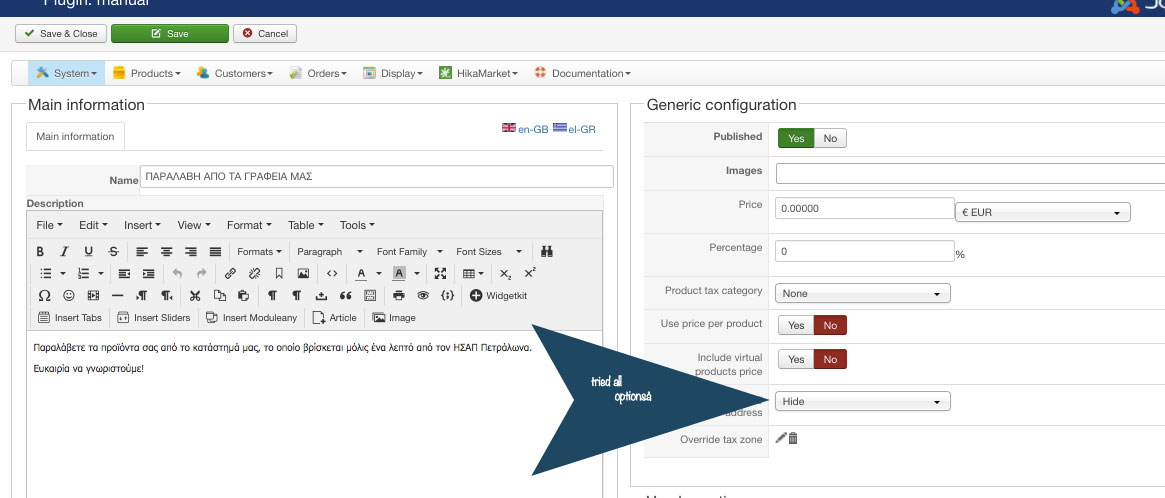
my shipping plugin has Override shipping address to hidden (I checked all options)
When I choose this shipping method
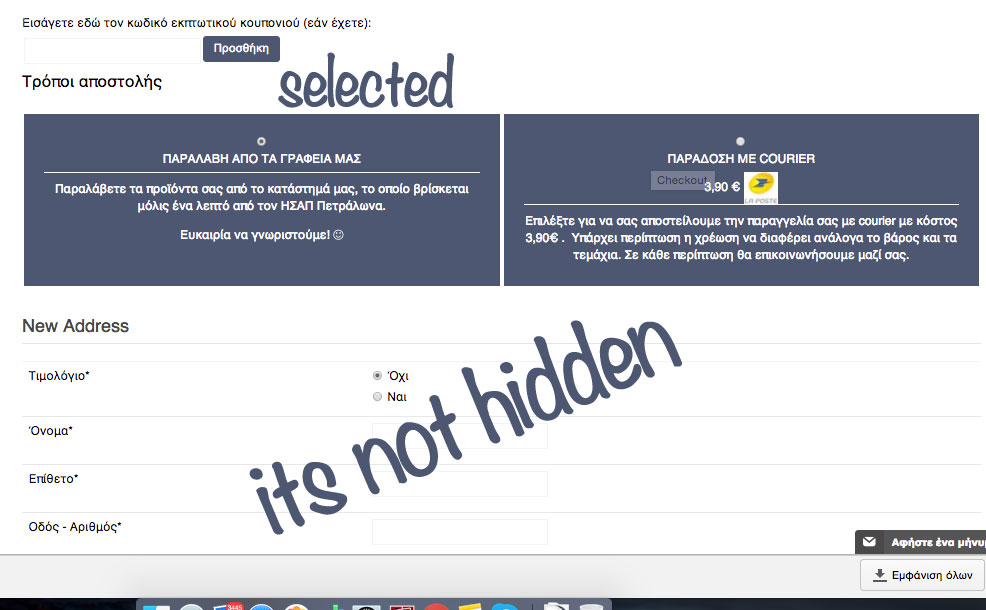
I still get the New address thing, So we cannot override.
I checked also by renaming the whole hikashop folder in my template overrides. But still the same.
As you can see in the screenshots (backend),
my shipping plugin has Override shipping address to hidden (I checked all options)
When I choose this shipping method
I still get the New address thing, So we cannot override.
I checked also by renaming the whole hikashop folder in my template overrides. But still the same.
Please Log in or Create an account to join the conversation.
9 years 5 months ago #266350
by Jerome
Jerome - Obsidev.com
HikaMarket & HikaSerial developer / HikaShop core dev team.
Also helping the HikaShop support team when having some time or couldn't sleep.
By the way, do not send me private message, use the "contact us" form instead.
Replied by Jerome on topic Skip address in manual shipping plugin
Hello,
In your screenshot we can just see that you have an address in edition ; not that the shipping address part is "hidden".
So I'm afraid that your screenshot do not prove your point.
Regards,
In your screenshot we can just see that you have an address in edition ; not that the shipping address part is "hidden".
So I'm afraid that your screenshot do not prove your point.
Regards,
Jerome - Obsidev.com
HikaMarket & HikaSerial developer / HikaShop core dev team.
Also helping the HikaShop support team when having some time or couldn't sleep.
By the way, do not send me private message, use the "contact us" form instead.
Please Log in or Create an account to join the conversation.
9 years 5 months ago #266409
by verzevoul
Replied by verzevoul on topic Skip address in manual shipping plugin
Please Jerome, don t speak like that!
I use hikashop from Joomla 1.5. I know what I m showing to you.
I use hikashop from Joomla 1.5. I know what I m showing to you.
Please Log in or Create an account to join the conversation.

9 years 5 months ago - 9 years 5 months ago #266433
by Philip
Replied by Philip on topic Skip address in manual shipping plugin
Hello,
I have a look on your website, and is see that this part disappear when you select the shipping method.
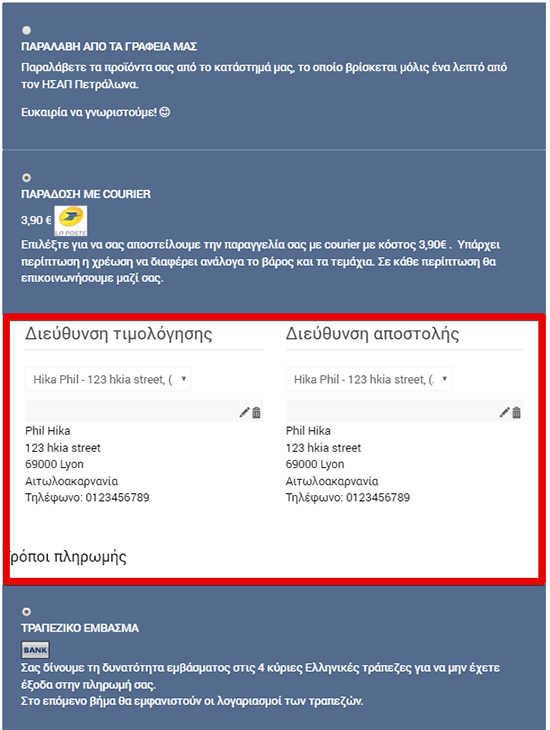
What you want remove is the New address, because if you use a guest mode there is no address in data base AND billing address is required...Because you can't have a payment WITHOUT billing address.
Regards
I have a look on your website, and is see that this part disappear when you select the shipping method.
What you want remove is the New address, because if you use a guest mode there is no address in data base AND billing address is required...Because you can't have a payment WITHOUT billing address.
Regards
Last edit: 9 years 5 months ago by Philip.
Please Log in or Create an account to join the conversation.
9 years 5 months ago #266539
by verzevoul
Replied by verzevoul on topic Skip address in manual shipping plugin
why does billing address required?
If I don t want it to be there?
If I don t want it to be there?
Please Log in or Create an account to join the conversation.
9 years 5 months ago #266570
by Jerome
Jerome - Obsidev.com
HikaMarket & HikaSerial developer / HikaShop core dev team.
Also helping the HikaShop support team when having some time or couldn't sleep.
By the way, do not send me private message, use the "contact us" form instead.
Replied by Jerome on topic Skip address in manual shipping plugin
Hello,
A billing address is mandatory when you have an e-commerce store.
It's a legal concern.
Regards,
A billing address is mandatory when you have an e-commerce store.
It's a legal concern.
Regards,
Jerome - Obsidev.com
HikaMarket & HikaSerial developer / HikaShop core dev team.
Also helping the HikaShop support team when having some time or couldn't sleep.
By the way, do not send me private message, use the "contact us" form instead.
Please Log in or Create an account to join the conversation.
Time to create page: 0.368 seconds