

- Posts: 87
- Thank you received: 2
Adding watermark
15 years 7 months ago #9234
by agrfoto
Adding watermark was created by agrfoto
I've added a watermark (png with transparency) to the main config / files and set the opacity at 25%.
The image size is the same as the larger image, the same as the popup from product page.
At present none of the existing images on the site show this watermasrk.
I then tried deleting the uploaded file (used in the popup) and added it again from the local source. It then only showed the default icon. I tried again this time deleting from within the products back-end page and now I have a white image with drop shadow (hard edge).
I have tried deleting cache of thumbs and preview and thumbnails in com_hikashop but still the correct image does not appear.
Are there other files on the server that need deleting before uploading the images again? Or perhaps I have messed up my work-flow.
Then next question is, can a public user copy images from the site even though there is a watermark? Normally I would add these to the image themselves before uploading but should this work directly in hikashop that would save my a little time.
Many thanks
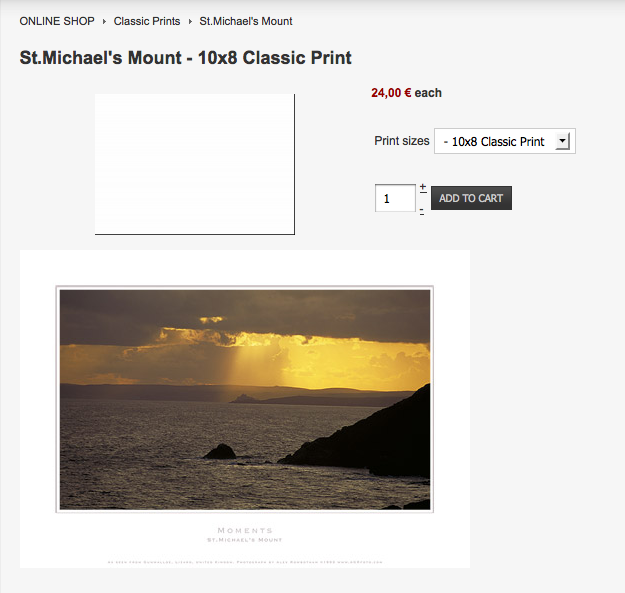
The image size is the same as the larger image, the same as the popup from product page.
At present none of the existing images on the site show this watermasrk.
I then tried deleting the uploaded file (used in the popup) and added it again from the local source. It then only showed the default icon. I tried again this time deleting from within the products back-end page and now I have a white image with drop shadow (hard edge).
I have tried deleting cache of thumbs and preview and thumbnails in com_hikashop but still the correct image does not appear.
Are there other files on the server that need deleting before uploading the images again? Or perhaps I have messed up my work-flow.
Then next question is, can a public user copy images from the site even though there is a watermark? Normally I would add these to the image themselves before uploading but should this work directly in hikashop that would save my a little time.
Many thanks
Please Log in or Create an account to join the conversation.
15 years 7 months ago - 15 years 7 months ago #9235
by agrfoto
Replied by agrfoto on topic Re: Adding watermark
Config/files:
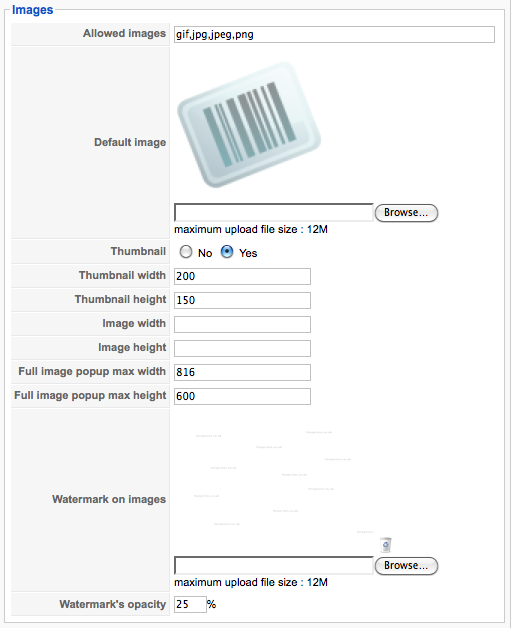
In fact I have also just added a completely new product with the same results. So from that I can deduct that it is something to do with me adding the watermark image.
In fact I have also just added a completely new product with the same results. So from that I can deduct that it is something to do with me adding the watermark image.
Last edit: 15 years 7 months ago by agrfoto.
Please Log in or Create an account to join the conversation.

15 years 7 months ago #9255
by nicolas
Replied by nicolas on topic Re: Adding watermark
It seems that there is a problem when a watermark image is set but that there are no image height/width set in the config.
Could you edit the file administrator/components/com_hikashop/helpers/image.php and change the code:
if($image_x && $image_y){
$this->width=$new[0];
$this->height=$new[1];
to:
$this->width=$new[0];
$this->height=$new[1];
if($image_x && $image_y){
That resolved the problem on our end.
Could you edit the file administrator/components/com_hikashop/helpers/image.php and change the code:
if($image_x && $image_y){
$this->width=$new[0];
$this->height=$new[1];
to:
$this->width=$new[0];
$this->height=$new[1];
if($image_x && $image_y){
That resolved the problem on our end.
Please Log in or Create an account to join the conversation.
15 years 7 months ago #9257
by agrfoto
Replied by agrfoto on topic Re: Adding watermark
Changed the code and uploaded the file using ftp.
Opened product page, deleted the image, and selected a new image, but now the image is white without the drop shadow.
Opened product page, deleted the image, and selected a new image, but now the image is white without the drop shadow.
Please Log in or Create an account to join the conversation.
15 years 7 months ago #9259
by nicolas
Replied by nicolas on topic Re: Adding watermark
We couldn't reproduce the problem of the white thing.
What kind of image do you use ? Gif ? I read a post with that same problem with a gif: www.codingforums.com/archive/index.php/t-128046.html
Using png for the watermark we didn't get the problem.
What kind of image do you use ? Gif ? I read a post with that same problem with a gif: www.codingforums.com/archive/index.php/t-128046.html
Using png for the watermark we didn't get the problem.
Please Log in or Create an account to join the conversation.
15 years 7 months ago #9266
by agrfoto
Replied by agrfoto on topic Re: Adding watermark
I remade the file in case it was corrupted. The first version was also png 8 whereas now it is png 24, but it's still the same. I have now deleted the watermark and that has also made no difference.
Please Log in or Create an account to join the conversation.
15 years 7 months ago #9267
by nicolas
Replied by nicolas on topic Re: Adding watermark
If you removed the watermark and that you didn't specify any image width/height there is no operation on the image so the full image should display normally. Is that the case or do you have both the thumbnail and the full image which are white ?
If it's the thumbnail which is white then, It might be a problem with GD. I recall that someone else had to reinstall his apache/php and then the white issue disappeared.
If it's the thumbnail which is white then, It might be a problem with GD. I recall that someone else had to reinstall his apache/php and then the white issue disappeared.
Please Log in or Create an account to join the conversation.
15 years 7 months ago #9268
by agrfoto
Replied by agrfoto on topic Re: Adding watermark
I managed to get the image appearing again. SOlving the 'white' or 'blank' image issue.
I did this:
Cleared cache in Joomla back-end and then using ftp deleted the relevant product image files and watermarks in com_hikashop/upload/ and in the subfolder thumbnail.
Uploaded the product image again from within the back-end but with new names, then back in the config --> files window I uploaded the watermark image again.
So the image is showing again however there are no watermarks.
I did this:
Cleared cache in Joomla back-end and then using ftp deleted the relevant product image files and watermarks in com_hikashop/upload/ and in the subfolder thumbnail.
Uploaded the product image again from within the back-end but with new names, then back in the config --> files window I uploaded the watermark image again.
So the image is showing again however there are no watermarks.
Please Log in or Create an account to join the conversation.
15 years 7 months ago #9269
by nicolas
Replied by nicolas on topic Re: Adding watermark
And if you put the watermark and delete the relevant product image files in com_hikashop/upload/ and in the subfolder thumbnails, and then try to upload the image again in the backend, does it works ?
Please Log in or Create an account to join the conversation.
15 years 7 months ago #9273
by agrfoto
Replied by agrfoto on topic Re: Adding watermark
I take it you mean if the reverse order that I just did.
So now, I deleted the watermark and product images from within the back-end, but noticed by using ftp that only the product images had been deleted from the server, so I deleted the watermark images using ftp in the two folders.
I first then uploaded again the watermark image using the config --> files page, and then the product image.
All is fine except no watermark is showing.
Maybe I am missing the point somewhere with the water mark image. The size is 800 x 566px is this a problem?
So now, I deleted the watermark and product images from within the back-end, but noticed by using ftp that only the product images had been deleted from the server, so I deleted the watermark images using ftp in the two folders.
I first then uploaded again the watermark image using the config --> files page, and then the product image.
All is fine except no watermark is showing.
Maybe I am missing the point somewhere with the water mark image. The size is 800 x 566px is this a problem?
Please Log in or Create an account to join the conversation.
15 years 7 months ago #9274
by nicolas
Replied by nicolas on topic Re: Adding watermark
It depends of the size of your other images. On our end we tried with a watermark smaller than the images we uploaded. Is that the case on your end ?
Please Log in or Create an account to join the conversation.
15 years 7 months ago #9278
by agrfoto
Replied by agrfoto on topic Re: Adding watermark
All my product images are no wider than 800px and the height varies to a max of 598px so let me check if I make the watermark.png smaller.
Please Log in or Create an account to join the conversation.
15 years 7 months ago #9279
by agrfoto
Replied by agrfoto on topic Re: Adding watermark
I made a completely new png watermark file with smaller dimensions than the images. Still not showing up on the front-end images.
Not something to do with the fact I am logged in to the front-end as administrator is it? I mean is there a config that say turn on the watermark for the public level?
Not something to do with the fact I am logged in to the front-end as administrator is it? I mean is there a config that say turn on the watermark for the public level?
Please Log in or Create an account to join the conversation.
15 years 7 months ago #9280
by nicolas
Replied by nicolas on topic Re: Adding watermark
the watermark is added to your images when you upload them via the interface of the backend so if you don't see it in the images listing of your product once uploaded, you won't see it on the front end.
Please Log in or Create an account to join the conversation.
15 years 7 months ago #9283
by agrfoto
Replied by agrfoto on topic Re: Adding watermark
Right, OK, let me try to create a completely new product page from scratch and see if the watermark appears or not.
Please Log in or Create an account to join the conversation.
15 years 7 months ago #9289
by agrfoto
Replied by agrfoto on topic Re: Adding watermark
Yes, that's it. I have to delete and upload all the images, which at this point in time is not so bad since there are only about 60 so far. I will eventually have 1000s.
The issue I have now is making the watermark file in a way that it appears centered on the product images since some are vertical images and some horizontal.
If I create an equal-sided file ie 450x450px it will be embedded centrally and without being stretched to fit?
The issue I have now is making the watermark file in a way that it appears centered on the product images since some are vertical images and some horizontal.
If I create an equal-sided file ie 450x450px it will be embedded centrally and without being stretched to fit?
Please Log in or Create an account to join the conversation.
15 years 7 months ago - 15 years 7 months ago #9290
by agrfoto
Replied by agrfoto on topic Re: Adding watermark
By the way, since purchasing the business edition of Hikashop, creating new products is much quicker as I can now copy other similar products and change only the images and the codes of the variants for the characteristics. This is very useful to anyone with a shop where the sizes and prices are all exactly the same for each product.
Last edit: 15 years 7 months ago by agrfoto.
Please Log in or Create an account to join the conversation.
15 years 7 months ago #9291
by nicolas
Replied by nicolas on topic Re: Adding watermark
The watermark is positioned from the bottom right of the images.
Please Log in or Create an account to join the conversation.
12 years 11 months ago #125569
by dunxmax
DunxMax
The more we learn the less we know.
Replied by dunxmax on topic Adding watermark
I don't mean particularly to revive this thread, but I just tried to add a watermark to images which I had already uploaded via ftp to the upload folder.
I take it from this thread that the watermark only works if you add an image via the product page? And the watermark has to be configured first? Is this correct?
Furthermore it won't work in either case if I've done a mass upload?
Thanks for your help.
Dunxmax
I take it from this thread that the watermark only works if you add an image via the product page? And the watermark has to be configured first? Is this correct?
Furthermore it won't work in either case if I've done a mass upload?
Thanks for your help.
Dunxmax
DunxMax
The more we learn the less we know.
Please Log in or Create an account to join the conversation.
12 years 11 months ago #125595
by nicolas
Replied by nicolas on topic Adding watermark
That's is all correct.
If you want to add an image on top of your images automatically, you can use a badge instead (menu Products>Badges). As the badge image is superposed with the product image by the browser it can work directly for all the products while for watermarks, it has to be processed for each image at upload as it is an intensive process.
If you want to add an image on top of your images automatically, you can use a badge instead (menu Products>Badges). As the badge image is superposed with the product image by the browser it can work directly for all the products while for watermarks, it has to be processed for each image at upload as it is an intensive process.
Please Log in or Create an account to join the conversation.
Time to create page: 0.280 seconds