

- Posts: 26
- Thank you received: 0
Checkout-Form IE and FireFox differences
15 years 6 months ago #10498
by an_0815
Checkout-Form IE and FireFox differences was created by an_0815
Hello,
we've a problem within the checkout - user registration form. If one have used the IE 8.x, after selection of country, the state drop-down field does not show any state automatically. It left blank, until you click it and make a selection of the state manually.
In FireFox 3.6.x: If you select a country within the registration form, the state drop-down box updates itself instantly.
Where does it come from? Do you see a chance to solve this behavior?
Thanks
Andreas
we've a problem within the checkout - user registration form. If one have used the IE 8.x, after selection of country, the state drop-down field does not show any state automatically. It left blank, until you click it and make a selection of the state manually.
In FireFox 3.6.x: If you select a country within the registration form, the state drop-down box updates itself instantly.
Where does it come from? Do you see a chance to solve this behavior?
Thanks
Andreas
Please Log in or Create an account to join the conversation.

15 years 6 months ago #10501
by nicolas
Replied by nicolas on topic Re: Checkout-Form IE and FireFox differences
Could you give a link to your website so that we can see the problem ?
Do you have the same problem on our demo website ?
Do you have the same problem on our demo website ?
Please Log in or Create an account to join the conversation.
15 years 6 months ago #10503
by an_0815
Replied by an_0815 on topic Re: Checkout-Form IE and FireFox differences
Hello,
the link is: joomla2.amocol.com
Please make a deal as anonymous customer, go to checkout and click in the registration form country, Germany and see that IE doesn't refresh the state drop-down box.
The same procedure with FireFox will refresh the state drop-down box.
The problem is, if the customer isn't aware of it, later there is no shipping method available.
In this case I like to ask you this: is it possible to track only the country to figure out the shipping method and price if state isn't available or empty? I reviewed already some forum topics for this but sorry no answer did really help.
Thanks
Andreas
the link is: joomla2.amocol.com
Please make a deal as anonymous customer, go to checkout and click in the registration form country, Germany and see that IE doesn't refresh the state drop-down box.
The same procedure with FireFox will refresh the state drop-down box.
The problem is, if the customer isn't aware of it, later there is no shipping method available.
In this case I like to ask you this: is it possible to track only the country to figure out the shipping method and price if state isn't available or empty? I reviewed already some forum topics for this but sorry no answer did really help.
Thanks
Andreas
Please Log in or Create an account to join the conversation.
15 years 6 months ago #10505
by nicolas
Replied by nicolas on topic Re: Checkout-Form IE and FireFox differences
Could you go in Display->Custom fields and edit the address_state custom field and make sure that its zone type is "state" and that its default value is one of the states of germany and save its options and try again ?
Please Log in or Create an account to join the conversation.
15 years 6 months ago #10506
by an_0815
Replied by an_0815 on topic Re: Checkout-Form IE and FireFox differences
Thanks a lot for your quick answer. I veryfied the zone type, it is state. Pleas watch the attached screen shot.
Andreas

Andreas
Please Log in or Create an account to join the conversation.
15 years 6 months ago #10508
by an_0815
Replied by an_0815 on topic Re: Checkout-Form IE and FireFox differences
Hello,
if it's to complicated to figure it out... I can give you access via TeamViewer to my screen to inspect the configuration.
Andreas
if it's to complicated to figure it out... I can give you access via TeamViewer to my screen to inspect the configuration.
Andreas
Please Log in or Create an account to join the conversation.
15 years 6 months ago #10510
by nicolas
Replied by nicolas on topic Re: Checkout-Form IE and FireFox differences
Please go in Display->Custom fields and edit the address_state custom field and make sure that its zone type is "state" and that its default value is one of the states of germany and save its options and try again. I don't want you to just check the options of the custom field but also save them in order to be sure that the information in the database reflects the reality.
Please Log in or Create an account to join the conversation.
15 years 6 months ago #10516
by an_0815
Replied by an_0815 on topic Re: Checkout-Form IE and FireFox differences
Hello,
I double checked it as you suggested. Every setup seemed correctly but I saved the values for sure. And now the state refreshes under IE for country Germany.
But, if you change the country to another name, i.e. to France, the state field in checkout - register form is blank again. This is not really the big problem, but if it is blank i.e. no shipping method is displayed. What can we change that HikaShop only takes the country into account to filter the shipping method?
Thanks,
Andreas
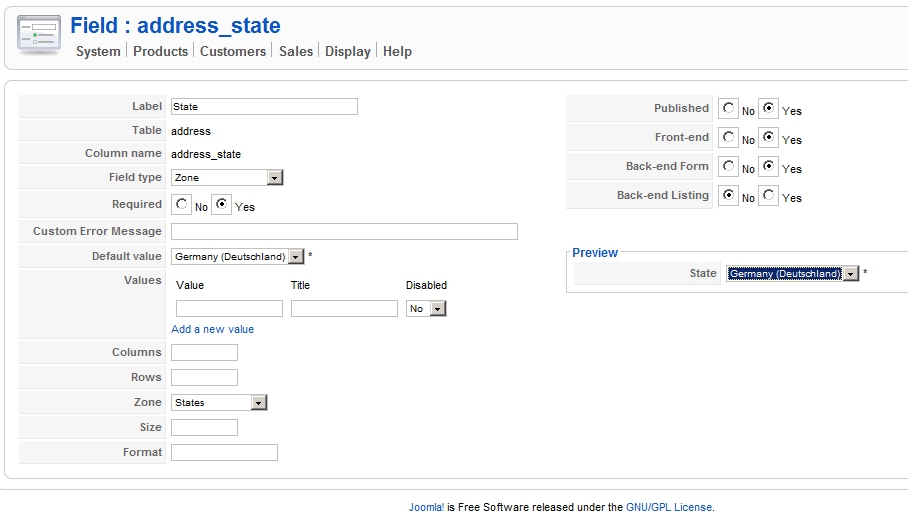
I double checked it as you suggested. Every setup seemed correctly but I saved the values for sure. And now the state refreshes under IE for country Germany.
But, if you change the country to another name, i.e. to France, the state field in checkout - register form is blank again. This is not really the big problem, but if it is blank i.e. no shipping method is displayed. What can we change that HikaShop only takes the country into account to filter the shipping method?
Thanks,
Andreas
Please Log in or Create an account to join the conversation.
15 years 6 months ago #10520
by nicolas
Replied by nicolas on topic Re: Checkout-Form IE and FireFox differences
In your shipping methods, you can configure the zone to which the shipping method applies.
If you set a state, it will apply to a state, if you set it to a country it will apply to a country...
If you set a state, it will apply to a state, if you set it to a country it will apply to a country...
Please Log in or Create an account to join the conversation.
15 years 6 months ago #10571
by tecnet
Replied by tecnet on topic Re: Checkout-Form IE and FireFox differences
Hi there,
I work with an_0815 on that problem so I hope I can give you more information about the bug we found:
Default values are Germany (as example) with Country and State. When you start the checkout you will see Country and State set with default values. When you change the country to any other value, the state box will refresh with the depending states.
BUT(!) in FF you will see the first entry of states for that country whil IE will show an empty state field. You have to select in the state field the value you want. When the user did not recognize that the field is empty and moves on with the next step he will not be informed about the empty state field. The Shipping and tax will fail because it looks like the IE sends any data the hikashop work with and fails to resolve the correct tax and shipping to the country.
We tried to remove state but than we have the same issue in FF also.
I work with an_0815 on that problem so I hope I can give you more information about the bug we found:
Default values are Germany (as example) with Country and State. When you start the checkout you will see Country and State set with default values. When you change the country to any other value, the state box will refresh with the depending states.
BUT(!) in FF you will see the first entry of states for that country whil IE will show an empty state field. You have to select in the state field the value you want. When the user did not recognize that the field is empty and moves on with the next step he will not be informed about the empty state field. The Shipping and tax will fail because it looks like the IE sends any data the hikashop work with and fails to resolve the correct tax and shipping to the country.
We tried to remove state but than we have the same issue in FF also.
Please Log in or Create an account to join the conversation.
15 years 6 months ago #10596
by nicolas
Replied by nicolas on topic Re: Checkout-Form IE and FireFox differences
We were indeed able to reproduce the problem on IE.
It seems that IE doesn't use the first option of a select as default value if none is selected like all the other browsers do.
Could you try to edit the file administrator/components/com_hikashop/classes/field.php and replace the code:
by
That should set a default value on the server side and avoid the problem on IE.
It seems that IE doesn't use the first option of a select as default value if none is selected like all the other browsers do.
Could you try to edit the file administrator/components/com_hikashop/classes/field.php and replace the code:
Code:
}else{
$arg = 'size="1"';
}
Code:
}else{
$arg = 'size="1"';
if(is_string($value)&& empty($value) && !empty($field->field_value)){
$found = false;
$first = false;
foreach($field->field_value as $oneValue => $title){
if($first===false){
$first=$oneValue;
}
if($oneValue==$value){
$found = true;
break;
}
}
//set default value for IE
if(!$found){
$value = $first;
}
}
}
Please Log in or Create an account to join the conversation.
15 years 6 months ago #10667
by tecnet
Replied by tecnet on topic Re: Checkout-Form IE and FireFox differences
Seems to work, even when the state field is still empty.
Thank you!
Thank you!
Please Log in or Create an account to join the conversation.
15 years 6 months ago #10900
by tecnet
Replied by tecnet on topic Re: Checkout-Form IE and FireFox differences
Hello it's me again 
I'm sorry to tell you that the last reply was too fast and the problem was just moved forward. Adress worked well but when it is time to tell you the shipping options it fails again. So I did it the other way around:
/administrator/components/com_hikashop/classes/user.php
This will check if the state field is empty and prints an error message. Register will fail in this case and jumps back to registration site. The STATE_NOT_VALID message is set in the language file.
I'm sorry to tell you that the last reply was too fast and the problem was just moved forward. Adress worked well but when it is time to tell you the shipping options it fails again. So I did it the other way around:
/administrator/components/com_hikashop/classes/user.php
Code:
if (isset($addressData->address_state) && empty($addressData->address_state)){
$app->enqueueMessage( JText::_('STATE_NOT_VALID') );
return false;
}
This will check if the state field is empty and prints an error message. Register will fail in this case and jumps back to registration site. The STATE_NOT_VALID message is set in the language file.
Please Log in or Create an account to join the conversation.
15 years 6 months ago #10926
by nicolas
Replied by nicolas on topic Re: Checkout-Form IE and FireFox differences
Hi,
Indeed we tested our modification and it didn't solve the problem. We made an additional modification to the file. It now works on our end.
Please try to replace the file administrator/components/com_hikashop/classes/field.php with the file in the archive enclosed.
This attachment is hidden for guests.
Indeed we tested our modification and it didn't solve the problem. We made an additional modification to the file. It now works on our end.
Please try to replace the file administrator/components/com_hikashop/classes/field.php with the file in the archive enclosed.
This attachment is hidden for guests.
Please log in or register to see it.
Please Log in or Create an account to join the conversation.
15 years 6 months ago #10987
by tecnet
Replied by tecnet on topic Re: Checkout-Form IE and FireFox differences
Update is online and seems to work as intended. IE now fills the state field like Firefox does.
Thank you!
Thank you!
Please Log in or Create an account to join the conversation.
Time to create page: 0.258 seconds