

- Posts: 28
- Thank you received: 0
Pop-Up: "Not enough stock"
15 years 6 months ago #11347
by RemoteC
Pop-Up: "Not enough stock" was created by RemoteC
Hi!
I have the following problem: If I click on the "plus" on the product page a Pop-Up apperas saying "Not enough stock". I can't explain that because stock is set to unlimited.
Fist I thought this is because I have tha max. order quantity set to "1" but changing this doesn't change anything on the message.
Probably there is just one little setting wrong but I can't figure out where :blush:
best regards!
I have the following problem: If I click on the "plus" on the product page a Pop-Up apperas saying "Not enough stock". I can't explain that because stock is set to unlimited.
Fist I thought this is because I have tha max. order quantity set to "1" but changing this doesn't change anything on the message.
Probably there is just one little setting wrong but I can't figure out where :blush:
best regards!
Please Log in or Create an account to join the conversation.

15 years 6 months ago #11348
by nicolas
Replied by nicolas on topic Re: Pop-Up: "Not enough stock"
Could you give a link that page and a screenshot of the product settings ?
Please Log in or Create an account to join the conversation.
15 years 6 months ago - 15 years 6 months ago #11349
by RemoteC
Replied by RemoteC on topic Re: Pop-Up: "Not enough stock"
Link isn't possible because atm the whole site is only available on a local server 
Screenshot is attached.
But I think the problem is somewhere else because also a change of e.g. the description on the product page doesn't take place in the frontend. In the Joomla settings caching is disabled - any ideas? After save & close and reopening the product the new description is there ... but not in the frontend :huh: Also using another browser (to avoid some caching here) doesn't change anything: backend description != frontend description :blink:
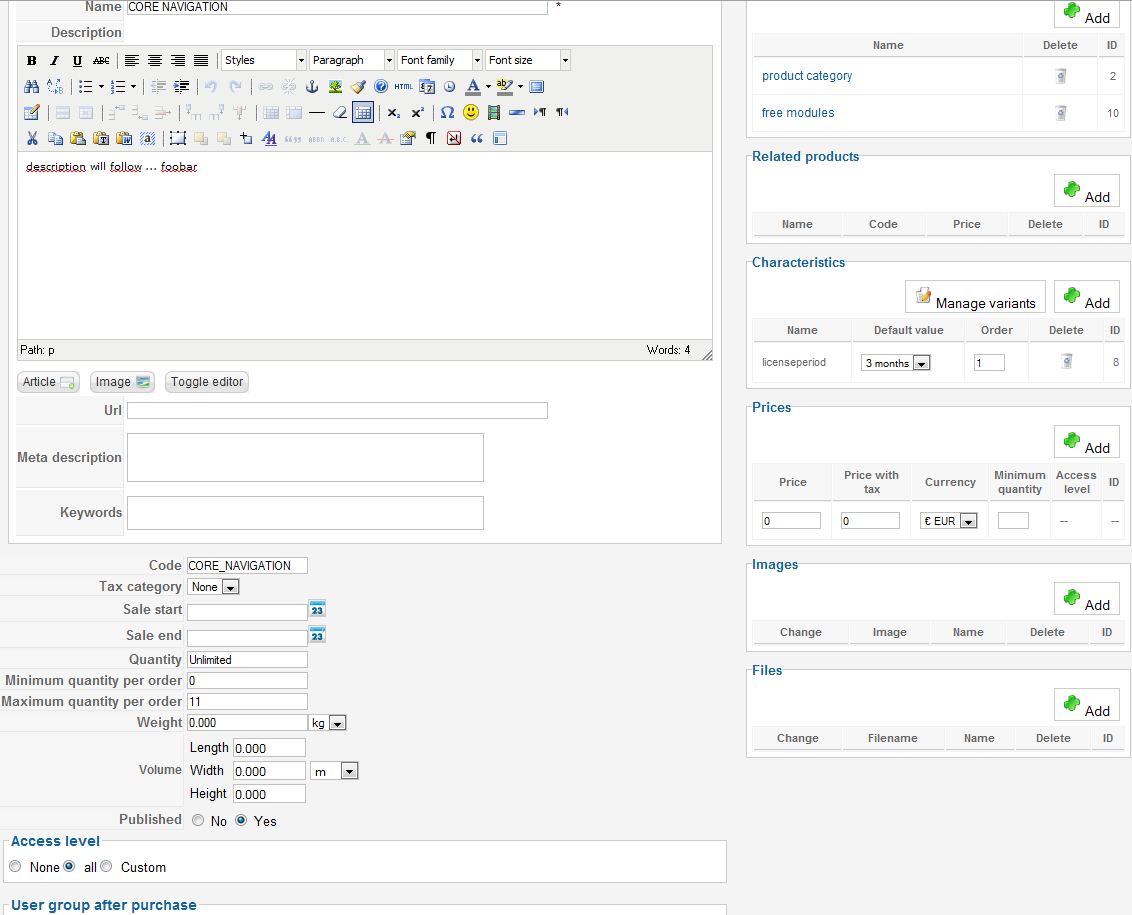
Screenshot is attached.
But I think the problem is somewhere else because also a change of e.g. the description on the product page doesn't take place in the frontend. In the Joomla settings caching is disabled - any ideas? After save & close and reopening the product the new description is there ... but not in the frontend :huh: Also using another browser (to avoid some caching here) doesn't change anything: backend description != frontend description :blink:
Last edit: 15 years 6 months ago by RemoteC.
Please Log in or Create an account to join the conversation.
15 years 6 months ago #11350
by nicolas
Replied by nicolas on topic Re: Pop-Up: "Not enough stock"
I see that you have variants so you should check the settings of the variants of your product via the button "manage variants".
Also please check that the joomla cache plugin is unpublished.
Also please check that the joomla cache plugin is unpublished.
Please Log in or Create an account to join the conversation.
15 years 6 months ago - 15 years 6 months ago #11351
by RemoteC
Replied by RemoteC on topic Re: Pop-Up: "Not enough stock"
I figured out my problem: I was changing the product page but I need to change the settings on the "variant" site of the product. That's not only a little bit confusing :S
If I now change the max_quantity on the "variant" site of the product e.g. to "3" the pop-up appears when I want to buy more then 3 pieces of this very product ... Is it possible that there was a change on the newest version of HikaShop? I can't remember this pop-up in the previous version.
Edit: you were faster replying then I typing this post ^^
If I now change the max_quantity on the "variant" site of the product e.g. to "3" the pop-up appears when I want to buy more then 3 pieces of this very product ... Is it possible that there was a change on the newest version of HikaShop? I can't remember this pop-up in the previous version.
Edit: you were faster replying then I typing this post ^^
Last edit: 15 years 6 months ago by RemoteC.
Please Log in or Create an account to join the conversation.
15 years 6 months ago #11352
by nicolas
Replied by nicolas on topic Re: Pop-Up: "Not enough stock"
We indeed added that popup in february because otherwise users might not understand that they reached the limit.
Please Log in or Create an account to join the conversation.
15 years 6 months ago #11354
by RemoteC
Replied by RemoteC on topic Re: Pop-Up: "Not enough stock"
I understand this problem but this popup isn't very helpful on a product that can't be out of stock 
Is this text in some ini file? Or is there the possibility to disable the quantity (plus/minus, input field) on the product page at all?
Is this text in some ini file? Or is there the possibility to disable the quantity (plus/minus, input field) on the product page at all?
Please Log in or Create an account to join the conversation.
15 years 6 months ago #11356
by nicolas
Replied by nicolas on topic Re: Pop-Up: "Not enough stock"
All the text in HikaShop can be changed in the config under the tab languages by overriding the default translation file.
You can also disable the quantity field with the option "Display the quantity field on the product page"
You can also disable the quantity field with the option "Display the quantity field on the product page"
Please Log in or Create an account to join the conversation.
15 years 6 months ago #11360
by RemoteC
Replied by RemoteC on topic Re: Pop-Up: "Not enough stock"
Thank you! Disabling the display of the quantity field is doing it in my case ... hopefully - maybe the project leader has other ideas :side:
Please Log in or Create an account to join the conversation.

14 years 1 month ago #60184
by nowherenowhere
Believe in Better
Replied by nowherenowhere on topic Re: Pop-Up: "Not enough stock"
Hi Nicolas,
 I have a question for you... I love the way this pop-up appears, but it would be super awesome if it said what the actual stock level is... For exmplape I have 9 items in the store... user adds 10 to the cart, pop notification says >> Sorry we only have x amount of items available
Is it possible?
I have a question for you... I love the way this pop-up appears, but it would be super awesome if it said what the actual stock level is... For exmplape I have 9 items in the store... user adds 10 to the cart, pop notification says >> Sorry we only have x amount of items availableIs it possible?
Believe in Better
Please Log in or Create an account to join the conversation.
14 years 1 month ago #60236
by nicolas
Replied by nicolas on topic Re: Pop-Up: "Not enough stock"
No there is no option for that.
You would have to edit the code of the file administrator/components/com_hikashop/classes/cart.php but that's not easy to do and you will loose the modifications if you update.
You would have to edit the code of the file administrator/components/com_hikashop/classes/cart.php but that's not easy to do and you will loose the modifications if you update.
Please Log in or Create an account to join the conversation.
Time to create page: 0.239 seconds