
Paypal & custom field

Question 1:
I succesfully added a custom field to the article layout. Currently it shows up on every article. I was wondering if it is possible to have a custom field added only to selected articles, or define if it should be added when creating an article ?
Question 2:
As you probably know paypal charges for each transaction, i was wondering if there is a way to add a certain amount (paypal ratio+fixed amount) so that it adds it to the final article price, resulting in the extra cost added covering the charge and the final received amount is the actual total product price and also make it clear that there is an extra cost when using the paypal payment option
Please Log in or Create an account to join the conversation.

1. There is no option for that for now but you can easily do it. Create a custom field of the table product so that you can select whether a product should have the custom item fields displayed or not (values yes and no). Then, edit the file show of the view product via the menu Display->Views and change the line:
if(!empty($this->itemFields)){
to:
if(!empty($this->itemFields) && $this->element->custom_field_column_name=='yes'){
2. There is not yet an option for that. And it wouldn't be easy to add for you.
Please Log in or Create an account to join the conversation.
Please Log in or Create an account to join the conversation.
I told you which view to edit: the file show of the view product
Please Log in or Create an account to join the conversation.
 anymore on any article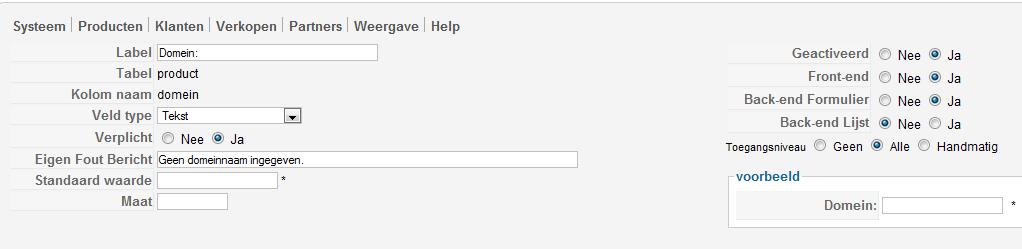
Please Log in or Create an account to join the conversation.
Please Log in or Create an account to join the conversation.
Please Log in or Create an account to join the conversation.
Please Log in or Create an account to join the conversation.
Please Log in or Create an account to join the conversation.
one of the table product and of the type radio with two values, yes and no. So that you can select if the product needs the custom item field or not.
one of the table item and of the type text. So that you can display the input box on the product page.
Please Log in or Create an account to join the conversation.
visible radio button on backend (mandatory to select if custom text field is needed)
custom field configured to have mandatory text input. However when radio is set to yes, field doesnt appear
item view has been modified with your code change


Please Log in or Create an account to join the conversation.
Please Log in or Create an account to join the conversation.
also tiny OT: what is "back end list" for ?
Please Log in or Create an account to join the conversation.
Please Log in or Create an account to join the conversation.
Please Log in or Create an account to join the conversation.
If you give us access to the back end, we'll check your settings.
Please Log in or Create an account to join the conversation.
Please Log in or Create an account to join the conversation.
The code needs to correspond to the valeus in the custom field... So it should be:
if(!empty($this->itemFields) && $this->element->domein=='Ja'){
I've modified it on your view and it's working.
Please Log in or Create an account to join the conversation.
Also a few more things:
* how come it has to be 'domein' and not 'domeinnaam'. How does it work when the 2 field column names are different. I tried it at first with 2 identical names but it wouldn't save. There has to be some kind of link between the 2 fields that tells joomla that the radio button is specifically for that text field only. What if i created a second one. I'm trying to understand the mechanics about that in the event i want to add a 2nd text box i know what the communal link has to be
* where do i go to resize the template things inside the categories listing & on the final article display. Im mainly talking about that big white area
* is it possible to place restrictions on that newly created field. I need the users to be able to enter any alphabetical text but it has to end with eg: .be on other item's ill need that field to accept any alphabetical text but it has to end with anything BUT eg: .be
Is that possible ?
Sorry about that but thanks for fixing it

Final thing: whats that back end list for. Any special purpose ?
Please Log in or Create an account to join the conversation.
another reason i'm asking is that if i want to add another custom field i'd need to know how and what the common link should be
Please Log in or Create an account to join the conversation.