

- Posts: 15
- Thank you received: 0
Problem configuring and adding categories
15 years 1 month ago #22067
by geti
Problem configuring and adding categories was created by geti
Hello, I've just installed HikaShop Starter 1.5.2, for Joomla 1.7.0 for evaluation purposes.
I've noticed that I cannot save any new configuration settings or add categories. If I click on 'New' nothing happens except for a # sign appearing in the url. Is this a bug or is it something to do with it being the free version?
Many thanks.
PS - Apart from not being able to use it yet, Hikashop does look very good
I've noticed that I cannot save any new configuration settings or add categories. If I click on 'New' nothing happens except for a # sign appearing in the url. Is this a bug or is it something to do with it being the free version?
Many thanks.
PS - Apart from not being able to use it yet, Hikashop does look very good
Please Log in or Create an account to join the conversation.

15 years 1 month ago #22077
by nicolas
Replied by nicolas on topic Re: Problem configuring and adding categories
Hi,
The Starter edition is fully functional. No one reported such problem with 1.7 so far and it works ok on our end. Could you give more information on the problem ? Do you have also the problem when creating a product ?
Did you installed "system" plugins on joomla 1.7 ? If you turn on the debug mode of the configuration of joomla and try again, do you get error messages ?
The Starter edition is fully functional. No one reported such problem with 1.7 so far and it works ok on our end. Could you give more information on the problem ? Do you have also the problem when creating a product ?
Did you installed "system" plugins on joomla 1.7 ? If you turn on the debug mode of the configuration of joomla and try again, do you get error messages ?
Please Log in or Create an account to join the conversation.
15 years 1 month ago - 15 years 1 month ago #22094
by geti
Replied by geti on topic Re: Problem configuring and adding categories
Yes I have the same problem with creating a product - clicking save, save and close or cancel doesn't do anything apart from add a # sign in the url.
There appears to be 1 Hikashop system plugin installed 'HikaShop user synchronization plugin' and this is enabled. I couldn't see any error messages in debug mode - but there again I wouldn't really know what to look for
Regards
There appears to be 1 Hikashop system plugin installed 'HikaShop user synchronization plugin' and this is enabled. I couldn't see any error messages in debug mode - but there again I wouldn't really know what to look for
Regards
Last edit: 15 years 1 month ago by geti. Reason: typo
Please Log in or Create an account to join the conversation.
15 years 1 month ago #22104
by nicolas
Replied by nicolas on topic Re: Problem configuring and adding categories
Could you give us an access to the back end of your website so that we can have a look at the problem ?
Please Log in or Create an account to join the conversation.
15 years 1 month ago #22105
by geti
Replied by geti on topic Re: Problem configuring and adding categories
yes that's fine - I'll set you up. How would you like me to get the details to you?
Please Log in or Create an account to join the conversation.
15 years 1 month ago #22108
by nicolas
Replied by nicolas on topic Re: Problem configuring and adding categories
You can either PM me our use our contact form. Please give a link to that thread in your message so that we know why you're giving us an access to your website 
Please Log in or Create an account to join the conversation.
15 years 1 month ago #22112
by geti
Replied by geti on topic Re: Problem configuring and adding categories
Details sent as requested.
Regards,
Alan
Regards,
Alan
Please Log in or Create an account to join the conversation.
15 years 1 month ago #22156
by nicolas
Replied by nicolas on topic Re: Problem configuring and adding categories
It seems to be a problem with the javascript of joomla 1.7 for the submitbutton function.
Could you edit the file administrator/components/com_hikashop/views/product/tmpl/listing.php via FTP and change the line:
<form action="index.php?option=<?php echo HIKASHOP_COMPONENT ?>&ctrl=product" method="post" name="adminForm">
to:
<form action="index.php?option=<?php echo HIKASHOP_COMPONENT ?>&ctrl=product" method="post" name="adminForm" id="adminForm">
Then, try again to create a new product. Do you now see the interface of the product edition screen ?
Could you edit the file administrator/components/com_hikashop/views/product/tmpl/listing.php via FTP and change the line:
<form action="index.php?option=<?php echo HIKASHOP_COMPONENT ?>&ctrl=product" method="post" name="adminForm">
to:
<form action="index.php?option=<?php echo HIKASHOP_COMPONENT ?>&ctrl=product" method="post" name="adminForm" id="adminForm">
Then, try again to create a new product. Do you now see the interface of the product edition screen ?
Please Log in or Create an account to join the conversation.
15 years 1 month ago - 15 years 1 month ago #22162
by geti
Replied by geti on topic Re: Problem configuring and adding categories
I've made the change but it doesn't appear to have done anything yet 
Last edit: 15 years 1 month ago by geti.
Please Log in or Create an account to join the conversation.
15 years 1 month ago #22163
by nicolas
Replied by nicolas on topic Re: Problem configuring and adding categories
Would it be possible to have a FTP access in order to directly debug the problem ?
Please Log in or Create an account to join the conversation.
15 years 1 month ago #22164
by geti
Replied by geti on topic Re: Problem configuring and adding categories
Yes - I'll send you details
Thanks for your help
Regards Alan
Thanks for your help
Regards Alan
Please Log in or Create an account to join the conversation.
15 years 1 month ago #22168
by nicolas
Replied by nicolas on topic Re: Problem configuring and adding categories
Thanks. We got them. We'll look at the problem tomorrow as it's getting late over here.
Please Log in or Create an account to join the conversation.
15 years 1 month ago #22169
by geti
Replied by geti on topic Re: Problem configuring and adding categories
The night is young! - it's only 11:10pm here
Have a good night
Regards,
Alan
Have a good night
Regards,
Alan
Please Log in or Create an account to join the conversation.
15 years 1 month ago #22206
by nicolas
Replied by nicolas on topic Re: Problem configuring and adding categories
The problem comes from the code
of the file media/system/js/core.js which throws the error below when clicking on a button :
core.js:24Uncaught TypeError: Cannot read property 'task' of null
But on our version of Joomla 1.7.0 (the official that we downloaded from joomla.org after the release) on which we tested HikaShop, we don't have that problem, simply because we don't have the same code in that file.
We actually have the code:
So there are three possibilities here:
1. You installed an extension which changed that file
2. You changed that file yourself
3. You use a version 1.7.0 which is not the final version
If you use the original core.js file of the currently released 1.7.0 package instead of your current core.js file, that will solve the problem.
Code:
Joomla.submitform = function(task, form) {
if (typeof(form) === 'undefined') {
form = document.getElementById('adminForm');
}
if (typeof(task) !== 'undefined') {
form.task.value = task;
}
core.js:24Uncaught TypeError: Cannot read property 'task' of null
But on our version of Joomla 1.7.0 (the official that we downloaded from joomla.org after the release) on which we tested HikaShop, we don't have that problem, simply because we don't have the same code in that file.
We actually have the code:
Code:
Joomla.submitform=function(a,b){if(typeof b==="undefined"&&(b=document.getElementById("adminForm"),!b))b=document.adminForm;if(typeof a!=="undefined")b.task.value=a;
1. You installed an extension which changed that file
2. You changed that file yourself
3. You use a version 1.7.0 which is not the final version
If you use the original core.js file of the currently released 1.7.0 package instead of your current core.js file, that will solve the problem.
Please Log in or Create an account to join the conversation.
15 years 1 month ago #22227
by geti
Replied by geti on topic Re: Problem configuring and adding categories
Thank you Nicolas it seems to be working now, I've just spent the last hour pressing buttons and seeing what they do - I think I'd better have a look at the documentation for how to use it now
Regards,
Alan
Regards,
Alan
Please Log in or Create an account to join the conversation.
15 years 1 month ago #22255
by geti
Replied by geti on topic Re: Problem configuring and adding categories
I've resisted looking at the documentation so far in true 'man' style but one thing I've noticed that, I don't know if it has any relationship to the original problem, is that on the product I've added in 'Plain Titanium Rings' category, when I open the exploded view of the product and then close it again, it closes Hikashop and returns to the homepage. I haven't noticed a setting that makes it do this - is this normal?
Please Log in or Create an account to join the conversation.
15 years 1 month ago #22268
by nicolas
Replied by nicolas on topic Re: Problem configuring and adding categories
I'm not following you. Could you do some screenshots of the problem ?
Please Log in or Create an account to join the conversation.
15 years 1 month ago #22281
by geti
Replied by geti on topic Re: Problem configuring and adding categories
Certainly:
Click on product image to expand it:
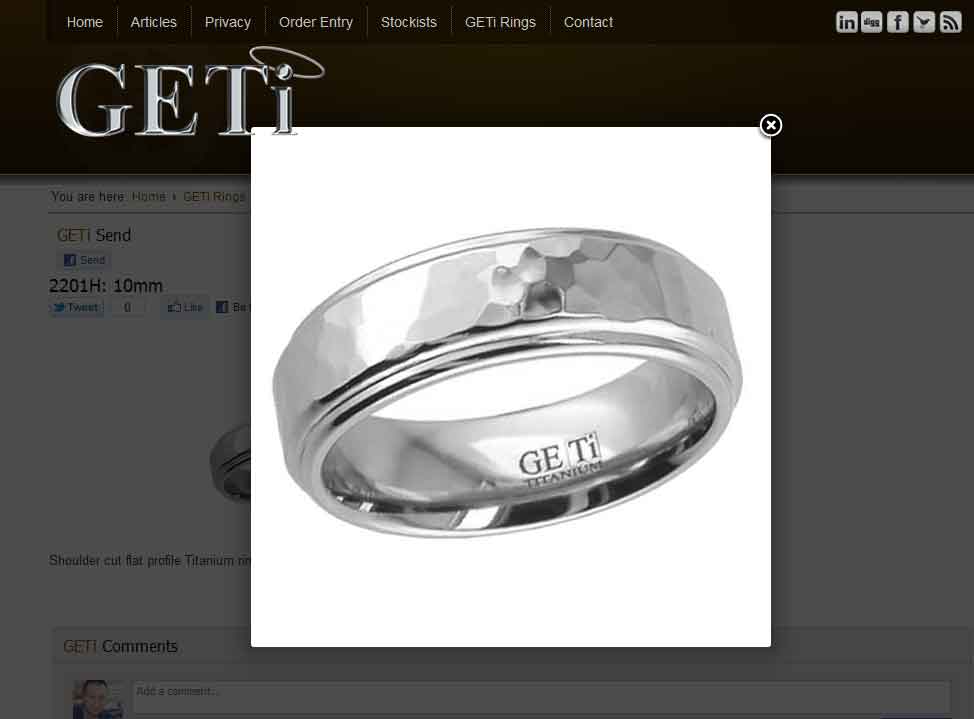
Click on product image to expand it:
Please Log in or Create an account to join the conversation.
15 years 1 month ago #22282
by geti
Replied by geti on topic Re: Problem configuring and adding categories
then when you click on the cross to close the expanded image, the screen reverts back to the homepage:

Please Log in or Create an account to join the conversation.
15 years 1 month ago #22283
by nicolas
Replied by nicolas on topic Re: Problem configuring and adding categories
Mmm. That sounds like a problem with the modal library of joomla 1.7.
We tried to reproduce the problem on Joomla 1.7 on our end but it works properly so maybe you have a conflict with something else installed on your website. Or maybe it's related to your browser ? Did you try with other browsers ? Could you give a link to that page so that we can try ?
We tried to reproduce the problem on Joomla 1.7 on our end but it works properly so maybe you have a conflict with something else installed on your website. Or maybe it's related to your browser ? Did you try with other browsers ? Could you give a link to that page so that we can try ?
Please Log in or Create an account to join the conversation.
Time to create page: 0.251 seconds