
- Posts: 51
- Thank you received: 0
Problems with characteristics when importing CSV
- Andreas_Sweden
-
 Topic Author
- Offline
Less
More
15 years 1 month ago #22158
by Andreas_Sweden
Problems with characteristics when importing CSV was created by Andreas_Sweden
I am having problems with my characteristics setting when importing CSV-files, files that I imported at the beginning of my project works with the size characteristic but other files (made the same way) the heading disapears in the product view and the size doesn't change when I change it in the drop down.
I also just noticed that the heading has disapered on the files that worked before after I upgraded to a newer version. I used to have the headline in fron of the ID and size behind but now I only have size in front of and behind the ID
Size option works: www.fashionyouknow.com/klaeder/product/s...category_pathway-356
Size option not working: www.fashionyouknow.com/abercrombie-fitch...e-fitch-hoodies-herr
I also get this message on some products: The default value of one of the characteristics of that product isn't available as a variant. Please check the characteristics and variants of that product
I also just noticed that the heading has disapered on the files that worked before after I upgraded to a newer version. I used to have the headline in fron of the ID and size behind but now I only have size in front of and behind the ID
Size option works: www.fashionyouknow.com/klaeder/product/s...category_pathway-356
Size option not working: www.fashionyouknow.com/abercrombie-fitch...e-fitch-hoodies-herr
I also get this message on some products: The default value of one of the characteristics of that product isn't available as a variant. Please check the characteristics and variants of that product
Please Log in or Create an account to join the conversation.

15 years 1 month ago #22170
by nicolas
Replied by nicolas on topic Re: Problems with characteristics when importing CSV
The title on the product page isn't updating because there is a problem with the way you imported your products/variants.
It's hard to say more without having a look at the CSV but there must be an error in it. Also, note that if you have several characteristics with the same values, it can sometimes cause a conflict during the import. If so, you should make sure that each value is unique and try again after updating the CSV.
For the last message, it's also because of the CSV. It means that in the CSV, your product has values of characteristics which do not match with a variant of that product in the CSV.
It's hard to say more without having a look at the CSV but there must be an error in it. Also, note that if you have several characteristics with the same values, it can sometimes cause a conflict during the import. If so, you should make sure that each value is unique and try again after updating the CSV.
For the last message, it's also because of the CSV. It means that in the CSV, your product has values of characteristics which do not match with a variant of that product in the CSV.
Please Log in or Create an account to join the conversation.
- Andreas_Sweden
-
Topic Author
- Offline
Less
More
- Posts: 51
- Thank you received: 0
15 years 1 month ago - 15 years 1 month ago #22230
by Andreas_Sweden
Replied by Andreas_Sweden on topic Re: Problems with characteristics when importing CSV
This is an example of the file that worked before the update of hikashop to newer version:
product_name;product_description;product_code;product_parent_id;product_weight;product_keywords;product_meta_description;price_value;storlek;images;categories;price_currency_id
Armani kalsonger;Armani Underkläder Herr;334549;;1;Armani Underkläder Herr;Armani Underkläder Herr;85;;334549.jpg;2,16,15,355,356,31,363;150
;;334549 M;334549;;;;;m;;;
;;334549 L;334549;;;;;l;;;
;;334549 XL;334549;;;;;xl;;;
;;334549 XXL;334549;;;;;xxl;;;
;;334549 XXXL;334549;;;;;xxxl;;;
And here is an example of one that never worked properly with characteristics
product_name;product_description;product_code;product_parent_id;product_weight;product_keywords;product_meta_description;price_value;storlek;images;categories;price_currency_id
Lacoste Piké Dam;Fin Pikétröja Dam;339078;;1;Lacoste Pikétröja Dam;Lacoste Pikétröja Dam;125;;339078.jpg;2,15,16,49,513,656,765;150
;;339078 xs;339078;;;;;XS ;;;150
;;339078 s;339078;;;;;S;;;150
;;339078 m;339078;;;;;M;;;150
;;339078 l;339078;;;;;L;;;150
;;339078 xl;339078;;;;;XL;;;150
Products without chracteristics work without any problems
product_name;product_description;product_code;product_parent_id;product_weight;product_keywords;product_meta_description;price_value;storlek;images;categories;price_currency_id
Armani kalsonger;Armani Underkläder Herr;334549;;1;Armani Underkläder Herr;Armani Underkläder Herr;85;;334549.jpg;2,16,15,355,356,31,363;150
;;334549 M;334549;;;;;m;;;
;;334549 L;334549;;;;;l;;;
;;334549 XL;334549;;;;;xl;;;
;;334549 XXL;334549;;;;;xxl;;;
;;334549 XXXL;334549;;;;;xxxl;;;
And here is an example of one that never worked properly with characteristics
product_name;product_description;product_code;product_parent_id;product_weight;product_keywords;product_meta_description;price_value;storlek;images;categories;price_currency_id
Lacoste Piké Dam;Fin Pikétröja Dam;339078;;1;Lacoste Pikétröja Dam;Lacoste Pikétröja Dam;125;;339078.jpg;2,15,16,49,513,656,765;150
;;339078 xs;339078;;;;;XS ;;;150
;;339078 s;339078;;;;;S;;;150
;;339078 m;339078;;;;;M;;;150
;;339078 l;339078;;;;;L;;;150
;;339078 xl;339078;;;;;XL;;;150
Products without chracteristics work without any problems
Last edit: 15 years 1 month ago by Andreas_Sweden.
Please Log in or Create an account to join the conversation.
15 years 1 month ago #22233
by nicolas
Replied by nicolas on topic Re: Problems with characteristics when importing CSV
Could you do a screenshot of the characteristic storlek edition screen ?
I see that you use both upper and lower case or the characteristics values... It might come from that...
I see that you use both upper and lower case or the characteristics values... It might come from that...
Please Log in or Create an account to join the conversation.
- Andreas_Sweden
-
Topic Author
- Offline
Less
More
- Posts: 51
- Thank you received: 0
15 years 1 month ago #22236
by Andreas_Sweden
Replied by Andreas_Sweden on topic Re: Problems with characteristics when importing CSV
I have tried to change the upper and lower case but not had any success, it still remain the same.
And the thing is that the first example used to work until I upgraded, after the upgrade I lost the headline for the product and just got the ID and size (but the size characteristivs still works)
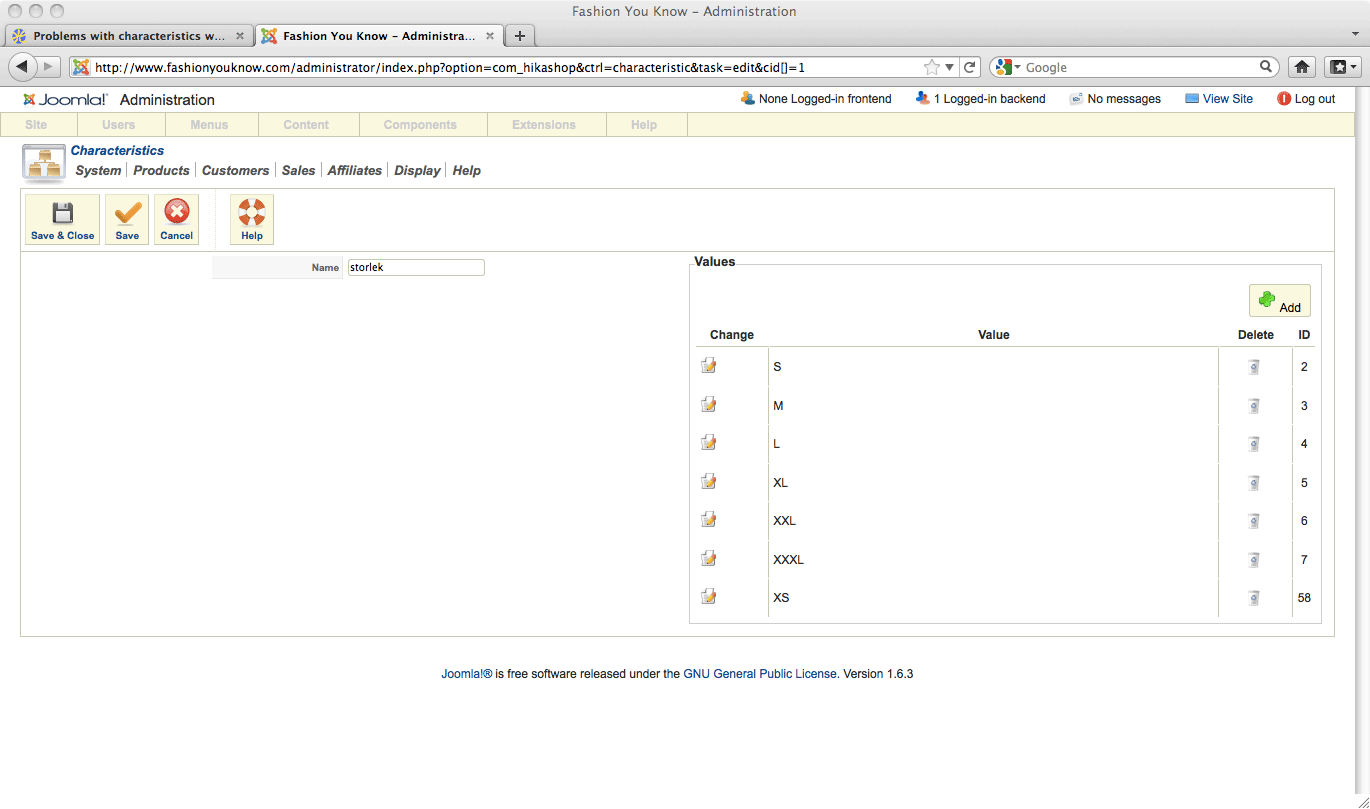
And the thing is that the first example used to work until I upgraded, after the upgrade I lost the headline for the product and just got the ID and size (but the size characteristivs still works)
Please Log in or Create an account to join the conversation.
15 years 1 month ago #22241
by nicolas
Replied by nicolas on topic Re: Problems with characteristics when importing CSV
I think I understand. You didn't specify the default value for the characteristic in the main product data of your CSV.
It should be:
Armani kalsonger;Armani Underkläder Herr;334549;;1;Armani Underkläder Herr;Armani Underkläder Herr;85;M;334549.jpg;2,16,15,355,356,31,363;150
It should be:
Armani kalsonger;Armani Underkläder Herr;334549;;1;Armani Underkläder Herr;Armani Underkläder Herr;85;M;334549.jpg;2,16,15,355,356,31,363;150
Please Log in or Create an account to join the conversation.
- Andreas_Sweden
-
Topic Author
- Offline
Less
More
- Posts: 51
- Thank you received: 0
15 years 1 month ago #22247
by Andreas_Sweden
Replied by Andreas_Sweden on topic Re: Problems with characteristics when importing CSV
Thanks, I will give it a try amd get back with the result
Please Log in or Create an account to join the conversation.
- Andreas_Sweden
-
Topic Author
- Offline
Less
More
- Posts: 51
- Thank you received: 0
15 years 1 month ago #22295
by Andreas_Sweden
Replied by Andreas_Sweden on topic Re: Problems with characteristics when importing CSV
That worked the sizes are now working on the ones I tested it on, however I am still missing the headlines and just get the Product Code and size in the headline supposed to be headline, product ID and size, the headlines went away after upgrading could it be related to this:
www.hikashop.com/en/support/forum/4-how-...customer-can-se.html
if there has been changes made in the code to the new version?
Please Log in or Create an account to join the conversation.
15 years 1 month ago #22322
by nicolas
Replied by nicolas on topic Re: Problems with characteristics when importing CSV
Did you edit the show file of the view product before updating maybe ?
We had changed the way the name is displayed so if you had edited the view before updating, such problem could be happening.
We had changed the way the name is displayed so if you had edited the view before updating, such problem could be happening.
Please Log in or Create an account to join the conversation.
- Andreas_Sweden
-
Topic Author
- Offline
Less
More
- Posts: 51
- Thank you received: 0
15 years 1 month ago #23156
by Andreas_Sweden
Replied by Andreas_Sweden on topic Re: Problems with characteristics when importing CSV
All problems solved with characteristics s, m, l etc but I am still having trouble with sizes on shoes where it is numeric, I get the drop down menu but the size doesen't change in the order or the headline.
Please Log in or Create an account to join the conversation.
15 years 1 month ago #23179
by nicolas
Replied by nicolas on topic Re: Problems with characteristics when importing CSV
Could you give a link to the product page where the size doesn't change ?
Please Log in or Create an account to join the conversation.
- Andreas_Sweden
-
Topic Author
- Offline
Less
More
- Posts: 51
- Thank you received: 0
15 years 1 month ago #23422
by Andreas_Sweden
Replied by Andreas_Sweden on topic Re: Problems with characteristics when importing CSV
Sorry for the delay, here is one example
www.fashionyouknow.com/barnklaeder2/prod...category_pathway-895
I also get: The default value of one of the characteristics of that product isn't available as a variant. Please check the characteristics and variants of that product
I also get: The default value of one of the characteristics of that product isn't available as a variant. Please check the characteristics and variants of that product
Please Log in or Create an account to join the conversation.
15 years 1 month ago #23436
by nicolas
Replied by nicolas on topic Re: Problems with characteristics when importing CSV
Could you try the modification explained on that post:
www.hikashop.com/en/support/forum/3-bug-...cs-issues.html#23222
That might solve the problem.
That might solve the problem.
Please Log in or Create an account to join the conversation.
- Andreas_Sweden
-
Topic Author
- Offline
Less
More
- Posts: 51
- Thank you received: 0
15 years 1 month ago #23484
by Andreas_Sweden
Replied by Andreas_Sweden on topic Re: Problems with characteristics when importing CSV
nicolas wrote:
It didn't help
Could you try the modification explained on that post: www.hikashop.com/en/support/forum/3-bug-...cs-issues.html#23222
That might solve the problem.
It didn't help
Please Log in or Create an account to join the conversation.
15 years 1 month ago #23546
by nicolas
Replied by nicolas on topic Re: Problems with characteristics when importing CSV
The problem on this product
www.fashionyouknow.com/barnklaeder2/prod...category_pathway-895
is that the default value of the characteristic in your CSV is not available as a variant. So HikaShop cannot pick it up to generate the dropdown properly. That's why the refresh is not working and that's why you have the error message
So the problem comes from the CSV.The default value of one of the characteristics of that product isn't available as a variant. Please check the characteristics and variants of that product
Please Log in or Create an account to join the conversation.
Time to create page: 0.261 seconds