
- Posts: 135
- Thank you received: 3
Checkout looping between Shipment and Payment
- simonkloostra
-
 Topic Author
- Offline
Less
More
14 years 9 months ago #32920
by simonkloostra
Checkout looping between Shipment and Payment was created by simonkloostra
I'm still busy setting up my shop using the latest Essential version. It all worked fine sofar, untill I was updating my payment methods. I was first using the Check payment plugin, while I meant to use the Bank transfer method. After setting up both of them all still worked, but then I Unpublished the Check payment plugin.
Now when I go to the checkout (using the following workflow: address,shipping,payment,confirm_cart_status_fields_terms,end), I can select the Shipment, and then the Payment method, but then the previous screen is being returned, saying I did not select any Transfer method. Also I noticed I can now by bypass the Shipment page without selecting anything, only when I reach the Payment page, the Shipment step is being checked.
I could more or less fix this issue by publishing the cheque payment plugin again, and the checkout worked, but now I found on the confirmation screen that even when selecting Bank transfer, still Cheque payment was confirmed as the chosen method.
Looks like the payment plugins are quite mixed up...
Now when I go to the checkout (using the following workflow: address,shipping,payment,confirm_cart_status_fields_terms,end), I can select the Shipment, and then the Payment method, but then the previous screen is being returned, saying I did not select any Transfer method. Also I noticed I can now by bypass the Shipment page without selecting anything, only when I reach the Payment page, the Shipment step is being checked.
I could more or less fix this issue by publishing the cheque payment plugin again, and the checkout worked, but now I found on the confirmation screen that even when selecting Bank transfer, still Cheque payment was confirmed as the chosen method.
Looks like the payment plugins are quite mixed up...
Please Log in or Create an account to join the conversation.

14 years 9 months ago #32944
by nicolas
Replied by nicolas on topic Re: Checkout looping between Shipment and Payment
Could you do a screenshot of the options of your payment method and a link to your shop so that we can see what you did ?
You cannot have the address view without the login view in the checkout workflow. Otherwise, it won't work properly, maybe that could explain why it doesn't work properly.
You cannot have the address view without the login view in the checkout workflow. Otherwise, it won't work properly, maybe that could explain why it doesn't work properly.
Please Log in or Create an account to join the conversation.
- simonkloostra
-
Topic Author
- Offline
Less
More
- Posts: 135
- Thank you received: 3
14 years 9 months ago #32964
by simonkloostra
Replied by simonkloostra on topic Re: Checkout looping between Shipment and Payment
I have disabled registration for the shop in the configuration, so the checkout should work without login, and it worked nicely before I removed the check payment option (did about 10-20 orderss without problems). The only payment method still active is "HikaShop bank transfer payment plugin". Not quite sure what you would like to see in the configuration, as thee only parameter is the publish/unpublish option, the rest is just text for this plugin. See screenprint just to be sure:

The webshop is currently behind a login, as it is not active yet. Can email you a login if necessary.
The webshop is currently behind a login, as it is not active yet. Can email you a login if necessary.
Please Log in or Create an account to join the conversation.
14 years 9 months ago #32984
by nicolas
Replied by nicolas on topic Re: Checkout looping between Shipment and Payment
I can see that you restricted that payment method to netherlands only. That means that if your address or the default tax zone is outside netherlands, you won't see it.
Would that explain your problem ?
Would that explain your problem ?
Please Log in or Create an account to join the conversation.
- simonkloostra
-
Topic Author
- Offline
Less
More
- Posts: 135
- Thank you received: 3
14 years 9 months ago #33012
by simonkloostra
Replied by simonkloostra on topic Re: Checkout looping between Shipment and Payment
No, I will only address customers in the Netherlands, and in my tests I only use addresses in the Netherlands. This all worked nicely before the removal of the cheques plugin
Please Log in or Create an account to join the conversation.
14 years 9 months ago #33014
by nicolas
Replied by nicolas on topic Re: Checkout looping between Shipment and Payment
Could you give a link to your website so that we can see the problem ?
Please Log in or Create an account to join the conversation.
- simonkloostra
-
Topic Author
- Offline
Less
More
- Posts: 135
- Thank you received: 3
14 years 9 months ago - 14 years 9 months ago #33015
by simonkloostra
Replied by simonkloostra on topic Re: Checkout looping between Shipment and Payment
I opened up the shop for restriced users, but I created a special user for this topic. You can access using
hielspoorinfo.nl/webshop
and use user hikaforum, password also hikaforum.
Just go ahead and place an order, it's just a playground still.
Thanks already for looking into this
O yes, and make sure you use an address in the Netherlands
Just go ahead and place an order, it's just a playground still.
Thanks already for looking into this
O yes, and make sure you use an address in the Netherlands
Last edit: 14 years 9 months ago by simonkloostra.
Please Log in or Create an account to join the conversation.
14 years 9 months ago #33030
by nicolas
Replied by nicolas on topic Re: Checkout looping between Shipment and Payment
Please update to HikaShop 1.5.5 and try again.
Please Log in or Create an account to join the conversation.
- simonkloostra
-
Topic Author
- Offline
Less
More
- Posts: 135
- Thank you received: 3
14 years 9 months ago #33072
by simonkloostra
Replied by simonkloostra on topic Re: Checkout looping between Shipment and Payment
Just updated, but still the same problem, no checkout is possible 
Please Log in or Create an account to join the conversation.
14 years 9 months ago #33086
by nicolas
Replied by nicolas on topic Re: Checkout looping between Shipment and Payment
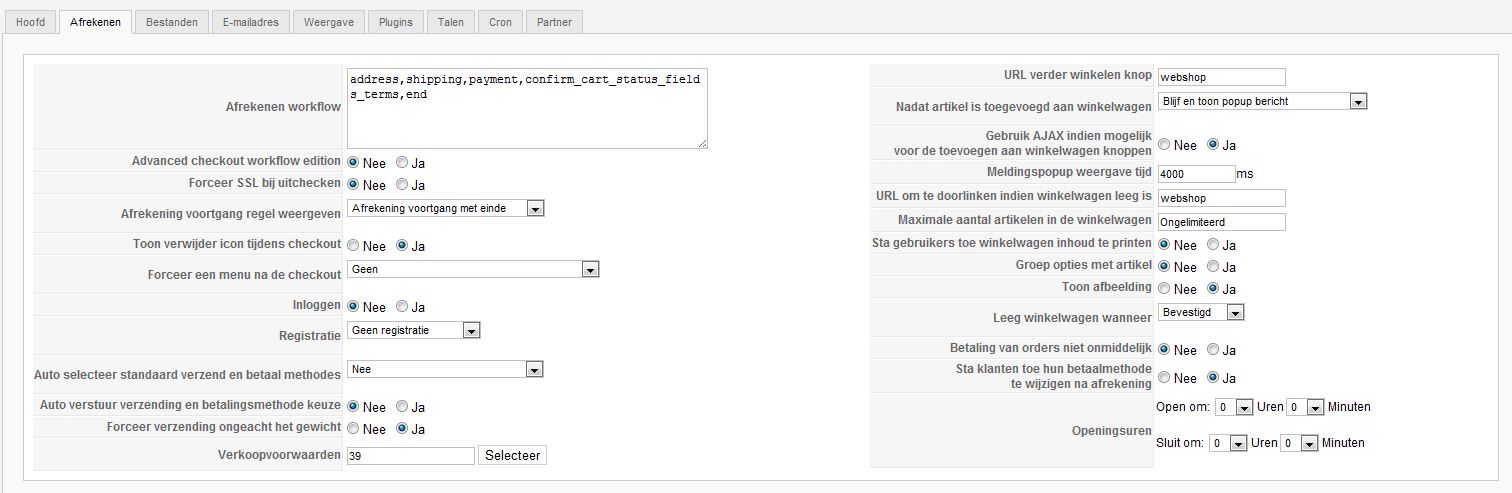
That's strange. Could you do a screnshot of the Checkout tab of your HikaShop configuration so that we can see how you configured it ?
Please Log in or Create an account to join the conversation.
14 years 9 months ago #33087
by nicolas
Replied by nicolas on topic Re: Checkout looping between Shipment and Payment
That's strange. Could you do a screnshot of the Checkout tab of your HikaShop configuration so that we can see how you configured it ?
Please Log in or Create an account to join the conversation.
- simonkloostra
-
Topic Author
- Offline
Less
More
- Posts: 135
- Thank you received: 3
14 years 9 months ago - 14 years 9 months ago #33104
by simonkloostra
Replied by simonkloostra on topic Re: Checkout looping between Shipment and Payment
OK, see the screenprint attached :
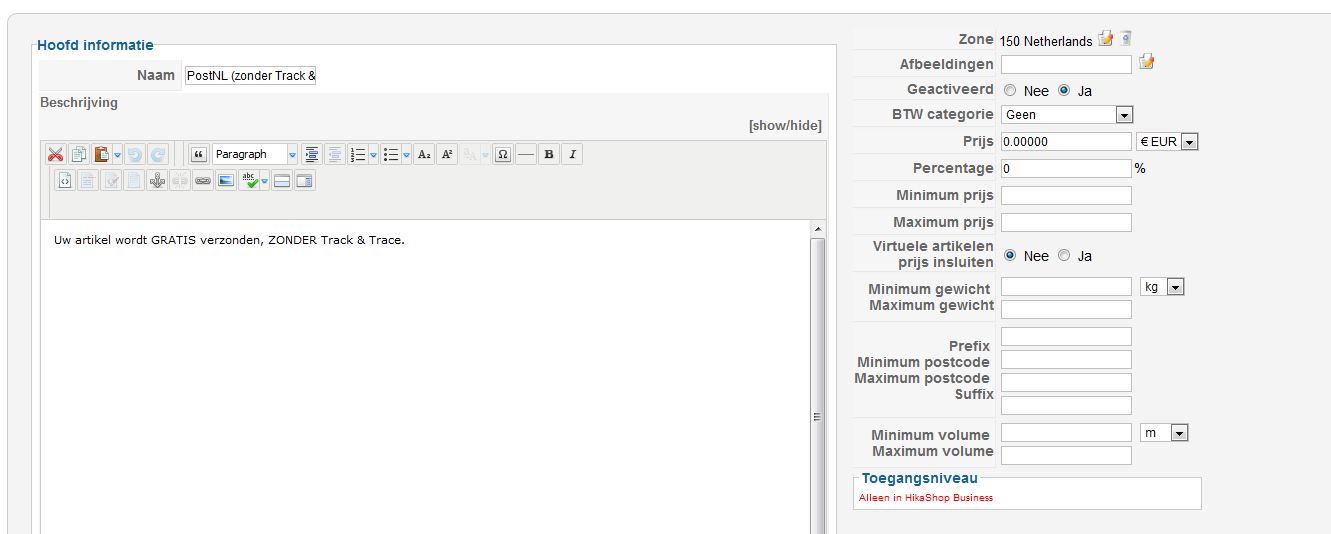
Other configurations that might be of interest: Shipping is done using "HikaShop manual shipping plugin", in 2 variants, both for NL only. see a screenprint for one:
As I said, it all worked before, so it almost feels as if something is corrupt in the configuration...
Other configurations that might be of interest: Shipping is done using "HikaShop manual shipping plugin", in 2 variants, both for NL only. see a screenprint for one:
As I said, it all worked before, so it almost feels as if something is corrupt in the configuration...
Last edit: 14 years 9 months ago by simonkloostra.
Please Log in or Create an account to join the conversation.
14 years 9 months ago #33106
by nicolas
Replied by nicolas on topic Re: Checkout looping between Shipment and Payment
Could you try to activate the auto select and auto submit options and try again ?
Please Log in or Create an account to join the conversation.
- simonkloostra
-
Topic Author
- Offline
Less
More
- Posts: 135
- Thank you received: 3
14 years 9 months ago #33107
by simonkloostra
Replied by simonkloostra on topic Re: Checkout looping between Shipment and Payment
I have updated the configuration as per your suggestion. I now also saw a message that my checkout workflow is incorrect, as I cannot have address without login. Not quite how I would want it, but maybe that's something I do not fully understand, I will check the documentation for that.
The checkout now seems to work though, so thanks for that. I still see some minor things, but for now I'm happy, so thanks for the support!
The checkout now seems to work though, so thanks for that. I still see some minor things, but for now I'm happy, so thanks for the support!
Please Log in or Create an account to join the conversation.
- simonkloostra
-
Topic Author
- Offline
Less
More
- Posts: 135
- Thank you received: 3
14 years 8 months ago #34405
by simonkloostra
Replied by simonkloostra on topic Re: Checkout looping between Shipment and Payment
I have been busy setting up my shop, and for the most I'm quite happy with Hikashop, except for this issue. Using the advised settings the checkout process works fine, but I find that auto-selecting and -sending works confusing, it is not the behaviour that a user would expect.
I have tried setting the parameters for autosend and autosubmit back to "No", but this results in the checkout looping again.
Is there a way to correctly set these parameters, or is this a bug?
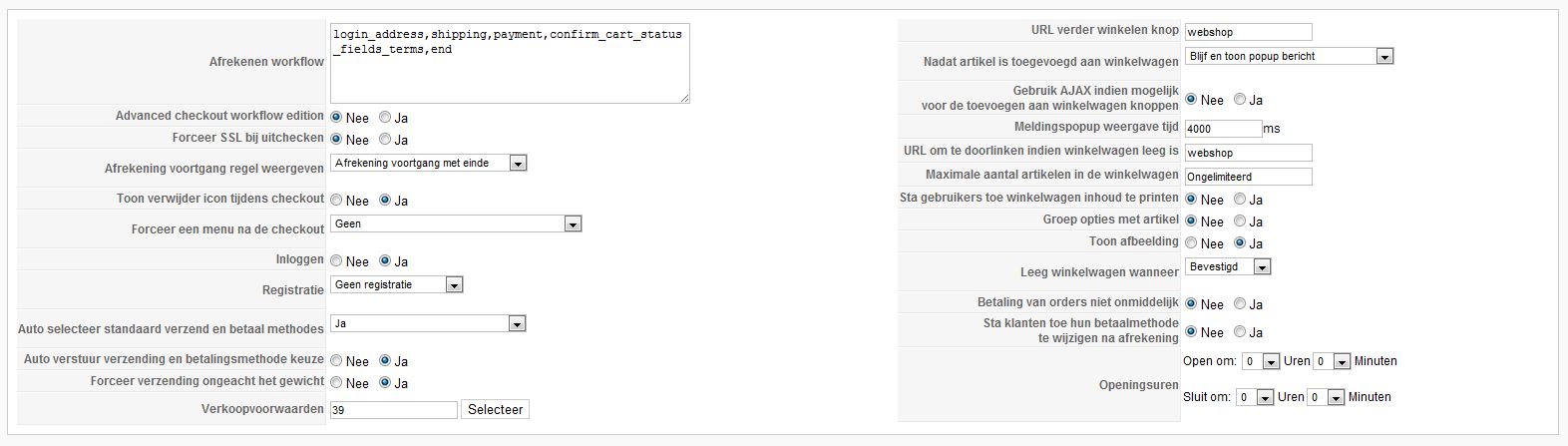
I have tried setting the parameters for autosend and autosubmit back to "No", but this results in the checkout looping again.
Is there a way to correctly set these parameters, or is this a bug?
Please Log in or Create an account to join the conversation.
- simonkloostra
-
Topic Author
- Offline
Less
More
- Posts: 135
- Thank you received: 3
14 years 8 months ago #34621
by simonkloostra
Replied by simonkloostra on topic Re: Checkout looping between Shipment and Payment
Do you have any suggestions?
Please Log in or Create an account to join the conversation.
14 years 8 months ago #34657
by nicolas
Replied by nicolas on topic Re: Checkout looping between Shipment and Payment
Sorry, I missed your previous message.
Could you give again your website URL and set back the settings to what they were so that we can have a look at the problem again ?
Could you give again your website URL and set back the settings to what they were so that we can have a look at the problem again ?
Please Log in or Create an account to join the conversation.
- simonkloostra
-
Topic Author
- Offline
Less
More
- Posts: 135
- Thank you received: 3
14 years 8 months ago #34659
by simonkloostra
Replied by simonkloostra on topic Re: Checkout looping between Shipment and Payment
No problem
You can access the ste using hielspoorinfo.nl/webshop . It is accessible for registered users, you can use user hikashop, password also hikashop.
I doublechecked that the problem is also there if I set access to public by the way.
You can access the ste using hielspoorinfo.nl/webshop . It is accessible for registered users, you can use user hikashop, password also hikashop.
I doublechecked that the problem is also there if I set access to public by the way.
Please Log in or Create an account to join the conversation.
14 years 8 months ago #34697
by nicolas
Replied by nicolas on topic Re: Checkout looping between Shipment and Payment
I can see that you have javascript errors on your page which leads to the page selection to not be sent properly.
Could you edit the file components/com_hikashop/views/checkout/view.html.php
and change the lines:
$doc->addScriptDeclaration("<!--\n".$js."\n//-->");
to:
$doc->addScriptDeclaration("\n<!--\n".$js."\n//-->\n");
(there are several places)
Then, it should fix the javascript errors and it should help.
Could you edit the file components/com_hikashop/views/checkout/view.html.php
and change the lines:
$doc->addScriptDeclaration("<!--\n".$js."\n//-->");
to:
$doc->addScriptDeclaration("\n<!--\n".$js."\n//-->\n");
(there are several places)
Then, it should fix the javascript errors and it should help.
Please Log in or Create an account to join the conversation.
- simonkloostra
-
Topic Author
- Offline
Less
More
- Posts: 135
- Thank you received: 3
14 years 8 months ago #34740
by simonkloostra
Replied by simonkloostra on topic Re: Checkout looping between Shipment and Payment
Too bad, it did not work, still the same problem. I made the change on 6 lines.
Please Log in or Create an account to join the conversation.
Time to create page: 0.272 seconds